2 min read ·

How does Profit enable OKR visibility across departments or business segments?

Bastin Gerald Bastin Gerald ·

OKRs enables organizations to perform and manage tasks efficiently. OKR tools basically help teams master their goal-management skills to enhance their professional capability as well as to work collaboratively with team spirit.

While OKRs promote transparency, there are situations where you want OKRs to be restricted. For example, you may have a secret initiative that needs to be restricted to a smaller team of people. Or you may just want to keep an OKR restricted because you want to keep others from getting distracted.

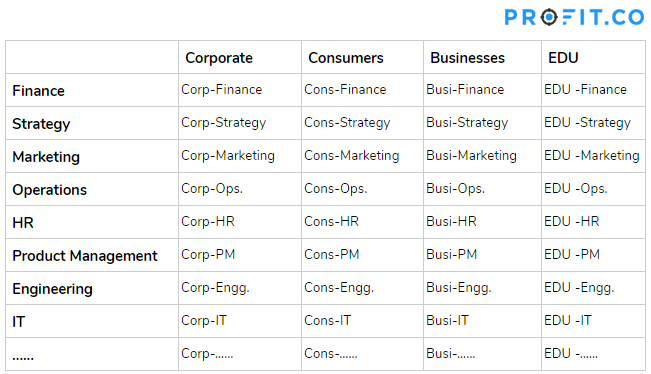
Assuming you have a matrixed structure like this:
tble

Each of the business segments can be considered as departments in Profit.

Profit.co supports the following visibility options for departmental OKRs:

  • Public – Visible to everyone
  • Team -Only Members of the department
  • Access List – Only a restricted named list of employees

Using the access list you can choose the users to whom you want to give access for visibility. Also, you can restrict the users by not giving them visibility access through the access list.

Navigate to OKRs and click on the department name from the left navigation panel. Click on the Create OKR button (Using Forms/Step by Step Guide). In the OKR levels section, select any department and select visibility.

Using Form:

When using the form to create an objective, you will see visibility dropdown.
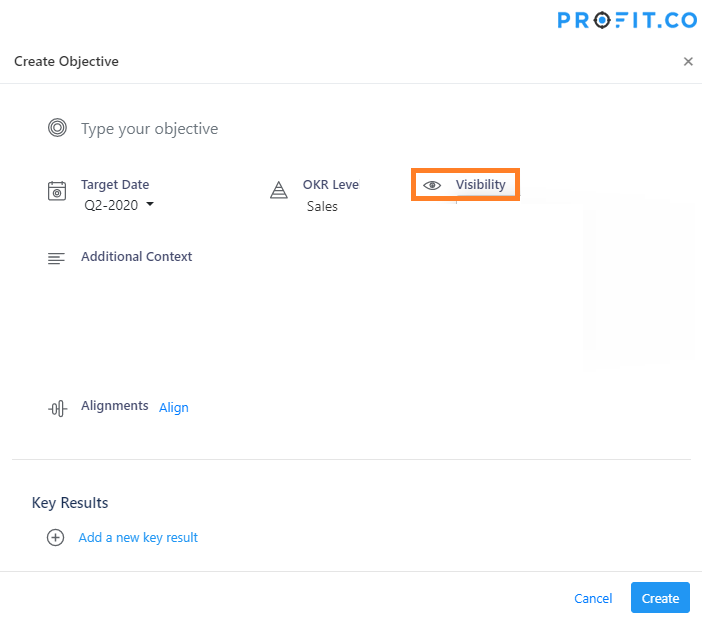
visibility

When you click on the Visibility dropdown it will display 3 options

  • Public – OKR will be visible to all the users in the organization.
  • Teams – OKR will be visible to those who belong to that team or having access to the team.
  • Access List – Only those who are selected from the popup window can see that particular team OKR.
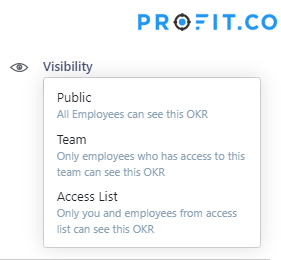
visibility-category

Using Step-by-Step wizard:

When you create an objective using a step-by-step wizard, you will find visibility options in the third step.
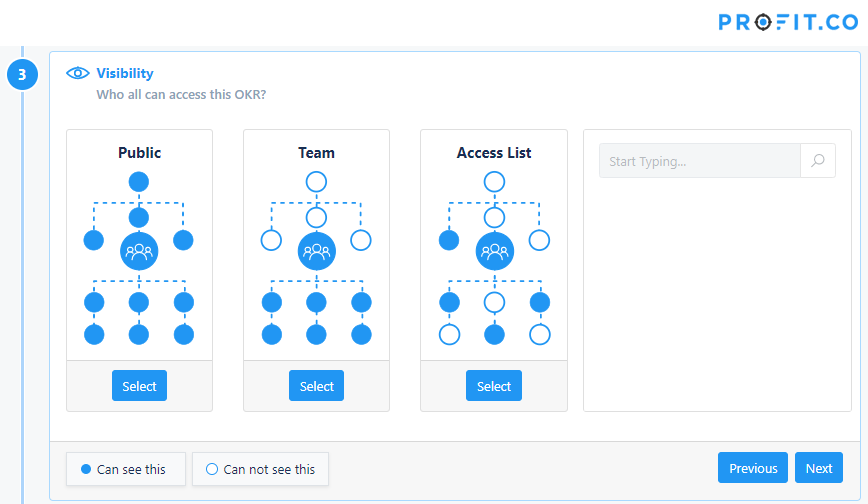
visibility-search

Note: By Default, visibility is set as Public.

Related Articles

Product
5 min read · December 20, 2024

5 Essential Dashboards Every Business Leader Should Use

Business leaders, are you steering your strategy with crystal-clear insights—or flying blind? Profit.co’s dashboards are designed to make your decisions…

Bastin Gerald Bastin Gerald
what-is-a-succession
Product
13 min read · January 30, 2024

What is a Succession Development Plan in Profit.co?

In the corporate world, the continuity of performance and leadership among employees is paramount. The expertise and internal understanding gained…

Bastin Gerald Bastin Gerald
Balanced-Scorecard
Product
10 min read · October 24, 2023

What is a Balanced Scorecard?

The Balanced Scorecard (BSC) is a revolutionary tool that offers a broader perspective on performance. Through the BSC, businesses can…

Bastin Gerald Bastin Gerald
individual_development_plan
Product
6 min read · May 17, 2023

Why Does Your Organization Need an Individual Development Plan (IDP) to Grow?

Introduction If you want to stay up to date on the job market, tackle the demands of today’s workplace, and…

Bastin Gerald Bastin Gerald
Performance Competencies
Product
6 min read · May 12, 2021

Performance Competencies in Profit.co: Uses, Levels, & Examples

Evaluating Performance Performance management is one of the key pillars of a successful organization. Delivering useful feedback to employees and…

Bastin Gerald Bastin Gerald
Top down Bottom Up alignment
Product
17 min read · January 21, 2021

Top down and bottom up alignment

OKRs are the most widely-used goal-setting tool utilized by industry-leaders around the world to set more challenging, ambitious goals with…

Bastin Gerald Bastin Gerald