



How to set recurring tasks through mobile application?
Category: General
Profit.co also allows you to set recurring tasks through the mobile application.
Why this feature?
- Mobile phone applications play an incalculable role in our daily lives and activities. Mobile phones are no longer the common communication tool they once were, it has grown to be the center of attention and help both individuals and enterprises.
- Profit.co’s mobile application allows users to set recurring tasks easily.
Step 1
To set recurring tasks, navigate to Tasks from the down menu.
Select the Task, and set the Due Date.
Click on the Set Recurring option.
Plan the timeframe with the explanation.
- Repeats Every → Denotes the time period of the tasks like Daily, weekly, monthly, or yearly.
- Never → The time frame will never end.
- After → The timeframe will end after a certain occurrence that you mention.
- On → The time frame will end after a particular schedule(you can assign a date/month/year).
Once done, click "Save."
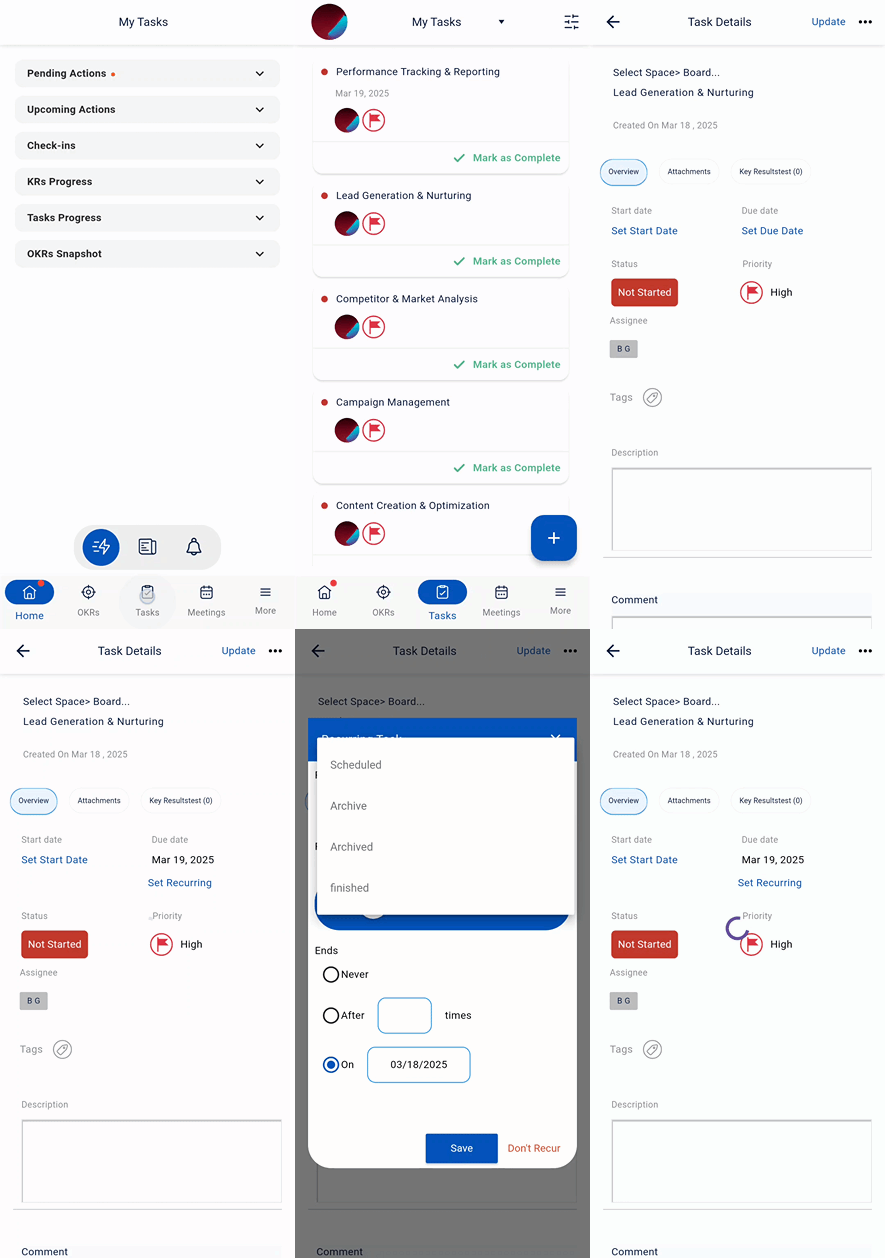
When a task is moved to the Completed status the same task will be created again in the status Not Started.
Related Questions
-
How to Initiate Meetings through Mobile Application?
Profit.co’s mobile application allows users to quickly initiate and schedule different types of meetings, such as ...Read more
-
What is the Notes app in Profit.co mobile application?
The Notes app in the Profit.co mobile application lets you create, organize, and manage notes on the go. It helps you ...Read more
-
What options are available in the 'Settings' section of the Profit.co mobile application?
The Settings section in the Profit.co mobile application lets you manage your account, preferences, users, and app ...Read more
-
How to Sync Office 365 Meetings with Profit.co as an End User?
Profit.co provides a built-in Office 365 integration that allows you to seamlessly sync your meetings between Profit.co ...Read more