

As a system administrator, you can customize Profit.co's Project Closure feature to align with your organization's project lifecycle standards. Configure custom closure reasons, add additional fields specific to your requirements, and establish approval flows to ensure projects close with appropriate governance and documentation standards.
⚡ Quick Answer
To configure Project Closure in Profit.co, go to Settings → Portfolios and Projects → Projects → Project Closure. From there, administrators can define closure reasons, add custom fields via the Master Layout, and set up sequential or parallel approval flows. Changes take effect immediately and apply to all projects organization-wide.
Table of Contents
- What project closure settings can administrators configure?
- How do I access Project Closure configuration settings?
- How do I customize additional closure fields?
- How do I configure approval flows for project closure?
- Best practices for configuring Project Closure
- Related Questions
- Frequently Asked Questions
How do I configure approval flows for project closure?
- Under the Approval Flow section, choose between a Standard or Rule-Based approval flow.
- A standard flow applies the same approval chain to all closure requests.
- A rule-based flow lets you define conditional chains based on project attributes.
What project closure settings can administrators configure?
- Administrators have comprehensive control over the project closure process, enabling customization across three key areas:
- Closure Reasons Configuration: Define the categories that describe why projects end in your organization
- Additional Fields Customization: Add custom fields to capture organization-specific closure information beyond standard fields
- Approval Flow Setup: Establish governance controls requiring stakeholder approval before projects can be formally closed
- These configuration options ensure project closure processes align with organizational standards, compliance requirements, and knowledge management objectives.
How do I access Project Closure configuration settings?
Before closing projects, administrators should configure closure reasons that align with organizational project lifecycle standards.
-
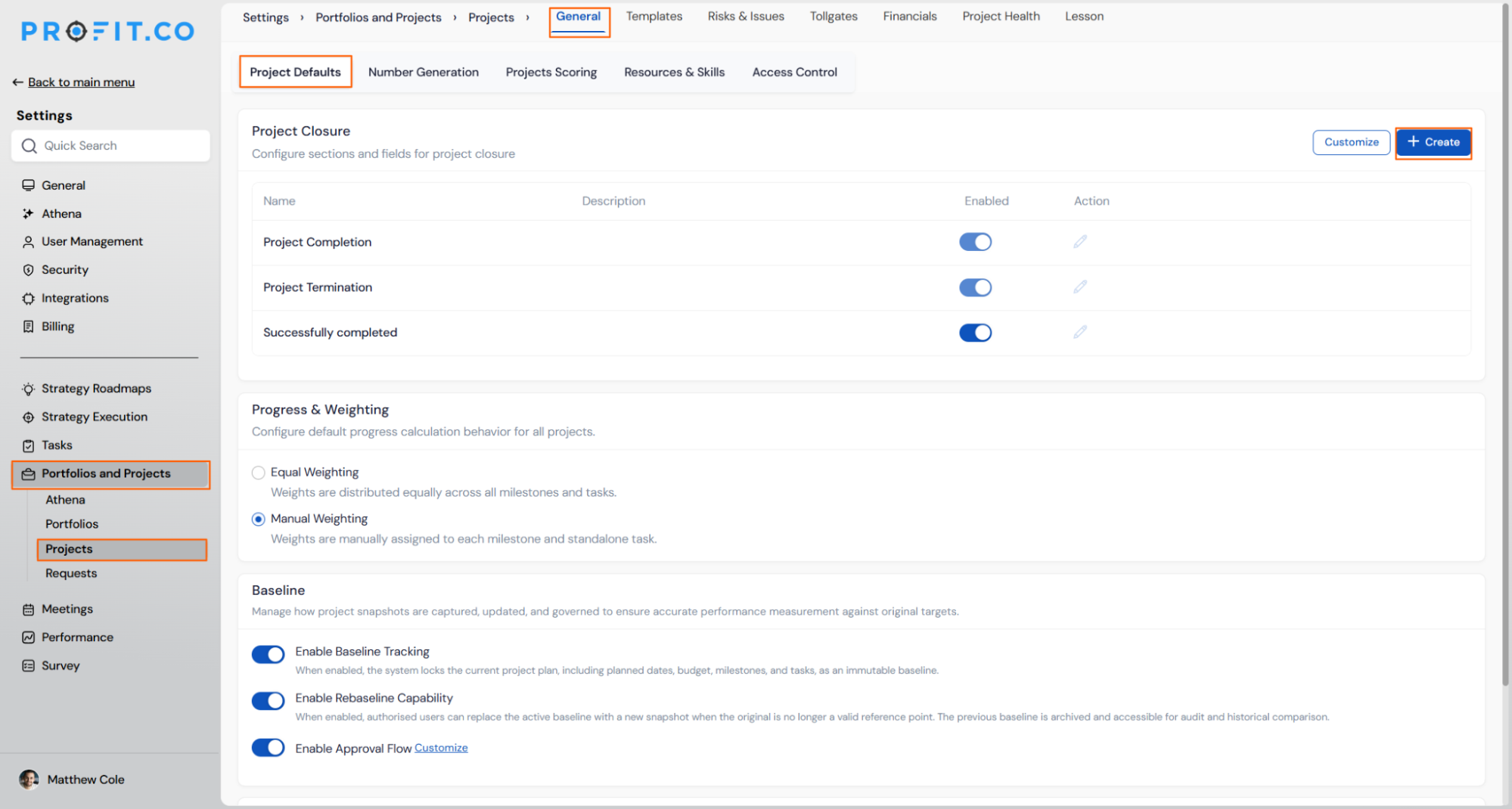
Navigate to Settings → Portfolios & Projects → Projects from the left navigation panel.
-
On the General page, open the Project Defaults section.
-
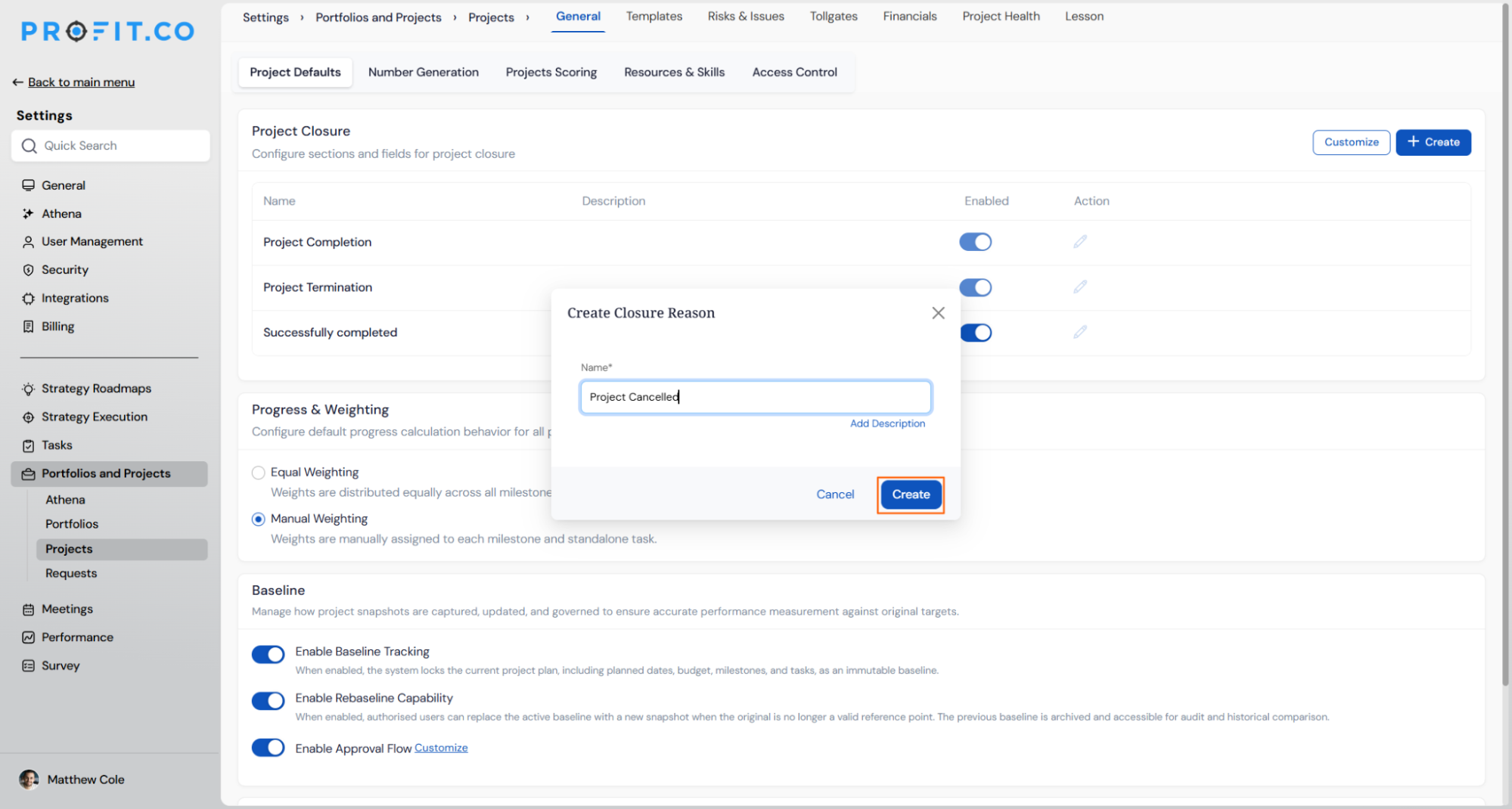
Under Project Closure, click Add Closure Reason.
-
Enter a meaningful Closure Reason that aligns with your organization's project closure process. Save the closure reason. You can add multiple closure reasons as needed.
Common Closure Reason Examples:
| Closure Reason | Use Case | Example Scenario |
|---|---|---|
| Successfully Completed | Project achieved all objectives on time/budget | Product launch delivered with all features |
| Cancelled | Project terminated before completion | Budget cuts eliminated funding |
| On Hold | Project paused temporarily | Awaiting regulatory approval |
| Scope Change | Original scope no longer valid | Business priorities shifted dramatically |
| Resource Constraints | Unable to staff adequately | Key team members departed |
| Technology Obsolescence | Selected technology no longer viable | Vendor discontinued platform support |
How do I customize additional closure fields?
Beyond standard closure fields (Achievements, Lessons Learned, Checklist, Reason), organizations can add custom fields to capture specific information required for governance, compliance, or knowledge management.
Customize Additional Fields (Optional)
- Click the Customize option in the Project Closure settings
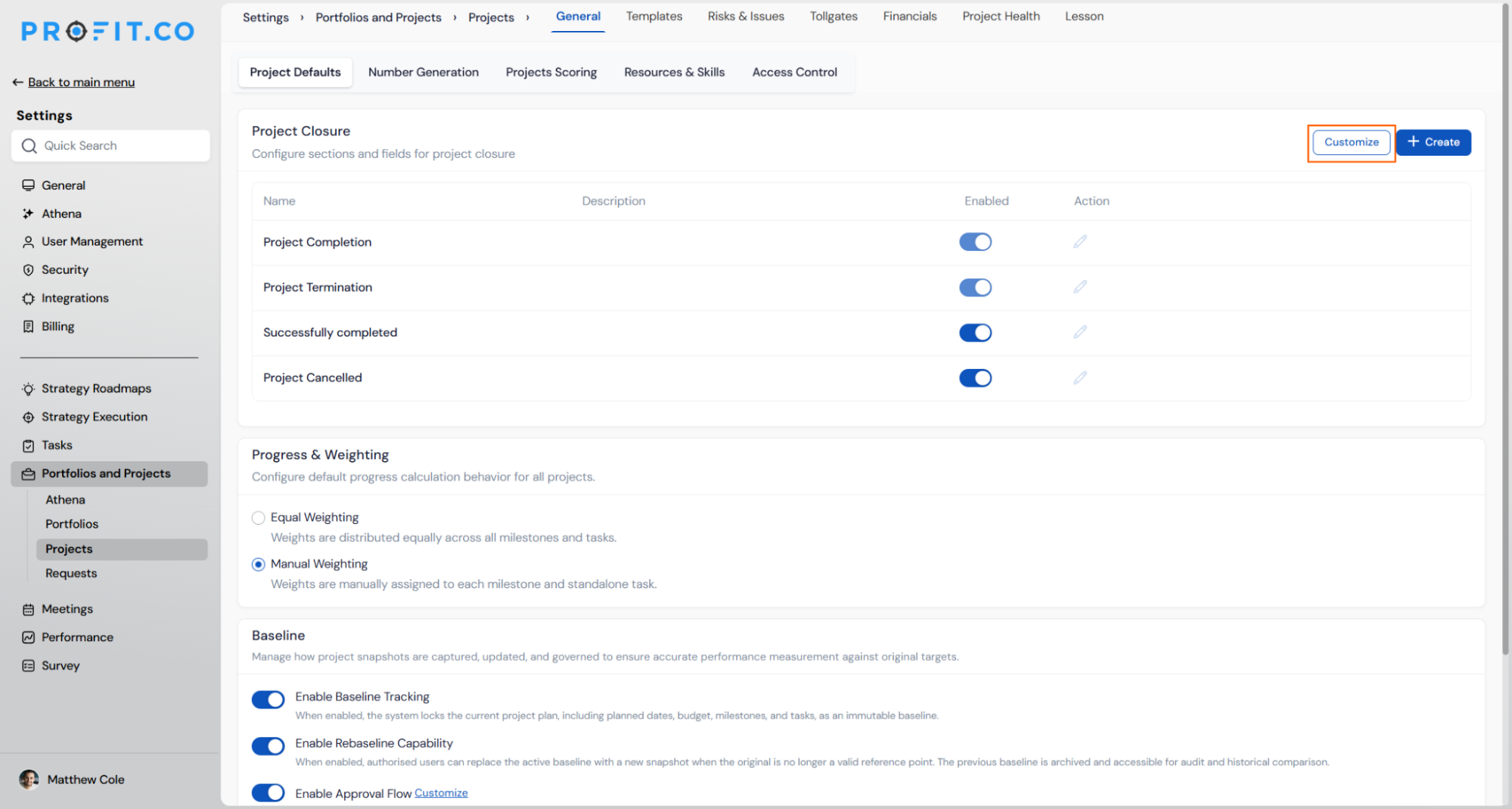
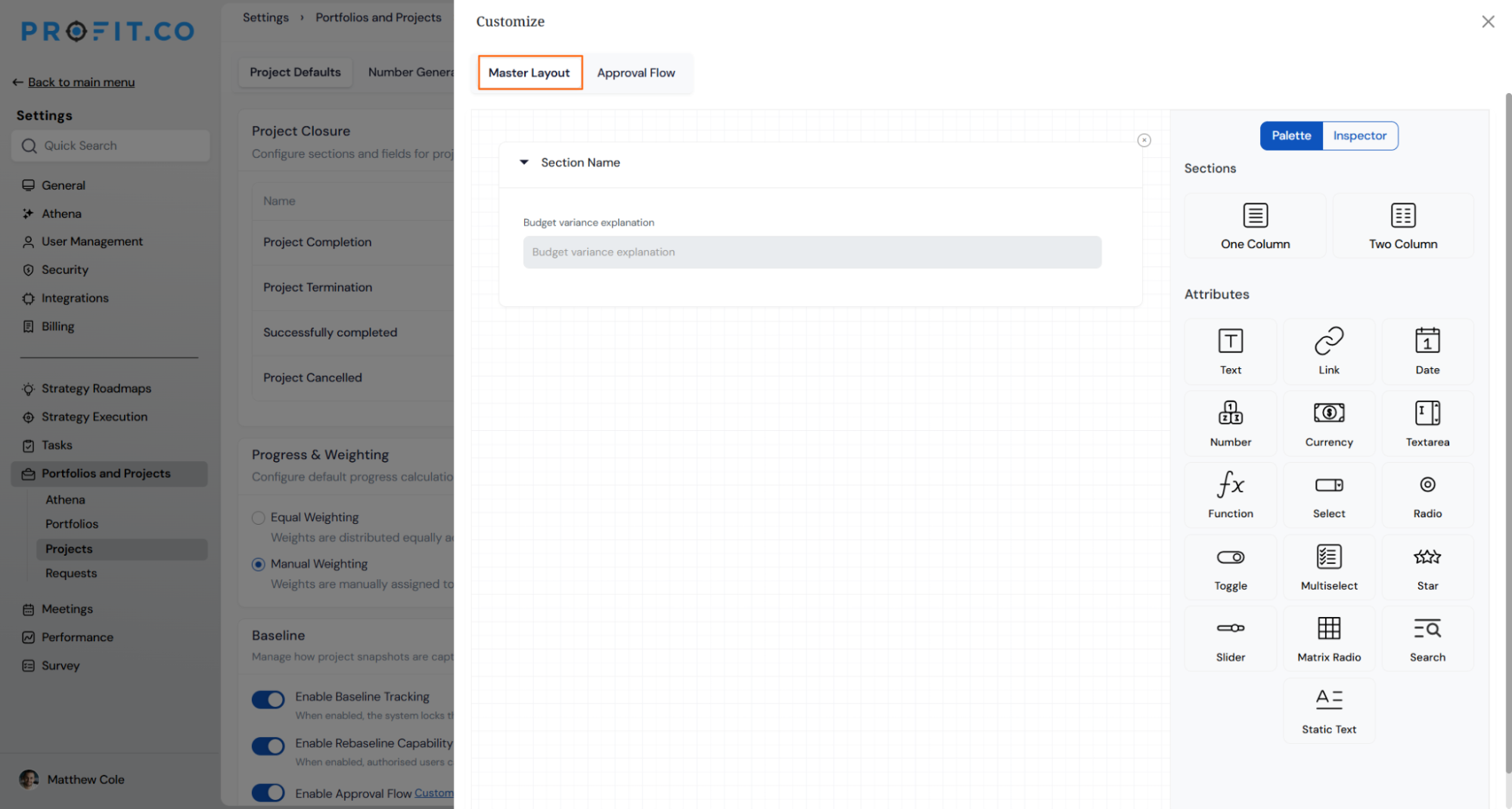
- The Master Layout window opens
- Add custom fields specific to your organization's closure requirements
- Examples: Budget variance explanation, Configure field types (text, dropdown, date, etc.) based on data needs
- Save field configuration
How do I configure approval flows for project closure?
- Under the Approval Flow section, choose between a Standard or Rule-Based approval flow.
- A standard flow applies the same approval chain to all closure requests.
- A rule-based flow lets you define conditional chains based on project attributes.
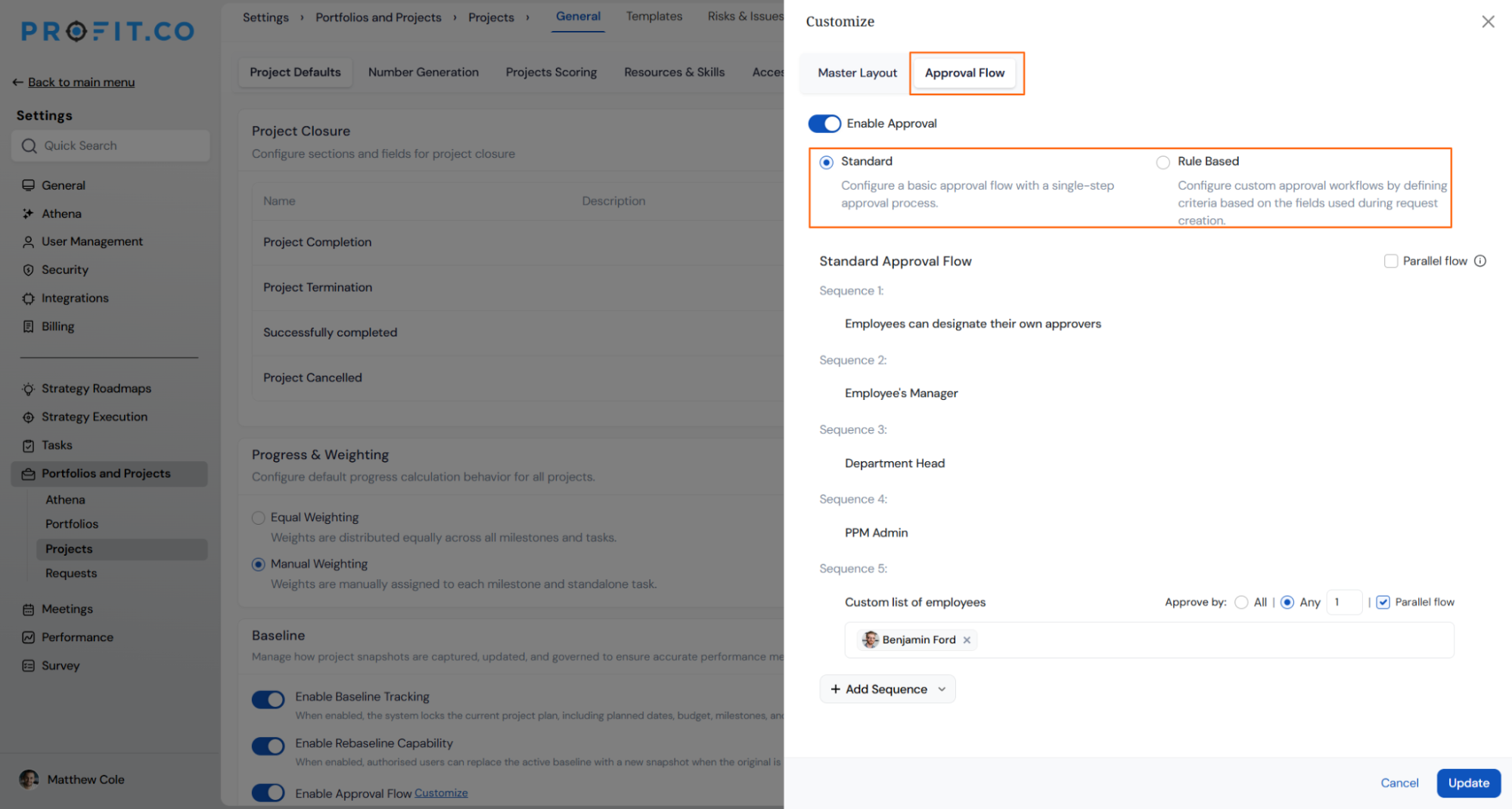
Build Your Sequential Approval Chain
Use Add Sequence to define each approval level in order. The example below shows a 4-level chain for a product team:
| Level | Approver Type | Role in Workflow |
|---|---|---|
| Level 1 | Technical Expert (Self-Designated) | Product Manager designates technical reviewer |
| Level 2 | PM's Direct Manager (Employee's Manager) | Validates team capacity and resource availability |
| Level 3 | VP of Product (Department Head) | Ensures strategic alignment with department goals |
| Level 4 | PMO (PPM Admin) | Final portfolio governance and prioritization check |
To configure this chain in the Approval Flow tab:
- Click Add Sequence and select the first approver type: Employees can designate their own approvers.
- Click Add Approver again and select: Employee's Manager.
- Continue adding levels — select Department Head, then PPM Admin for the final level.
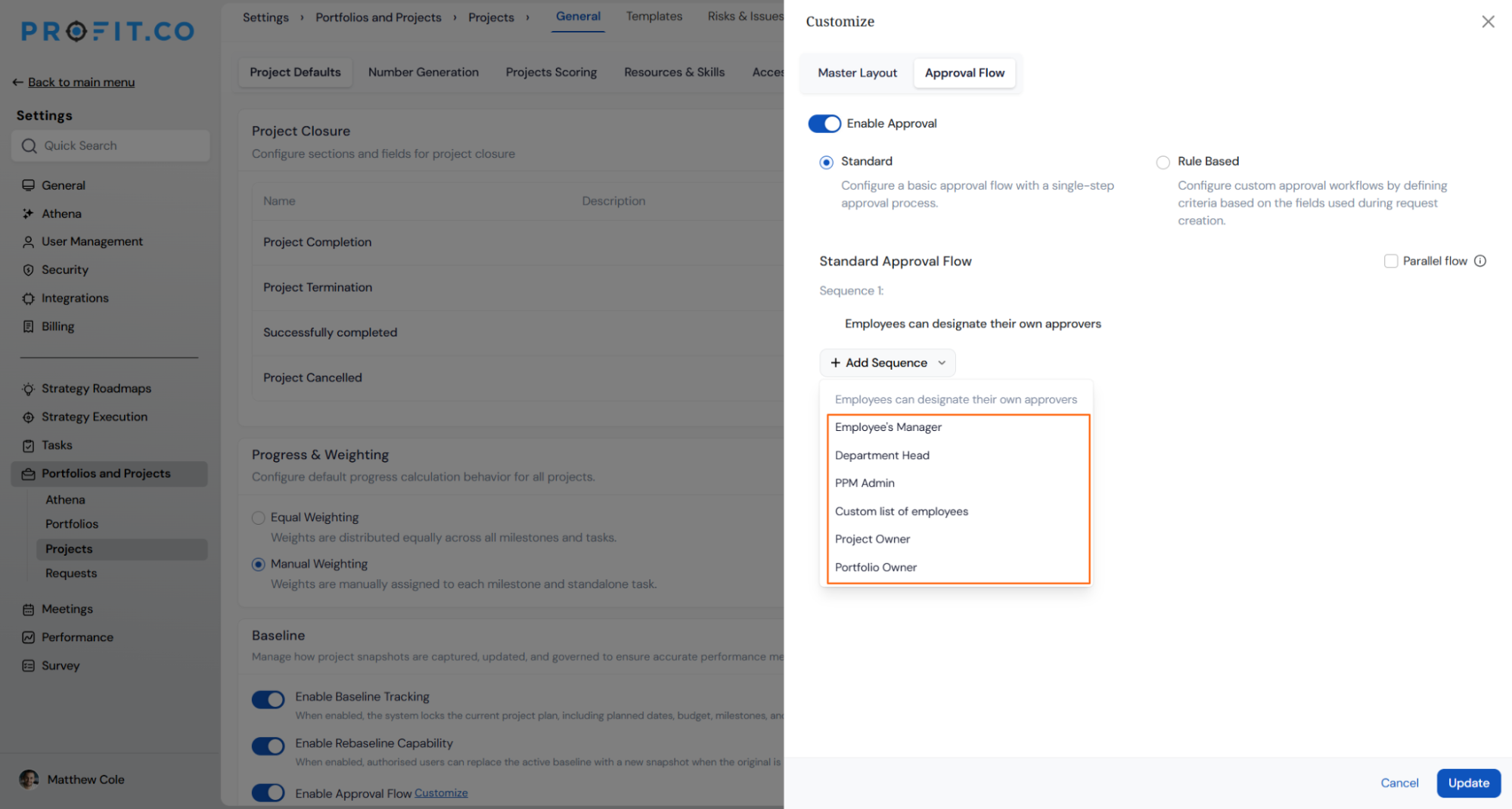
Note: Once you enable the Parallel Flow option, all approvers complete the approval process simultaneously rather than sequentially. Use sequential flow when each level must validate before the next can act.
Best practices for configuring Project Closure
- Start with essential closure reasons and expand over time:
- Begin with 5-7 core closure reasons (Successfully Completed, Cancelled, On Hold, etc.) and add specialized reasons as patterns emerge. Avoid overwhelming users with 20+ options from the start, let organizational needs drive expansion.
- Limit required additional fields to critical information:
- Every required field increases closure friction. Only mandate fields essential for governance, compliance, or critical knowledge capture. Make nice-to-have fields optional to balance thoroughness with usability.
- Align approval flows with organizational maturity:
- Early-stage organizations may not need approval flows, while enterprises require PMO oversight. Match approval requirements to your governance sophistication—overcontrolling immature processes creates bureaucracy without value.
Related Questions
How do end users close projects? Click Here
Frequently Asked Questions
Yes, you can edit or rename closure reasons at any time. Already-closed projects will retain their original closure reason even if you modify the reason name or remove it from the active list. This preserves historical accuracy while allowing configuration evolution.
Deleting a closure reason removes it from the available options for new closures, but does not affect projects already closed with that reason. Historical data remains intact. Consider renaming instead of deleting if you want to discourage future use while preserving clarity for existing closed projects
Currently, closure configuration applies organization-wide across all projects. However, you can use conditional logic in custom fields to show/hide fields based on project attributes. Contact Profit.co support about advanced project type-specific configuration requirements.
Execute your strategy with confidence
Connect OKRs, tasks, and teams in one place with Profit.co
