

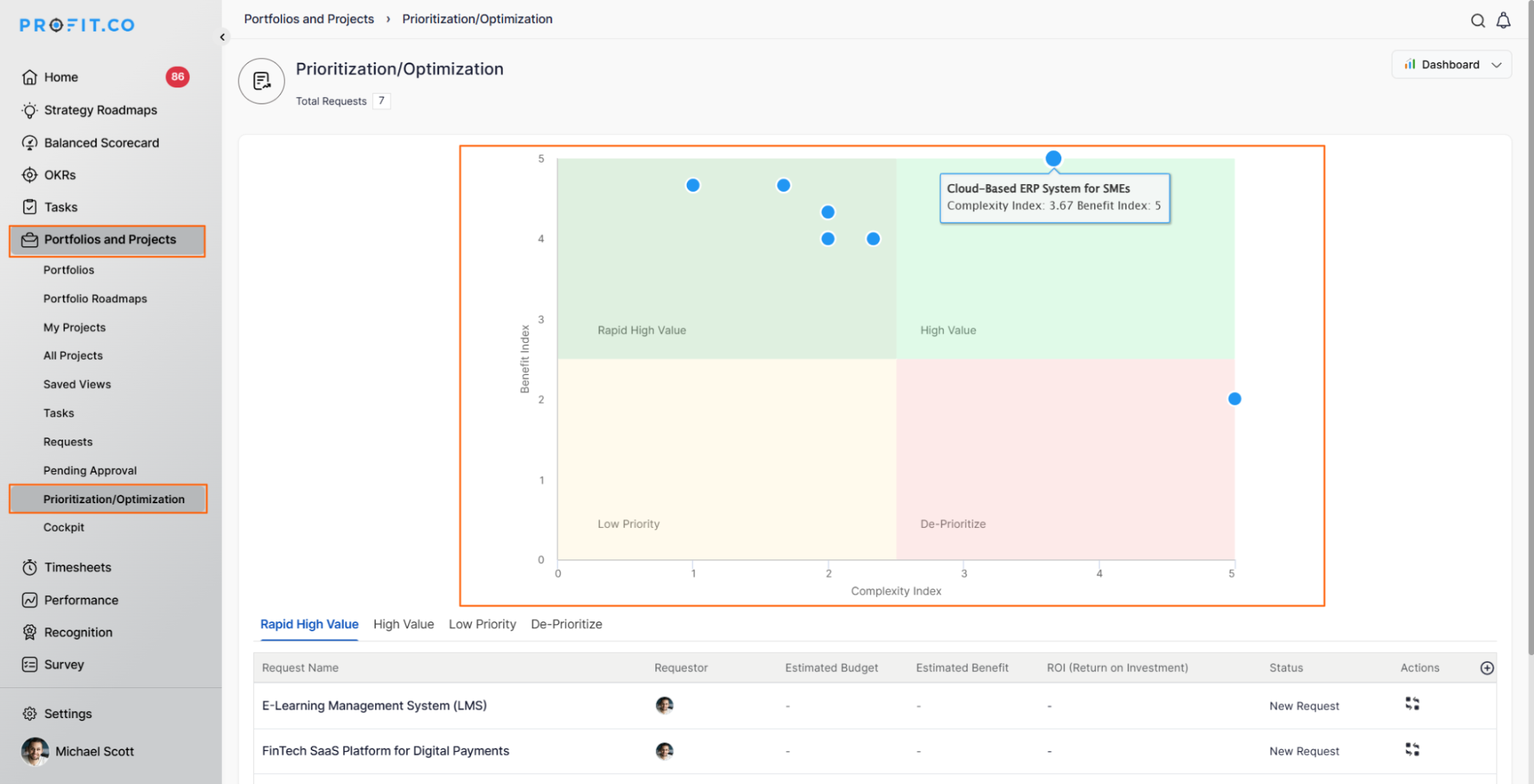
The Prioritization and Optimization Grid in Profi.co's PPM (Project Portfolio Management) module is a 2x2 matrix visualization tool that helps evaluate and rank project ideas based on their Benefit Index and Complexity Index. It enables organizations to identify which projects to prioritize by plotting them across four quadrants: Low Priority, De-Prioritize, High Value, and Rapid High Value, ensuring resources are invested in the most impactful initiatives.
Table of Contents
- Why is the Prioritization and Optimization Grid important?
- What are the two key calculations used in the Prioritization Grid?
- What are the four quadrants in the Prioritization and Optimization Grid?
- How does the 2x2 matrix visualization work?
- How do I access the Prioritization and Optimization Grid in Profi.co?
- Best Practices for Using the Prioritization and Optimization Grid
- Related Questions
- Frequently Asked Questions
Why is the Prioritization and Optimization Grid important?
The Prioritization and Optimization Grid is essential for strategic project portfolio management. Here's why this feature matters:
- Strategic Resource Investment: Focus on projects with the highest benefits and manageable complexity, ensuring strategic resource investment in initiatives that drive maximum impact and organizational success.
- Simplified Decision-Making: The 2x2 matrix simplifies complex evaluations, providing actionable insights to prioritize quick wins and high-impact projects while de-prioritizing low-value or overly complex initiatives.
- Data-Driven Prioritization: After generating innovative project ideas in the Demand Generation phase, evaluate and rank them to ensure resources are invested in the most impactful projects.
- Visual Clarity: Provides a clear visual representation of your entire project portfolio, making it easier for leadership to make informed decisions.
What are custom fields in OKR creation?
The Prioritization and Optimization Grid uses two fundamental indices to evaluate projects:
Benefit Index
The Benefit Index measures the potential value and impact a project can deliver to the organization.
Calculated using metrics such as:
- Benefit-Cost Ratio
- Stakeholder Impact
- Priority Score
The Benefit Index is plotted on the Y-axis with a scale from 0 to 5.
Complexity Index
The Complexity Index assesses the difficulty and challenges involved in executing a project.
Determined by factors like:
- Dependencies
- Risk Level
- Resource Availability
The Complexity Index is plotted on the X-axis with a scale from 0 to 5.
Using a mathematical formula, both indices are calculated and plotted onto the matrix to provide a comprehensive view of each project's position.
What are the four quadrants in the Prioritization and Optimization Grid?
The matrix is divided into four strategic quadrants that guide decision-making:
1. Low Priority (Bottom-left quadrant)
Characteristics:
Low benefits and low complexity
Offers minimal returns to the organization
Not worth significant resource investment
Action: Consider postponing or eliminating these projects.
2. De-Prioritize (Bottom-right quadrant)
Characteristics:
High complexity and low benefits
The value doesn't justify the complexity and effort required
High risk with minimal reward
Action: Avoid or deprioritize these projects unless strategic reasons exist.
3. High Value (Top-right quadrant)
Characteristics:
High benefits and high complexity
Worth pursuing due to their potential impact
Require significant resources but deliver substantial value
Action: Plan carefully and allocate adequate resources for these strategic initiatives.
4. Rapid High Value (Top-left quadrant)
Characteristics:
High benefits and low complexity
Represents quick wins for immediate execution
Best return on investment with minimal effort
Action: Prioritize these projects for immediate implementation to gain fast results.
How does the 2x2 matrix visualization work?
The Prioritization and Optimization Grid uses a coordinate system to plot projects:
X-axis (Horizontal):
- Represents the Complexity Index
- Scale ranges from 0 to 5
- Projects move to the right as complexity increases
Y-axis (Vertical):
- Represents the Benefit Index
- Scale ranges from 0 to 5
- Projects move upward as benefits increase
Each project is plotted as a point on this grid based on its calculated Benefit and Complexity indexes. The position of each project within the four quadrants immediately reveals its priority level and recommended action.
How do I access the Prioritization and Optimization Grid in Profi.co?
To view and use the Prioritization/Optimization Grid:
- Navigate to the Portfolios and Projects left navigation panel
- Click on Prioritization/Optimization
The grid will display all your evaluated projects positioned according to their Benefit and Complexity indexes, providing an at-a-glance view of your entire project portfolio.
Best Practices for Using the Prioritization and Optimization Grid
To maximize the effectiveness of the Prioritization and Optimization Grid:
- Regular Updates: Refresh the Benefit and Complexity indexes periodically as project conditions change.
- Consistent Evaluation Criteria: Use standardized metrics for calculating both index to ensure fair comparisons.
- Focus on Quick Wins: Prioritize Rapid High Value (top-left) projects first for immediate results and momentum.
- Strategic Balance: Maintain a healthy mix of quick wins and high-value strategic projects.
- Stakeholder Input: Involve key stakeholders in defining the metrics used for benefit and complexity calculations.
- Review Regularly: Reassess project positions quarterly or when significant changes occur.
- Data-Driven Decisions: Base prioritization decisions on objective data rather than subjective opinions.
- Resource Alignment: Ensure resource allocation reflects the prioritization shown in the grid.
Related Questions
How to create a Project in the PPM module. click here
Frequently Asked Questions
It's recommended to review and update the grid quarterly or whenever significant changes occur in project scope, resources, or organizational priorities.
Yes, projects can move between quadrants as their Benefit and Complexity indexes change due to new information, resource availability, or changing business conditions.
This suggests your portfolio consists of strategic, complex initiatives. Ensure you have adequate resources and timelines to execute these projects successfully, and consider balancing with some quick wins.
