

Profit.co's Critical Path Method (CPM) automatically identifies the sequence of tasks that determines your project's minimum completion time, and highlights them directly in List View, Gantt View, and Plan view. You can export the critical-path analysis to share with stakeholders without rebuilding it manually.
Table of Contents
What is the Critical Path Method (CPM)?
The Critical Path Method (CPM) is a project management technique that identifies the longest sequence of dependent tasks that must be completed in order to finish a project in the shortest possible time. Any delay to a task on the critical path directly delays the overall project completion.
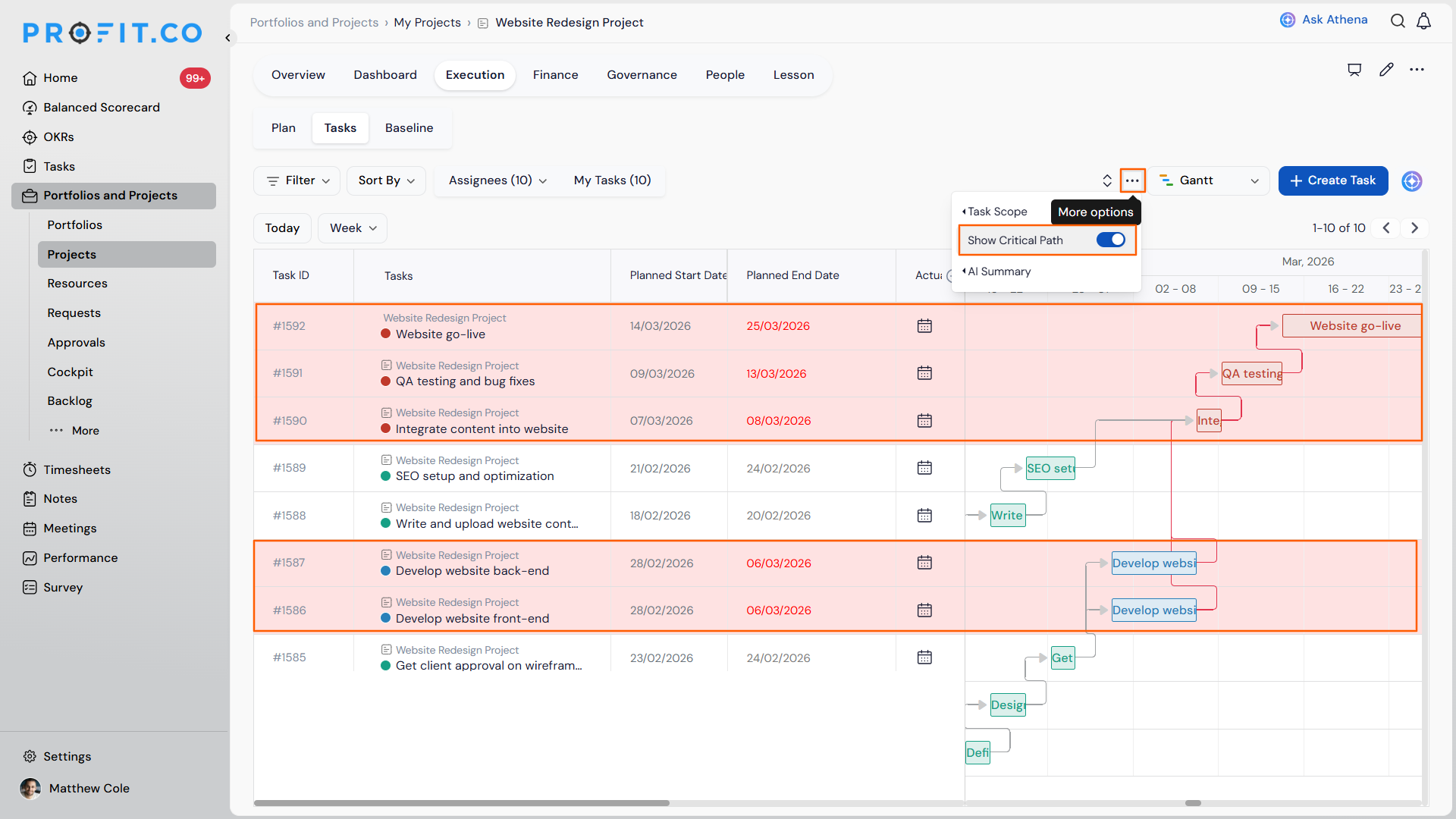
Profit.co calculates the critical path from two inputs: Task Duration and Task Dependencies. Using these, it automatically determines which tasks are critical and highlights them in red across List View, Gantt View, and Plan view.
| Attribute | Critical Tasks | Non-Critical Tasks |
|---|---|---|
| Scheduling Flexibility | Zero slack time | Have float/slack time |
| Impact on Project | Delays affect project completion | Delays may not impact the deadline |
| Visual Indicator | Highlighted in red | Standard display |
| Priority | Must be completed on time without exception | Can be scheduled with more flexibility |
Why the Critical Path Method Matters
In real-world projects with hundreds or thousands of tasks, CPM automatically identifies which subset is schedule-critical, so project managers can direct focus and resources accordingly. In a 10-task project, for example, only 8 tasks might land on the critical path, and those are exactly the ones that need consistent attention.
| Benefit | What Changes |
|---|---|
| Focus where it counts | CPM identifies exactly which tasks are schedule-critical, instead of leaving project managers to guess across hundreds or thousands of tasks. |
| Schedule risk visible on the Plan page | The critical path now highlights directly in Plan view, instead of requiring a switch to List View or Gantt View to see it. |
| Shareable analysis | Exporting the critical-path analysis lets you share it with stakeholders without rebuilding it manually. |
How It Works
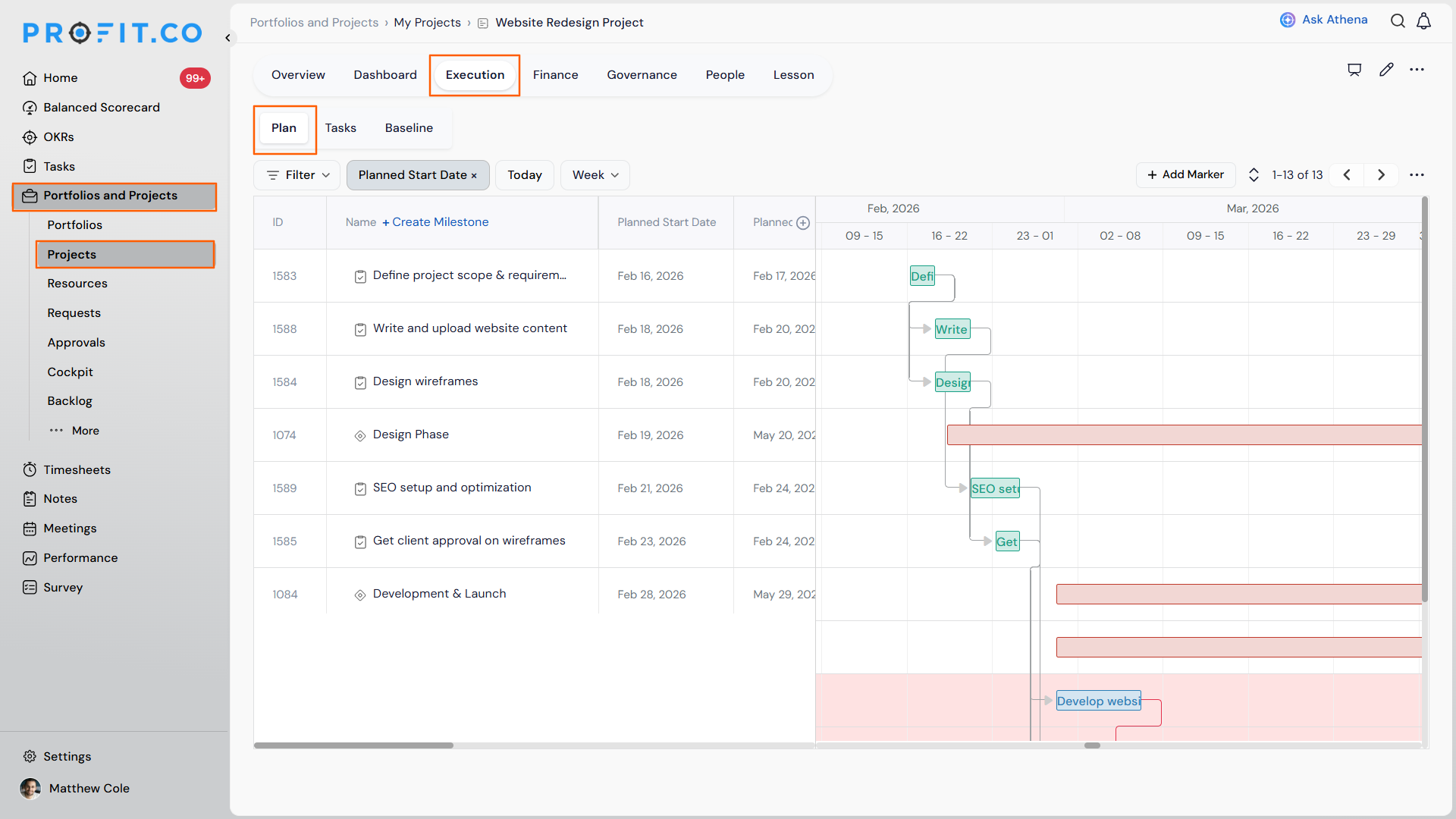
Step 1: Open the Project Plan
- Navigate to your project within Portfolios and Projects from the left navigation panel.
- Open the project and go to the Plan view.
- Verify that all tasks have a defined Planned Start Date and Planned End Date.
- Confirm that task dependencies are mapped correctly between tasks; this is essential for CPM to calculate accurately.
Step 2
- In List View or Gantt View, use the More options at the top of the page and click Show Critical Path to activate the highlighting.
- In Plan view, the critical path appears highlighted among the tasks.
Note
The Critical Path Method (CPM) is available in the List View, Gantt View, and Plan view of your project. From the Plan view, export the critical-path analysis to share it with stakeholders.
Critical Path Method Scenarios and Their Outcomes
| Scenario | What Happens |
|---|---|
| You export the critical-path analysis from the Plan view. | Profit.co generates a downloadable critical-path report you can share with stakeholders without rebuilding it manually. |
| You leave a task without a planned start date, end date, or a mapped dependency. | Profit.co's critical path calculation becomes inaccurate for that task, since task duration and task dependencies are the two inputs CPM relies on. |
| You update a task's duration or dependency after the critical path has already been calculated. | Profit.co recalculates the critical path using the updated values, which can change which tasks are highlighted as critical. |
Best Practices for Using CPM in Profit.co
- Ensure all tasks have accurate start and end dates before reviewing the critical path, since incorrect durations will skew the results.
- Map task dependencies carefully and completely, since missing dependencies will produce an inaccurate critical path.
- Review the critical path at regular intervals throughout the project, since schedule changes may shift which tasks are critical.
- Allocate your strongest resources to critical path tasks to reduce the risk of delays.
- Export the critical-path analysis before major stakeholder reviews or tollgate checkpoints, so the shared report reflects the latest schedule risk.
Related Articles
- What are Task Dependencies in Profit.co and How Do They Help Manage Project Execution?
Frequently Asked Questions
CPM in Profit.co is a feature that automatically identifies the longest sequence of dependent tasks in your project plan, highlighting which tasks must be completed on time to avoid delaying the overall project. It's visible in List View, Gantt View, and Plan view.
Profit.co uses two inputs: task duration (start and end dates) and task dependencies mapped between tasks in the project plan.
A highlighted critical task has zero float, meaning it cannot be delayed without pushing back the entire project completion date. These tasks require priority attention from the project manager.
Execute your strategy with confidence
Connect OKRs, tasks, and teams in one place with Profit.co
