



How do I build a time-phased budget cost plan in Profit.co Projects?
Category: PPM
In Profit.co, you can build a comprehensive cost plan by distributing planned costs across multiple project phases and months, providing detailed financial planning and cash flow management throughout your project lifecycle.
Table of Contents
- What is a Cost Plan with Multi-Phase Breakdown?
- Why should I build a Cost Plan with Multi-Phase Breakdown?
- What benefits does monthly cost distribution provide?
- How do I access the Cost-Benefit Analysis tab?
- What types of costs can I add to my Cost Plan?
- How do I add a one-time cost with a monthly breakdown?
- How do I add a recurring cost with a monthly breakdown?
- Best practices for building Cost Plans with Multi-Phase Breakdown
- Related Questions
- Frequently Asked Questions
What is a Cost Plan with Multi-Phase Breakdown?
A Cost Plan with Multi-Phase Breakdown is a detailed financial plan that distributes project costs across different time periods (months) and project phases. This approach allows you to map expenses to specific project stages, providing granular visibility into when costs will be incurred throughout the project lifecycle.
Why should I build a Cost Plan with Multi-Phase Breakdown?
Multi-phase cost planning provides comprehensive financial management benefits:
| Benefit | Description |
|---|---|
| Phase-Based Planning | Align costs with specific project phases (Initiation, Planning, Execution, Closure) |
| Accurate Forecasting | Predict when funds will be needed throughout the project |
| Cash Flow Management | Ensure adequate budget availability when expenses occur |
| Resource Allocation | Allocate costs to the phases based on resource plan |
| Budget Control | Monitor spending phase-by-phase to prevent overruns |
| Stakeholder Communication | Provide transparent cost timelines to stakeholders |
What benefits does monthly cost distribution provide?
Monthly cost distribution delivers specific advantages for project financial management:
| Benefit | Impact |
|---|---|
| Realistic Timeline | Shows when money will actually be needed, not just total amounts |
| Cash Flow Visibility | Finance teams can see monthly funding requirements |
| Variance Detection | Identify spending issues early by comparing monthly actuals vs. plan |
| Resource Planning | Schedule resources based on when costs indicate activity peaks |
| Risk Mitigation | Identify months with high spending that may need contingency planning |
| Phased Approval | Obtain budget approvals aligned with spending phases |
| Progress Tracking | Monitor project progress based on cost consumption over time |
| Forecasting Accuracy | Improve future estimates by analyzing monthly cost patterns |
How do I access the Cost-Benefit Analysis tab?
Follow these steps to begin building your cost plan:
Step 1
- Go to Portfolios and Projects from the left navigation panel.
- Select All Projects or the relevant portfolio.
- Click on the project where you want to create a cost plan.
- In the project detail page, locate and click the Cost-Benefit Analysis tab.
- Note: The Cost-Benefit Analysis tab is not visible by default. It appears only when:
- Cost-Benefit Analysis (CBA) is enabled in Settings → Portfolios and Projects → Project → Financial tab.
- The project is configured as a budget-driven project
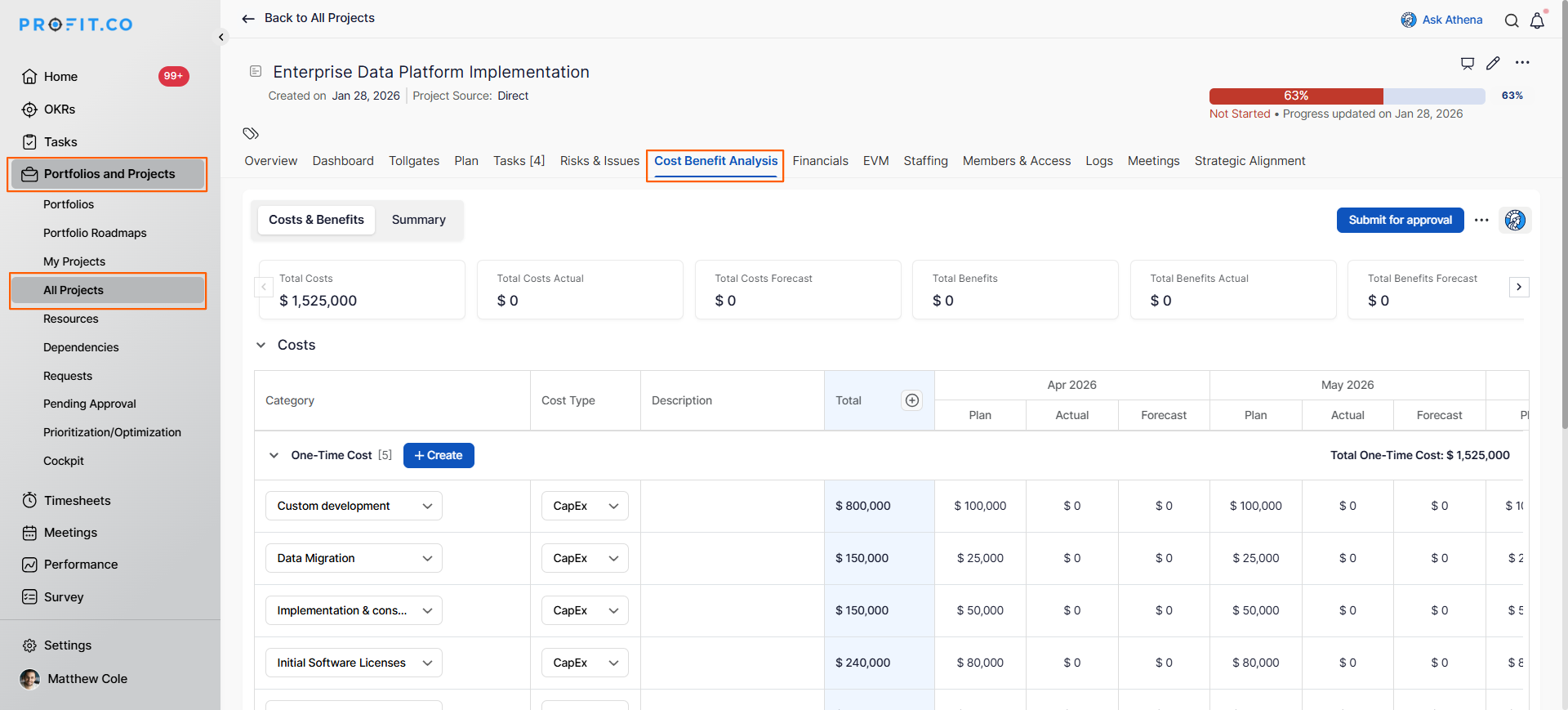
You will now see the Cost-Benefit Analysis interface where you can configure parameters and build your cost plan.
What types of costs can I add to my Cost Plan?
Profit.co supports multiple cost Types for comprehensive planning:
| Cost Type | Description | Distribution Approach | Phase Alignment |
|---|---|---|---|
| One-Time Cost | Single-occurrence expenses | Allocate to specific month(s) when the expense occurs | Typically in early phases (Initiation, Planning) |
| Recurring Cost | Regular, repeating expenses | Distribute across multiple months with consistent or varying amounts | Throughout the execution and operational phases |
Note: You can create custom cost types beyond the default One-Time and Recurring options to match your organization's specific planning requirements.
How do I add a one-time cost with a monthly breakdown?
Single-occurrence expenses are incurred once during the project lifecycle, regardless of payment structure.
Step 1
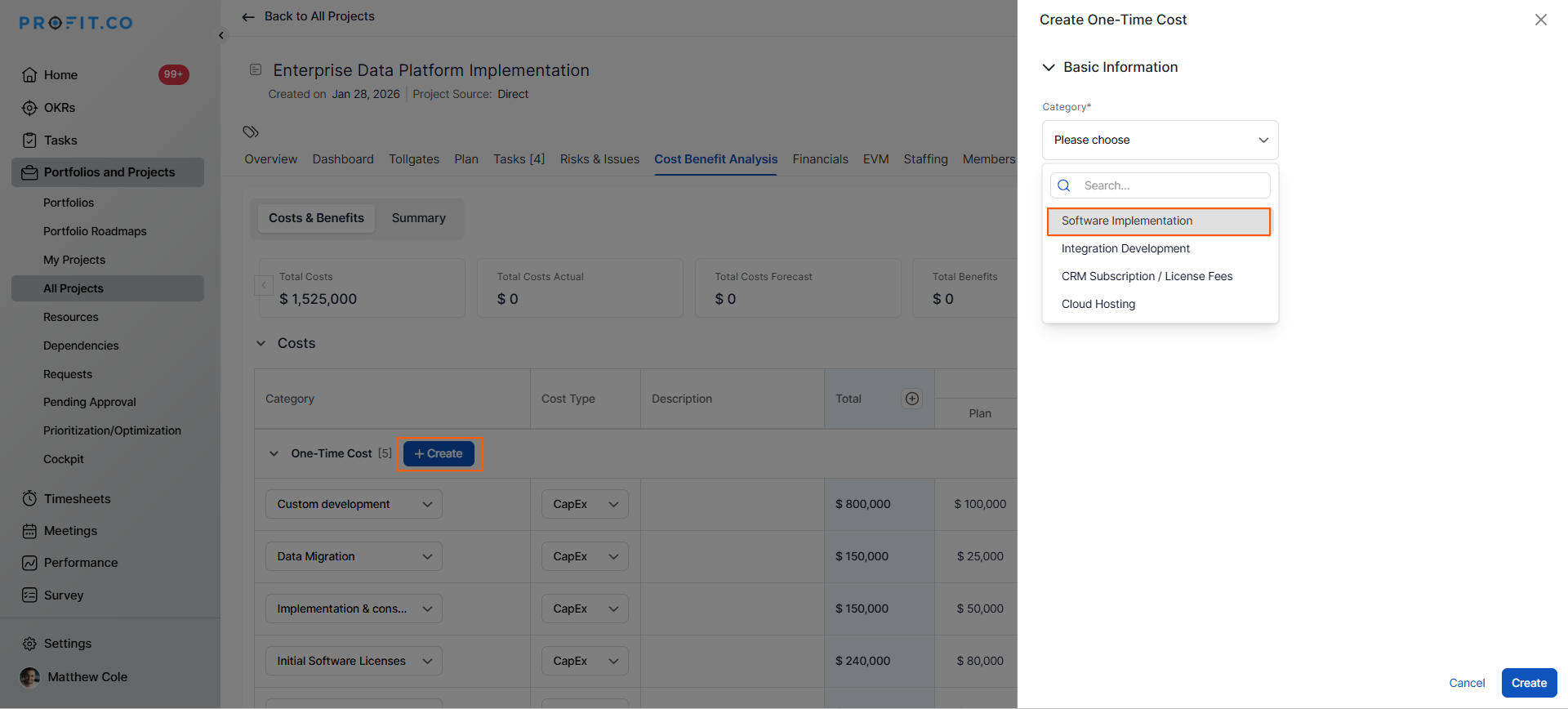
- In the Cost-Benefit Analysis tab, locate the One-Time Cost section.
- Click the + Create button next to One-Time Cost.
- In the side panel that appears, choose the category from the predefined category list.
- Examples: Equipment, Licenses, Consulting Fees, Initial Setup.
- Enter the total Planned Value (the full cost for this item).
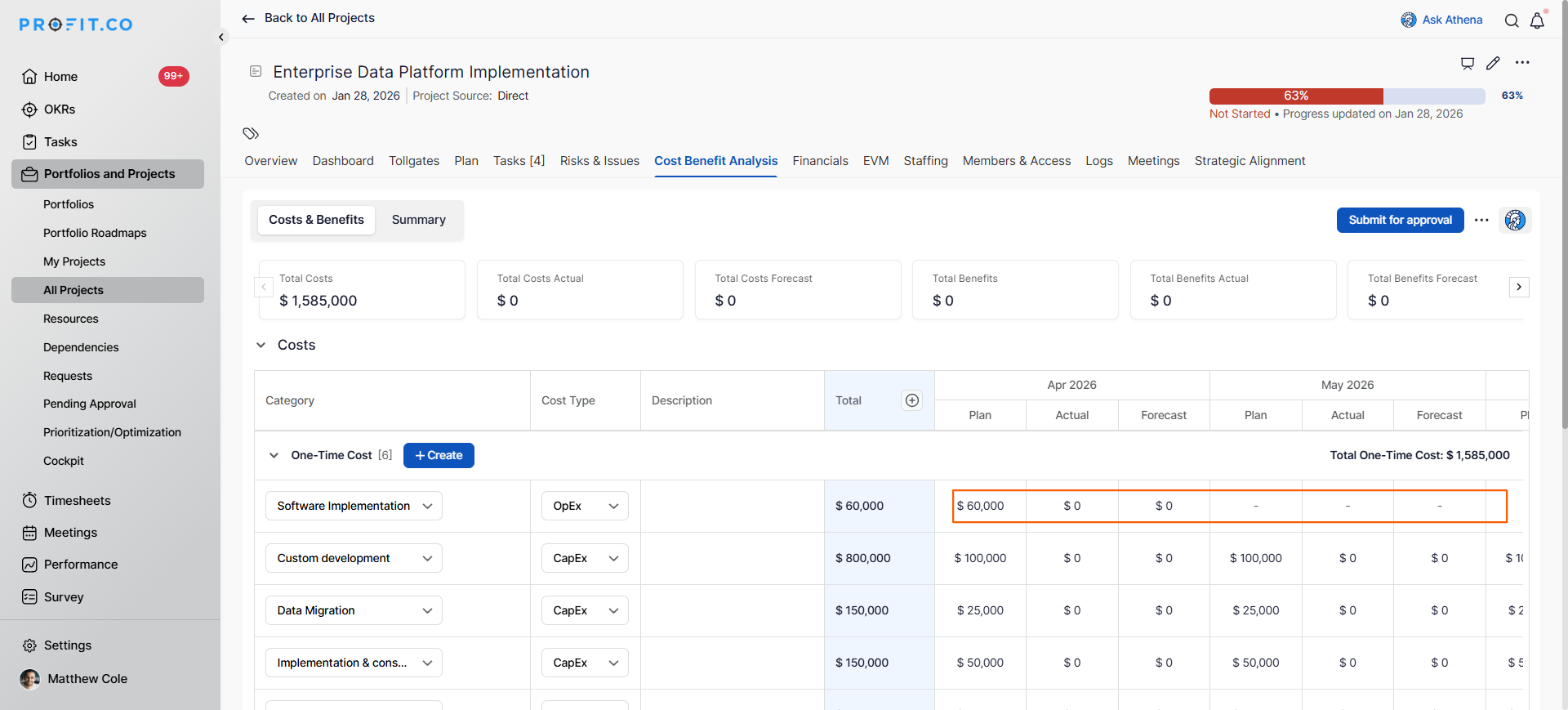
- The monthly breakdown section is for recording when this one-time cost occurs during the project period.
- Enter the amount in the relevant month(s).
- The total entered must equal the Planned Value.
How do I add a recurring cost with a monthly breakdown?
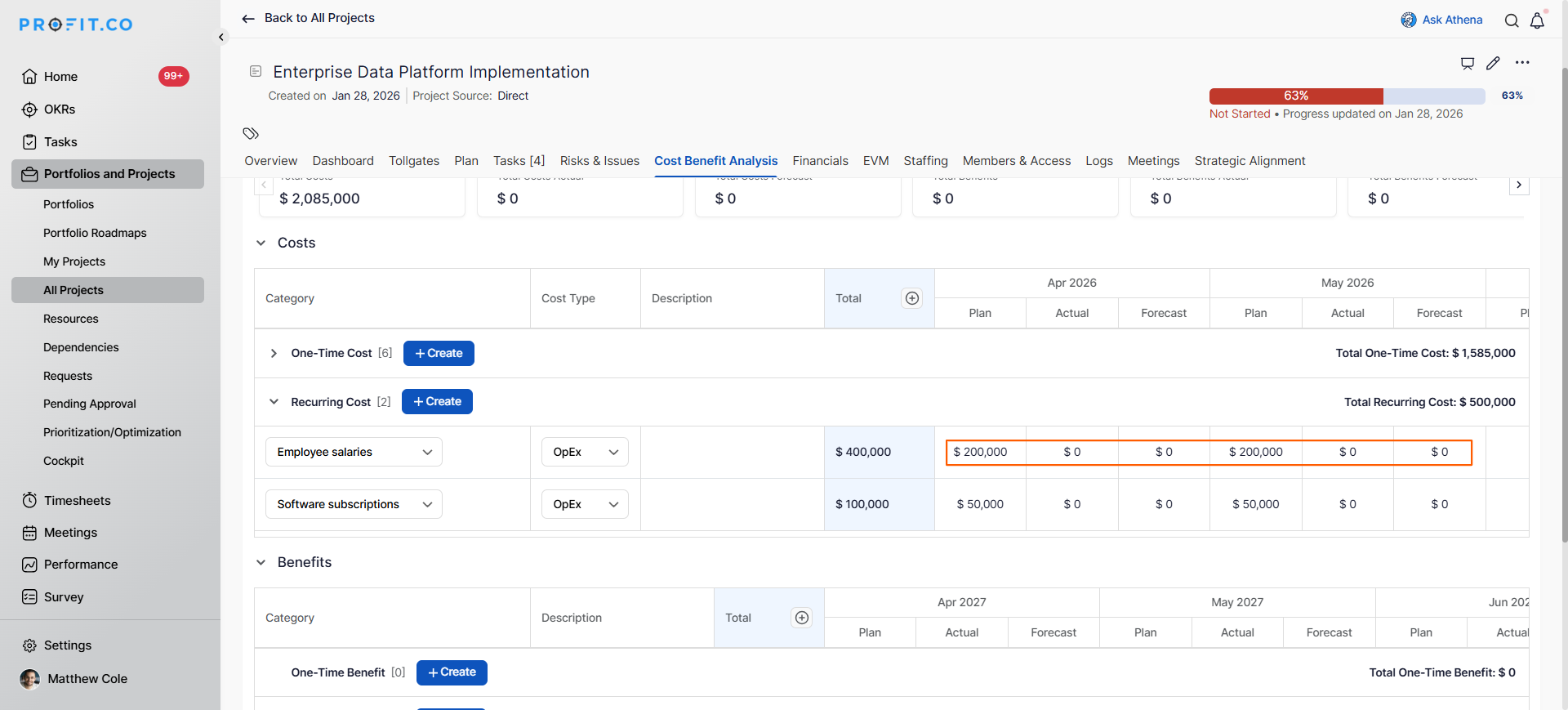
Recurring costs are distributed across multiple months based on when they repeat:
Step 1
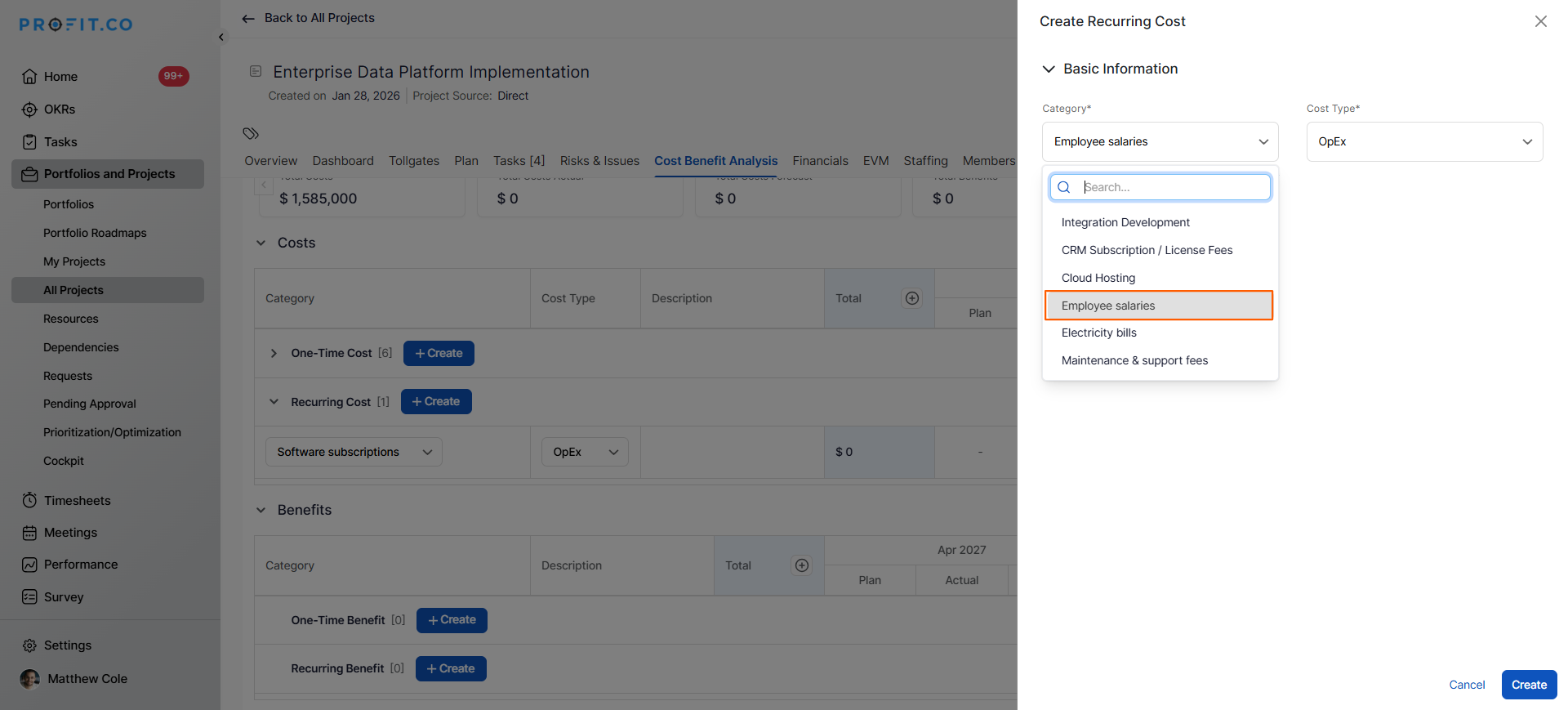
In the Cost-Benefit Analysis tab, locate the Recurring Cost section.
Click the + Create button next to Recurring Cost.
In the side panel, choose the category from the predefined options.
Examples: subscriptions, salaries, maintenance, and utilities.
- Enter the Planned Value (the amount per occurrence).
- Provide a descriptive name for this recurring cost.
- Add this cost across different months throughout the project's duration.
- For constant recurring costs, enter the same amount each month.
- For variable recurring costs, adjust amounts based on anticipated usage or resource needs.
Best practices for building Cost Plans with Multi-Phase Breakdown
- Start by defining your project phases clearly before adding costs to ensure logical distribution.
- Map each cost to the specific phase where it will be incurred for accurate phase-based budgeting.
- Use realistic monthly amounts based on vendor payment terms, payroll schedules, and procurement timelines.
- Front-load one-time costs in early phases (Initiation, Planning) where they typically occur.
- Distribute recurring costs throughout execution phases, adjusting for team scaling and resource intensity.
Related Questions
To learn more about configuring financial parameters in cost-benefit analysis. Click here
Frequently Asked Questions
This is normal; track actual costs alongside your plan to identify variances. Use these insights to adjust future months and improve cost estimates for similar projects.
Yes, you can typically edit cost items and adjust the monthly breakdown as your project evolves and you gain more accurate information.
It depends on your goal. For cash flow planning, use the actual payment month. For phase-based cost accounting, distribute it across months where the benefit is received.
Related Questions
-
How do I set up financial forecasting for projects in Profit.co?
In Profit.co, financial forecasting allows you to project and adjust cost estimates beyond your initial planned values, ...Read more
-
How do I view portfolio health metrics and heatmaps in Profit.co?
In Profit.co, the Portfolio Dashboard provides comprehensive health metrics and visual heatmaps that help you monitor ...Read more
-
How do I use hashtagged conversations for project collaboration in Profit.co?
In Profit.co, hashtagged conversations allow you to organize and categorize discussions using customizable #hashtags ...Read more
-
How do I set up a document repository for projects in Profit.co?
In Profit.co, the Document Repository allows you to centralize all project-related files and links in one location, ...Read more