



How do I set up financial forecasting for projects in Profit.co?
Category: PPM
In Profit.co, financial forecasting allows you to project and adjust cost estimates beyond your initial planned values, enabling dynamic budget management as you gain more insight into actual spending patterns and changing project conditions.
Table of Contents
- What is Financial Forecasting in Profit.co?
- Why should I use Financial Forecasting for projects?
- How do I access the Cost-Benefit Analysis tab?
- How do I add costs with Financial Forecasting?
- How do I interpret Plan vs. Forecast vs. Actual?
- Best practices for Financial Forecasting in Profit.co
- Related Questions
- Frequently Asked Questions
What is financial forecasting in Profit.co?
Financial Forecasting is a dynamic budgeting feature that allows you to project updated cost estimates based on current trends, new information, or changing project conditions. While your planned values represent the original budget, forecasting lets you adjust predictions for specific months where you expect costs to differ from the initial plan.
Why should I use financial forecasting for projects?
Financial Forecasting provides critical capabilities for adaptive project management:
| Reason | Description |
|---|---|
| Respond to Changes | Adjust projections as project conditions change without modifying original baseline |
| Risk Management | Identify potential budget overruns before they occur |
| Improved Accuracy | Update budget estimates based on actual spending patterns and new insights |
| Informed Decision-Making | Make resource allocation decisions based on current projections |
| Stakeholder Communication | Provide realistic cost expectations to stakeholders |
How do I access the Cost-Benefit Analysis tab?
Follow these steps to begin setting up financial forecasting:
Step 1
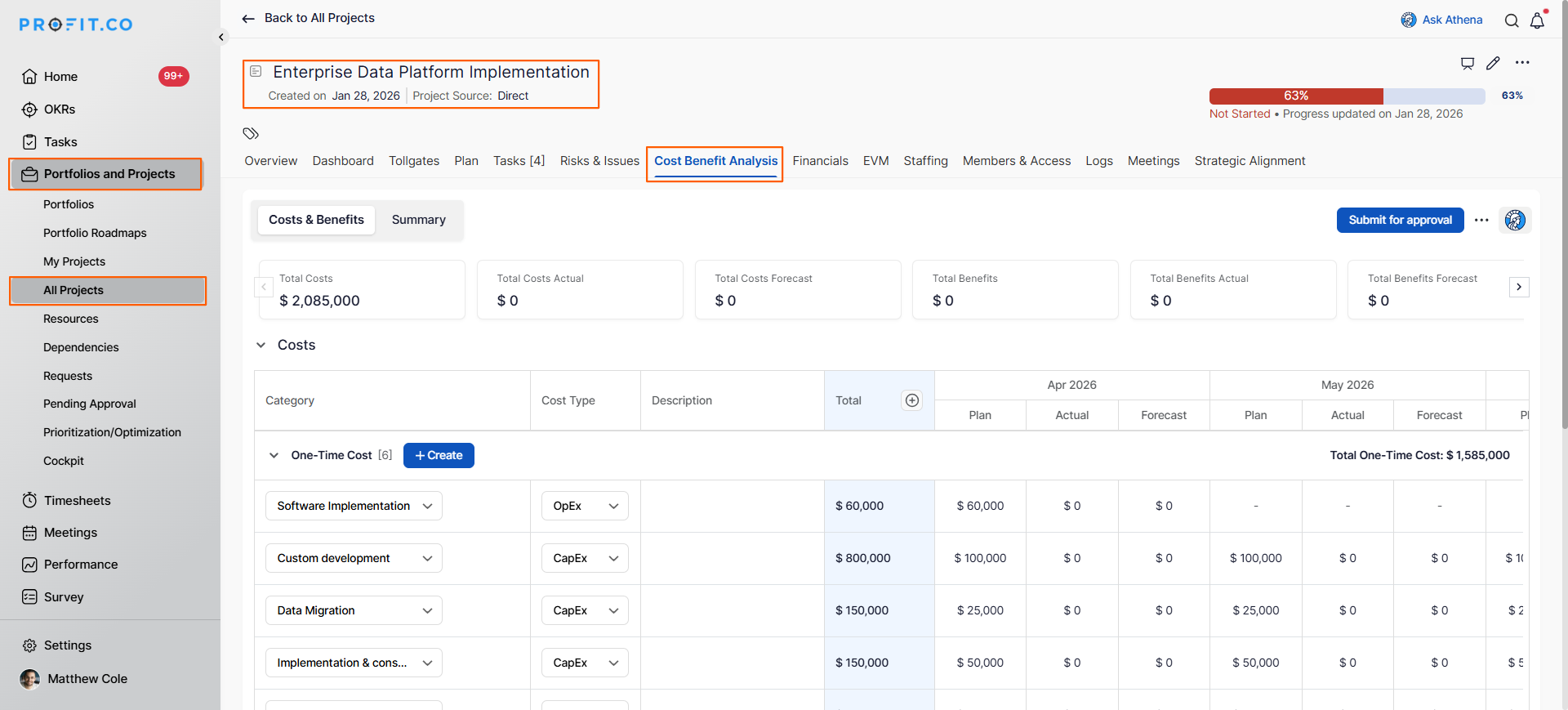
- Click on Portfolios and Projects from the left navigation panel.
- Select All Projects or the relevant portfolio.
- Click on the project where you want to set up financial forecasting.
- In the project detail page, locate and click the Cost-Benefit Analysis tab.
Note: The Cost-Benefit Analysis tab is not visible by default. It appears only when:
- Cost-Benefit Analysis (CBA) is enabled in Settings → Portfolios and Projects → Project → Financial tab.
- The project is configured as a budget-driven project
You will now see the cost planning interface where you can add costs with forecasting.
How do I add costs with financial forecasting?
Step 1
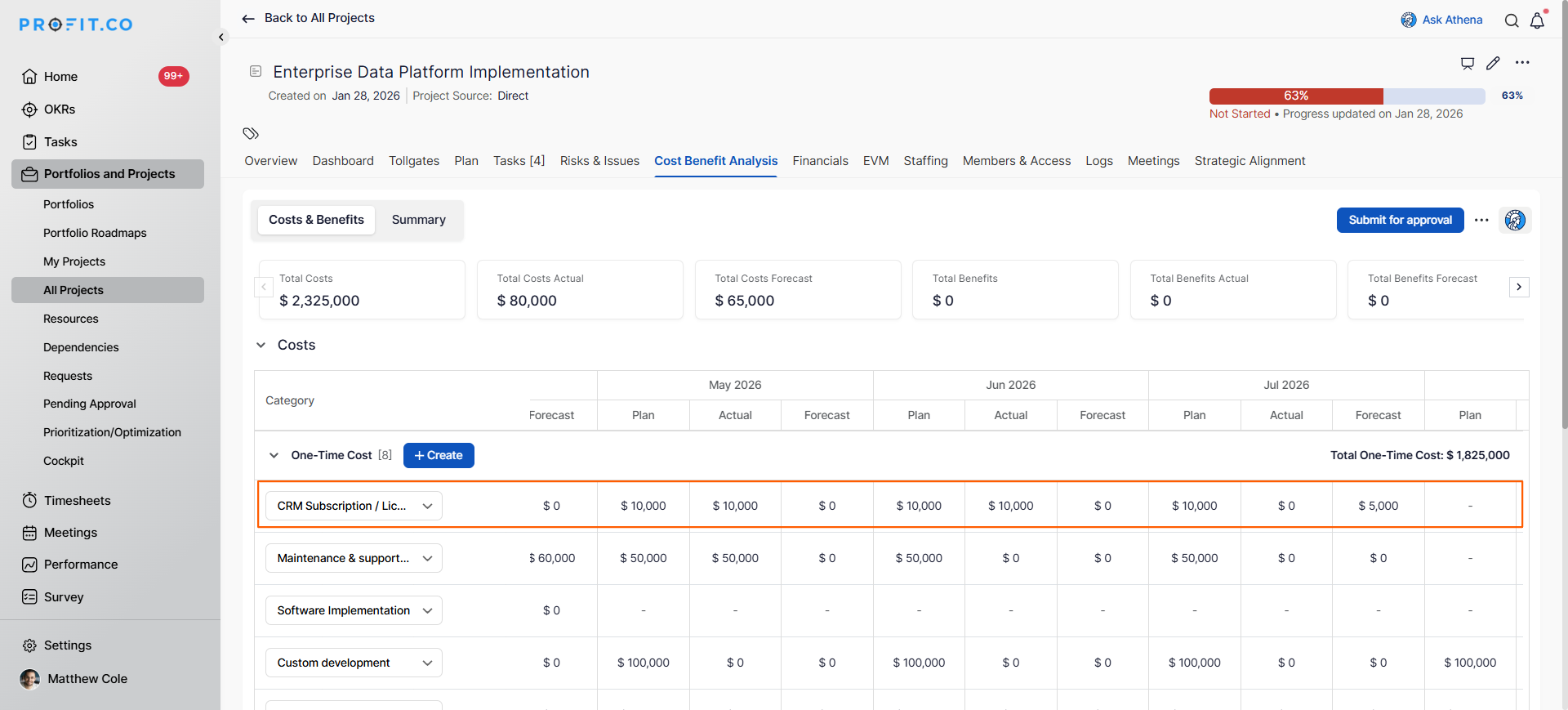
- If certain months require additional costs beyond your plan value, you can adjust forecasts at the month level:
- Select the month where you expect cost variance (e.g., month 6)
- Enter the adjusted amount in the Forecasting section
- Example: Your baseline is $10,000/month, but month 6 requires an extra $5,000 due to equipment upgrade → enter $5,000 as the forecast for month 6
- Repeat for any other months requiring adjustments
How do I interpret Plan vs. Forecast vs. Actual?
Understanding the three cost metrics enables effective budget management:
| Metric | Definition | Purpose |
|---|---|---|
| Plan | Original budgeted cost | Baseline for variance analysis |
| Forecast | Current projected cost | Best estimate based on current information |
| Actual | Money actually spent | Reality check against plan and forecast |
Best practices for financial forecasting in Profit.co
- Update forecasts monthly or whenever significant new information becomes available to maintain accuracy.
- Don't change planned values after project start; use forecasting to show updated projections while preserving baseline.
- Document the reason for each forecast adjustment to support variance analysis and lessons learned.
- Use actual spending trends from completed months to inform forecasts for future months.
- Apply consistent forecasting methodologies across your portfolio for comparable metrics.
Related Questions
To learn more about Cost-Benefit Analysis in Profit.co Click here
Frequently Asked Questions
The plan is your baseline and should remain stable. Updating the forecast shows your current best estimate without losing the ability to measure variance against the planned budget.
Update forecasts monthly during project reviews or immediately when significant events occur that impact costs (scope changes, vendor quotes, or schedule shifts).
Yes, the forecasting process works for both one-time costs and recurring costs, allowing you to adjust projections for any cost category.
Related Questions
-
How to create a Project in the PPM module?
Profit.co provides an option for users to create a project within the Project Portfolio Management (PPM) module. This ...Read more
-
How do I manage tollgate compliance across projects in Profit.co?
In Profit.co, you can Manage tollgate compliance across projects by associating tollgate sequences with projects, ...Read more
-
How do I set up resource rate cards and cost allocation in Profit.co?
In Profit.co, you can set up resource rate cards by creating Resource Types with specific hourly cost rates, assigning ...Read more
-
How to View Critical Tasks of a Project in Profit.co?
Profit.co's Critical Path Method (CPM) feature helps project managers identify the most essential sequence of tasks ...Read more