



How to Track Request Pipeline and Status?
Category: PPM
Profit.co's Request Pipeline tracking enables organizations to visualize and manage incoming project requests through their demand intake process using customizable stages that match their approval workflow.
Table of Contents
What are Request Stages in Profit.co?
Request Stages represent the sequential phases that a request moves through from submission to completion in a project lifecycle.
Key benefits of request stages:
- Workflow Customization: Define stages that match your organization's specific intake and approval process
- Approval Flow Visibility: Track exactly where each request stands in the approval pipeline
- Process Standardization: Ensure consistent handling of all requests through defined approval stages
- Progress Tracking: Monitor request movement from submission through approval to execution
- Governance Alignment: Configure approval stages that reflect organizational governance requirements
How do I create new Request Stages?
Administrators can add new request stages to match organizational approval workflows and governance requirements.
Step 1
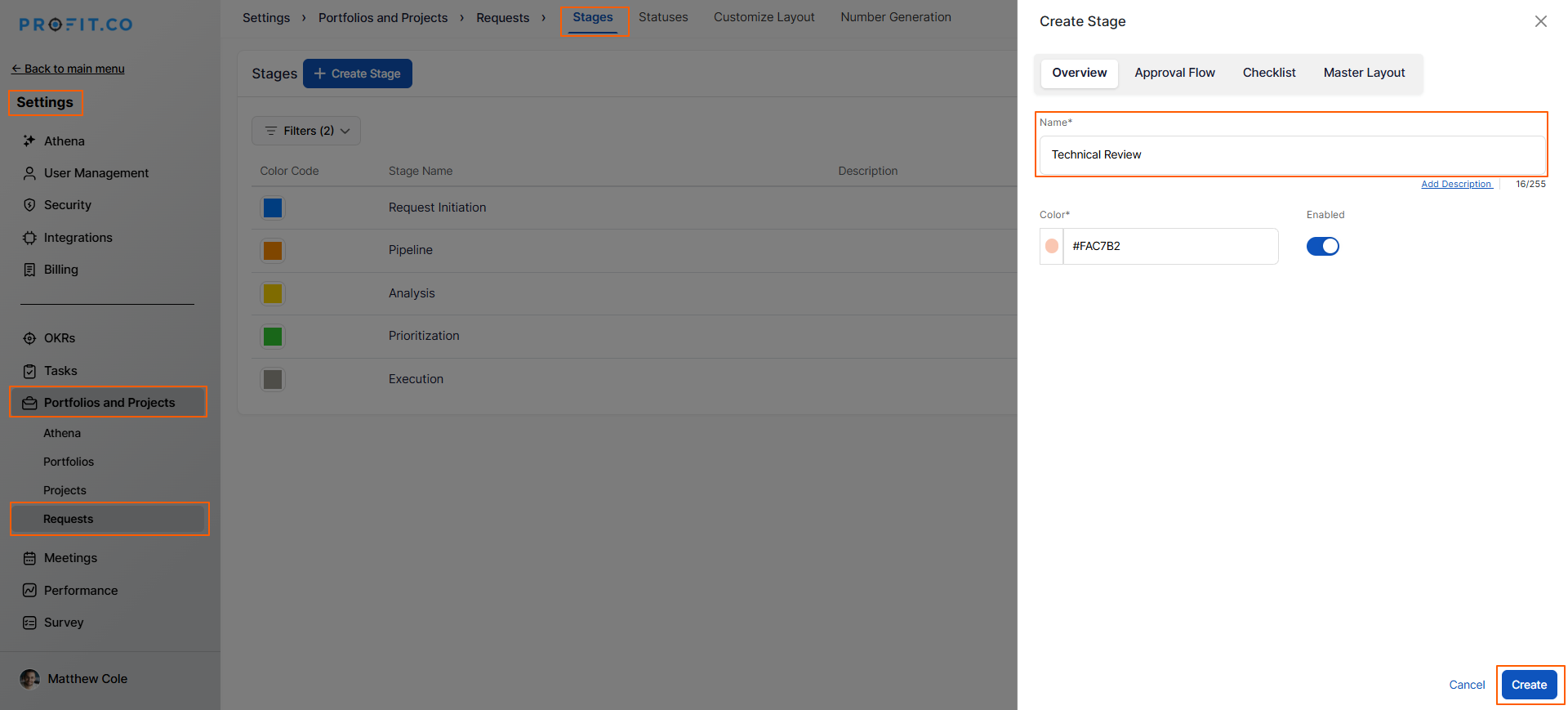
- Navigate to Settings→ Portfolios and Projects→ Request from the left navigation panel.
- Switch to the Stages tab
- Click the + Create button to add a new stage
- Enter the Stage Name (e.g., "Technical Review", "Budget Approval", "Executive Review")
- Review your stage configuration
- Click the Create button to save the new stage
How do I customize the Stage?
You can enhance each stage with approval flows, checklists, and custom sections to match your workflow requirements.
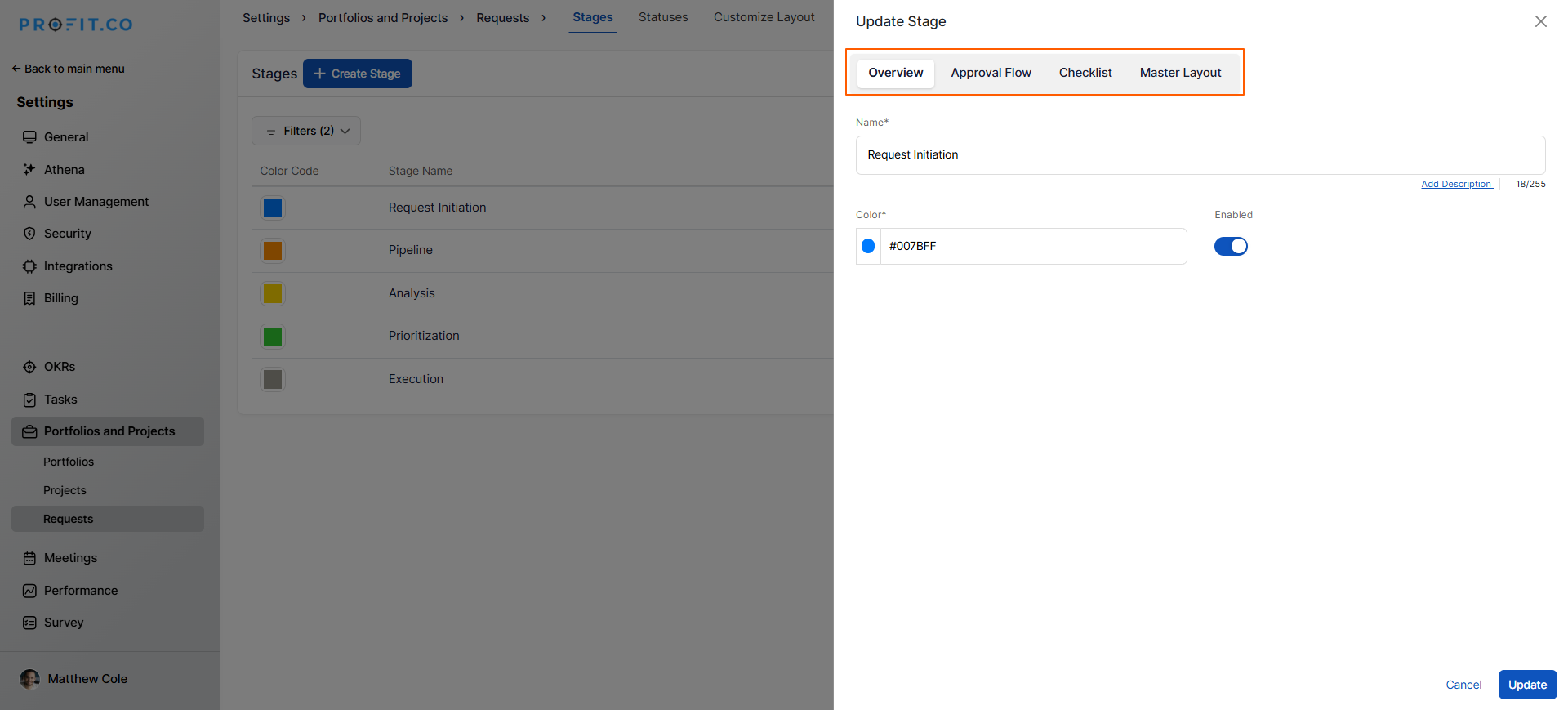
- Click on the stage name you want to customize
- A side panel opens with customization options
The side panel displays three customization options:
Approval Flow
- Enable the Approval Flow toggle
- Select the approval workflow for this stage
- This adds required approvals before requests can move to the next stage
Checklist
- Enable the Checklist toggle
- Add checklist items that must be completed in this stage
Master Layout
- Use the master layout to add custom sections to the stage
- Configure additional fields or information required for this stage
How do I track request status using stages?
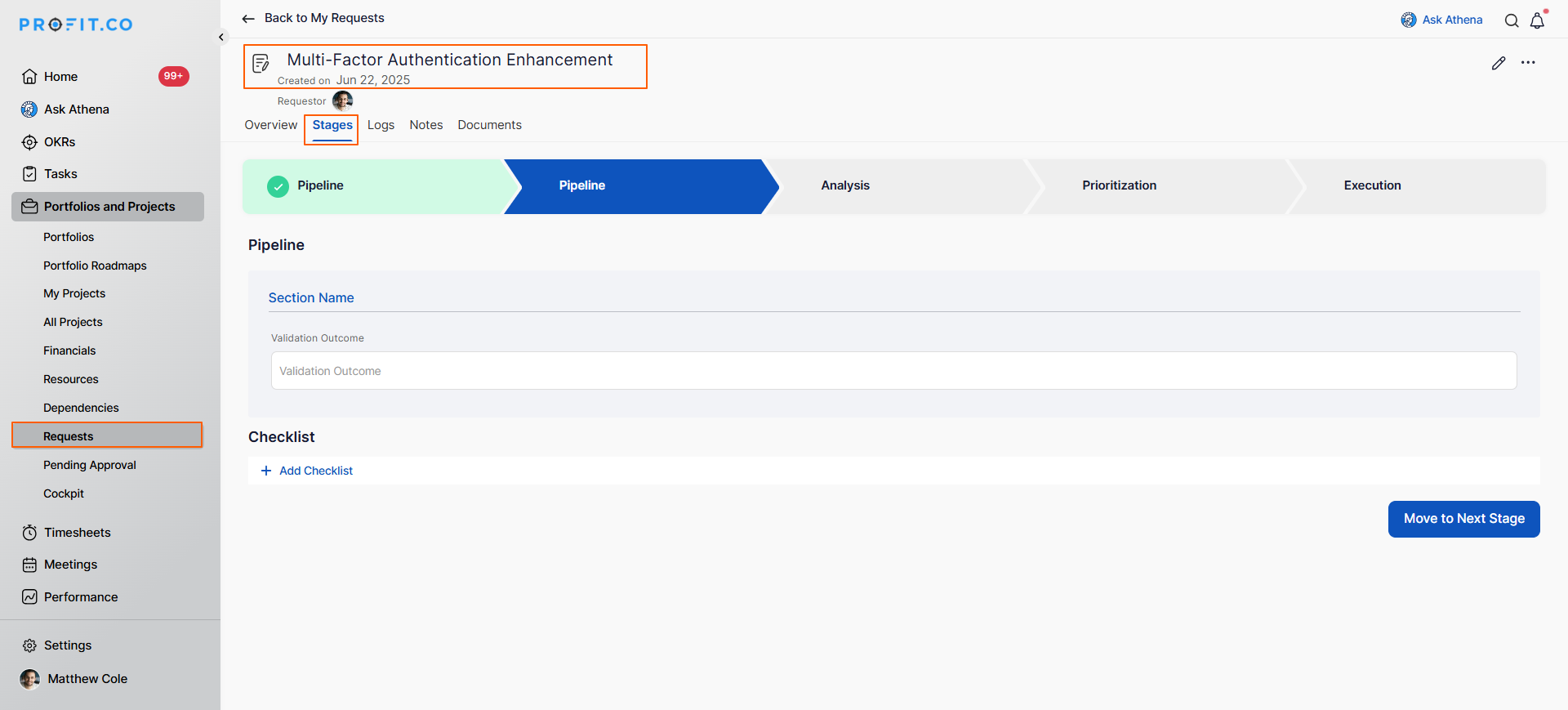
Once you've created a new request, stages provide real-time visibility into request progress.
- Open your submitted request
- The current stage is displayed prominently in the request details
- Stage information shows where the request stands in the approval pipeline
How do request stages integrate with the approval workflow?
Request stages work seamlessly with Profit.co's approval system to provide comprehensive request lifecycle management. Learn More
Best practices for exporting project data in Profit.co
Design stages that reflect actual decision points:
Each stage should represent a meaningful decision or action point in your workflow, not arbitrary checkpoints. Avoid creating stages just for status updates; ensure each stage requires deliberate action or review that adds value to the approval process.
Keep stage names clear and action-oriented:
Use descriptive names that immediately communicate what's happening: "Budget Approval" is clearer than "Stage 3" or "Review 2". Clear naming helps all stakeholders understand request status without needing to reference documentation.
Review and optimize stages quarterly:
Analyze stage metrics every quarter: average time per stage, bottleneck identification, rejection rates by stage. Use this data to refine your stage configuration, eliminate unnecessary stages, or add stages where gaps exist.
Related Questions
Learn the complete request submission process. Click Here
Frequently Asked Questions
Deleting a stage that contains active requests may cause workflow disruptions. Best practice: before deleting a stage, move all requests out of that stage to another appropriate stage.
Custom field availability at the stage level varies by configuration. Some organizations configure stage-specific required fields (e.g., Budget Review stage requires cost justification field completion). Contact your administrator about custom field configuration for your request stages.
Yes, Profit.co maintains a complete audit trail of stage transitions including: who moved the request, when the transition occurred, what stage the request moved from and to, and any comments added during the transition. This audit trail supports governance compliance and helps resolve questions about request processing.
Related Questions
-
How to create a Project in the PPM module?
Profit.co provides an option for users to create a project within the Project Portfolio Management (PPM) module. This ...Read more
-
How to Configure Email Notifications for PPM?
Profit.co provides an option to configure email notifications for the Portfolios and Projects module to keep team ...Read more
-
How to Localize Profit.co PPM Terminology to My Organizations PPM Terminology?
Profit.co provides an option to customize PPM terminology to match your organization's specific language and naming ...Read more
-
How to Link Portfolios to OKRs?
Profit.co provides an option to link portfolios to strategic objectives by aligning them with OKRs through the ...Read more