



What is the Risk & Issues Management Feature in Profit.co?
Category: PPM
Profit.co provides a Risk & Issues Management feature that allows you to proactively assess potential challenges, mitigate risks, and ensure smoother project execution across portfolios and initiatives.
Table of Contents
- What is Risk & Issues Management in the PPM module?
- Why is Risk & Issues Management important?
- How do I enable Risk & Issues Management in Profi.co?
- What can I configure in Risk Management?
- What can I configure in Issue Management?
- What's the difference between Risk and Issue Management?
- Best Practices for Risk & Issues Management
- Related Questions
- Frequently Asked Questions
What is Risk & Issues Management in the PPM module?
Risk & Issues Management is a comprehensive feature in Profit.co's PPM module that enables project teams to identify, assess, track, and respond to both risks and issues throughout the project lifecycle.
Key Distinctions:
Risks:
- Future-oriented: Potential events that may or may not occur
- Proactive management: Address them before they become problems
- Probability-based: Assessed on likelihood and potential impact
- Example: "Vendor may not deliver materials on time.
Issues:
- Present-oriented: Problems that have already occurred
- Reactive management: Requires immediate response and resolution
- Priority-based: Assessed on urgency and severity
- Example: "Vendor failed to deliver materials as scheduled.
Both require systematic tracking, but risks focus on prevention while issues focus on resolution.
Why is Risk & Issues Management important?
- Managing risks and issues is critical to avoiding project delays, budget overruns, and operational inefficiencies. This feature empowers teams to:
- Transparent Tracking: Log and track risks using custom statuses and categories, enabling transparency across the project lifecycle.
- Consistent Evaluation: Evaluate risks consistently using predefined impact and probability scores for better prioritization and decision-making.
- Visual Prioritization: Visually identify critical risks using a matrix-based view, making it easier to focus mitigation efforts where they matter most.
How do I enable Risk & Issues Management in Profit.co?
Follow these steps to activate the feature:
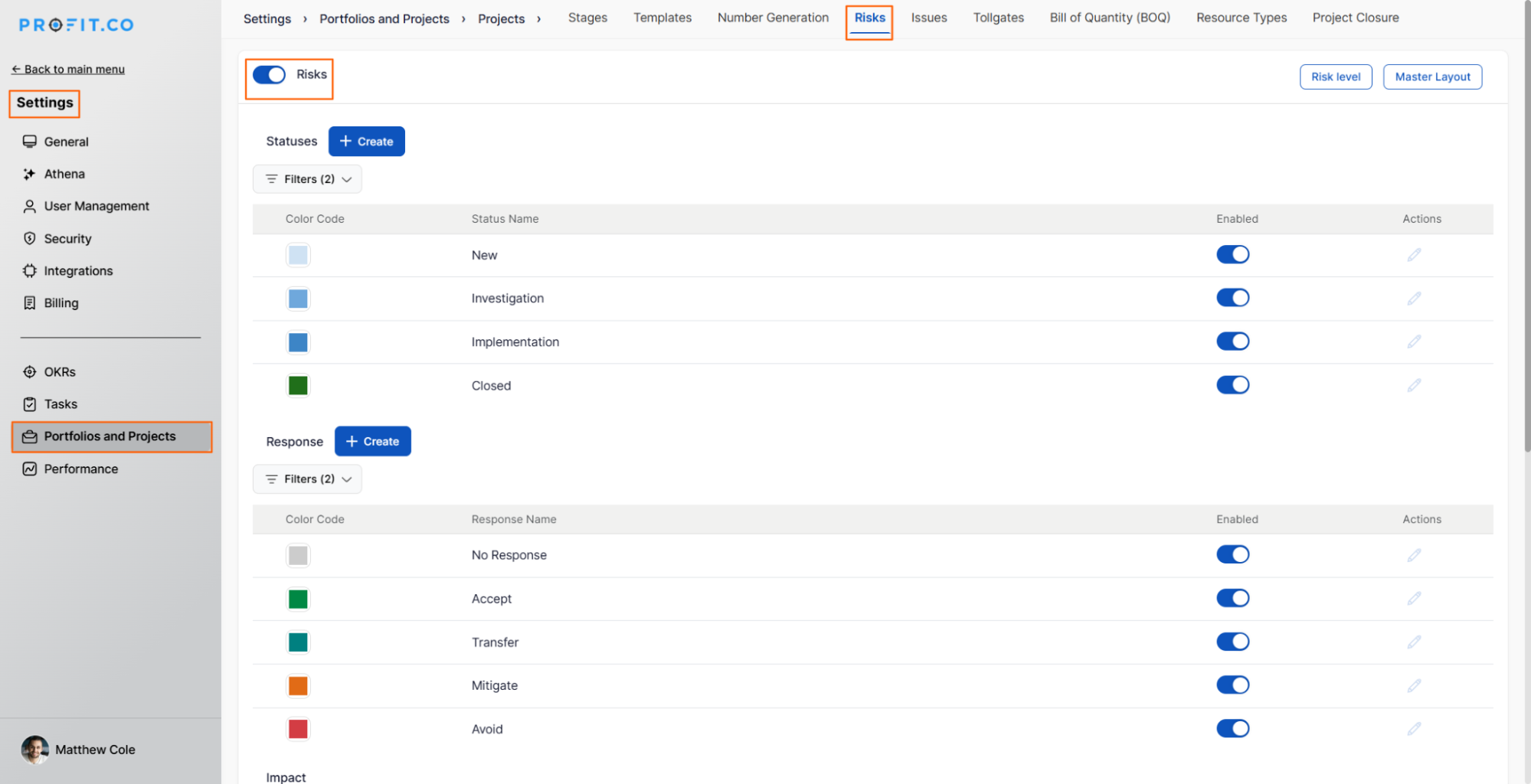
Step 1
Navigate to Settings from the left navigation panel
Go to Portfolios and Projects → Projects
Switch to the Risks tab
Enable the toggle to activate the Risk Management feature
Step 2
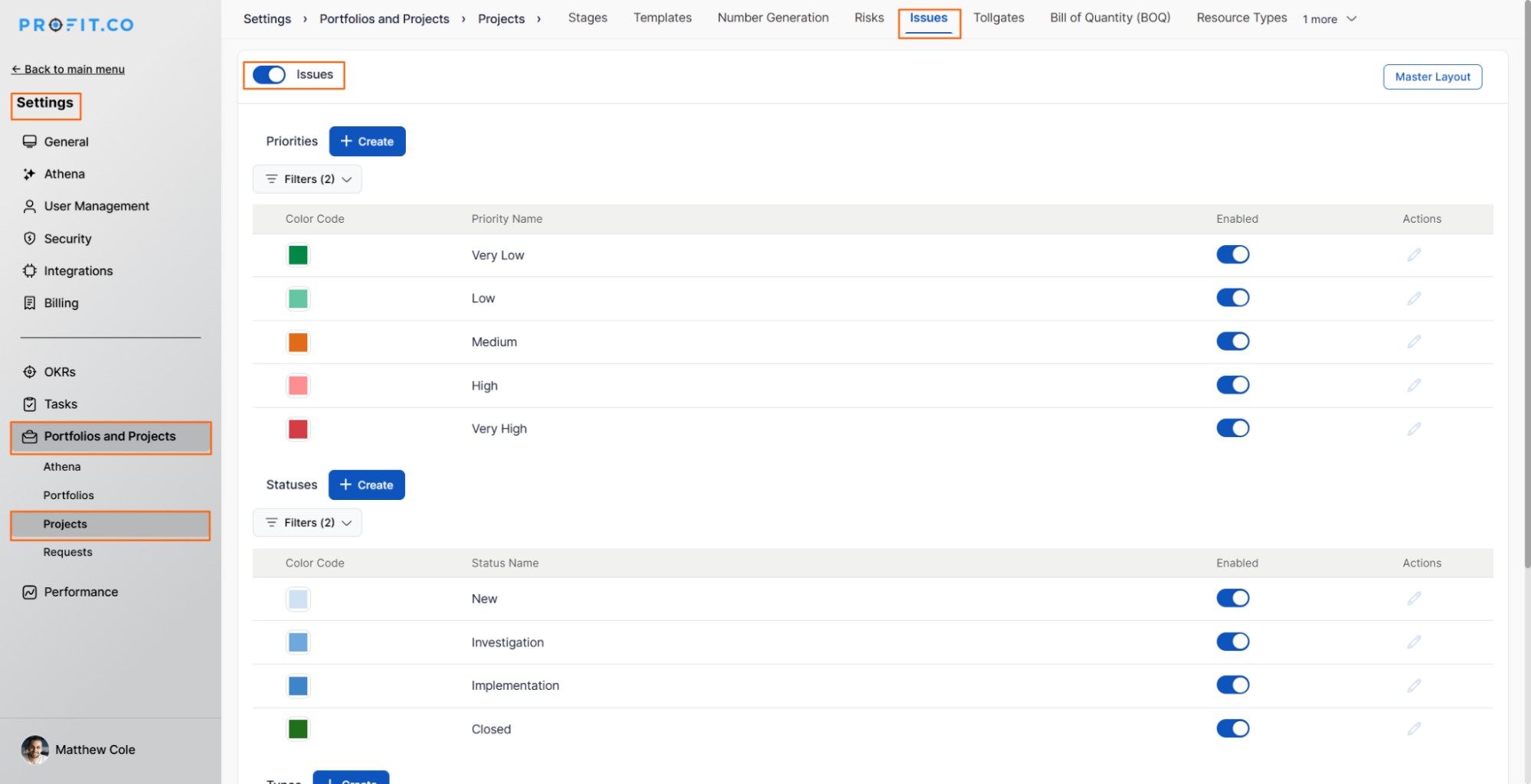
Switch to the Issues tab
Enable the toggle to activate the Issue Management feature
Once enabled, both features will be available across all projects in your portfolio.
What can I configure in Risk Management?
The Risk Management feature offers comprehensive configuration options:
- Risk Statuses
- Risk Responses
- Risk Impact Scores
- Probability Levels
- Risk Level Matrix
What can I configure in Issue Management?
The Issue Management feature provides essential configuration options:
- Priority Levels
- Issue Statuses
- Issue Types
- Ownership Assignment
What's the difference between Risk and Issue Management?
Understanding when to use each feature is crucial:
| Aspect | Risk Management | Issue Management |
|---|---|---|
| Timing | Future events (what might happen) | Current problems (what is happening) |
| Approach | Proactive and preventive | Reactive and corrective |
| Assessment | Probability + Impact | Priority + Severity |
| Goal | Prevent or minimize impact | Resolve and close |
| Status | May never occur | Already occurring |
| Response | Avoid, Mitigate, Transfer, Accept | Fix, Workaround, Escalate |
Example Scenario:
Risk: "There's a 60% chance the vendor will be late with deliveries."
Issue: "The vendor's delivery is 3 days late"
The risk becomes an issue when it materializes.
Best Practices for Risk & Issues Management
To maximize the effectiveness of these features:
For Risk Management:
- Regular Reviews: Assess risks at every project milestone or weekly
- Risk Register: Maintain a comprehensive list of all identified risks
- Early Identification: Encourage team to raise potential risks proactively
- Quantitative Assessment: Use consistent scoring for objective prioritization
For Issue Management:
- Rapid Logging: Document issues immediately when they occur
- Clear Ownership: Always assign a responsible party
- Root Cause Analysis: Understand why issues occurred to prevent recurrence
- Timely Resolution: Address critical and high-priority issues immediately
Related Questions
How can I use the Risks & Issues feature to improve project control in PPM, Click here
Frequently Asked Questions
Yes, during configuration you can define custom impact scores and probability levels that align with your organization's risk appetite and assessment methodology.
Typically, project managers, team leads, and stakeholders need access. Permissions can usually be configured based on roles within your organization
Yes, even small projects benefit from basic risk identification and tracking. The depth of analysis should scale with project size and complexity.
Related Questions
-
How to Enable Automatic Milestone Stage Propagation?
Profit.co provides an option to enable automatic milestone stage propagation based on progress percentage in the PPM ...Read more
-
How do I Customize Widgets in the PPM Cockpit in Profit.co?
The PPM Cockpit in Profit.co allows project managers and portfolio owners to customize and monitor performance metrics ...Read more
-
How do I Configure Project Closure Settings in Profit.co?
As a system administrator, you can customize Profit.co's Project Closure feature to align with your organization's ...Read more
-
How do I use cost-benefit analysis in Profit.co?
Profit.co provides integrated Cost-Benefit Analysis (CBA) as part of its Strategic Portfolio Management (SPM) ...Read more