



How to create tasks through Mobile Applications?
Category: Tasks
You can easily create and manage tasks on the go using the Profit.co mobile application. This helps you stay organized, assign work quickly, and track progress anytime, anywhere.
Table of Contents
Why create tasks using the mobile app?
The Profit.co mobile app allows you to create tasks instantly without logging into the web app. This helps teams act faster, stay productive, and keep work moving even when away from their desks.
Key benefits:
- Create tasks anytime from your mobile device
- Assign work quickly with clear due dates and priorities
- Track personal tasks in one place
- Improve productivity and accountability on the go
How do I create a task using the Profit.co mobile app?
Step 1: Navigate to Tasks
- Tap the ellipsis (⋮) icon in the top-left corner of the app.
- Select Tasks from the menu.
- Click the + icon to create a new task
Step 2: Enter task details
- Enter the Task Name
- Set the Due Date and Priority
- Select the appropriate Board
- Tap Create to save the task
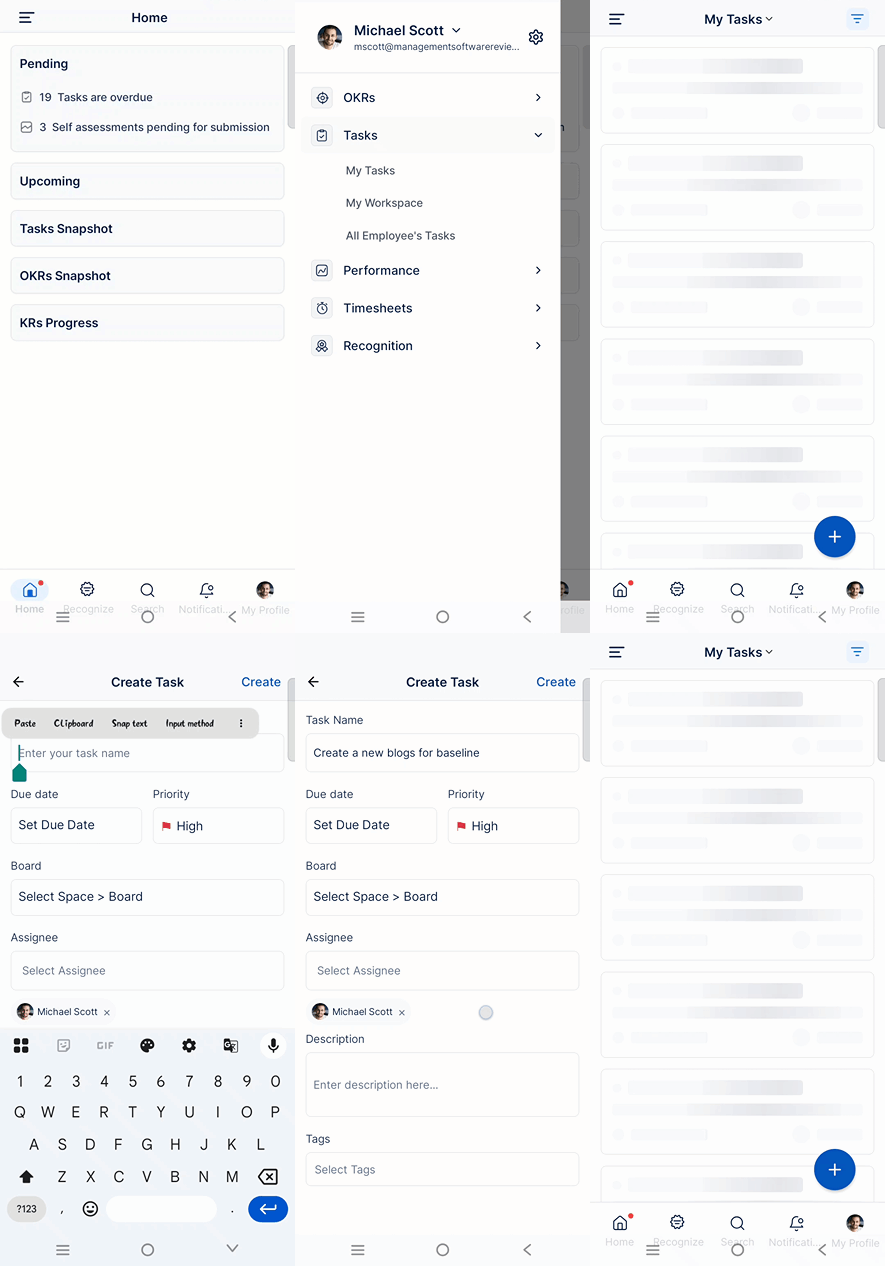
Once created, the task will appear under the My Tasks section, where you can track and update its progress.
Best Practices for Creating Tasks
- Keep task names short and action-oriented
- Always set due dates to avoid delays
- Choose the correct board for better organization
- Review My Tasks regularly to track progress
Frequently Asked Questions
Yes. While creating a task, you can assign it to yourself or any team member directly from the mobile app.
Yes. You can open the task anytime and update details like priority, due date, or status.
Yes. Tasks created in the mobile app sync instantly with the web application.
Related Questions
-
How to create new Workspace and Boards for Tasks through a mobile application?
Profit.co’s mobile application lets you quickly create Workspaces and Boards to organize, manage, and track tasks on ...Read more
-
How do I use Agile Epics and User Stories in Profit.co?
In Profit.co, you can use Agile Epics and User Stories to structure work effectively, ensuring clear alignment and ...Read more
-
How to Restore Deleted Tasks in Profit.co?
Profit.co offers a valuable safety net by enabling users to restore deleted tasks through the new Trash and Restore ...Read more
-
How does Profit.co help track task start, delivery, and execution performance?
In Profit.co, the My Tasks Dashboard provides comprehensive analytics on your task performance, including schedule ...Read more