



How to set manual user ID, while creating new users at profit.co?
Category: General
You can now set a manual user ID while creating new users in Profit.co.
Why this feature?
This feature helps you to create a manual user ID for the new users instead of just using auto-generated numbers.
Note: Only Super users can create new users.
Step 1
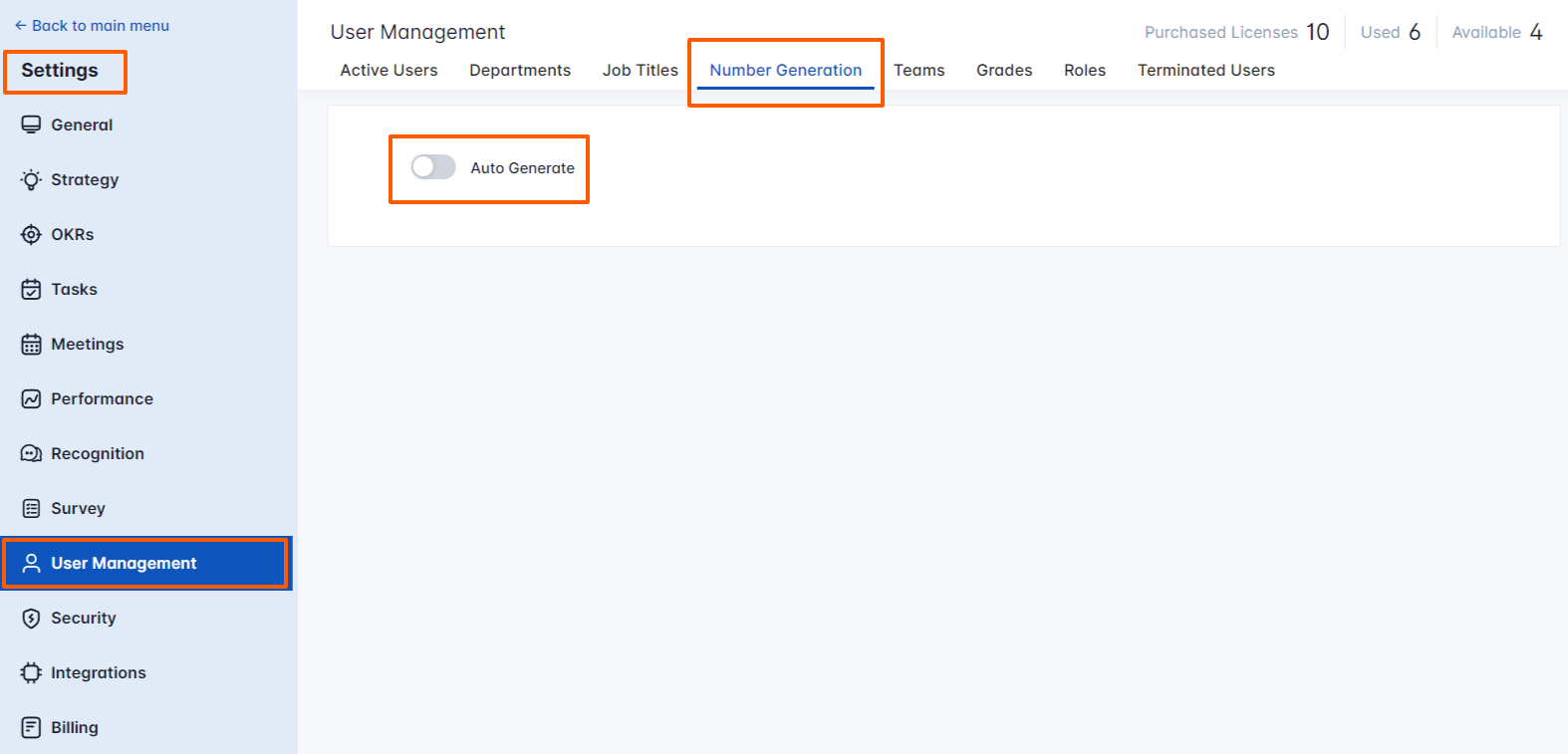
Navigate to Settings→ User management → from the left navigation panel.
Under the Number Generation page, disable the Auto Generate toggle.
Step 2
In the Active Users page, click on the Create User button to create a new user with user roles.
Now give a User ID number for a new user and fill in other details to click on the Create button. The new user will be created with the given User ID number.

Related Blog Post
To know more about What is People Management, click here.
Related Questions
-
How can I edit user information?
Table of Contents What does editing user information mean in Profit.co? Why should you use this feature? How to ...Read more
-
How can I create OKRs for one of my peers?
In Profit, there is a feature called Proxy users which allows you to login as a peer and create OKRs for them. If you ...Read more
-
What are the unique features of Profit?
From the outset, Profit.co understood the common issues, challenges, and dysfunctions around OKR implementation. We ...Read more
-
Do I get a task notification in the action center?
Profit.co allows you to get email notifications for all the pending tasks and tasks due. Why this feature? By using ...Read more