



What is the Use of Strategy Roadmaps Cockpit Dashboard in Profit.co?
Category: General
The Strategy Roadmaps Cockpit is a visual analytics dashboard in Profit.co that provides structured, executive-level insights into the performance and progress of your strategic initiatives - organized by Roadmap Folders and Sub-folders.
Table of Contents
What is the Strategy Roadmaps Cockpit?
The Strategy Roadmaps Cockpit is a dedicated dashboard within the Strategy module that visualizes initiative-level data across your roadmaps. It brings the same structured Cockpit experience available in OKRs and BSC directly into the Strategy Roadmaps module - giving strategy teams a single place to assess initiative performance without navigating individual roadmap views.
The Cockpit supports a full Folder and Sub-folder hierarchy, displaying data across all levels of your roadmap structure in one consolidated view.
Why Strategy Roadmaps Cockpit Matters
Without a dedicated Cockpit, assessing initiative performance across roadmaps requires opening each roadmap individually. The Strategy Roadmaps Cockpit centralizes this data into visual charts and summary cards, enabling faster executive reporting and more consistent cross-module analysis.
| Capability | Business Outcome |
|---|---|
| Executive-level visibility | Leadership can assess the state of strategic initiative execution at a glance without drilling into individual roadmaps. |
| Initiative performance assessment | Four dedicated initiative charts surface performance patterns, blockers, and progress trends across the portfolio. |
| Consistent Cockpit experience | Strategy teams work with the same dashboard framework used in OKRs and BSC - reducing the learning curve. |
| Improved strategic reporting | Three summary cards give an at-a-glance health check of the roadmap before diving into detailed charts. |
How to View the Strategy Roadmap Cockpit
Step 1
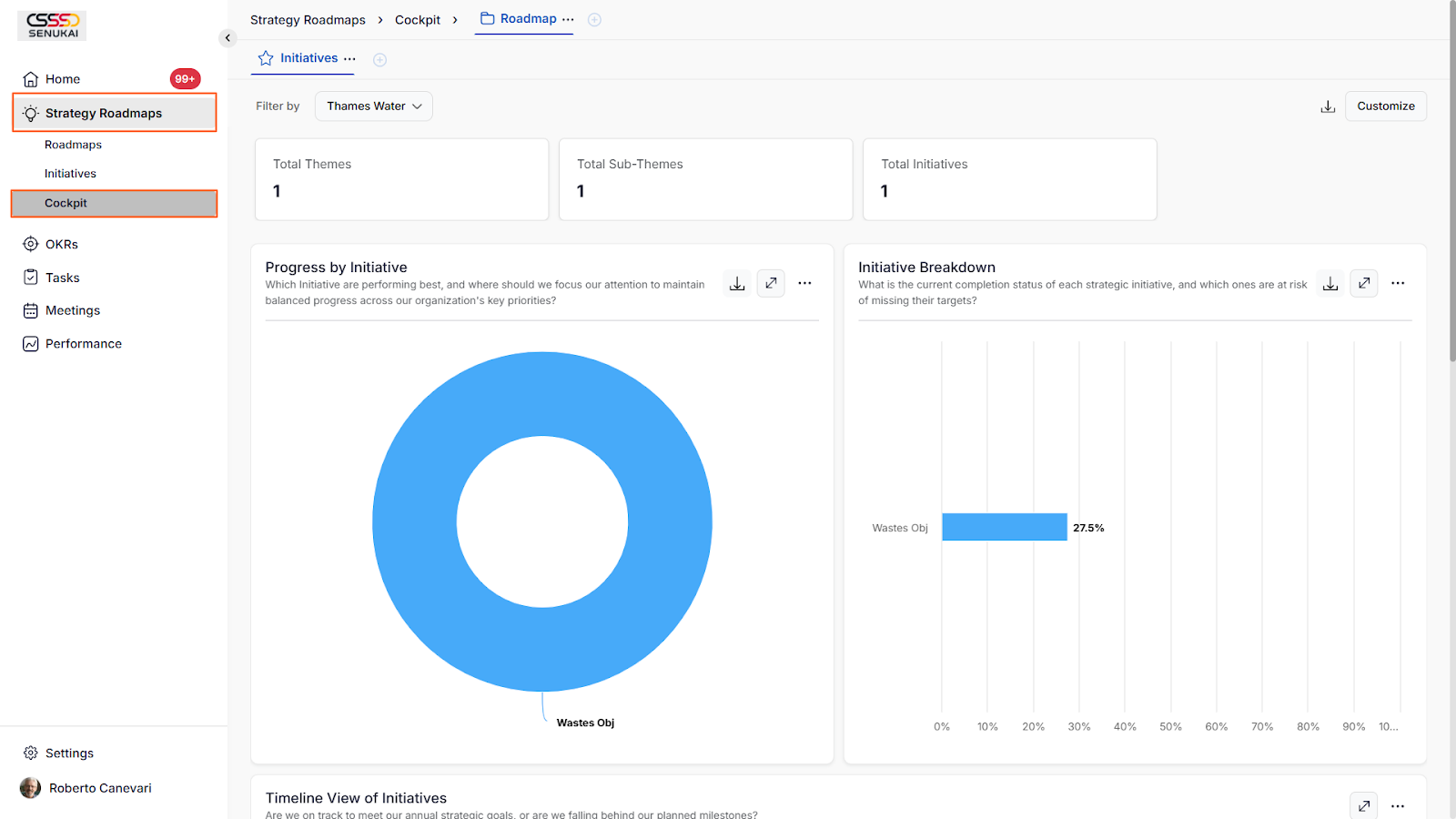
- Navigate to Strategy Roadmaps → Cockpit from the left navigation panel.
- The Cockpit page will load with the summary cards and initiative charts for the selected roadmap scope.
Note: The filter option allows selection between specific Folders and Sub-folders, displaying relevant data accordingly. Data is viewable only for the selected periods.
What's Inside the Cockpit
The Strategy Roadmaps Cockpit is organized into two layers - Summary Cards and Initiative Charts - providing both high-level health signals and granular performance breakdowns.
Summary Cards
Three summary cards appear at the top of the Cockpit, providing an immediate snapshot of roadmap health before you explore the charts below.
Initiative Charts
Four initiative-based charts visualize performance data across your roadmap Folders and Sub-folders. Each chart can be filtered by Folder or Sub-folder to focus on a specific area of the strategy.
Note: You have the option to view chart data in numeric, percentage, and score views. Data can be exported separately for each chart.
Best Practices for Strategy Roadmaps Cockpit
- Review the three summary cards at the start of each executive strategy review - they surface the most critical signals before you need to dig into individual initiative charts.
- Use the Folder and Sub-folder filter to scope Cockpit data to a specific strategic theme or workstream, rather than reviewing all roadmaps simultaneously during department-level reviews.
- Export initiative chart data after each quarter to build a historical record of roadmap execution performance across periods.
- Cross-reference Cockpit initiative data with the OKR Cockpit to validate whether strategic initiatives are tracking in alignment with the OKRs they support.
- Assign a strategy owner responsible for maintaining Cockpit accuracy - initiative status and progress must be updated regularly for the Cockpit to reflect a reliable picture of execution health.
Related Questions
- Click here to learn more about How does the Strategy Roadmaps work in Profit.co
- Click here to learn more about the use of the Cockpit Dashboard in Profit.co
Frequently Asked Questions
The Roadmap Cockpit must be manually enabled by a Super User from Settings → General → Apps. Once enabled, it becomes accessible to all users with Strategy Roadmaps access from the left navigation panel.
Yes. By default, the Cockpit displays data across all Folders within the selected roadmap. You can use the filter to narrow the view to a specific Folder or Sub-folder when you need focused analysis.
Yes. The Cockpit reflects the current state of initiative data. As owners update initiative progress and status, the charts and summary cards update accordingly - no manual refresh is required.
Related Questions
-
How to Initiate Meetings through Mobile Application?
Profit.co’s mobile application allows users to quickly initiate and schedule different types of meetings, such as ...Read more
-
What is the Notes app in Profit.co mobile application?
The Notes app in the Profit.co mobile application lets you create, organize, and manage notes on the go. It helps you ...Read more
-
What options are available in the 'Settings' section of the Profit.co mobile application?
The Settings section in the Profit.co mobile application lets you manage your account, preferences, users, and app ...Read more
-
How to Sync Office 365 Meetings with Profit.co as an End User?
Profit.co provides a built-in Office 365 integration that allows you to seamlessly sync your meetings between Profit.co ...Read more