



How to Create an Objective in Profit.co?
Category: OKRs
In Profit.co, users can create Objectives directly from the OKRs module using a quick-form panel, with support for multiple owners to accurately reflect shared accountability across teams.
Table of Contents
What is an Objective in Profit.co?
An Objective in Profit.co defines what you want to accomplish within a given period. It serves as the top-level item in the OKR framework, under which Key Results are created to measure progress toward the goal.
Objectives can be assigned to one or more owners, tagged for categorization, and set with specific visibility controls to determine who can view them across your organization.
Why Objective Creation Matters
Creating Objectives in Profit.co ties individual and team efforts to organizational strategy. When Objectives are properly configured with owners, visibility, and tags, teams operate with clear accountability and focused priorities.
The ability to assign multiple owners to a single Objective eliminates ambiguity in cross-functional goals — every stakeholder responsible for the outcome is formally recognized, not just listed as a contributor.
How It Works: Step-by-Step Guide
Step 1
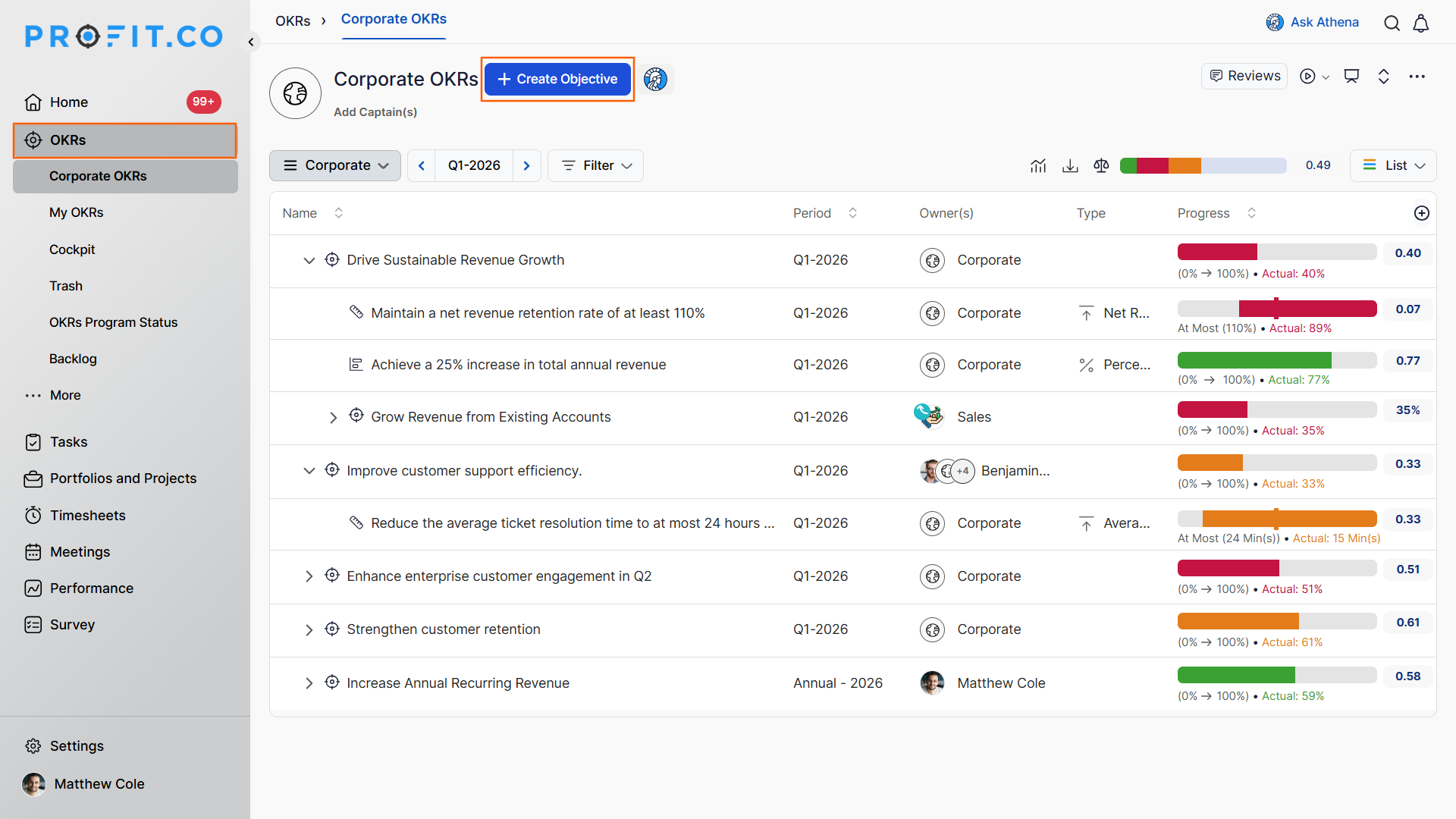
- Navigate to the OKRs from the left navigation panel.
- Click the + Create Objective button.
Step 2
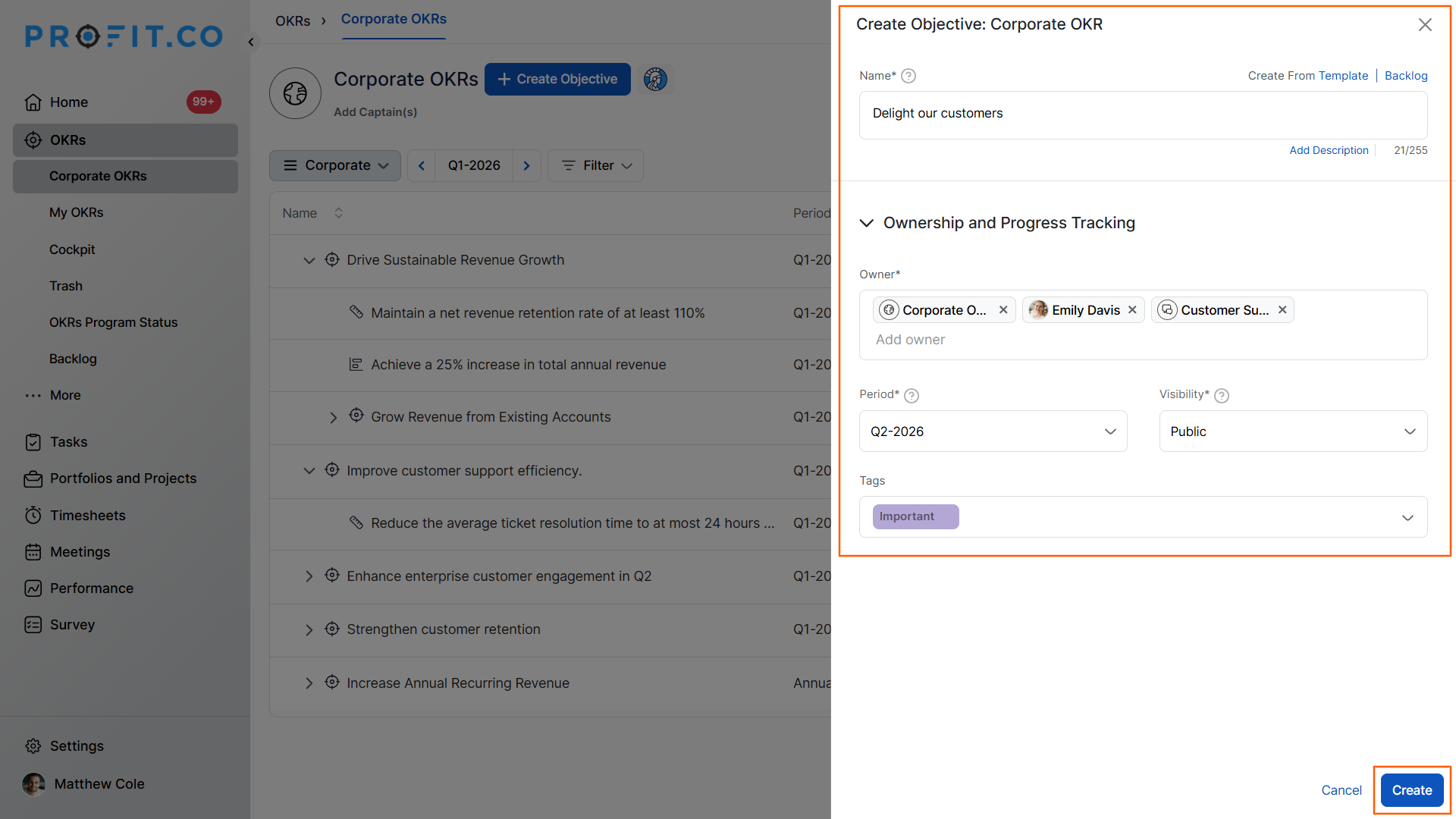
- A side panel will appear on the right side of the screen.
- Enter the Objective Name in the provided field.
- Choose the required Owner; you can select one or multiple users.
- Set the Visibility and add relevant Tags as needed.
- Once all required fields are filled, click the Create button.
- The newly created Objective will appear on the OKRs page.
Note: Individual OKRs can be created under My OKRs. For departmental OKRs, you can create them by choosing the required department from the dropdown.
Multiple Owners on an Objective
Profit.co supports assigning multiple owners to an Objective, bringing it in line with how ownership works for Key Results. In the Owner field of the Create or Edit Objective panel, you can select multiple users — each will carry equal visibility and accountability for the Objective.
This is particularly useful for cross-functional Objectives where more than one team or individual shares responsibility. Consider an Objective like Improve Customer Onboarding Experience:
| Stakeholder | Role | Reason for Ownership |
|---|---|---|
| Product Manager | Objective Owner | Improves product onboarding flow |
| Customer Success Manager | Objective Owner | Enhances onboarding support experience |
| Marketing Manager | Objective Owner | Refines onboarding communication strategy |
Previously, only one person could hold ownership while others were added as contributors — even when responsibility was shared equally. With multiple ownership, all three stakeholders above can be formally assigned as Objective owners, accurately reflecting joint accountability.
Best Practices for Creating Objectives
- Assign multiple owners only when stakeholders share equal, measurable accountability — avoid adding owners as a formality.
- Set Visibility deliberately: use Public for org-wide Objectives and Access List for cross-functional goals with defined participants.
- Use Tags consistently to enable filtering and reporting at scale — agree on a tagging convention across teams before creating Objectives.
- Write Objective names as clear, outcome-oriented statements rather than task descriptions — they should answer "What do we want to achieve?" not "What will we do?"
- Add Key Results immediately after creating an Objective to ensure it is measurable and actionable from day one.
Related Questions
Click here to learn more about how to enable multi-assignee in KR Assignment
Click here to learn more about How do I Change an Objective Owner
Frequently Asked Questions
Yes. You can edit an existing Objective and update the Owner field to add or remove owners at any time. All changes take effect immediately and are reflected across the Objective's view for all assigned owners.
Profit.co does not impose a fixed cap on the number of owners per Objective. However, assigning ownership should reflect genuine accountability — keeping the owner list focused ensures clarity and avoids diffused responsibility.
Tags are optional and can be added or updated at any time. Visibility defaults to a system-level setting if not explicitly configured during creation. You can always revisit and update these fields by editing the Objective after it has been created.
Related Questions
-
How to Use the OKR Present Mode in Profit.co?
Profit.co allows users to use the OKR Present Mode directly from the OKR list view in a structured presentation format. ...Read more
-
How do I enable and use the status map view in Profit.co?
The Status Map View in Profit.co provides a focused, high-level snapshot of your OKRs by displaying Objectives and Key ...Read more
-
How do I enable and use baseline tracking for projects in Profit.co?
Profit.co's Baseline Tracking feature lets you capture the original project plan and monitor every change made to ...Read more
-
How do I define weights for projects in Profit.co?
Profit.co's PPM module lets you control how project progress is calculated, either by distributing weight equally ...Read more