



How to calculate the OKR Fulfillment Score?
Category: OKRs
Profit.co provides an option to calculate the OKR fulfillment score.
Why this feature?
- In Profit.co, the OKR Fulfillment score can be calculated by the average value of the Objectives and Key Results progress assigned to you and your Department.
- Calculating OKR Fulfillment Scores offers organizations a concise performance metric that fosters accountability, aligns departments with strategic objectives, and promotes transparency.
Consider that there are two OKRs created in the Product Management Department.

Note: If the Key Result is assigned within the same department under the Objective, the objective progress will be calculated based on the progress of the Key Result.
Hence, the progress of Objectives is 53% and 63%.
Consider that the Product Marketing Department has assigned two key results to the Product Management Department.

As the Key Results have been assigned from another department, only the key result progress has to be taken into account.
Hence, the progress of the two Key Results is 60% and 30%.
Calculation:
The formula is,
Hence, OKR Fulfillment score = (116 + 90) / (2+2) = 51.4%.

Note:
- The OKR Fulfillment Score might change if you have applied weights to the OKRs.
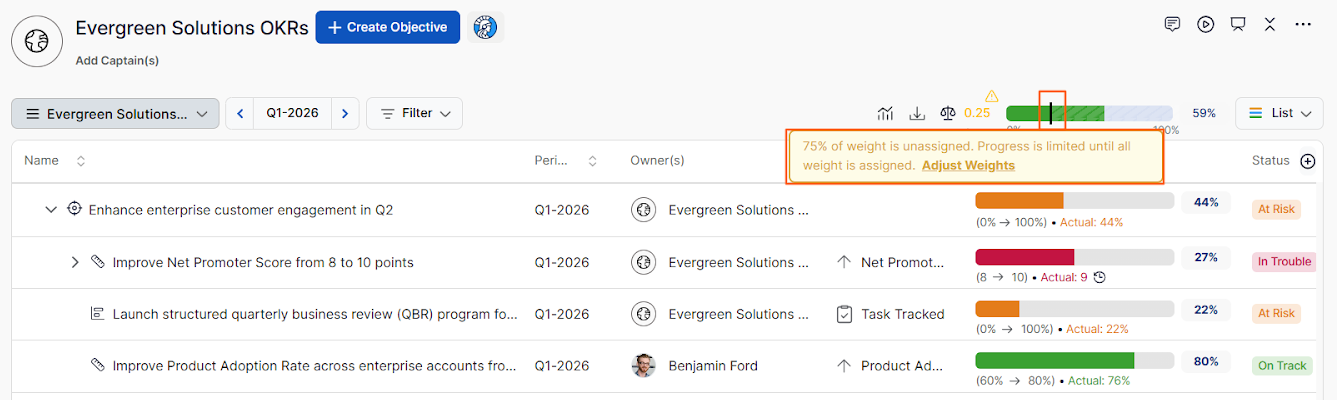
- When weightage is disabled, the OKR Fulfillment Score slider appears without any indicator.
- When enabled, a vertical line appears on the slider indicating the total assigned weight, and a tooltip on the weight icon flags any under or over-assignment.
- You can also click Adjust Weights to correct the distribution instantly.
Related Answer Post
To learn the difference between OKR Ranking and OKR Fulfillment Score, click here.
Related Questions
-
How do I enable and use the status map view in Profit.co?
The Status Map View in Profit.co provides a focused, high-level snapshot of your OKRs by displaying Objectives and Key ...Read more
-
How do I enable and use baseline tracking for projects in Profit.co?
Profit.co's Baseline Tracking feature lets you capture the original project plan and monitor every change made to ...Read more
-
How to Create an Objective in Profit.co?
In Profit.co, users can create Objectives directly from the OKRs module using a quick-form panel, with support for ...Read more
-
How do I define weights for projects in Profit.co?
Profit.co's PPM module lets you control how project progress is calculated, either by distributing weight equally ...Read more