



How to create Objectives and Key Results using the mobile application?
Category: OKRs
Profit.co empowers users to create and manage Objectives and Key Results (OKRs) directly from their mobile devices, ensuring goal-setting flexibility anytime, anywhere.
Table of Contents
What is this Feature?
The mobile OKR creation feature allows users to add new Objectives and Key Results through the Profit.co mobile application. This functionality provides complete OKR setup capabilities, including objective naming, key result configuration, target setting, and KPI assignment all from your smartphone or tablet. Users can create both individual and organizational OKRs on-the-go with the same comprehensive options available on the desktop platform.
Why this Feature?
- Mobility & Accessibility: Mobile phones have become essential tools in our daily lives, enabling work from anywhere at any time
- Modern Work Culture: Supports remote and hybrid work environments where users need flexibility to manage goals outside traditional office settings
- Timely Goal Setting: Enables immediate OKR creation when inspiration strikes or during meetings, eliminating delays caused by waiting to access desktop systems
How to Create OKRs Using Mobile Application?
- Open the Profit.co mobile application and navigate to Menu from the left navigation panel.
- Select OKR and then choose All OKRs. Tap the + icon at the bottom or top of the screen.
- Enter your Objective name in the text field.
- Click Create to save your objective.
How to Create KRs Using Mobile Application?
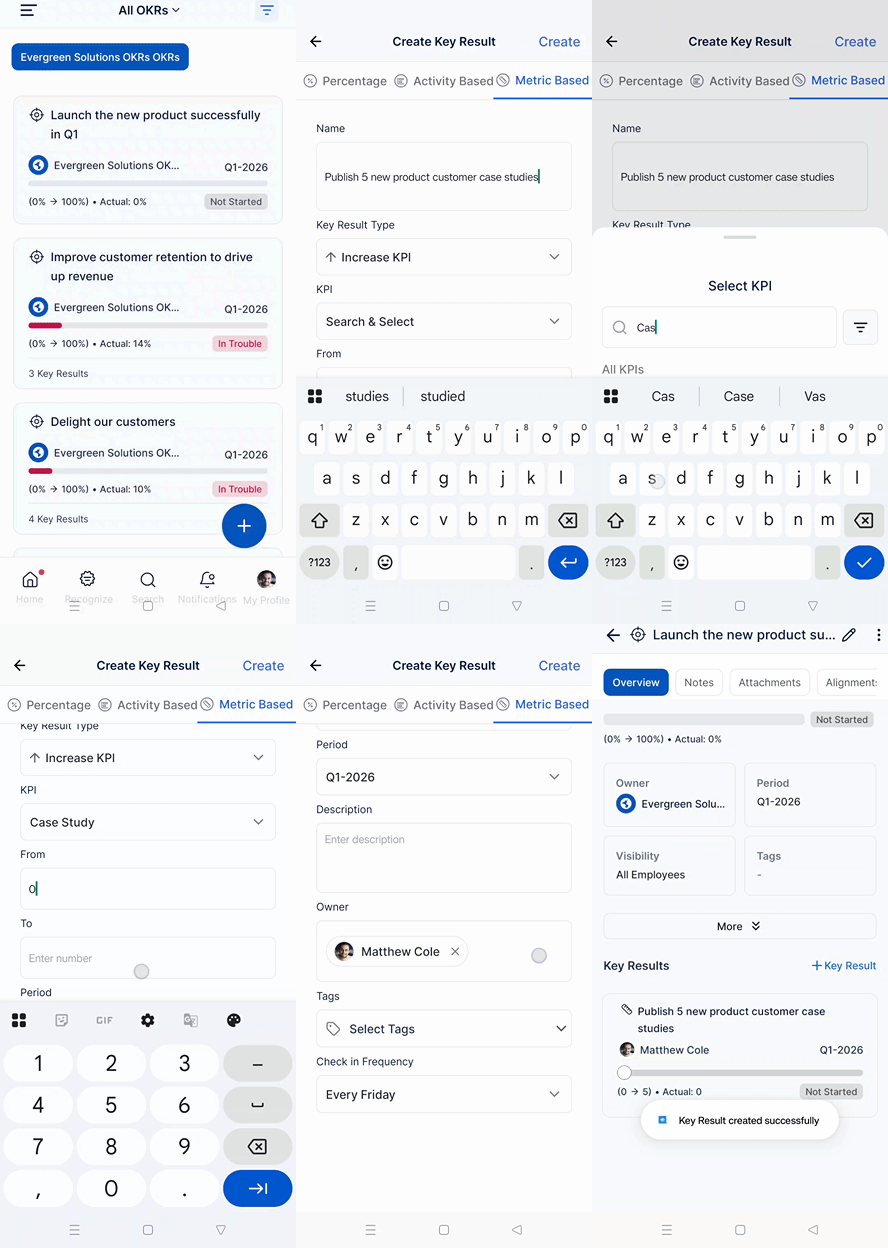
- Tap on the objective name you just created (or an existing objective). Scroll down to the Key Result section.
- Click on + Key Result. Choose the Key Result Type from the available options.
- Enter the key result name, Set the target date, Define the KPI (Key Performance Indicator), including the starting value and target value.
- Click Create to save your key result.
Best Practices
- Write Clear, Measurable Objectives: Ensure your objectives are specific and outcome-focused, even when typing on a mobile device
- Choose Appropriate Key Result Types: Select the correct KR type (Numeric, Percentage, Currency, Boolean) that best measures your success
- Set Realistic Targets: Define achievable yet challenging KPIs with appropriate starting and target values
- Use Action-Oriented Language: Start objectives with verbs like "Increase," "Improve," "Launch," or "Achieve"
- Align with Strategy: Ensure mobile-created OKRs align with your team's or organization's strategic priorities
Related Answer Posts
Understanding Different Key Result Types in Profit.co, Click Here
How to Track OKR Progress in Profit.co Mobile App, Click Here
Frequently Asked Questions
Yes, if you have the appropriate permissions, you can create team and organizational OKRs through the mobile application, just as you would on desktop.
There's no specific limit to mobile OKR creation. However, best practices recommend 3-5 Objectives with 3-5 Key Results each per cycle for optimal focus.
Yes, you can edit objectives and key results after creation. Simply tap on the OKR you want to
Related Questions
-
How do I enable and use the status map view in Profit.co?
The Status Map View in Profit.co provides a focused, high-level snapshot of your OKRs by displaying Objectives and Key ...Read more
-
How do I enable and use baseline tracking for projects in Profit.co?
Profit.co's Baseline Tracking feature lets you capture the original project plan and monitor every change made to ...Read more
-
How to Create an Objective in Profit.co?
In Profit.co, users can create Objectives directly from the OKRs module using a quick-form panel, with support for ...Read more
-
How do I define weights for projects in Profit.co?
Profit.co's PPM module lets you control how project progress is calculated, either by distributing weight equally ...Read more