

Profit.co provides users with the flexibility to move Objectives and Key Results (OKRs) between employees, departments, and teams directly through the mobile application. This feature enables seamless reorganization of goals as priorities shift, team structures change, or responsibilities are redistributed, ensuring your OKR framework remains aligned with current business needs.
What is the Move OKRs Feature?
The Move OKRs feature allows users to transfer ownership of Objectives and Key Results from one employee, department, or team to another using the mobile application. This functionality includes a built-in approval workflow where the recipient can accept or reject the transferred OKR, ensuring proper accountability and acknowledgment.
Why Use the Move OKRs Feature?
- Mobile Flexibility: Mobile phones have become essential tools in modern business, enabling critical operations anytime, anywhere
- Cross-Functional Collaboration: Facilitates easy transfer of goals across teams when projects require interdepartmental cooperation
- Goal Alignment: Ensures OKRs remain properly aligned with the right owners as organizational structures and priorities evolve
- Enhanced Transparency: Creates a clear audit trail of OKR ownership changes with built-in acceptance/rejection workflow
How to Move OKRs Using Mobile Application
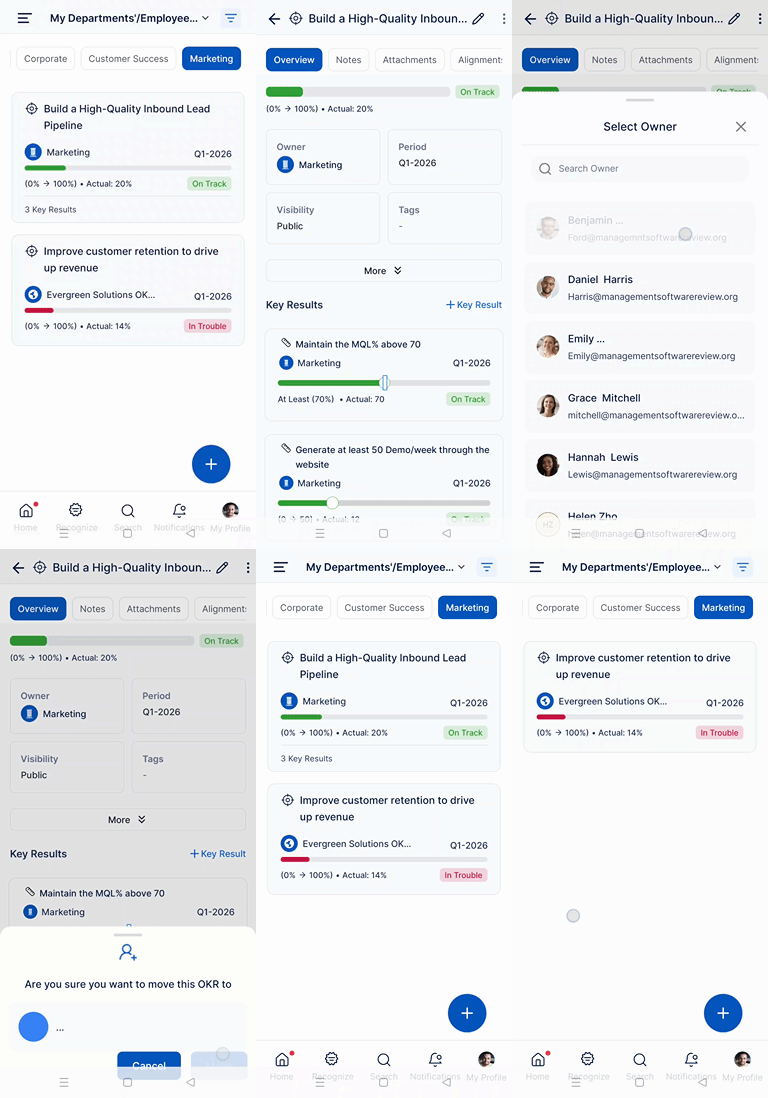
Open the Profit.co mobile application and navigate to Menu from the left navigation panel.
Select OKR and then choose All OKRs. Click on the OKRs you want to move.
Tap on the Ellipsis icon (three dots) in the top right corner of the screen.
Select the Move option from the dropdown menu.
Choose the destination for your OKR by selecting:
- Employee: To move the OKR to a specific individual
- Department: To move the OKR to a different department
- Team: To move the OKR to another team
A Confirmation pop-up will appear asking you to confirm the move action. Click Move to complete the process.
Common Scenarios for Moving OKRs
Organizational Restructuring:
- When departments merge or split, OKRs can be quickly reassigned to maintain continuity
- During leadership changes, strategic objectives can be transferred to new owners
- Team reorganizations require goal redistribution to reflect new reporting structures
Role Changes and Transitions:
- Employee promotions or lateral moves necessitate transferring their previous OKRs
- During onboarding, relevant OKRs can be moved to new team members
Project-Based Collaboration:
- Cross-functional projects may require moving OKRs to the team best positioned to execute
- As project phases change, ownership can shift to different departments
- Resource constraints may require redistributing goals to available team members
Best Practices for Moving OKRs
- Communicate Before Moving: Discuss the move with the recipient before initiating to ensure alignment and acceptance
- Provide Context: Add comments or notes explaining why the OKR is being moved and what support is available
- Check Capacity: Ensure the recipient has the bandwidth and resources to take on additional goals
- Maintain Alignment: Verify that the moved OKR aligns with the recipient's role, department objectives, and strategic priorities
- Transfer Knowledge: Share relevant background information, progress history, and any obstacles encountered
Related Answer Posts
To learn how to create Objectives and Key Results using the mobile application, Click here
Frequently Asked Questions
Users with appropriate permissions can move OKRs. Typically, this includes the OKR owner, managers, and administrators. Permission settings vary by organization.
All progress data, check-in history, comments, and attachments transfer with the OKR to maintain complete continuity and context for the new owner.
Yes, moving an Objective automatically moves all associated Key Results to the new owner, maintaining the complete goal structure.
