

Profit.co enables users to view the progress of OKRs by displaying multivariate data on the progress in the form of a radar chart.
Why this feature?
- The Radar chart in Profit.co gives the user an illustrative and quantitative representation of data specific to the planned and actual progress of the OKRs.
- By using this feature the user can track progress and overview the OKRs.
Note: You need to have at least a minimum of three objectives to view the progress of OKRs in the form of a radar chart.
To navigate to the radar chart view of the OKRs follow the below steps.
Step 1:
Navigate to the OKRs → All OKRs page from the left navigation panel and click on the Dashboard icon.

Step 2:
Once you click on the dashboard icon, you will be navigated to the radar chart page.
The Actual and Planned progress value of the objective will be shown if you hover the cursor on the Radar chart.
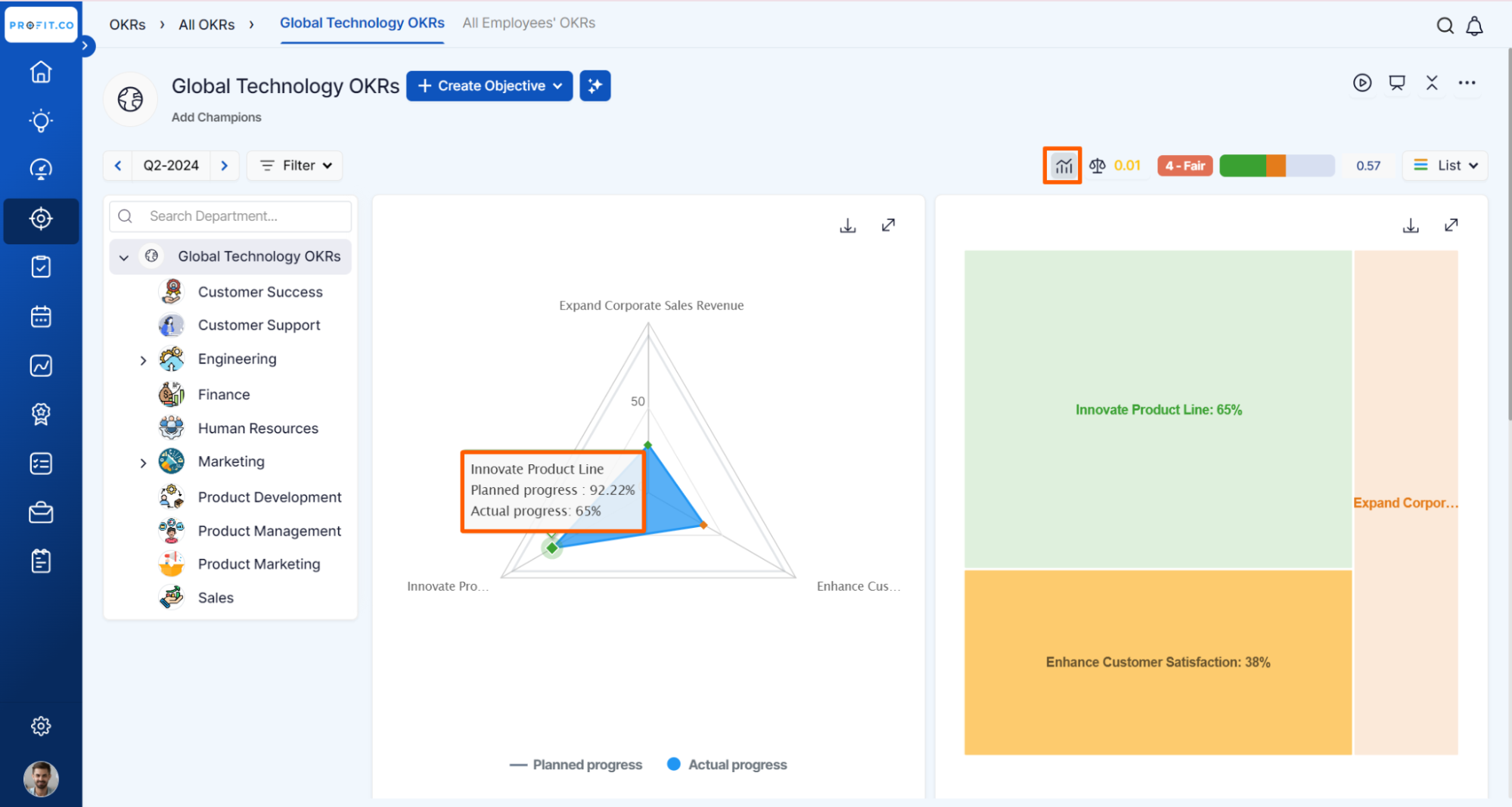
The planned progress value will be updated and the actual value will be based on the progress that we make in the Objective i.e. the average of all the Key Results.
You can also view the Planned and Actual values in the heatmap.

Related Answer Post
To learn the process of calculating Actual and Planned Score, click here.
To learn more about how to enable and read the bar chart value of OKRs, click here.
