



How does the new PPM Settings access help PPM Admins?
Category: PPM
Profit.co offers PPM Admins the flexibility to independently manage and configure PPM-related settings for their organization.
Table of Contents
- Why is dedicated PPM Admin access important?
- What is the PPM Admin role?
- What's changed with the new PPM Settings access?
- How do I assign the PPM Admin role to a user?
- What settings can PPM Admins access?
- What's the difference between PPM Admin, Super User, and PPM User?
- Best Practices for Managing PPM Admin Access
- Related Questions
- Frequently Asked Questions
Why is dedicated PPM Admin access important?
The PPM Admin role provides significant organizational benefits by creating the right balance between control and efficiency. Here's why this feature matters:
- Empowered Administration: Empowers PPM Admins with dedicated control over tollgate creation and project templates, reducing reliance on Super Users and speeding up project setup processes.
- Enhanced Usability: Enhances usability by restricting settings visibility to appropriate roles, ensuring end users have a clutter-free interface while maintaining security and access controls.
- Faster Configuration: Enables PPM-specific changes without waiting for Super User availability.
- Reduced Bottlenecks: Distributes administrative responsibilities for more efficient operations.
- Better Security: Limits settings access to only those who need it, reducing risk of accidental changes.
What is the PPM Admin role?
The PPM Admin role is a specialized administrative role in Profit.co that provides dedicated access to Project Portfolio Management settings without granting full system-wide Super User privileges.
Key Characteristics:
- Module-Specific: Access limited to PPM-related settings only
- Configuration Rights: Can manage tollgates, templates, and other PPM configurations
- No Cross-Module Access: Cannot access settings for other modules (OKR, Performance, etc.)
- Independent Operation: Can work autonomously without Super User intervention
- Security-Conscious: Maintains separation of duties and role-based access
This role bridges the gap between end users who need no settings access and Super Users who have organization-wide control.
What's changed with the new PPM Settings access?
Before (Previous System):
- Super User Dependency: Only Super Users could view and manage Settings across all modules
- Bottleneck Creation: PPM Admins had to request Super Users to make PPM-related changes
- Slower Processes: Configuration changes required coordination and delays
- Broader Access Than Needed: Super Users had more access than necessary for PPM tasks
After (New System):
- Direct Access: Users with PPM Admin role can access and configure settings specific to the PPM module
- Faster Configuration: PPM Admins can make changes immediately without waiting
- Appropriate Permissions: Access is limited to only what's needed for PPM management
- Improved Efficiency: Reduces administrative overhead and speeds up project setup
This change represents a significant improvement in operational efficiency and role-appropriate access control.
How do I assign the PPM Admin role to a user?
Follow these steps to configure a user as a PPM Admin:
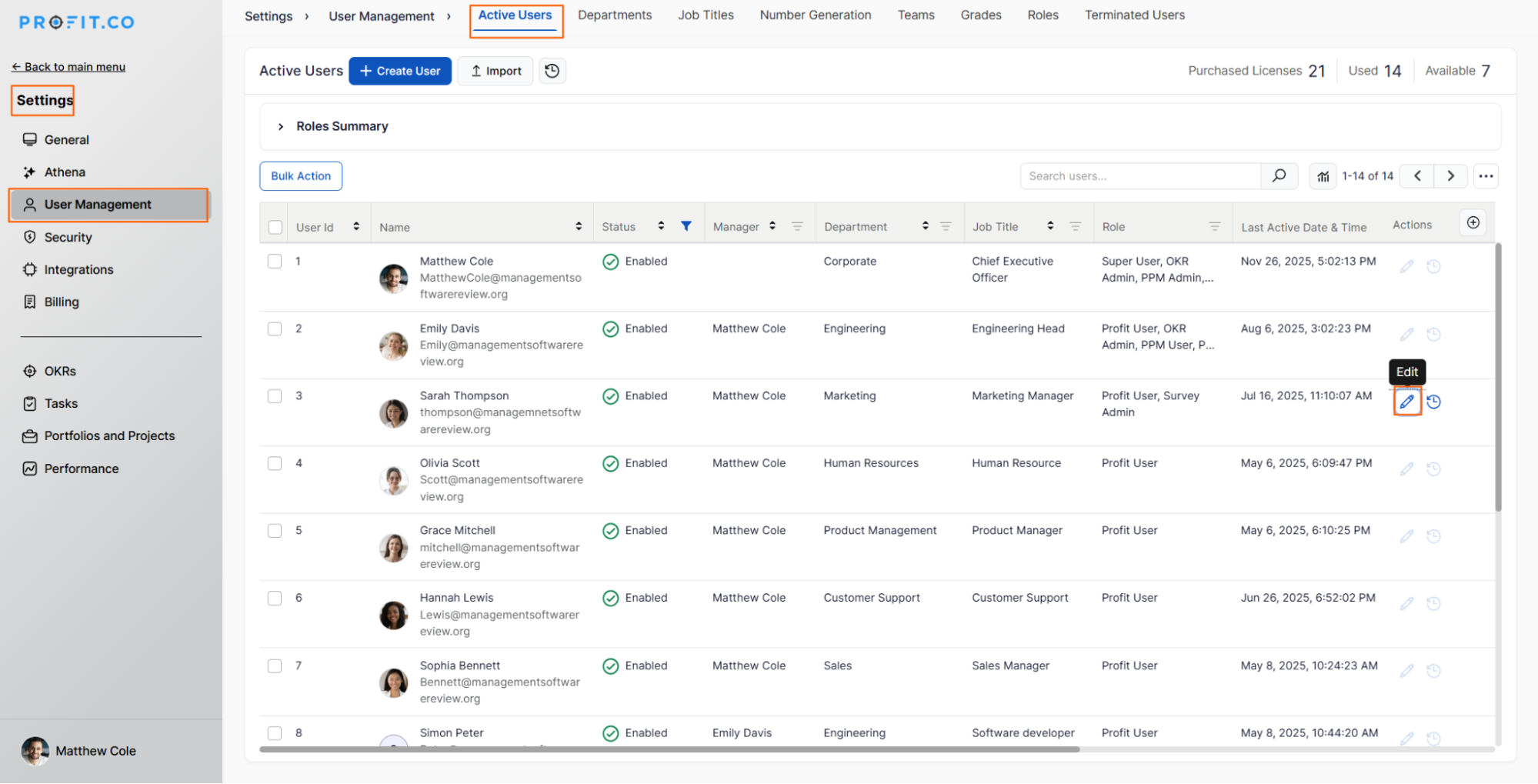
Step 1: Navigate to User Management
- Navigate to Settings → User Management from the left navigation panel
- On the Active Users page, select the required user
- Click on the Edit icon
Step 2: Assign PPM Admin Role
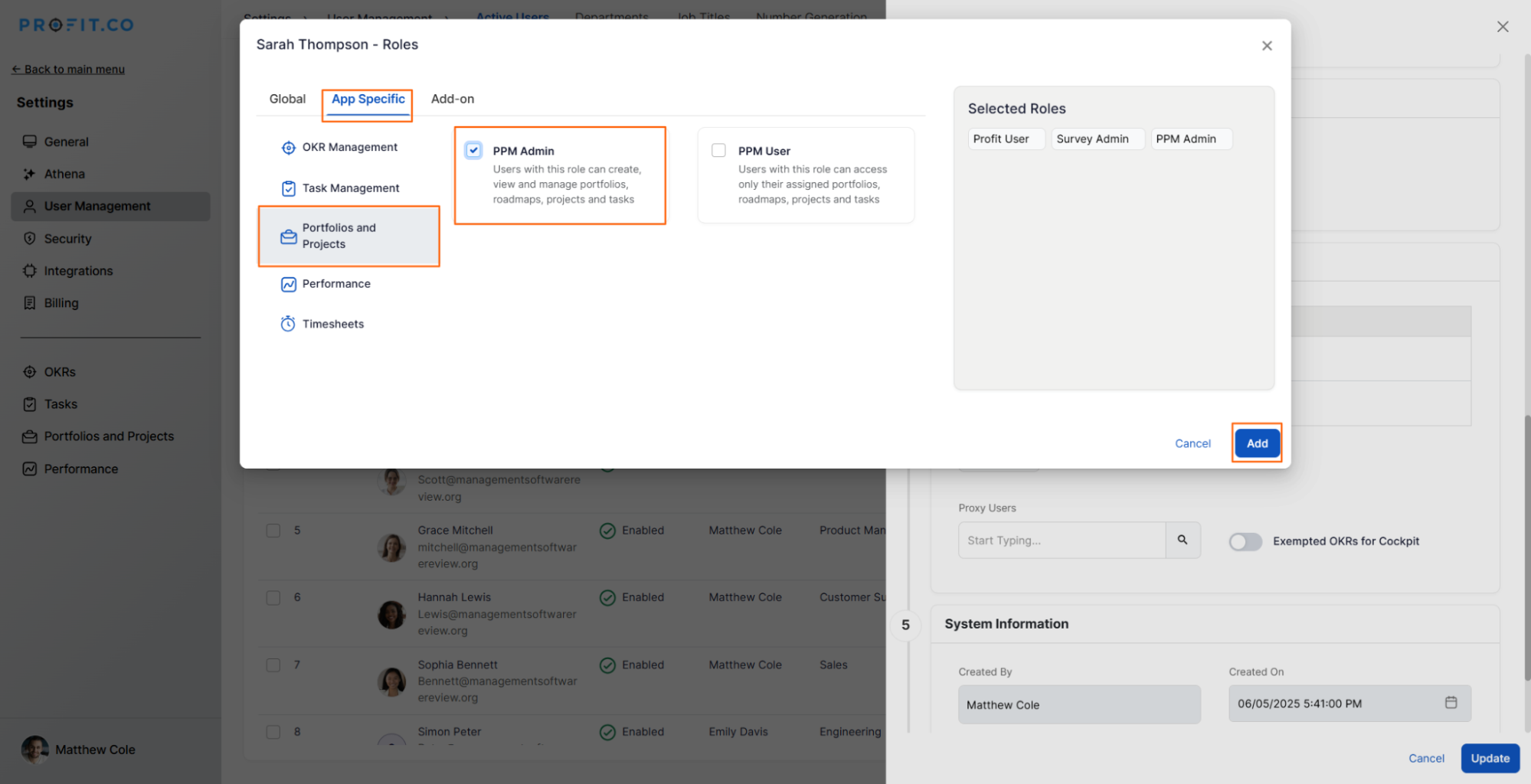
- In the edit user panel, choose the role of PPM Admin for the selected user
- Click on Add to assign the role
Step 3: Save Changes
- Click Update to save the changes
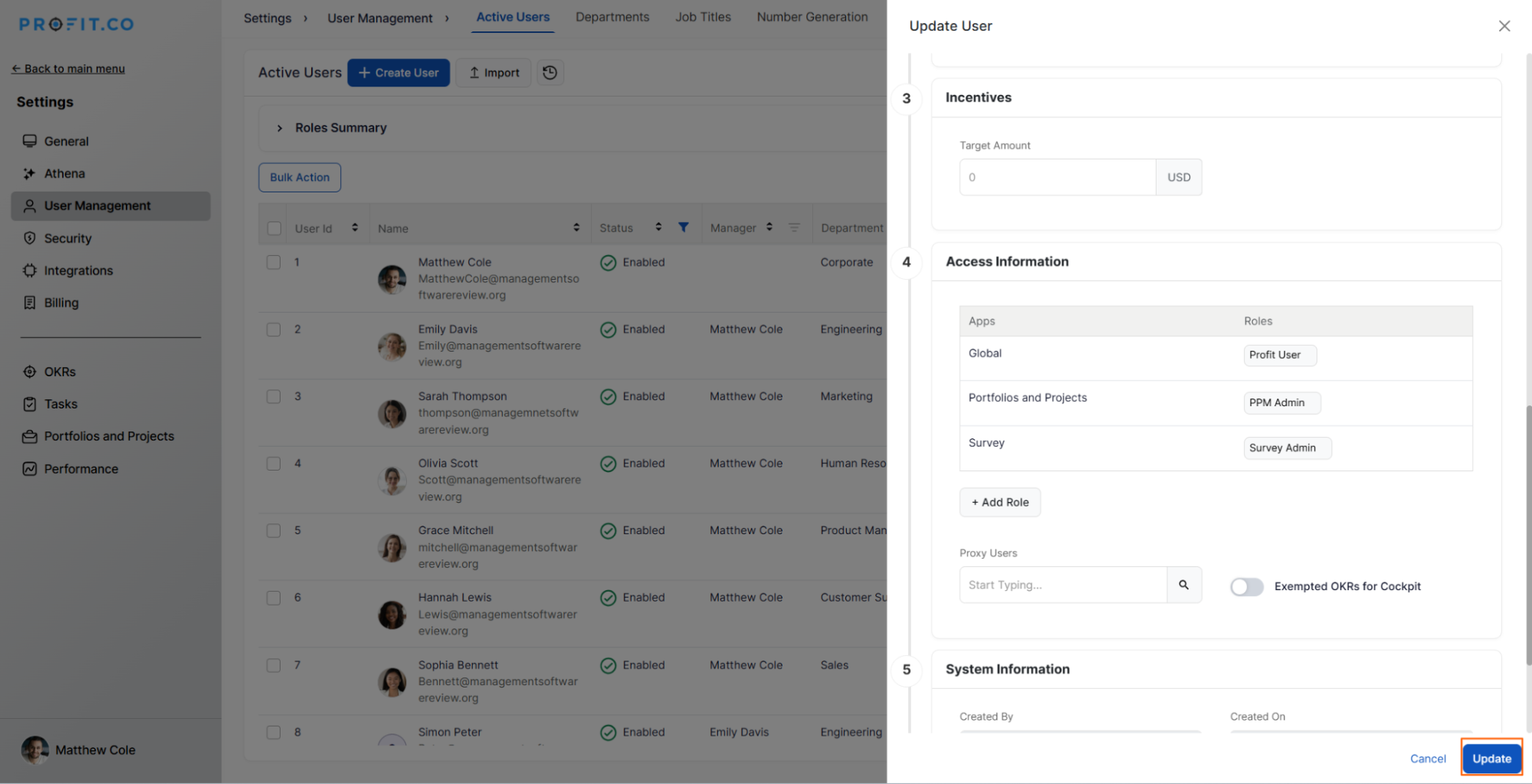
Once completed, the user with the PPM Admin role will have access to the PPM Settings.
Note:
- This access is limited to PPM-related settings and does not extend to settings in other modules
- End users (PPM Users Role) will not have access to the settings
What settings can PPM Admins access?
PPM Admins have comprehensive access to PPM-specific configuration options:
Project Management Settings:
- Project Templates: Create and manage reusable project templates
- Tollgate Configuration: Set up stage gates and approval workflows
- Project Statuses: Define custom status options for projects
- Project Types: Configure project categorization
- Custom Fields: Add project-specific custom fields
Portfolio Management Settings:
- Portfolio Templates: Create and manage portfolio templates
- Portfolio Statuses: Configure status options for portfolios
- Roadmap Settings: Manage roadmap configurations
Risk & Issue Settings:
- Risk Statuses: Define risk tracking statuses
- Risk Responses: Configure response types
- Impact Scores: Set up impact level definitions
- Probability Levels: Configure probability thresholds
- Issue Priorities: Define issue priority levels
- Issue Types: Configure issue categorization
Request Management Settings:
- Request Stages: Configure project request workflow stages
- Request Statuses: Define request status options
- Request Workflows: Set up approval processes
What's the difference between PPM Admin, Super User, and PPM User?
Understanding role distinctions helps assign appropriate access:
| Aspect | PPM User | PPM Admin | Super User |
|---|---|---|---|
| Settings Access | None | PPM module only | All modules |
| Project Creation | Yes (assigned) | Yes | Yes |
| Template Management | View only | Create/Edit | Create/Edit (all modules) |
| User Management | None | None | Full access |
| Tollgate Configuration | View only | Full control | Full control |
| Cross-Module Settings | None | None | Full access |
| Primary Focus | Execute projects | Configure PPM | Manage the entire system |
Best Practices for Managing PPM Admin Access
To maximize the effectiveness of PPM Admin roles:
Role Assignment:
- Be Selective: Assign the PPM Admin role only to trusted, qualified individuals
- Agile Configuration: Adapt PPM settings to changing business needs quickly
Related Questions
How to create a new template for projects?
How to create a new template for portfolios?
Frequently Asked Questions
Yes, users can have multiple roles.
No, PPM Admin access is restricted to PPM-specific settings.
No, role assignment remains with super users who have access to user management.
Related Questions
-
How to create a Project in the PPM module?
Profit.co provides an option for users to create a project within the Project Portfolio Management (PPM) module. This ...Read more
-
How do I manage tollgate compliance across projects in Profit.co?
In Profit.co, you can Manage tollgate compliance across projects by associating tollgate sequences with projects, ...Read more
-
How do I set up resource rate cards and cost allocation in Profit.co?
In Profit.co, you can set up resource rate cards by creating Resource Types with specific hourly cost rates, assigning ...Read more
-
How to View Critical Tasks of a Project in Profit.co?
Profit.co's Critical Path Method (CPM) feature helps project managers identify the most essential sequence of tasks ...Read more