

Profit.co provides an option for users to monitor Earned Value Management (EVM) in the project portfolio module. EVM is a project management technique that assesses project performance by comparing the planned budget with the actual work completed.
Table of Contents
- Why is Earned Value Management important?
- What is Earned Value Management (EVM)?
- What are the key EVM metrics in Profit.co?
- How do I access EVM metrics in Profit.co?
- What visual representations does the EVM dashboard provide?
- Best Practices for Using EVM in Profit.co
- How do I take corrective action based on EVM metrics?
- Related Questions
- Frequently Asked Questions
Why is Earned Value Management important?
Earned value management is a critical tool for project success and informed decision-making. Here's why this feature matters:
- Clear Performance View: EVM provides a clear view of project performance by comparing planned budget and actual work, enabling project managers to make informed decisions and adjustments to stay on track.
- Real-Time Insights: Key metrics like CPI, SPI, and TCPI offer real-time insights into both cost and schedule performance, helping identify potential risks early and ensure timely corrective actions.
- Comprehensive Monitoring: Track both cost and schedule performance simultaneously in a single integrated view.
- Early Risk Detection: Identify deviations from the plan early enough to implement corrective measures.
- Data-Driven Decisions: Make objective, metrics-based decisions rather than relying on subjective assessments.
What is Earned Value Management (EVM)?
Earned Value Management (EVM) is a project management technique used to assess a project's performance by comparing the planned budget with the actual work completed. It provides a clear view of the project's health, allowing project managers to make informed decisions and adjustments as needed to keep the project on track.
Core Concept: EVM integrates three critical data points:
- Planned Value (PV): What you planned to spend
- Actual Cost (AC): What you actually spent
- Earned Value (EV): The value of work actually completed
By analyzing these three metrics together, EVM helps monitor both cost and schedule performance, offering key performance indicators like the Cost Performance Index (CPI), Schedule Performance Index (SPI), and To-Complete Performance Index (TCPI). These metrics give a comprehensive overview of project progress, helping identify any risks to cost or schedule early enough to take corrective action.
What are the key EVM metrics in Profit.co?
Primary Performance Indicators:
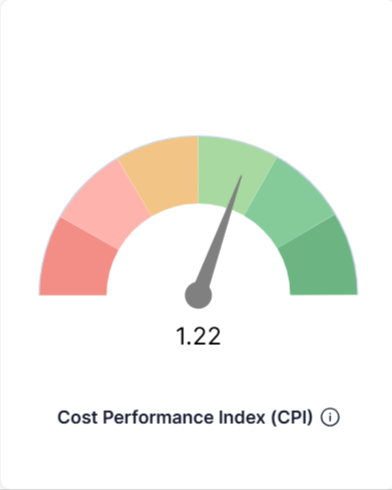
1. Cost Performance Index (CPI)
- Definition: Measures cost efficiency by comparing earned value to actual costs
- Formula: CPI = Earned Value (EV) / Actual Cost (AC)
- Interpretation:
- CPI > 1.0: Under budget (good performance)
- CPI = 1.0: On budget
- CPI < 1.0: Over budget (poor performance)
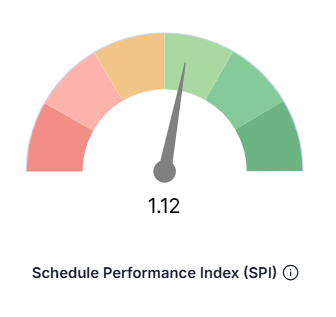
2. Schedule Performance Index (SPI)
- Definition: Measures schedule efficiency by comparing earned value to planned value
- Formula: SPI = Earned Value (EV) / Planned Value (PV)
- Interpretation:
- SPI > 1.0: Ahead of schedule (good performance)
- SPI = 1.0: On schedule
- SPI < 1.0: Behind schedule (poor performance)
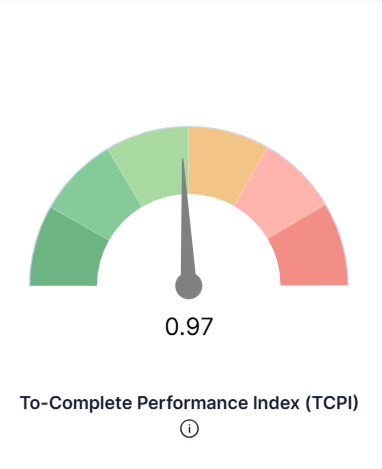
3. To-Complete Performance Index (TCPI)
- Definition: Measures the cost performance required to complete remaining work within budget
- Formula: TCPI = (Budget at Completion - Earned Value) / (Budget at Completion - Actual Cost)
- Interpretation:
- TCPI < 1.0: Easier to complete within budget
- TCPI = 1.0: Must maintain current performance
- TCPI > 1.0: Must improve performance to stay within budget
How do I access EVM metrics in Profit.co?
Follow these steps to view Earned Value Management data:
Step 1
- Navigate to the All Projects section in Profit.co
- Select the project for which you want to track performance
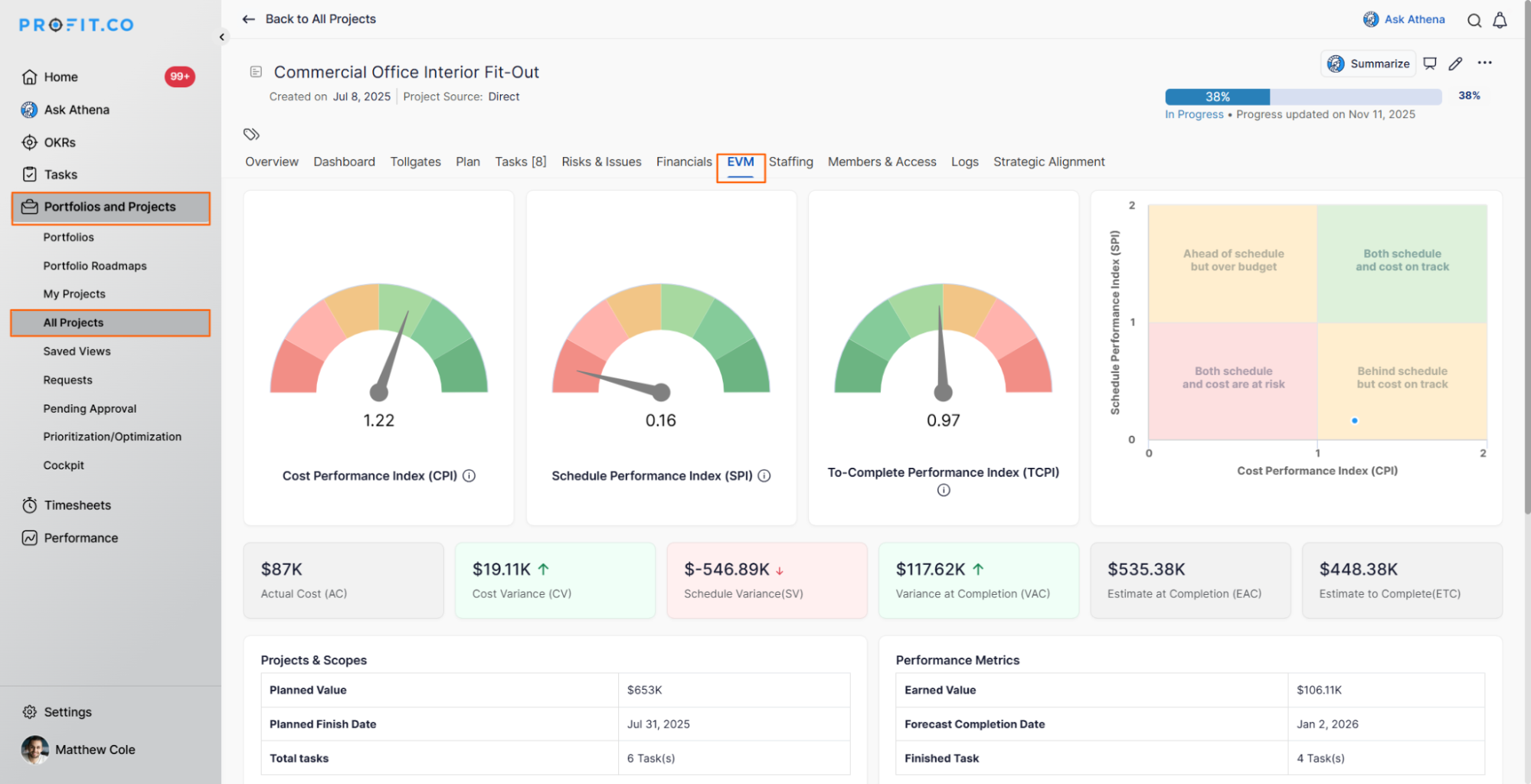
- Switch to the EVM tab to access the Earned Value Management metrics
- The EVM dashboard will display comprehensive performance indicators
Earned Value Management gives you a comprehensive view of your project's health by showing key performance indicators like CPI, SPI, and TCPI.
Step 2
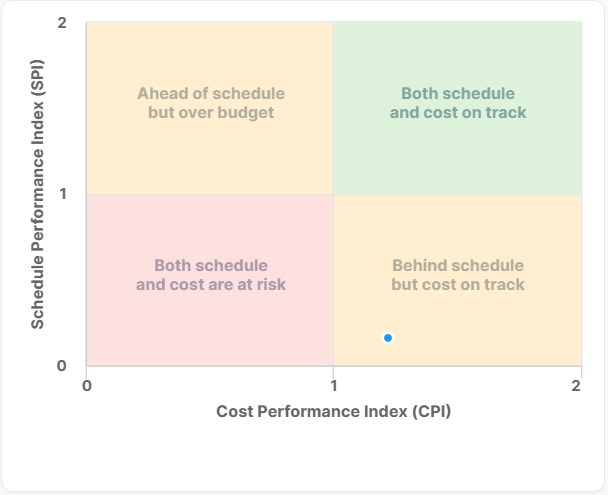
You will find a visual representation of performance using a four-quadrant system based on CPI and SPI:
Quadrant 1: Both schedule and cost are at risk (SPI < 1.0, CPI < 1.0)
- Behind schedule and over budget
- Requires immediate attention and corrective action
Quadrant 2: Behind schedule but on track with costs (SPI < 1.0, CPI ≥ 1.0)
- Schedule delays without cost overruns
- Focus on schedule acceleration
Quadrant 3: Ahead of schedule but over budget (SPI ≥ 1.0, CPI < 1.0)
- Fast progress but at a higher cost
- Review cost management practices
Quadrant 4: Both schedule and cost are on track (SPI ≥ 1.0, CPI ≥ 1.0)
- The project is performing well
- Maintain current practices
What visual representations does the EVM dashboard provide?
The EVM dashboard in Profit.co offers several visual elements:
Performance Charts:
- Triple-Line Graph: Shows Planned Value, Actual Cost, and Earned Value together on a timeline
- Four-Quadrant Matrix: Visual representation of CPI/SPI performance zones
- Trend Lines: Track how CPI and SPI evolve over the project lifecycle
Key Project Details Display:
- Planned Value: Total budgeted cost for scheduled work
- Planned Finish Date: Original target completion date
- Total Tasks: Number of tasks in the project
- Earned Value: Value of completed work
- Forecast Completion Date: Projected finish based on current performance
- Task Completion Rate: Percentage and number of completed tasks
These visualizations provide a clear representation of your project's progress, allowing you to easily track performance in terms of both time and cost. The dashboard offers insight into your Cost Performance Index (CPI) and Schedule Performance Index (SPI), helping you monitor efficiency across both dimensions as your project evolves.
Best Practices for Using EVM in Profit.co
To maximize the effectiveness of Earned Value Management:
- Regular Monitoring: Check EVM metrics consistently, not just when problems arise
- Baseline Management: Establish accurate baselines for meaningful comparisons
- Timely Updates: Keep actual costs and work completion data current
- Trend Analysis: Look for patterns over time, not just point-in-time values
- Combined Analysis: Use CPI and SPI together for comprehensive insights
- Action-Oriented: Translate metrics into concrete corrective actions
- Stakeholder Communication: Share EVM insights in clear, accessible language
- Early Intervention: Address negative trends early before they become critical
- Document Decisions: Record why variances occurred and actions taken
- Forecast Regularly: Use TCPI to understand performance requirements for completion
How do I take corrective action based on EVM metrics?
When EVM metrics indicate performance issues, consider these actions:
For Cost Overruns (Low CPI):
- Review budget allocations and spending patterns
- Identify cost-saving opportunities
- Optimize resource utilization
- Renegotiate vendor contracts if possible
- Consider value engineering for the remaining work
For Schedule Delays (Low SPI):
- Analyze critical path activities
- Add resources to critical tasks if possible
- Consider fast-tracking or crashing techniques
- Remove blockers and dependencies
- Streamline approval processes
For Combined Issues (Low CPI and SPI):
- Conduct a comprehensive project review
- Reassess project scope and priorities
- Engage stakeholders for support
- Consider project restructuring
- Evaluate whether completion is feasible
For TCPI Concerns:
- If TCPI > 1.0: Improve efficiency on remaining work
- Review estimates for remaining tasks
- Identify areas for cost reduction
- Consider scope reduction if necessary
Related Questions
- How can I use the Risks & Issues feature to improve project control in PPM? Click Here
Frequently Asked Questions
Generally, CPI and SPI values greater than 1.0 indicate good performance (under budget or ahead of schedule). Values between 0.95-1.05 are often considered acceptable. Values below 0.90 typically indicate significant performance issues requiring attention.
Yes, EVM enables forecasting through metrics like Estimate at Completion (EAC). Based on current CPI, you can predict the total cost required to complete the project.
Update frequencies depend on project size and duration. Weekly updates work for most projects, while critical projects may require daily updates. Consistent update schedules are more important than frequency.
