



How does Profit.co help track task start, delivery, and execution performance?
Category: Tasks
In Profit.co, the My Tasks Dashboard provides comprehensive analytics on your task performance, including schedule variance analysis, deadline adherence, and execution discipline metrics to help you track and improve productivity.
Table of Contents
- What is the My Tasks Dashboard in Profit.co?
- How do I access the My Tasks Dashboard?
- What analytics widgets are available on My Tasks Dashboard?
- What is Task Start Variance Analysis?
- What is Task Delivery Variance Analysis?
- What is Task Execution Discipline?
- Best practices for using My Tasks Dashboard in Profit.co
- Related Questions
- Frequently Asked Questions
What is the My Tasks Dashboard in Profit.co?
The My Tasks Dashboard is a personal analytics view that provides visual insights into your task performance. It tracks when you start tasks versus planned dates, when you complete tasks versus deadlines, and your overall execution discipline through interactive donut charts.
How do I access the My Tasks Dashboard?
Follow these steps to view your personal tasks dashboard:
Step 1
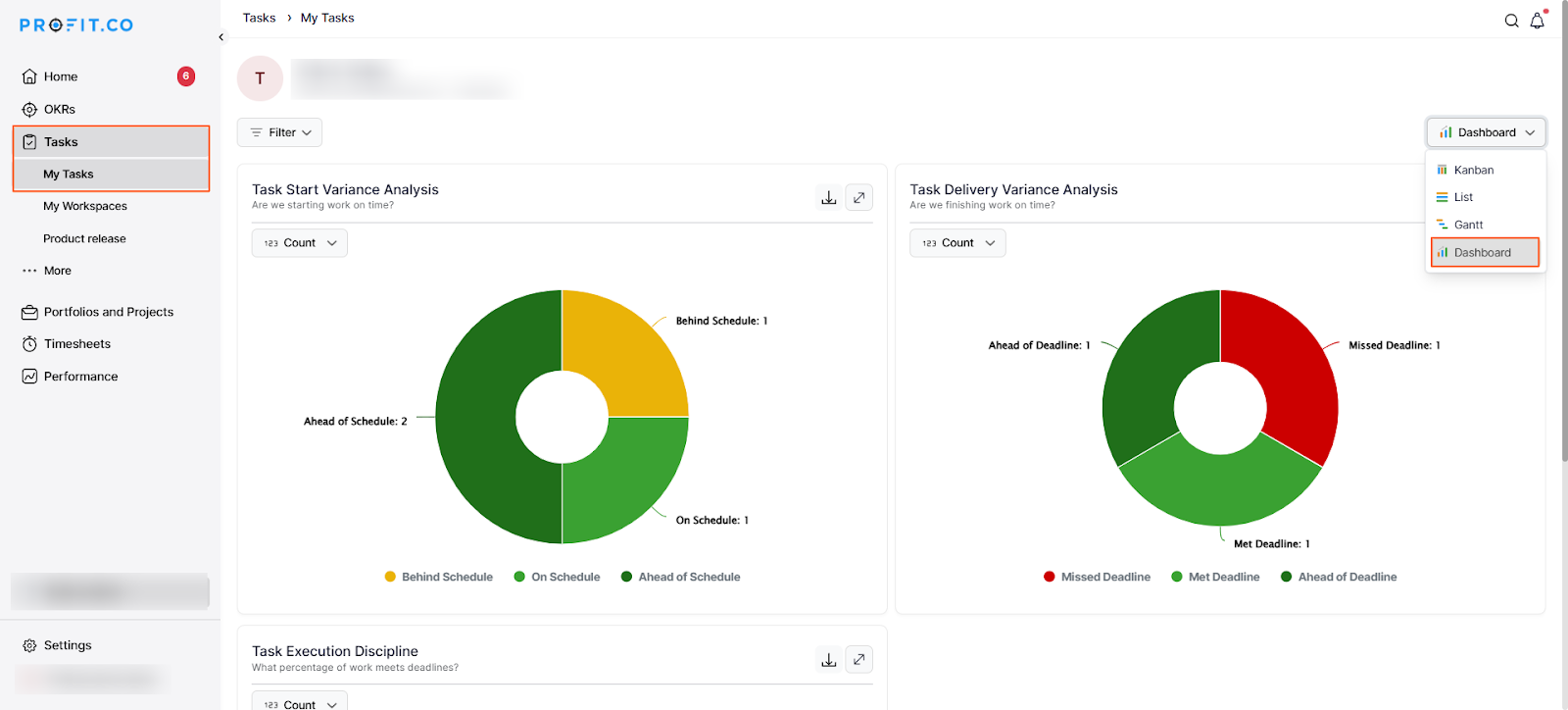
- Click on Tasks from the left navigation panel.
- Click on My Tasks from the Tasks submenu.
- Click on the Dashboard button in the top right corner of the page.
What analytics widgets are available on My Tasks Dashboard?
The My Tasks Dashboard includes three key analytics widgets:
| Widget | Purpose | Metrics Tracked |
|---|---|---|
| Task Start Variance Analysis | Analyzes when you start tasks relative to planned start date | Behind Schedule, On Schedule, Ahead of Schedule |
| Task Delivery Variance Analysis | Analyzes when you complete tasks relative to planned end date | Missed Deadline, Met Deadline, Ahead of Deadline |
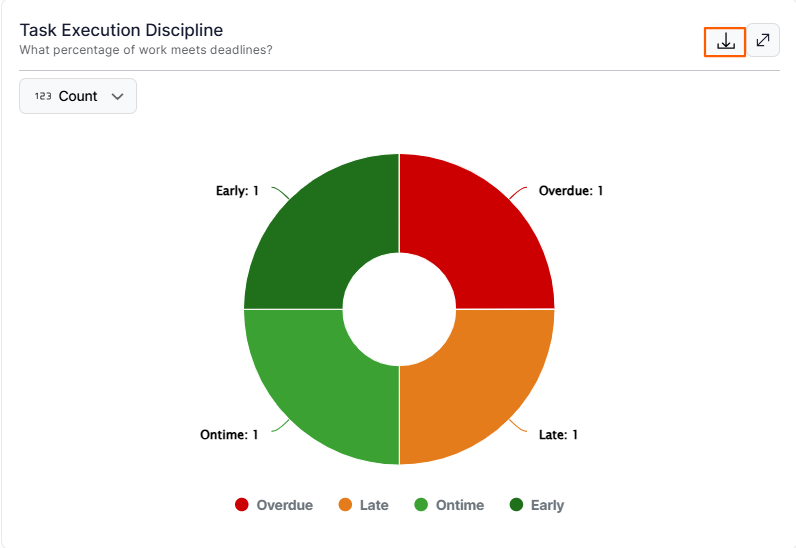
| Task Execution Discipline | Measures adherence to deadlines and timely completion | Overdue, Late, Ontime, Early |
What is Task Start Variance Analysis?
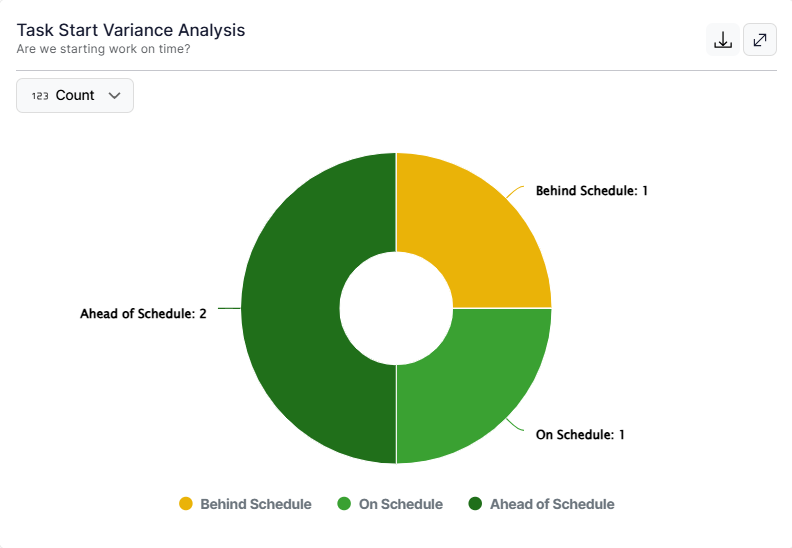
Task Start Variance Analysis tracks whether you're starting your tasks on time by comparing actual start dates with planned start dates. This widget helps you understand if you're beginning work ahead of schedule, on schedule, or falling behind at the task initiation phase.
Key Question Answered: "Are we starting work on time?"
What is Task Delivery Variance Analysis?
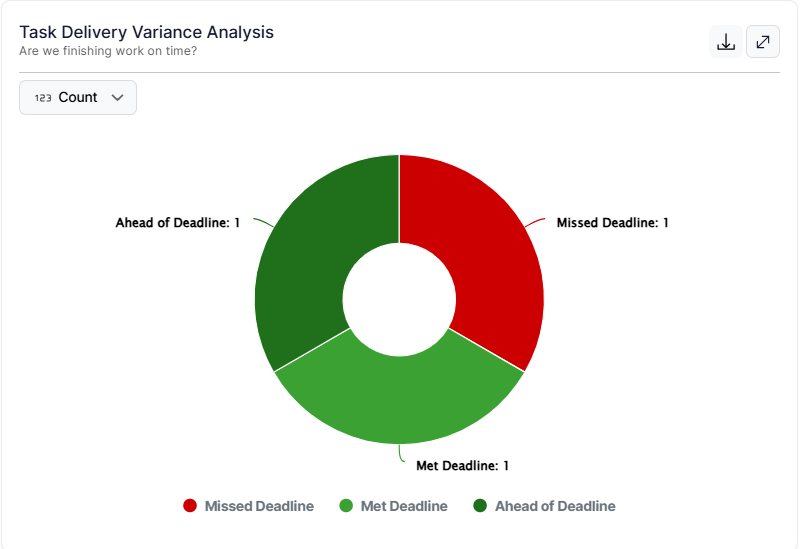
Task Delivery Variance Analysis tracks whether you're finishing your tasks on time by comparing actual completion dates with deadline dates. This widget helps you understand if you're meeting commitments, missing deadlines, or delivering ahead of schedule.
Key Question Answered: "Are we finishing work on time?"
What is Task Execution Discipline?
Task Execution Discipline measures what percentage of your work meets deadlines and categorizes your task completion behavior into four categories: Early, On time, Late, and Overdue. This provides a comprehensive view of your overall task management effectiveness.
Key Question Answered: "What percentage of work meets deadlines?"
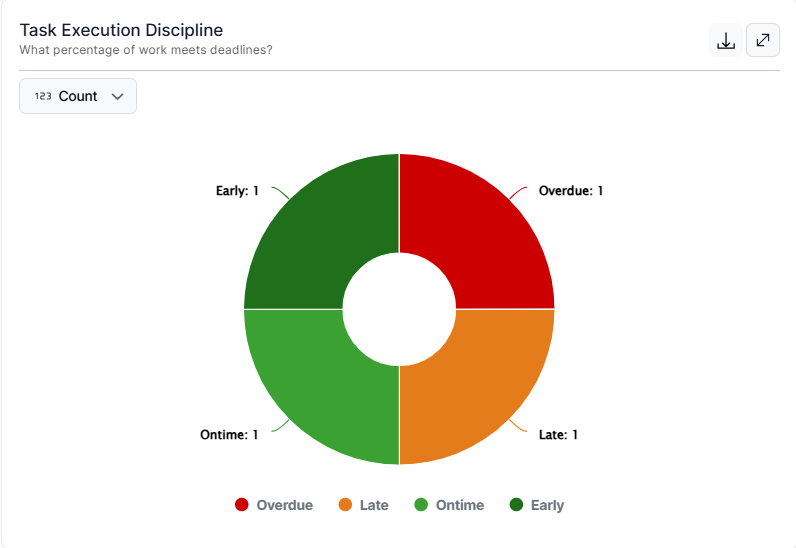
To download the widgets, click the Export icon. You can choose Download as JPG or PNG, and view the Export History for previously downloaded files
Best practices for using My Tasks Dashboard in Profit.co
- Review your My Tasks Dashboard weekly to identify patterns in your task start and completion behavior.
- If you have many tasks in "Behind Schedule" in the Start Variance Analysis, prioritize starting tasks earlier to prevent downstream delays.
- If you frequently see "Missed Deadline" in the Delivery Variance Analysis, review your time estimates and consider padding deadlines or breaking tasks into smaller chunks.
- Use the Task Execution Discipline widget as your primary performance metric to track improvement over time.
Related Questions
To learn more about how to create and manage tasks in Profit.co, click here
Frequently Asked Questions
The My Tasks Dashboard reflects real-time data and updates automatically as you start tasks, complete tasks, or as deadlines pass.
"Late" refers to tasks that were completed after the deadline, while "Overdue" refers to tasks that are past their deadline and still not completed.
Task Start Variance measures when you begin working on tasks relative to the planned start date, while Task Delivery Variance measures when you complete tasks relative to the deadline..
Related Questions
-
How to create new Workspace and Boards for Tasks through a mobile application?
Profit.co’s mobile application lets you quickly create Workspaces and Boards to organize, manage, and track tasks on ...Read more
-
How does the hierarchy of Task Issue Types work in Profit.co?
Profit.co provides an option to classify tasks using different Issue Types such as Epics, Stories, Tasks, Sub-tasks, ...Read more
-
How do I use Agile Epics and User Stories in Profit.co?
In Profit.co, you can use Agile Epics and User Stories to structure work effectively, ensuring clear alignment and ...Read more
-
How to Restore Deleted Tasks in Profit.co?
Profit.co offers a valuable safety net by enabling users to restore deleted tasks through the new Trash and Restore ...Read more