
Best Task Management Software

Top 10 Best Task Management Software for 2026

G2, Capterra and GartnerRated 4.7/5 by 500+ leaders

We analyzed 50+ platforms to identify the top 10 that turn tasks into measurable outcomes. Discover the right solution to keep your team’s work aligned with strategic goals, no matter your organization’s size.

How We Evaluated the Best Task Management Software

This list is based on enterprise user reviews, product capabilities, adoption ease, scalability, integrations, and long-term strategy execution support.

Detailed comparison of the 10 best task management software platforms for 2026

#1 Top Pick

1. Profit.co – Best Overall OKR-Aligned Task Management Platform

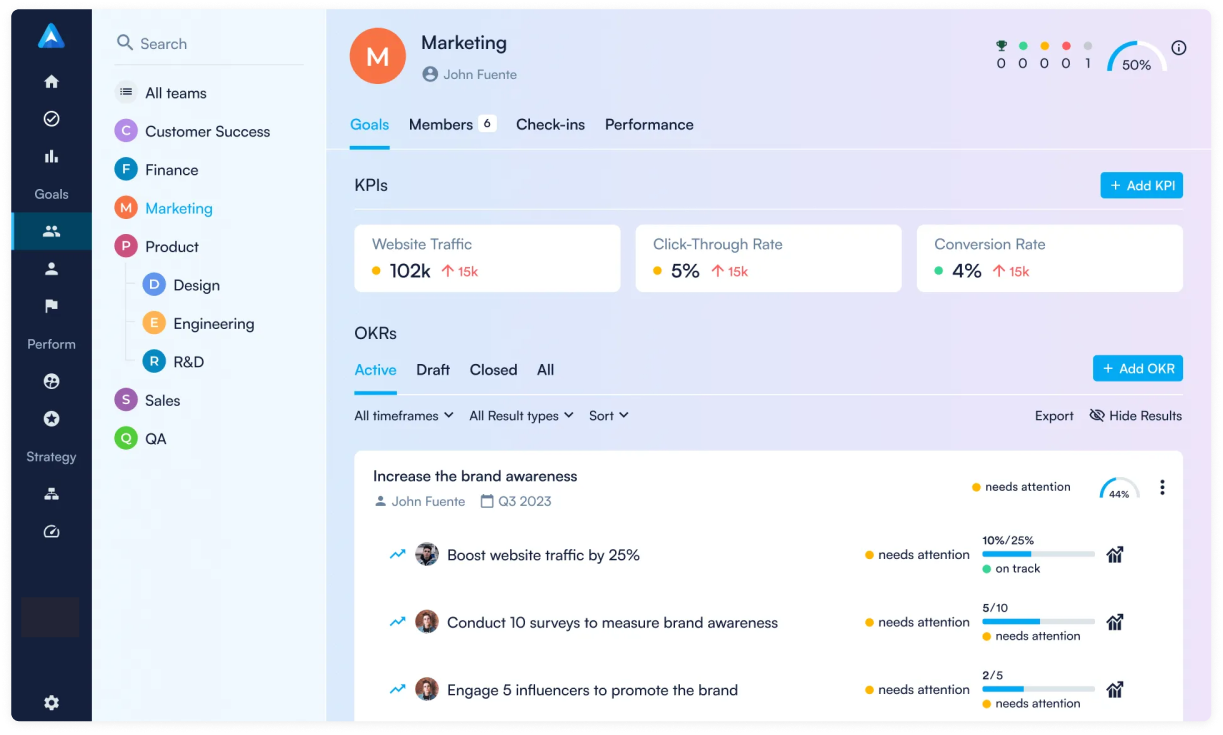
Profit.co delivers strategic task management that connects daily work to measurable outcomes. The only platform seamlessly unifying OKRs with task execution, ensuring every task contributes to quarterly objectives and company strategy.

Why Profit.co Takes the #1 Spot

Profit.co addresses the fundamental challenge most organizations face: the disconnect between daily tasks and strategic priorities. For businesses tired of task lists that feel disconnected from real impact, Profit.co delivers the complete Plan-Execute-Track-Achieve cycle that drives organizational success.
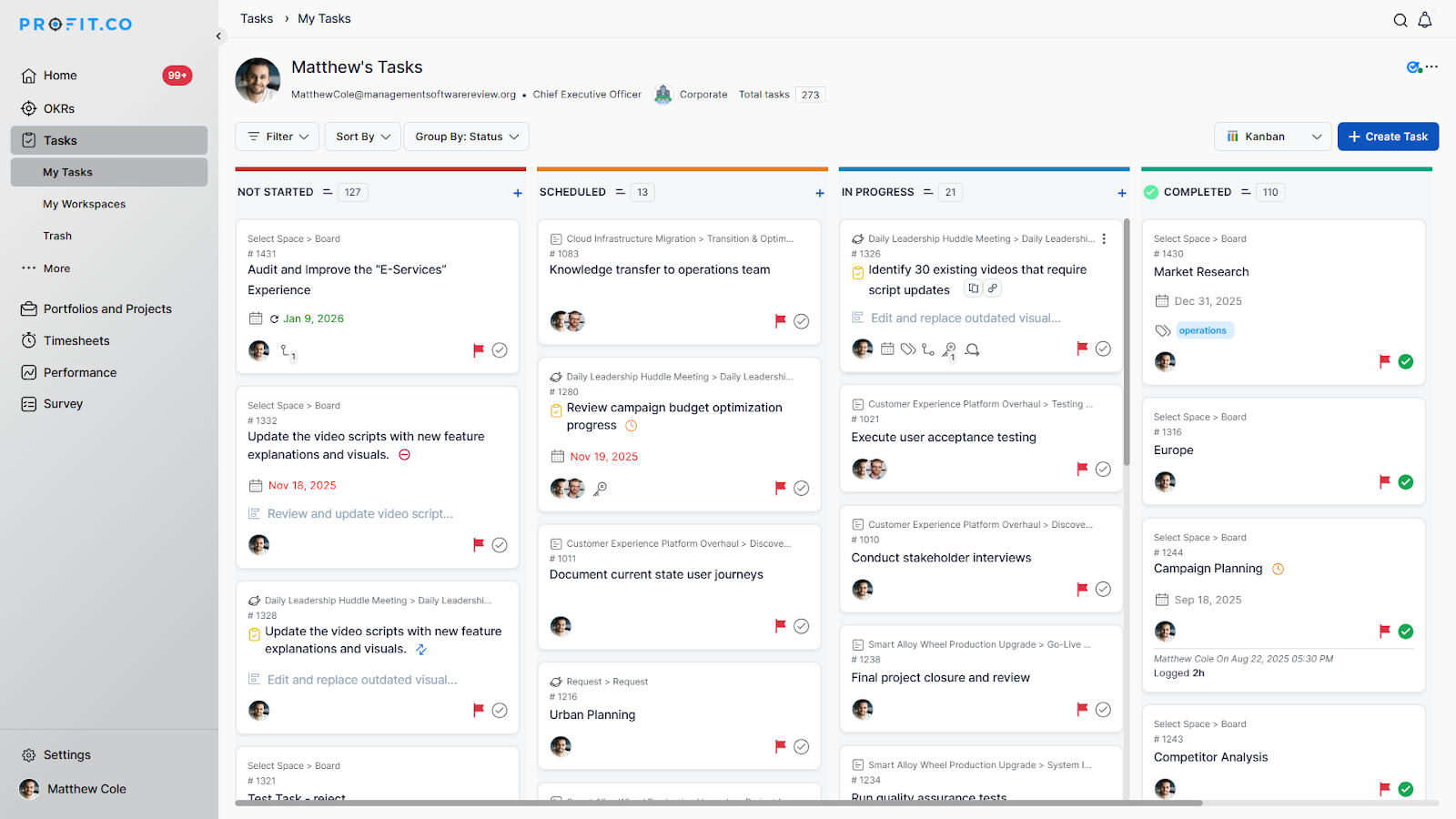
Profit.co OKR-aligned task management dashboard

Key Features

  • AI-powered task summaries generating progress reports from real work data
  • Automated progress updates for task-tracked Key Results eliminating manual check-ins
  • Customizable workspaces and boards with project-specific stages matching any workflow
  • Task-to-OKR alignment connecting individual work directly to company objectives
  • Task Dashboard by Tag providing visual distribution charts across workspaces
  • Notes module for meeting summaries and action items within workspaces
  • 100+ integrations including Slack, Microsoft Teams, Jira, and major HRIS systems

Pricing

Free Plan
Available for small teams to get started
Paid Plans
Flexible plans with advanced task management, OKR, and strategy execution capabilities
Trial
30 days free trial available
Note
Pricing varies based on organization size and required modules

Best for: Organizations demanding OKR-driven task execution with real-time visibility into how daily work impacts strategic outcomes.
#2

2. ClickUp – Best All-in-One Workspace

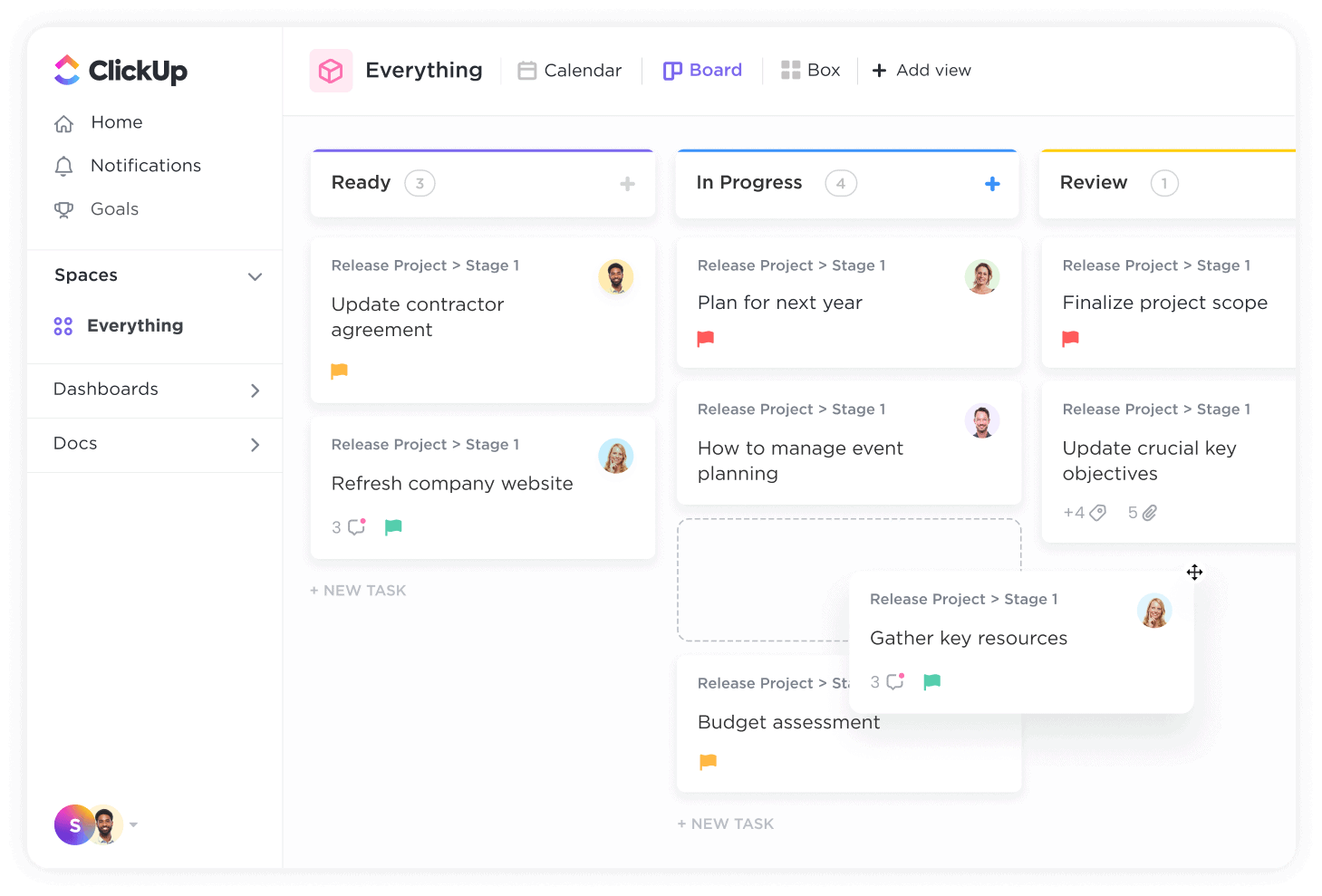
ClickUp positions itself as “the everything app for work,” combining task management, docs, chat, and goals in one highly customizable platform trusted by 20+ million users worldwide.

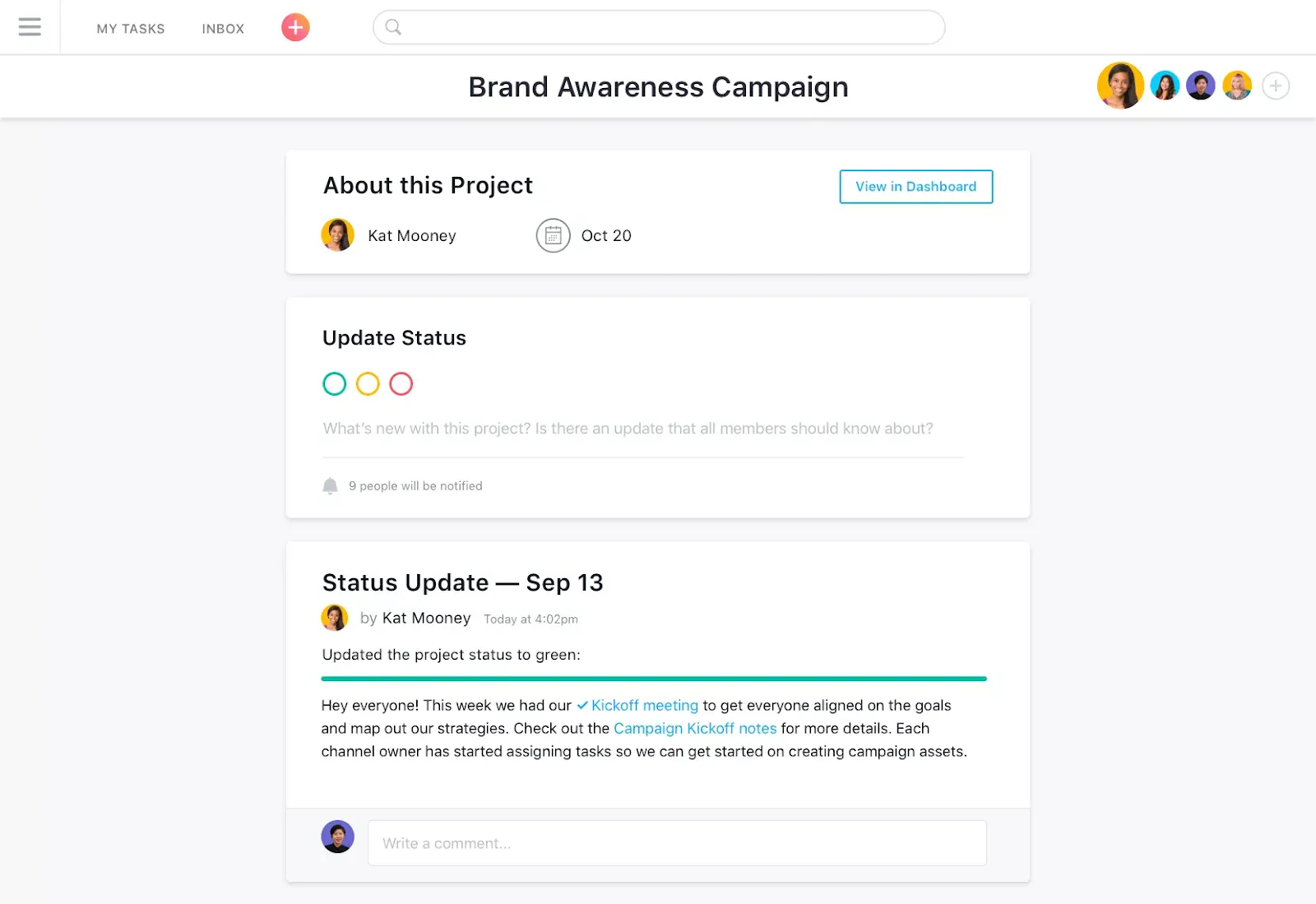
ClickUp all-in-one workspace and task views

Key Features

  • 15+ views including List, Board, Gantt, Calendar, Timeline, and Workload
  • ClickUp Brain AI for task summaries, auto-creation, and intelligent prioritization
  • 35+ ClickApps for customizing task management software features
  • Native time tracking with detailed reporting and billable hours
  • Automation builder for repetitive workflows with 100+ triggers
  • Docs and Whiteboards built directly into the platform
  • Sprint Points and Custom Fields for agile development teams

Pricing

Free Plan
Available with 100MB storage and unlimited tasks
Paid Plans
Unlimited, Business, and Enterprise tiers available
Trial
Free forever plan available
Note
ClickUp AI available as add-on for paid plans

Best for: Teams wanting to consolidate multiple task management tools into one customizable workspace with extensive feature depth.

#3

3. Monday.com – Best Visual Workflow Management

Monday.com is a cloud-based Work OS that powers teams to run processes, projects, and everyday work through highly visual, color-coded boards with powerful no-code automation.

Monday.com visual workflow boards

Key Features

  • Highly visual boards with customizable columns and color-coded statuses
  • Timeline, Gantt, Calendar, and Kanban views for flexible visualization
  • 250,000 automation and integration actions per month on Enterprise
  • Guest access for external collaborators and client visibility
  • Workload management for resource planning and capacity tracking
  • monday AI for content generation and task suggestions
  • 200+ native integrations including Slack, Salesforce, and Adobe

Pricing

Free Plan
Available for up to 2 users
Paid Plans
Basic, Standard, Pro, and Enterprise tiers
Trial
14-day free trial available
Note
Per-seat pricing requires minimum of 3 users on paid plans

Best for: Marketing, operations, and project teams prioritizing visual task management system with strong automation capabilities.

#4

4. Asana – Best Team Collaboration

Asana remains one of the most recognized task management platforms, known for its clean interface and robust collaboration features trusted by most paying organizations worldwide.

Asana team collaboration and project views

Key Features

  • Multiple project views including List, Board, Timeline, Calendar, and Gantt
  • Workflow Builder for no-code automation and process standardization
  • Goals feature connecting individual tasks to broader company objectives
  • Portfolio management for multi-project visibility and executive reporting
  • Workload balancing to prevent team burnout and optimize capacity
  • Asana Intelligence AI for task summaries and smart suggestions
  • Forms with branching logic for streamlined intake requests

Pricing

Free Plan
Available for up to 10 users
Paid Plans
Starter, Advanced, Enterprise, and Enterprise+ tiers
Trial
30-day free trial available
Note
AI features included in Advanced and Enterprise plans

Best for: Marketing, product, and operations teams managing multiple projects who need clear task visibility and strong collaboration.

#5

5. Trello – Best Simple Kanban Boards

Trello pioneered digital Kanban boards and remains the go-to choice for teams wanting straightforward, visual task management with minimal setup and instant onboarding.

Trello Kanban boards and task cards

Key Features

  • Intuitive drag-and-drop Kanban boards with cards and lists
  • Cards with attachments, checklists, due dates, and multiple assignees
  • Butler automation for repetitive tasks (up to 1,000 commands/month on Standard)
  • Power-Ups extending functionality with calendar, integrations, and custom fields
  • Timeline and Dashboard views on Premium for project scheduling
  • Mobile apps for iOS and Android with full functionality
  • Unlimited boards on all paid plans

Pricing

Free Plan
Available with up to 10 boards per workspace
Paid Plans
Standard, Premium, and Enterprise tiers
Trial
Free plan available indefinitely
Note
Non-profits receive 75% discount on paid plans

Best for: Small teams, freelancers, and organizations wanting intuitive visual task management tools without complexity.

#6

6. Notion – Best Docs and Database Hybrid

Notion combines document creation, wikis, and databases into a single flexible workspace, allowing teams to build custom task management systems integrated with their knowledge bases.

Notion docs and database task views

Key Features

  • Flexible databases with 20+ property types and relational linking
  • Multiple views including Table, Board, Calendar, Timeline, and Gallery
  • Rich document creation with nested pages and real-time collaboration
  • Notion AI for content generation, summaries, and task assistance
  • Templates for projects, tasks, sprints, and custom workflows
  • API and integrations with Slack, Google Calendar, and GitHub
  • Forms feeding responses directly into Notion databases

Pricing

Free Plan
Available with unlimited pages for individuals
Paid Plans
Plus, Business, and Enterprise tiers
Trial
Demo available
Note
AI features limited trial on Free/Plus; full access on Business+

Best for: Teams wanting to combine documentation, wikis, and task management software in one customizable workspace.

#7

7. Smartsheet – Best Enterprise Spreadsheet-Style

Smartsheet brings spreadsheet familiarity to task management with advanced automation, Gantt charts, and resource management capabilities for enterprise-scale operations.

Smartsheet spreadsheet-style task management

Key Features

  • Spreadsheet-style interface with familiar formulas and functions
  • Gantt chart, Calendar, Card, and Grid views for flexible visualization
  • Control Center for standardized project templates and governance
  • Automated workflows and multi-step approval processes
  • Resource management and capacity planning dashboards
  • Proofing for creative asset review and stakeholder approval
  • 100+ integrations including Salesforce, Jira, and Microsoft tools

Pricing

Free Plan
Available for 1 user with 2 editors
Paid Plans
Pro, Business, and Enterprise tiers
Trial
30-day free trial available
Note
Additional costs may apply for premium integrations and add-ons

Best for: Finance, operations, and PMO teams comfortable with spreadsheets who need audit trails and enterprise task management system controls.

#8

8. Wrike – Best Advanced Project Workflows

Wrike delivers enterprise-grade task management with particularly strong capabilities for professional services, marketing agencies, and creative teams managing complex client work.

Wrike advanced project and task workflows

Key Features

  • Multiple views including List, Board, Gantt, Timeline, and Workload
  • Visual proofing for creative asset review and annotation
  • Custom request forms for intake management and triage
  • Resource management with workload balancing and allocation
  • Time tracking with billable hours support and reporting
  • Dependencies and critical path analysis for project scheduling
  • Adobe Creative Cloud and 400+ app integrations

Pricing

Free Plan
Available with unlimited users and basic features
Paid Plans
Team, Business, Enterprise, and Pinnacle tiers
Trial
Free demo available
Note
Industry-specific solutions available for marketing and creative teams

Best for: Agencies and professional services firms managing complex multi-stakeholder projects with advanced task management software features.

#9

9. Todoist – Best Personal Productivity

Todoist focuses on doing one thing exceptionally well: capturing and managing tasks quickly with a clean interface and natural language input trusted by 35+ million users.

Todoist personal productivity task lists

Key Features

  • Natural language task input with smart date recognition
  • Projects, labels, filters, and priority levels for organization
  • Recurring tasks with flexible scheduling options
  • Karma productivity tracking system with streaks and goals
  • Subtasks, comments, and file attachments for task details
  • Cross-platform sync across web, desktop, mobile, and browser extensions
  • 80+ integrations including Google Calendar, Slack, and Zapier

Pricing

Free Plan
Available with 5 active projects
Paid Plans
Pro and Business tiers available
Trial
Free plan available indefinitely
Note
Most affordable paid option among top task management tools

Best for: Individual professionals, freelancers, and small teams wanting fast, reliable task management best practices without complexity.

#10

10. Airtable – Best Database-Driven Organization

Airtable combines spreadsheet accessibility with relational database power, uniquely suited for teams needing to connect and organize complex information across multiple workflows.

Airtable database-driven task organization

Key Features

  • Relational database with linked records across tables
  • Multiple views including Grid, Kanban, Calendar, Gallery, Timeline, and Gantt
  • Automations with 15+ triggers and actions for workflow automation
  • Interface Designer for custom dashboards and stakeholder views
  • Forms for data collection feeding directly into bases
  • Field-level editing permissions and granular access controls
  • Sync with external data sources and 1,000+ integrations

Pricing

Free Plan
Available with unlimited bases and 1,000 records per base
Paid Plans
Team, Business, and Enterprise Scale tiers
Trial
Free demo available
Note
Higher price point but powerful for data-intensive workflows

Best for: Data-driven teams and operations needing custom applications with relational data connections and advanced task management software features.

Our recommendation

Why Profit.co is Our Top Pick

After evaluating dozens of task management platforms, Profit.co consistently delivers the best combination of:

  • OKR-task integration

    OKR-task integration that connects daily work to strategic outcomes

  • AI-powered automation

    AI-powered automation generating progress updates from real work data

  • Complete visibility

    Complete visibility from individual tasks to company-wide objectives

  • Enterprise-grade security

    Enterprise-grade security with SOC 2 Type II and GDPR compliance

  • 24/7 support and coaching

    24/7 customer support with dedicated implementation coaching

  • Built to customize

    High customization for organizations of any size and industry

Profit.co offers modern, strategy-aligned task management software that ensures every task drives measurable results, making it ideal for teams committed to turning daily work into organizational success.

Integrations ecosystem

Connects to the tools
your teams already use

100+ native integrations that keep your data in sync – so teams check in, update progress, and stay aligned without switching apps.

Browse all 100+ integrations

Customer stories

The results speak for themselves

Rated 4.7 out of 5 on G2, Capterra and Gartner

Rated 4.7/5 by 500+ Leaders

After implementing Profit.co, our employee participation in goal setting jumped from 60% to 80%, and review cycles became much faster.

Suganya R.

One of the significant benefits we found was reduced time spent on reviews — 75% reduction of time spent in reviews for executives.

Gerardo Haro

Profit.co gave our teams a shared language for strategy — priorities stay visible, and execution finally matches the plan.

Hasna Beeran

We accomplished nearly 90% of our high-level objectives that we set out at the beginning of the year.

Dr. Thomas Troeger

With Profit.co, strategy reviews stopped being slide decks — we see live progress and act on risks in the same week.

Rakshit Choudhary

OKRs in Profit.co helped us connect product delivery to company outcomes — everyone knows what winning looks like.

Prakash Nair

After implementing Profit.co, our employee participation in goal setting jumped from 60% to 80%, and review cycles became much faster.

Suganya R.

One of the significant benefits we found was reduced time spent on reviews — 75% reduction of time spent in reviews for executives.

Gerardo Haro

Profit.co gave our teams a shared language for strategy — priorities stay visible, and execution finally matches the plan.

Hasna Beeran

We accomplished nearly 90% of our high-level objectives that we set out at the beginning of the year.

Dr. Thomas Troeger

With Profit.co, strategy reviews stopped being slide decks — we see live progress and act on risks in the same week.

Rakshit Choudhary

OKRs in Profit.co helped us connect product delivery to company outcomes — everyone knows what winning looks like.

Prakash Nair

We finally have one place where goals, projects, and performance stay aligned — no more chasing updates across tools.

Henry Braithwaite

Profit.co made cross-team priorities transparent — we ship what matters and drop the noise with confidence.

Rahul Daswani

Just in the last year, tracking work in Profit.co made it easy to prove ROI and scale OKRs across the company.

Juan Felipe Arjona

Weekly check-ins in Profit.co keep every squad honest about progress — blockers surface early, not at quarter end.

Ankita Roy

Leaders now have clear, real-time visibility into progress — strategy stopped living in disconnected spreadsheets.

Jose Duvan V.

Profit.co helped us turn annual plans into weekly execution — teams know the score and move with clarity.

Kari Montes

We finally have one place where goals, projects, and performance stay aligned — no more chasing updates across tools.

Henry Braithwaite

Profit.co made cross-team priorities transparent — we ship what matters and drop the noise with confidence.

Rahul Daswani

Just in the last year, tracking work in Profit.co made it easy to prove ROI and scale OKRs across the company.

Juan Felipe Arjona

Weekly check-ins in Profit.co keep every squad honest about progress — blockers surface early, not at quarter end.

Ankita Roy

Leaders now have clear, real-time visibility into progress — strategy stopped living in disconnected spreadsheets.

Jose Duvan V.

Profit.co helped us turn annual plans into weekly execution — teams know the score and move with clarity.

Kari Montes

Enterprise Grade Security

Keep your company’s data secure and compliant with industry-leading security standards and certifications.

  • SOC 2 certified

    SOC 2 TYPE II

  • ISO 27001 certified

    ISO 27001

  • GDPR compliant

    GDPR

  • HIPAA compliant

    HIPAA

FAQ

Have questions?

Still have questions? Ask Questions

Experience OKR-aligned task management with Profit.co, where strategy meets daily execution, powered by AI.