
CAPA Management OKR Tracker Template

Rated 4.7/5 by 500+ Leaders
Use ready-made CAPA management OKRs to keep quality teams closing issues for good all quarter.
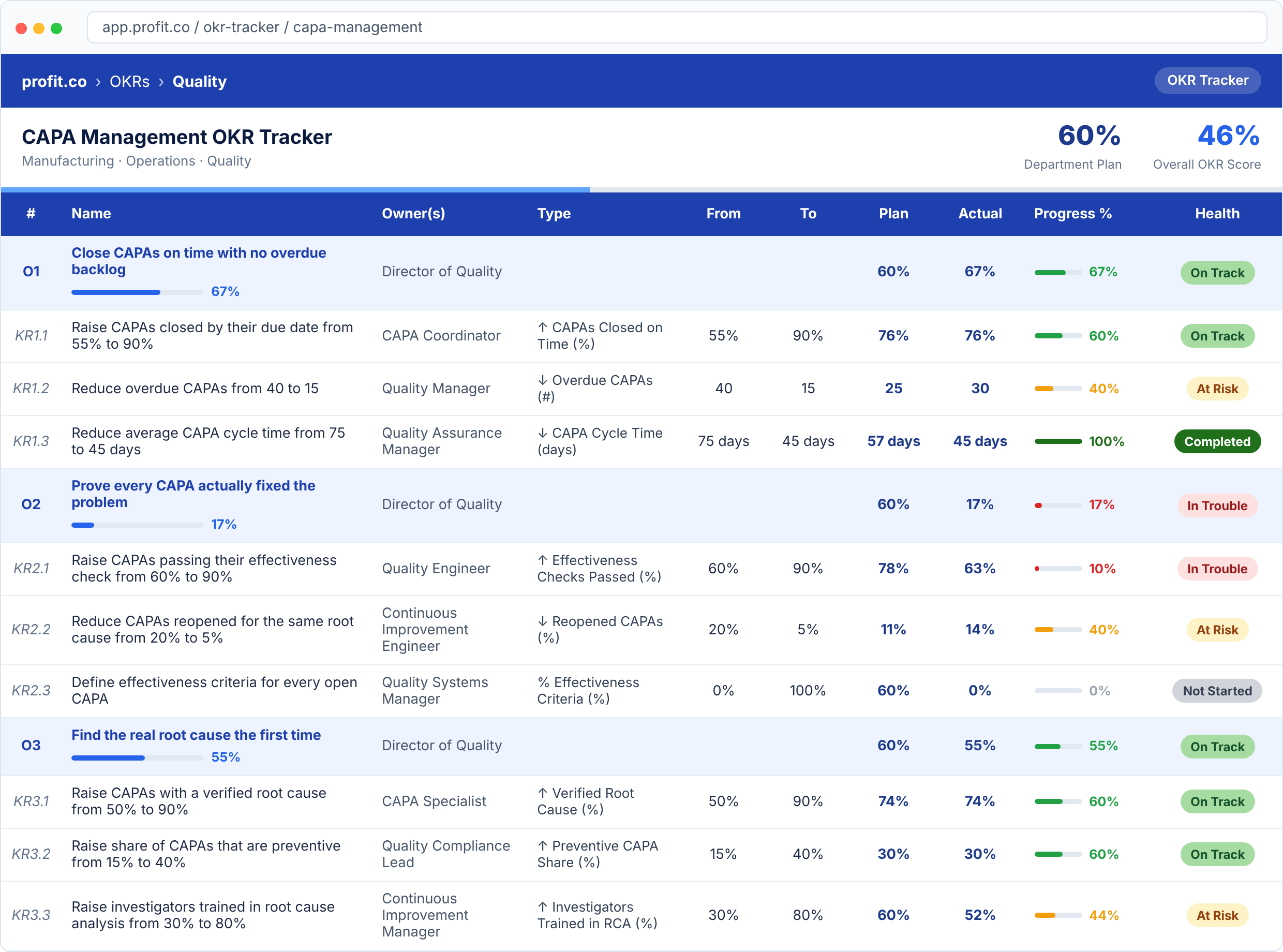
- O1: Close CAPAs on time with no overdue backlog KR1.1: Raise CAPAs closed by their due date from X% to Y% KR1.2: Reduce overdue CAPAs from 40 to 15 KR1.3: Reduce average CAPA cycle time from 75 to 45 days
- O2: Prove every CAPA actually fixed the problem KR2.1: Raise CAPAs passing their effectiveness check from X% to Y% KR2.2: Reduce CAPAs reopened for the same root cause from X% to Y% KR2.3: Define effectiveness criteria for every open CAPA
- O3: Find the real root cause the first time KR3.1: Raise CAPAs with a verified root cause from X% to Y% KR3.2: Raise share of CAPAs that are preventive from X% to Y% KR3.3: Raise investigators trained in root cause analysis from X% to Y%
What is CAPA management?
How quality teams fix problems and stop repeats.
CAPA, or corrective and preventive action, is the process of finding and removing the causes of nonconformities. CAPA management tracks each action from root cause to proven fix.
CAPA management OKRs turn that process into quarterly goals. Each key result, such as closing CAPAs on time or passing effectiveness checks, gets a measurable target and a named owner.
Why track CAPA management with OKRs?
Close quality issues for good, not just on paper.
Clear the CAPA backlog
On-time closure, overdue count, and cycle time goals keep every CAPA moving to closure.
Prove the fix works
Effectiveness checks and repeat root cause goals show whether closed CAPAs stopped the problem.
Fix the real cause
Verified root cause, preventive share, and training goals stop teams from patching symptoms again.
What you'll get in this template
The real difference your team will see.
- A shrinking CAPA backlog, with every overdue action owned and escalated.
- Fewer repeat problems, because closed CAPAs must pass an effectiveness check.
- One shared view of CAPA health for quality, operations, and plant leaders.
How to use this template?
Four simple steps to a live quarterly plan.
- 1
See the example
Check Sheet 1 to see how it works.
- 2
Add your goals
Fill in Sheet 2 with your objectives and key results.
- 3
Update weekly
Enter your latest numbers each week.
- 4
Track your score
Progress and status update on their own.
Related templates
More OKR templates for Manufacturing teams.
Ready to track OKRs?
Start tracking your CAPA management OKRs today
Join 1,500+ organizations using profit.co to close CAPAs for good every quarter.