
Production Scheduling OKR Tracker Template

Rated 4.7/5 by 500+ Leaders
Use ready-made production scheduling OKRs to keep every line on schedule all quarter.
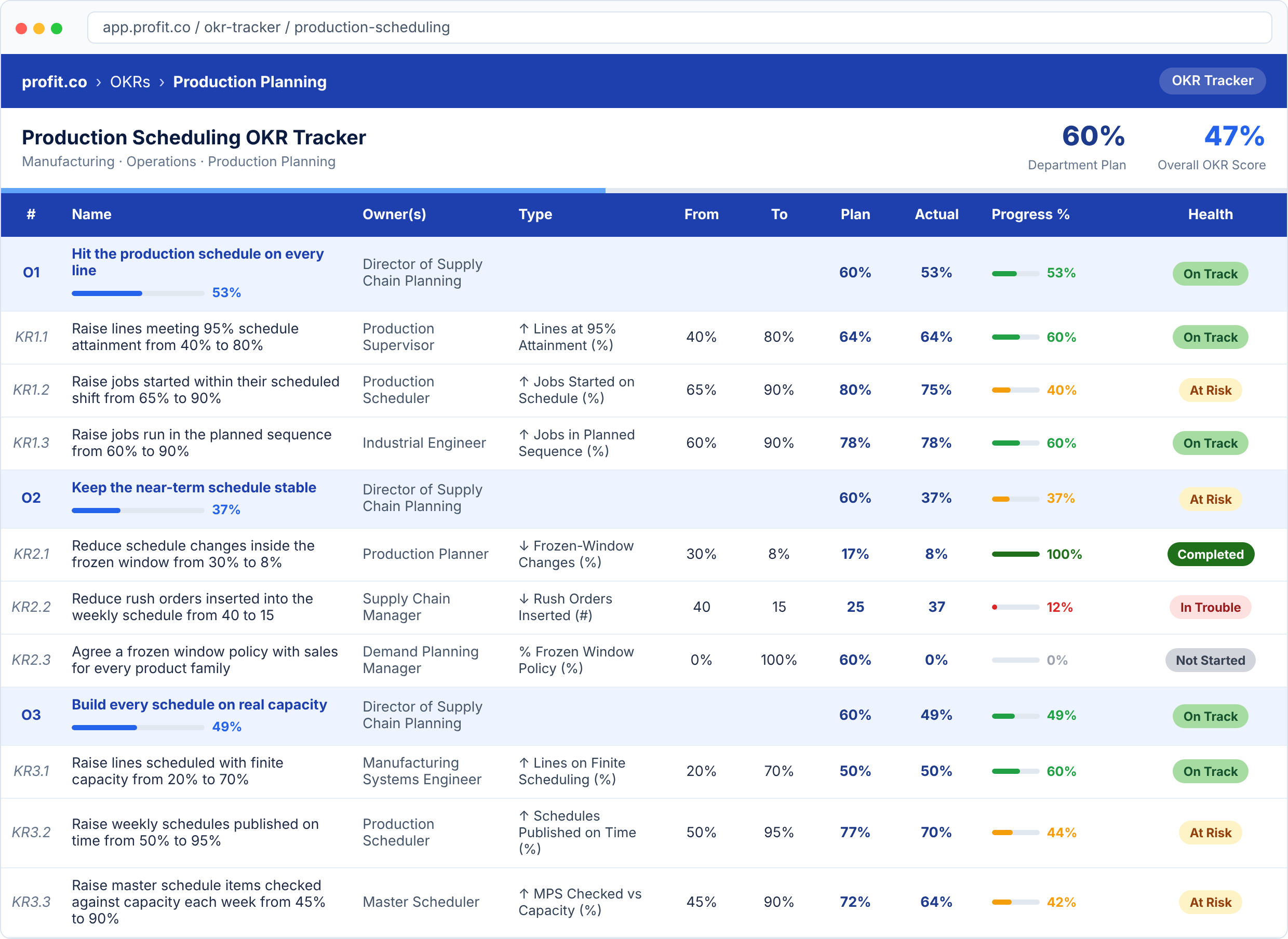
- O1: Hit the production schedule on every line KR1.1: Raise lines meeting 95% schedule attainment from X% to Y% KR1.2: Raise jobs started within their scheduled shift from X% to Y% KR1.3: Raise jobs run in the planned sequence from X% to Y%
- O2: Keep the near-term schedule stable KR2.1: Reduce schedule changes inside the frozen window from X% to Y% KR2.2: Reduce rush orders inserted into the weekly schedule from 40 to 15 KR2.3: Agree a frozen window policy with sales for every product family
- O3: Build every schedule on real capacity KR3.1: Raise lines scheduled with finite capacity from X% to Y% KR3.2: Raise weekly schedules published on time from X% to Y% KR3.3: Raise master schedule items checked against capacity each week from X% to Y%
What is production scheduling?
Deciding what each line makes, and when.
Production scheduling arranges manufacturing work over a set period based on demand and available resources. It starts from the master production schedule, which states what to make, how much, and when.
Production scheduling OKRs turn that schedule into quarterly goals. Each key result, such as cutting frozen-window changes or hitting attainment by line, gets a measurable target and a named owner.
Why track production scheduling with OKRs?
Keep schedules realistic, stable, and met every week.
Hit the schedule
Attainment, start time, and sequence goals show which lines miss the plan and why.
Protect the frozen window
Frozen-window change and rush order goals stop late changes from breaking the near-term schedule.
Schedule to real capacity
Finite capacity, on-time publishing, and master schedule goals keep plans within line capacity.
What you'll get in this template
The real difference your team will see.
- More lines hitting the plan, with fewer jobs started late each shift.
- A stable near-term schedule, because rush changes are agreed before they land.
- One shared view of the schedule for planning, production, and sales leaders.
How to use this template?
Four simple steps to a live quarterly plan.
- 1
See the example
Check Sheet 1 to see how it works.
- 2
Add your goals
Fill in Sheet 2 with your objectives and key results.
- 3
Update weekly
Enter your latest numbers each week.
- 4
Track your score
Progress and status update on their own.
Related templates
More OKR templates for Manufacturing teams.
Ready to track OKRs?
Start tracking your production scheduling OKRs today
Join 1,500+ organizations using profit.co to keep lines on schedule every quarter.