

Profit.co has enhanced Project Health Status with two sophisticated calculation methods: Progress-based (for all projects) and EVM-based (for billable projects only). This dual methodology ensures health scores accurately reflect project performance against plan, with advanced EVM quadrant analysis for financial projects.
Table of Contents
- What is the Project Health Score?
- What are the two Project Health Status calculation methods?
- How does the Progress-Based calculation method work?
- How does the EVM-Based calculation method work?
- When should I use each health calculation method?
- Best practices for managing Project Health Status
- Related Questions
- Frequently Asked Questions
What is the Project Health Score?
Project Health Status is an automated indicator that evaluates how well a project is performing against its planned schedule, progress, and budget. The health status provides at-a-glance visibility into project performance, helping teams identify issues early and take corrective action before problems escalate.
Profit.co calculates health status using two distinct methodologies depending on project type:
- Progress-Based Method: Available for all projects, evaluates schedule adherence based on task completion rates
- EVM-Based Method: Exclusive to billable projects, provides sophisticated cost and schedule performance analysis using earned value management principles
What are the two Project Health Status calculation methods?
Profit.co offers two calculation methodologies to match different project management needs:
| Method | Project Type | Primary Metrics | Best For |
|---|---|---|---|
| Progress-Based | All projects | Planned vs. Actual Progress, Deviation Percentage | Internal projects, non-billable initiatives, teams needing simple schedule tracking |
| EVM-Based | Billable projects only | Schedule Performance Index (SPI), Cost Performance Index (CPI), Quadrant Analysis | Client-facing projects, budget-sensitive initiatives, PMI-compliant organizations |
How does the Progress-Based calculation method work?
The Progress-Based method evaluates project health by comparing planned progress against actual progress using a deviation formula. This method is available for all projects regardless of billing status.
To enable Progress -based calculation, navigate to Settings → Portfolios and Projects → Projects from the left navigation panel. Then, switch to the Project Health tab and select the Progress-based option.
Note: This is the default calculation method.
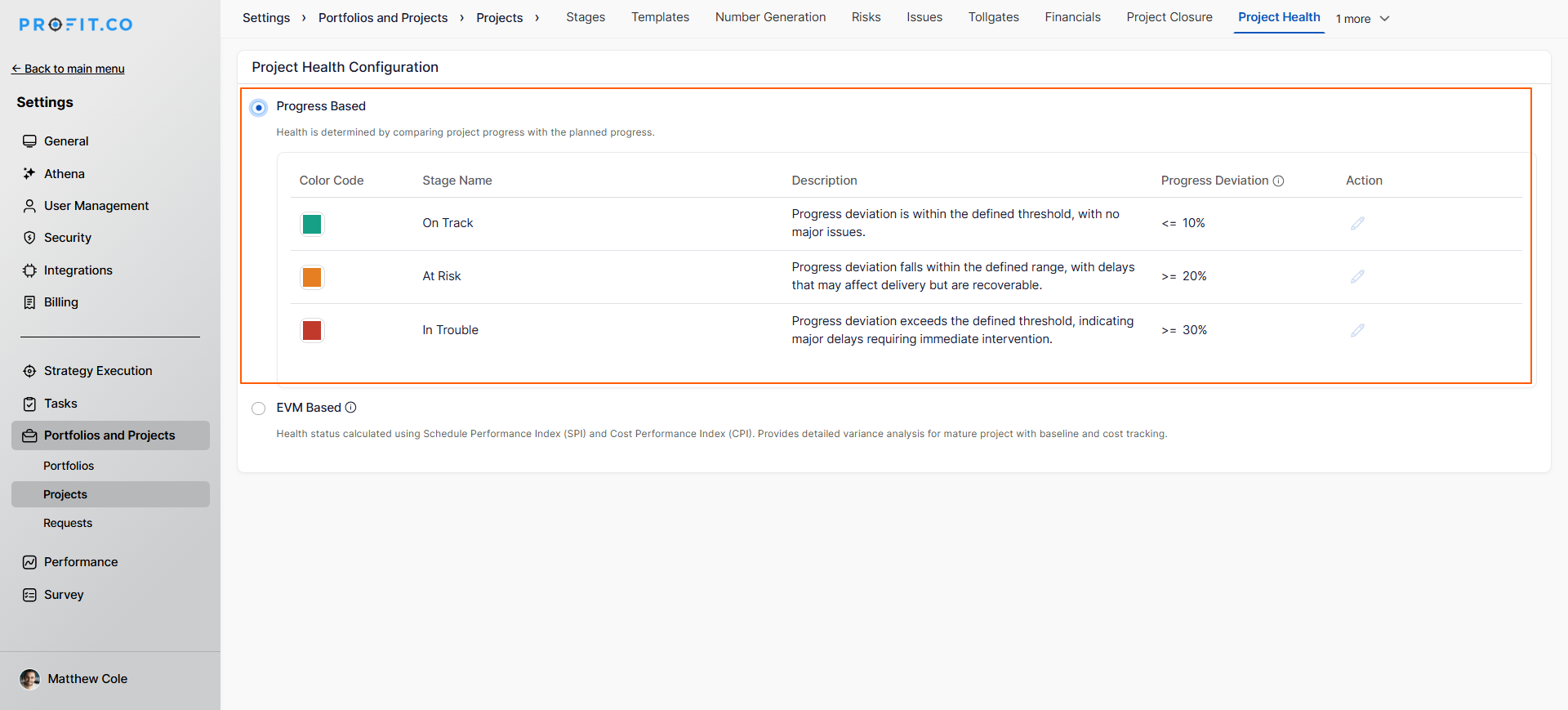
Calculation Formula
Deviation = (Planned Progress - Actual Progress) / Planned Progress * 100
Where:
- Planned Progress = Tasks with due date up to current date ÷ Total tasks with due date
- Actual Progress = Completed tasks (with due date) ÷ Total tasks with due date
Health Status Thresholds
| Health Status | Deviation Range | Meaning |
|---|---|---|
| On Track | Deviation ≤ 10% | Project is meeting or exceeding schedule expectations |
| At Risk | Deviation > 10% and < 30% | Project is falling behind but recoverable with intervention |
| In Trouble | Deviation ≥ 30% | Project is significantly behind schedule, requires immediate action |
Example Calculation
Scenario: A project has 23 total tasks with due dates. As of today, 18 tasks should be completed
Planned Progress: 18 tasks due ÷ 23 total tasks = 78.26%
Actual Progress: 12 completed tasks ÷ 23 total tasks = 52.17%
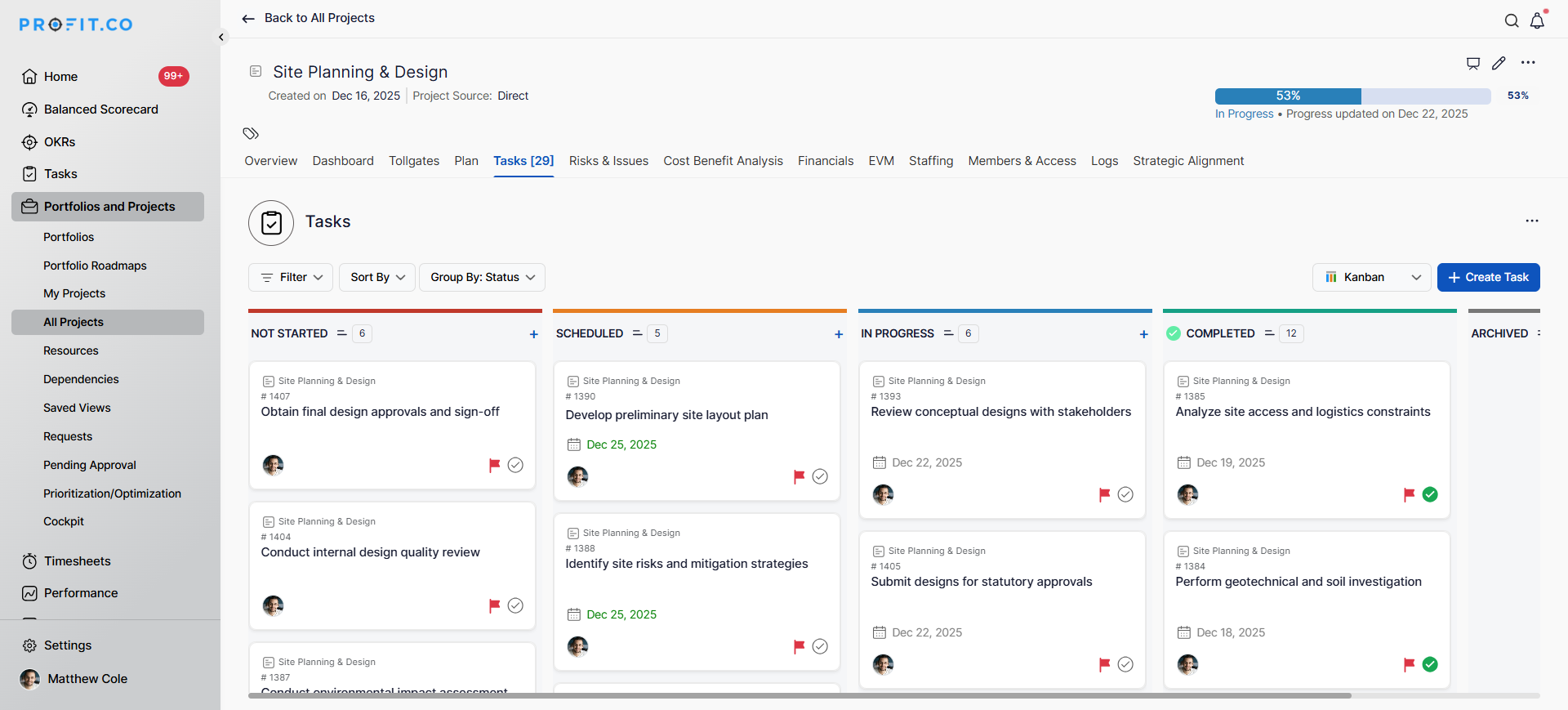
Deviation = (Planned Progress - Actual Progress) / Planned Progress * 100
So: (78.26 - 52.17) / 78.26 = 26.09 / 78.26 = 33.33% deviation
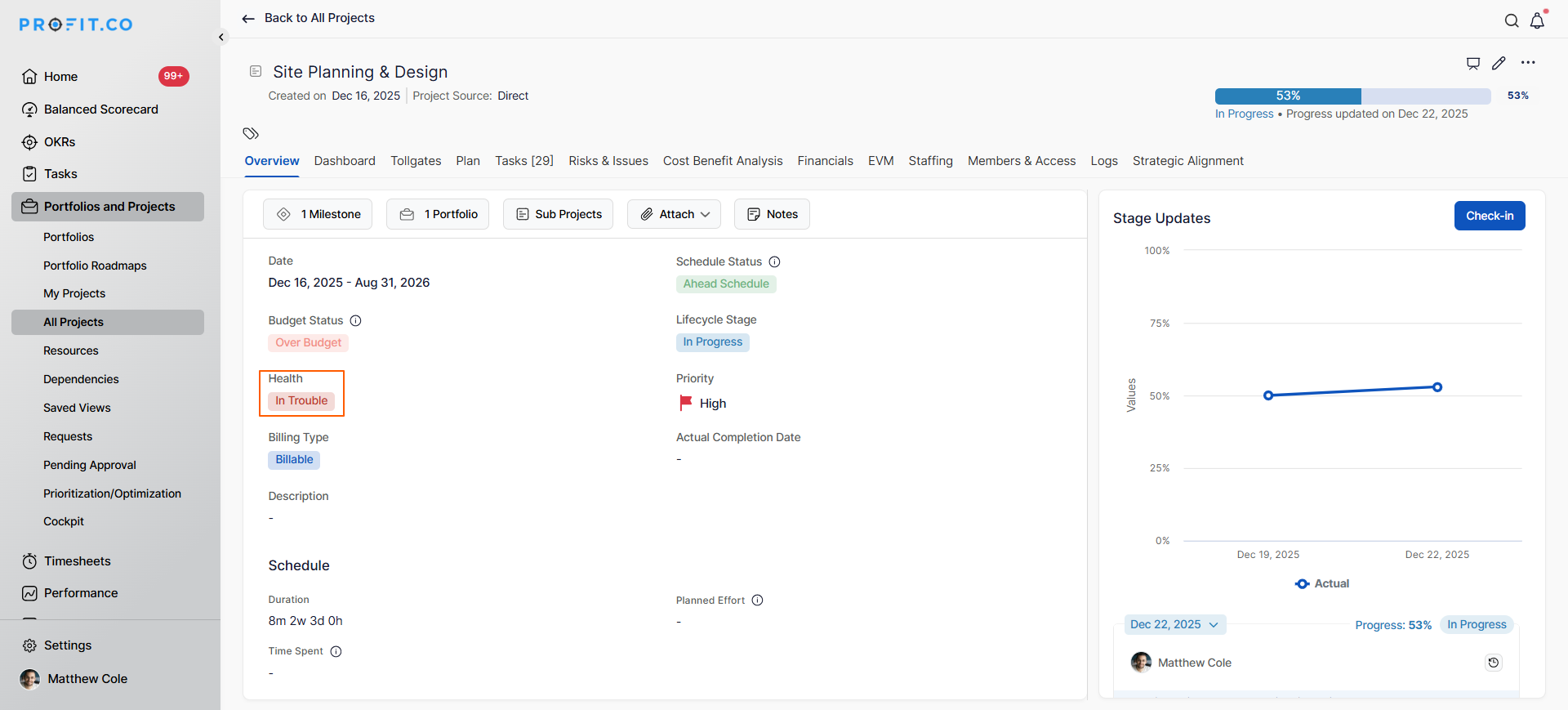
Health Status: In Trouble (deviation is 33.33%)
How does the EVM-Based calculation method work?
The EVM-Based method is exclusive to billable projects and uses Schedule Performance Index (SPI) and Cost Performance Index (CPI) to determine health status. This sophisticated approach plots project performance on customizable EVM quadrants, aligning with PMI best practices for earned value management.
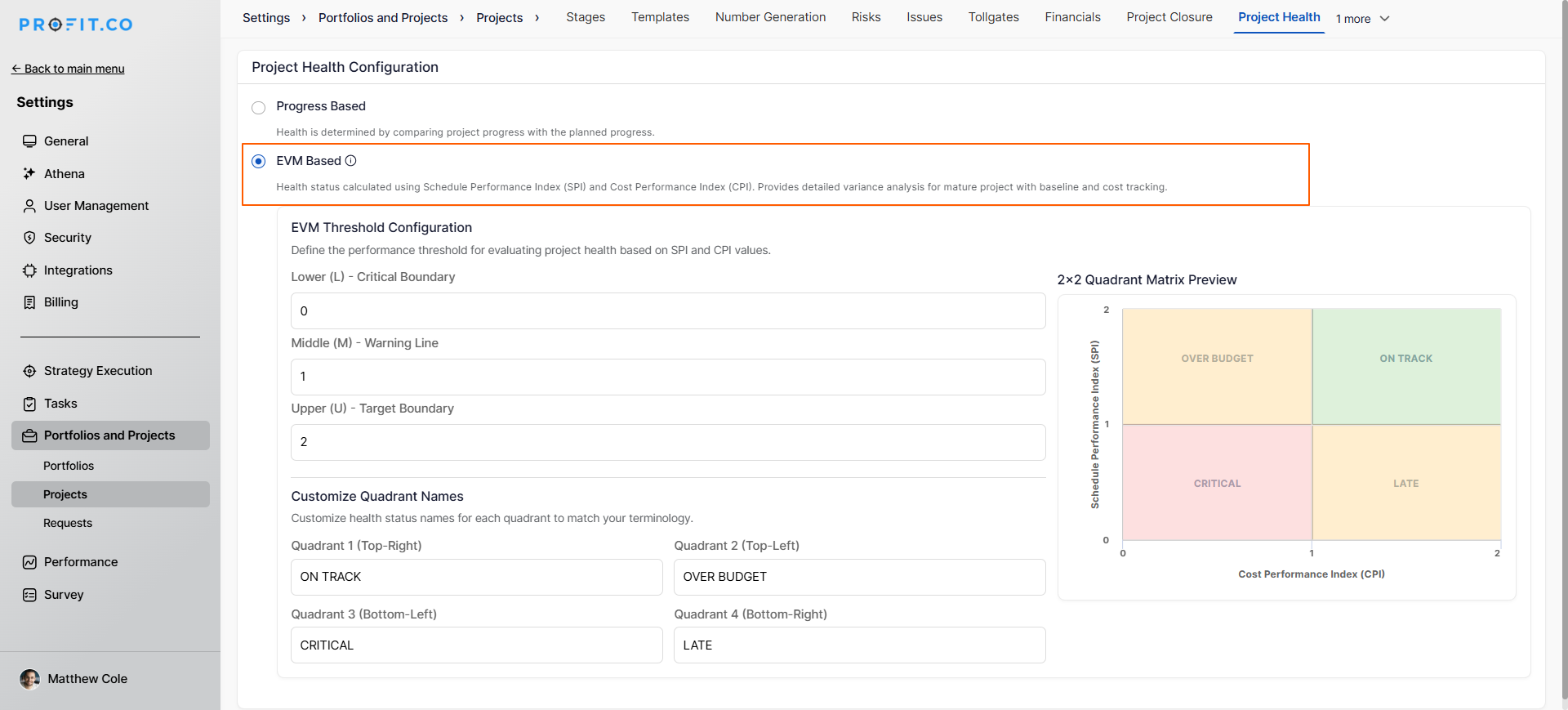
To enable EVM-based calculation, navigate to Settings → Portfolios and Projects → Projects from the left navigation panel. Then, switch to the Project Health tab and select the EVM-based option.
Note: Organizations can customize quadrant names and value ranges to match their specific governance standards.
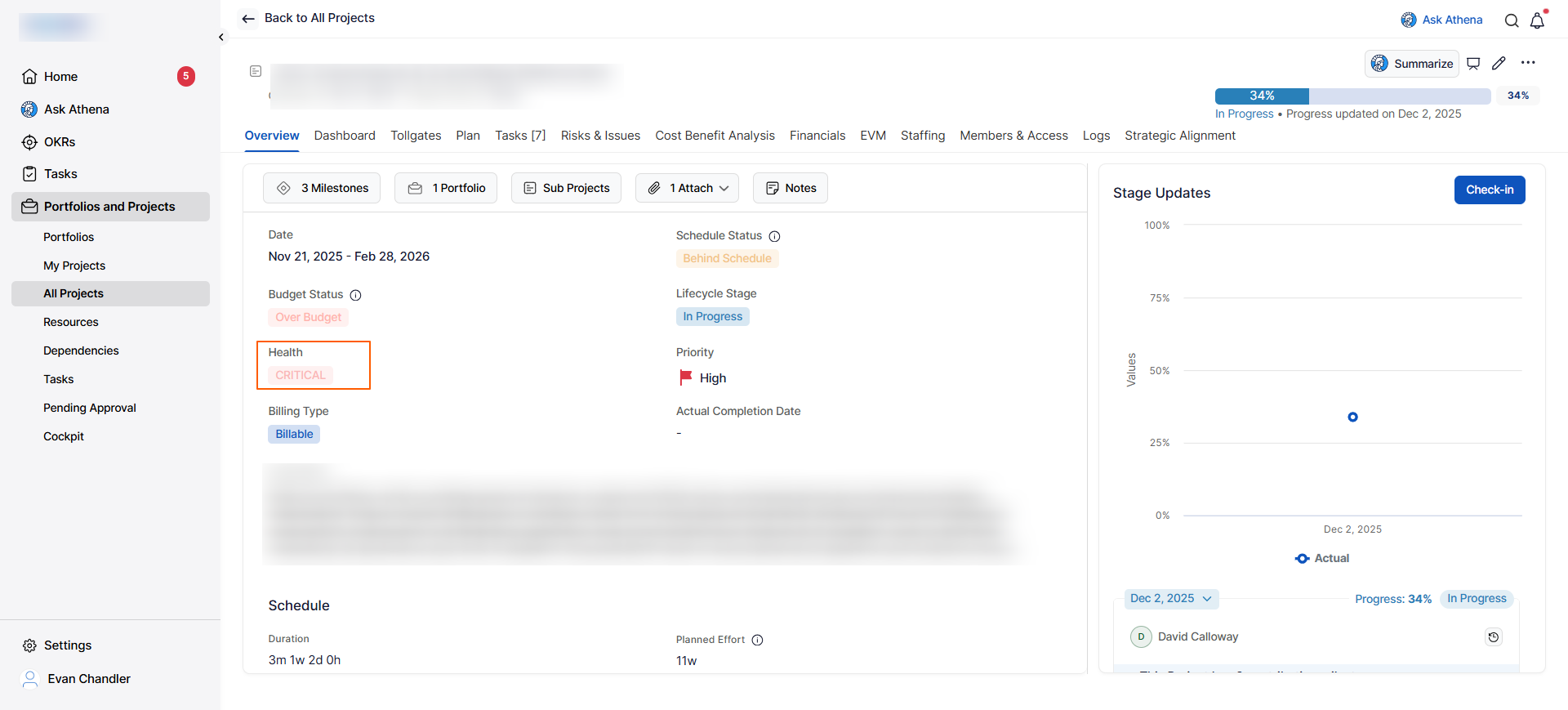
Example EVM Calculation
Scenario: A billable project with
SPI Calculation: 0.84
CPI Calculation: 0.49
Quadrant Position: CRITICAL
Health Status: CRITICAL
When should I use each health calculation method?
Choose the appropriate method based on your project characteristics and organizational requirements:
Use Progress-Based Method When:
Project characteristics:
- Non-billable internal projects
- Simple schedule tracking needs
- Teams without EVM training
- Projects without budget or schedule constraints
- Early-stage companies building MVP products
- Internal IT infrastructure projects
- Process improvement initiatives
- Training and development programs
Use EVM-Based Method When:
- Client-facing billable projects
- Fixed-price contracts requiring cost control
- Projects with strict budget accountability
- PMI-compliant project management requirements
Organizational context:
- Consulting and professional services firms
- Government contractors requiring EVM compliance
- Enterprise project portfolios with financial governance
- Projects requiring CFO-level financial reporting
Best practices for managing Project Health Status
Monitor health trends, not just current status:
Track health status changes over time to identify patterns. A project moving from On Track to At Risk indicates emerging issues, while consistent At Risk status may indicate systemic estimation problems requiring process improvement.
Use health status for proactive communication:
Share health status with stakeholders regularly, explaining the methodology and what actions are being taken for at-risk projects. Transparency builds trust and enables early stakeholder engagement when intervention is needed.
Calibrate thresholds to organizational maturity:
New teams or organizations may need tighter thresholds (e.g., 5% for At Risk) to build discipline, while mature teams with consistent delivery may use standard thresholds effectively. Adjust based on historical performance data.
Related Questions
Frequently Asked Questions
Yes, but only if the project is configured as billable.
Health status is calculated in real-time whenever relevant data changes such as task completion, due date modifications, or cost actuals entry.
When SPI or CPI values fall exactly on threshold boundaries (e.g., SPI = 1.0), the system applies consistent rounding rules to assign the project to a specific quadrant.
