

Profit.co allows you to enable and customize the Reflection Dashboard.
Why this feature?
- By using this feature you can customize the reflection dashboard while you perform reflect/reset in OKRs.
- Customization enables the inclusion of relevant metrics and data sources, ensuring that the dashboard provides the most valuable and actionable insights.
- It facilitates better data visualization and presentation, making it easier to understand and interpret the information.
Note: Only Super Users have access to customize the reflection dashboard.
Step 1
Navigate to Settings → OKRs→ Authoring from the left navigation panel.
On the Reflect/Reset page, enable the Reflect/Reset toggle and click on the Question Builder button.

Step 2
On the Master Layout: Reflect/Reset for OKR page, customize the questions in the Inspector tab, and based on the questions you can pick the Chart Type.

Once you customize the questions for reflection, they will be available for the users in the Reflection panel under the OKRs overview page.

Step 3
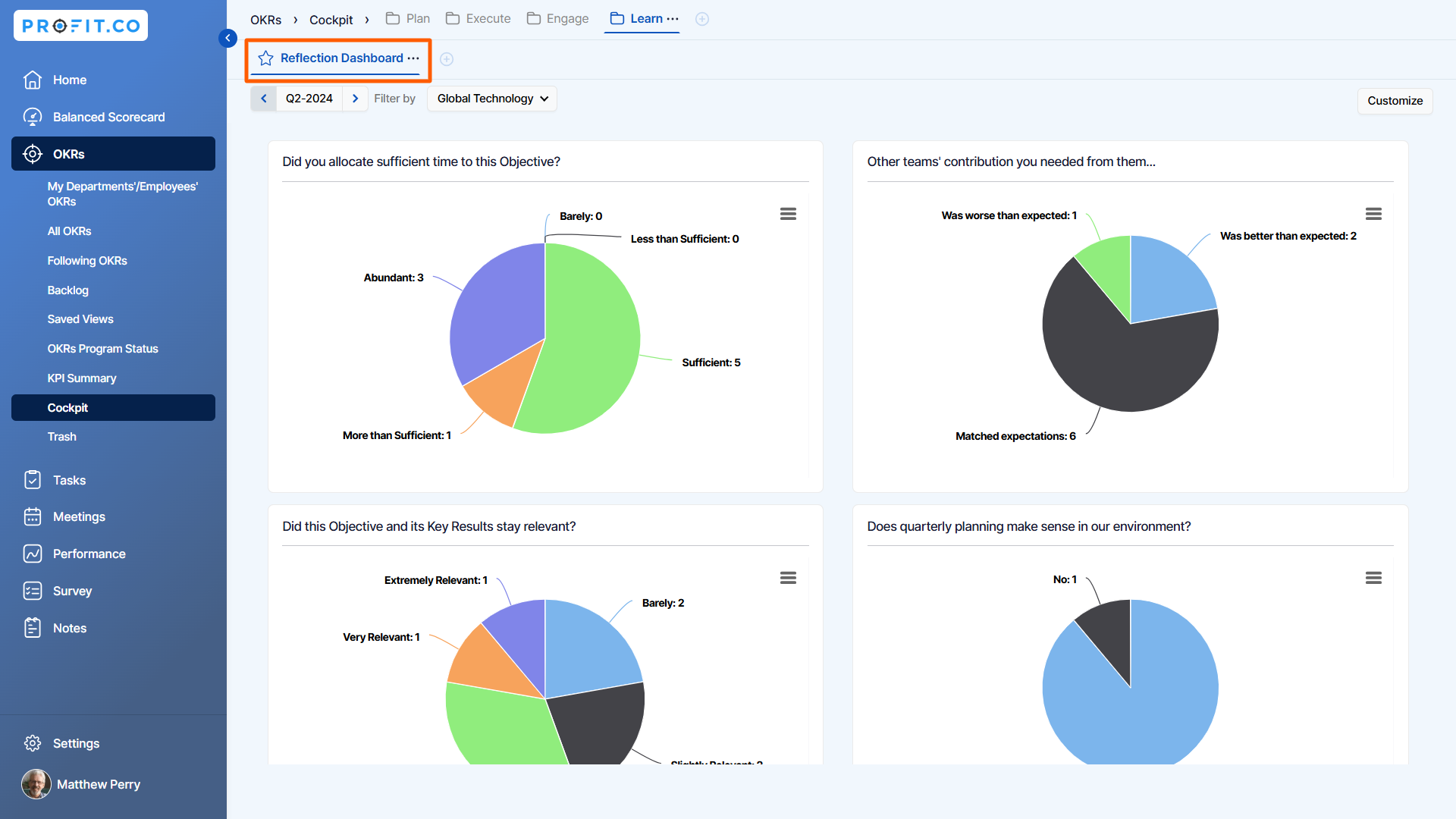
Once the questions are replied and submitted, reports will be generated and you can view the reports by navigating to Home → Reflection Dashboard from the left navigation panel.
On the Reflection Dashboard page, you can see all the responses given by all the employees as reports throughout the organization.
Related Answer Post
To learn more about how to reflect/reset OKRs, click here.
