

Profit.co provides Control KPI as one of the seven Key Result (KR) types, helping teams maintain a KPI within a defined acceptable range.
Table of Contents
Why this feature?
Control KPIs help you track metrics that must stay within a steady or expected range rather than increase or decrease. This type is ideal for monitoring recurring activities, operational consistency, and success-based outcomes.
Using Control KPIs enables you to maintain consistent performance for recurring work, evaluate whether a KPI stays within expected limits, support quick data-driven decisions with simple progress indicators, and track output patterns without a fixed numeric target.
What is a Control KPI?
A Control KPI is used when you are evaluating performance based on recurring tasks or outcomes that do not fit the Increase or Decrease KR structures. Examples include writing at least four blogs a week, making a minimum number of customer calls daily, or keeping response time within an acceptable limit.
Control KPIs evaluate success based on thresholds, ranges, or consistency rather than growth.
Note
The Control KPI type has been removed from KPI creation in Settings, so it can no longer be selected when configuring a new KPI. This closes off an incompatible option at the source.
Progress Calculation Types in Control KPI
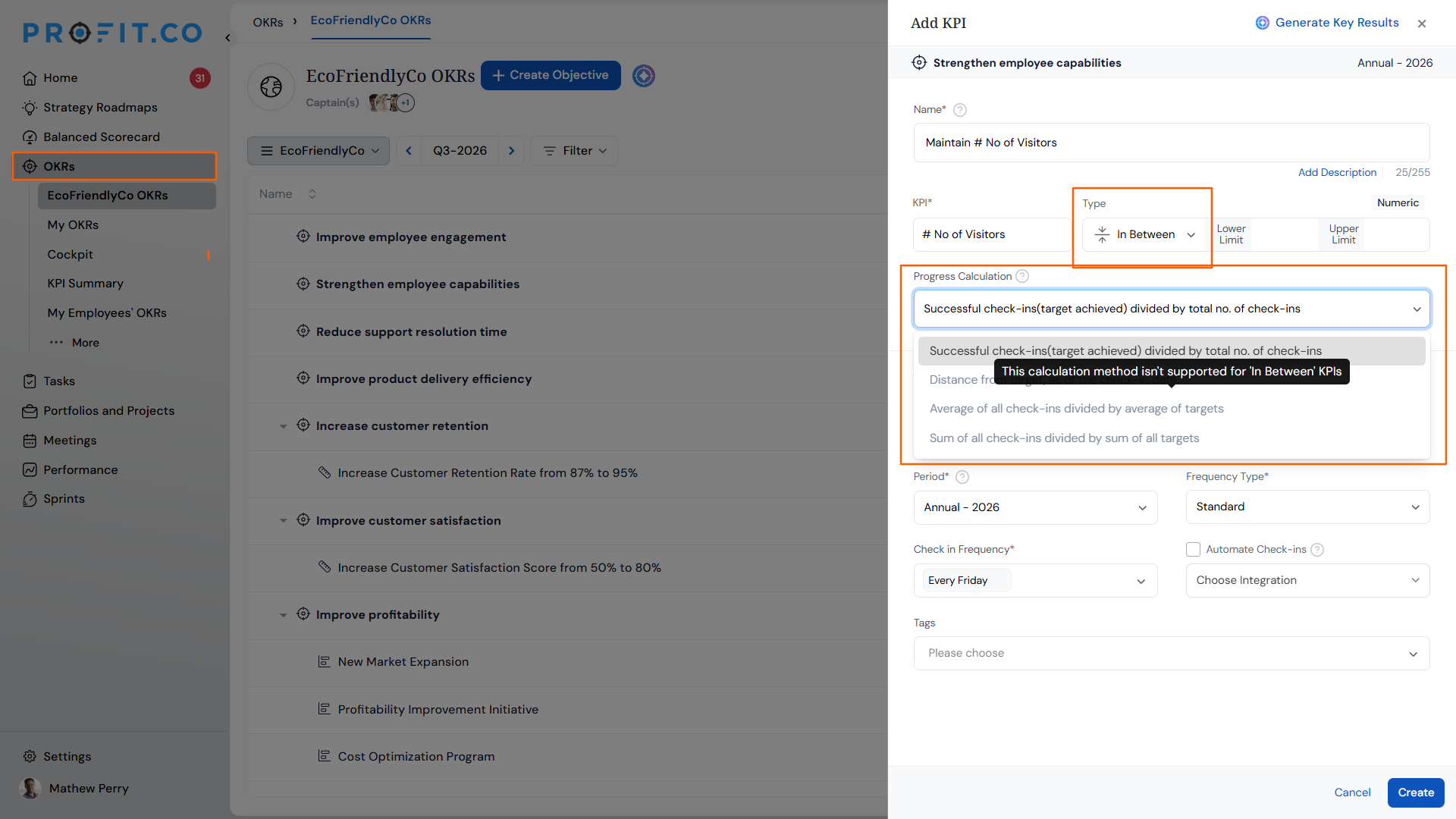
Control KPIs support four calculation methods:
- Successful check-ins (target achieved) divided by total number of check-ins - calculates how many check-ins met the expected target.
- Distance from target as of the check-in date - measures how far the check-in value is from the target threshold.
- Average of all check-ins divided by average of targets - uses average performance to calculate overall progress.
- Sum of all check-ins divided by sum of all targets - evaluates cumulative performance over time.
Note
When a key result's KPI value type is set to In Between, only Successful check-ins (target achieved) divided by total number of check-ins is selectable. The other three methods appear greyed out, and hovering over them shows: "This calculation method isn't supported for 'In Between' KPIs."
Value Types in Control KPI
Control KPIs allow three value types: At Least, At Most, and In Between (successful check-ins only).
| Value Type | Main Function |
|---|---|
| At Least | The progress won't update only if the check-in value is below the lower limit. |
| At Most | The progress won't update only if the check-in value is beyond the upper limit. |
| In Between | The progress won't update if the check-in value is below the lower limit and beyond the upper limit. |
Control KPI Calculation Methods
Learn more about each Control KPI calculation method:
- Successful check-ins (target achieved) divided by total number of check-ins in Control KPI: Read more
- Distance from target as of the check-in date in Control KPI: Read more
- Average of all check-ins divided by average of targets in Control KPI: Read more
- Sum of all check-ins divided by sum of all targets in Control KPI: Read more
Best Practices for Using Control KPIs in Profit.co
- Use Control KPIs for recurring work: choose this KR type when tracking routine or repeated activities where consistency matters more than increase or decrease.
- Define clear thresholds: set At Least, At Most, or a specific range so progress updates only when results fall within the intended limits.
- Select the appropriate calculation method: pick the progress calculation type that best reflects how the metric should be evaluated, and confirm it's supported for the value type you've chosen.
- Check in regularly: frequent check-ins ensure progress reflects real performance and helps identify patterns early.
Frequently Asked Questions
Use a Control KPI when a metric needs to stay within a target range or achieve a consistent minimum or maximum output.
Yes. You can edit the KR type if you need to restructure how progress is measured.
Yes. You can set the expected target, limits, and check-in frequency like any other KPI type.
The Control KPI type has been removed from KPI creation in Settings to prevent incompatible configurations from being set up.
If the KPI's value type is set to In Between, only Successful check-ins divided by total check-ins is supported. The remaining methods are disabled for that value type.
Execute your strategy with confidence
Connect OKRs, tasks, and teams in one place with Profit.co
