

Profit.co lets you log progress on a key result whenever it makes sense, without being tied to a fixed check-in date or frequency. This Flexible check-in type sits alongside the existing Standard and Custom types you already use.
Table of Contents
What Is the Flexible Check-In Type?
Flexible is one of three check-in types in Profit.co, alongside Standard and Custom. It lets you log progress on a key result at any time, without a fixed check-in date or frequency requirement.
Flexible check-ins do not appear in the check-in chart, do not show a Plan vs Actual comparison, and are not included in the check-in discipline score. You still enter a value and add comments when checking in, the same fields used for Standard and Custom check-ins.
Why Does the Flexible Check-In Type Matter?
Standard and Custom check-ins tie progress logging to a set date or frequency, which doesn't fit every key result. Flexible check-ins let you log progress whenever it makes sense for the work, instead of forcing an update on a schedule that doesn't apply.
Because Flexible check-ins are excluded from the check-in discipline score, they don't penalize teams for key results where periodic tracking isn't meaningful. This lets you match the check-in approach, Standard, Custom, or Flexible, to what each key result actually needs.
How Do I Enable Flexible Check-Ins?
Step 1
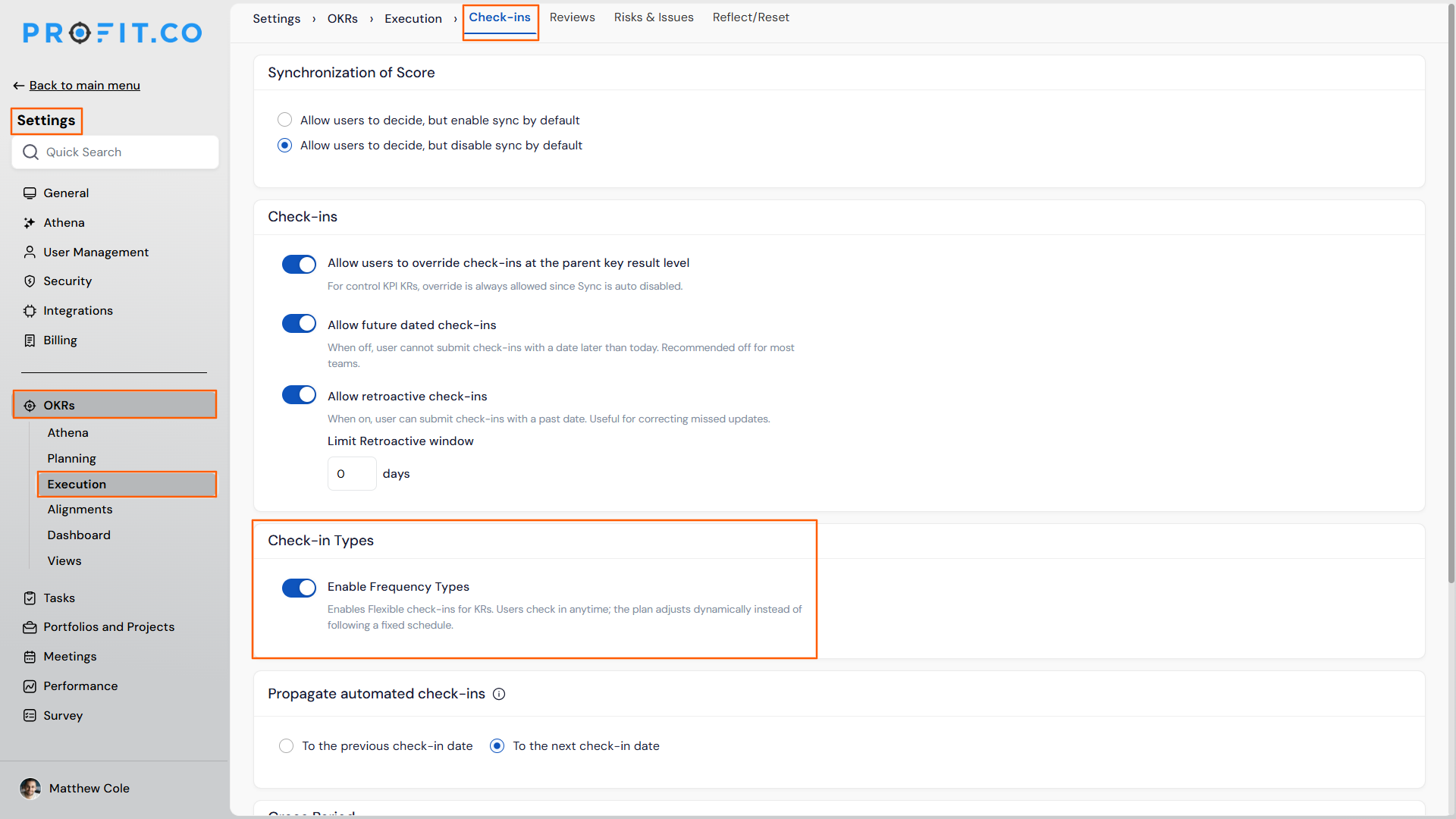
- Navigate to Settings → OKRs → Execution from the left navigation panel.
- Select the Check-ins tab and locate the Check-in Types section.
- Enable the Enable Flexible Check-ins toggle.
Step 2
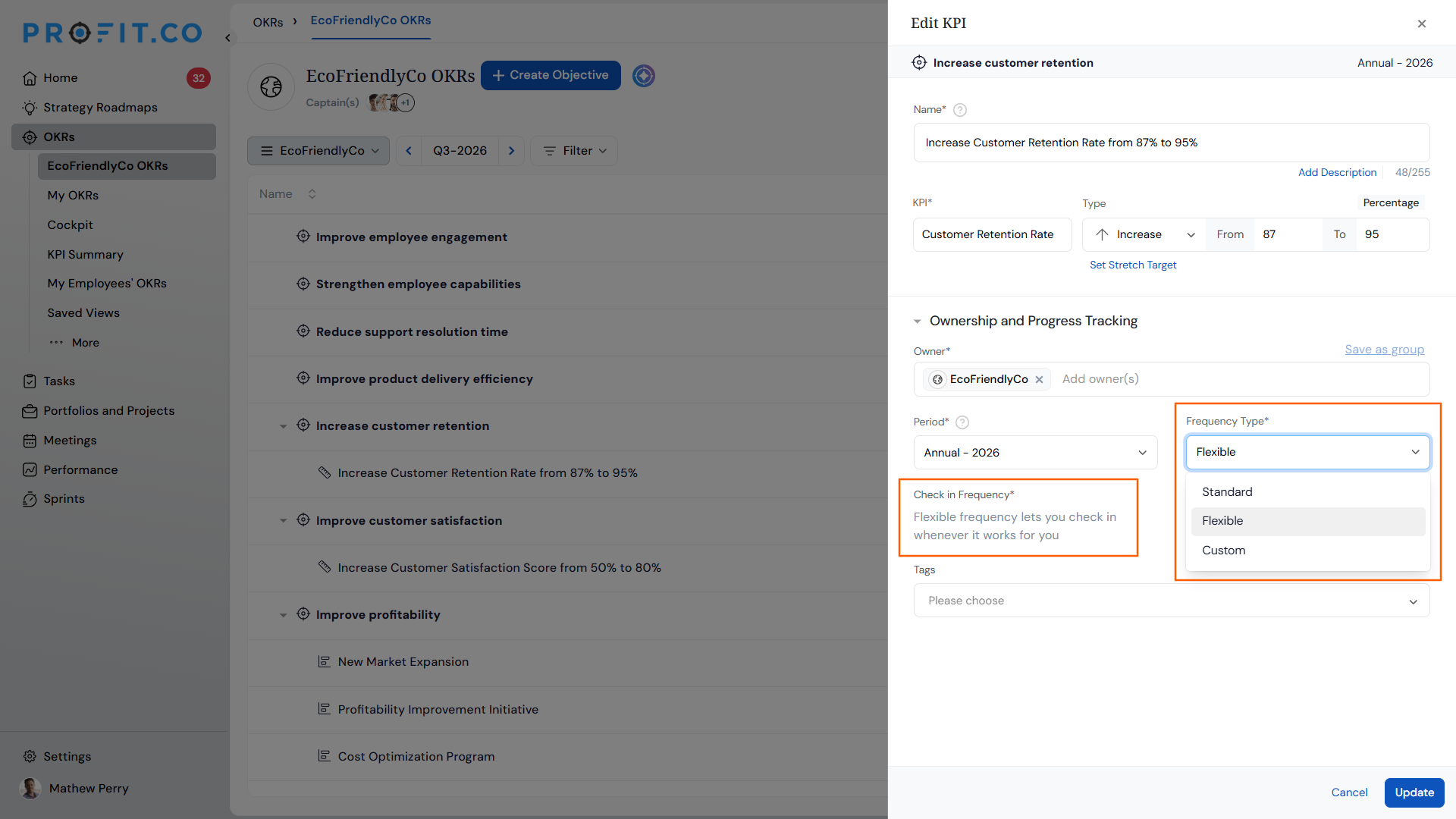
- Select Flexible as the check-in type when configuring a key result.
- Enter a value and add comments when checking in, at any time.
What Happens When You Use a Flexible Check-In?
| Scenario | What Happens |
|---|---|
| You log a Flexible check-in on a key result. | Profit.co accepts the check-in without requiring a fixed date or frequency. |
| You view the check-in chart for a key result using Flexible check-ins. | Profit.co displays Flexible check-ins in the check-in chart |
| You view Plan vs Actual data for a key result using Flexible check-ins. | Profit.co includes Flexible check-ins in the Plan vs Actual comparison for that key result. |
| You switch a key result's check-in type, such as from Standard to Flexible or back. | Profit.co keeps all existing check-in history on the key result and only changes how future check-ins are logged. |
What Are the Best Practices for Flexible Check-Ins?
- Reserve Flexible check-ins for key results where periodic tracking isn't meaningful, since they're excluded from the check-in discipline score and won't reflect team cadence.
- Use Standard or Custom check-ins instead of Flexible if you need the check-in chart or Plan vs Actual comparison, since Flexible check-ins don't appear in either.
- Enable the Enable Flexible Check-ins toggle in Settings before trying to assign it to a key result, since the type won't appear as an option until the toggle is turned on.
- Switch a key result's check-in type without worrying about losing data, since existing check-in history stays intact regardless of which type you switch to.
- Mix check-in types across a department deliberately, choosing Standard for scheduled tracking, Custom for tailored frequencies, and Flexible for open-ended updates, rather than defaulting every key result to one type.
Related Articles
- How does the check-in discipline process work in Profit.co?
- How to set up custom check-in frequency?
- How do I check-in for Key Results?
What Are Some Frequently Asked Questions About Flexible Check-Ins?
Yes. The three check-in types are independent settings you choose per key result, so a department can mix all three.
No. Enabling the toggle only makes Flexible available as an option to assign. Existing key results keep their current check-in type until you switch them.
Yes. Flexible check-ins use the same value and comment fields as Standard and Custom check-ins.
Execute your strategy with confidence
Connect OKRs, tasks, and teams in one place with Profit.co
