

Profit.co lets you change an OKR item's type and its position in the hierarchy in a single action, instead of deleting the item and rebuilding it from scratch. The conversion carries the item into its new structure immediately, wherever in the organization that structure sits.
Table of Contents
What Is OKR Item Conversion?
OKR item conversion is the action that changes an OKR item's type, for example turning a Child Objective into an Initiative, and repositions it under a new parent anywhere in the hierarchy, including a different department or cycle. It applies to Objectives, Child Objectives, and Initiatives.
When the converted item has child items, Profit.co checks each one for compatibility with the new parent's settings as part of the same action, rather than requiring a separate step.
| From | To |
|---|---|
| Objective | Child Objective |
| Objective | Initiative (project-tracked key results only) |
| Child Objective | Initiative |
| Initiative | Child Objective |
Note
An Initiative cannot be converted to a top-level Objective.
Why Does OKR Item Conversion Matter?
Before conversion, correcting a misplaced OKR item meant deleting it and rebuilding it under the correct parent, then manually re-entering every check-in, comment, and progress value that existed on the original item. Conversion removes that rebuild entirely, since history transfers with the item in the same action.
When a converted item has child items that no longer fit the new parent's settings, Profit.co adjusts each one automatically, instead of requiring you to open and fix every child item individually.
How Does OKR Item Conversion Work?
Step 1
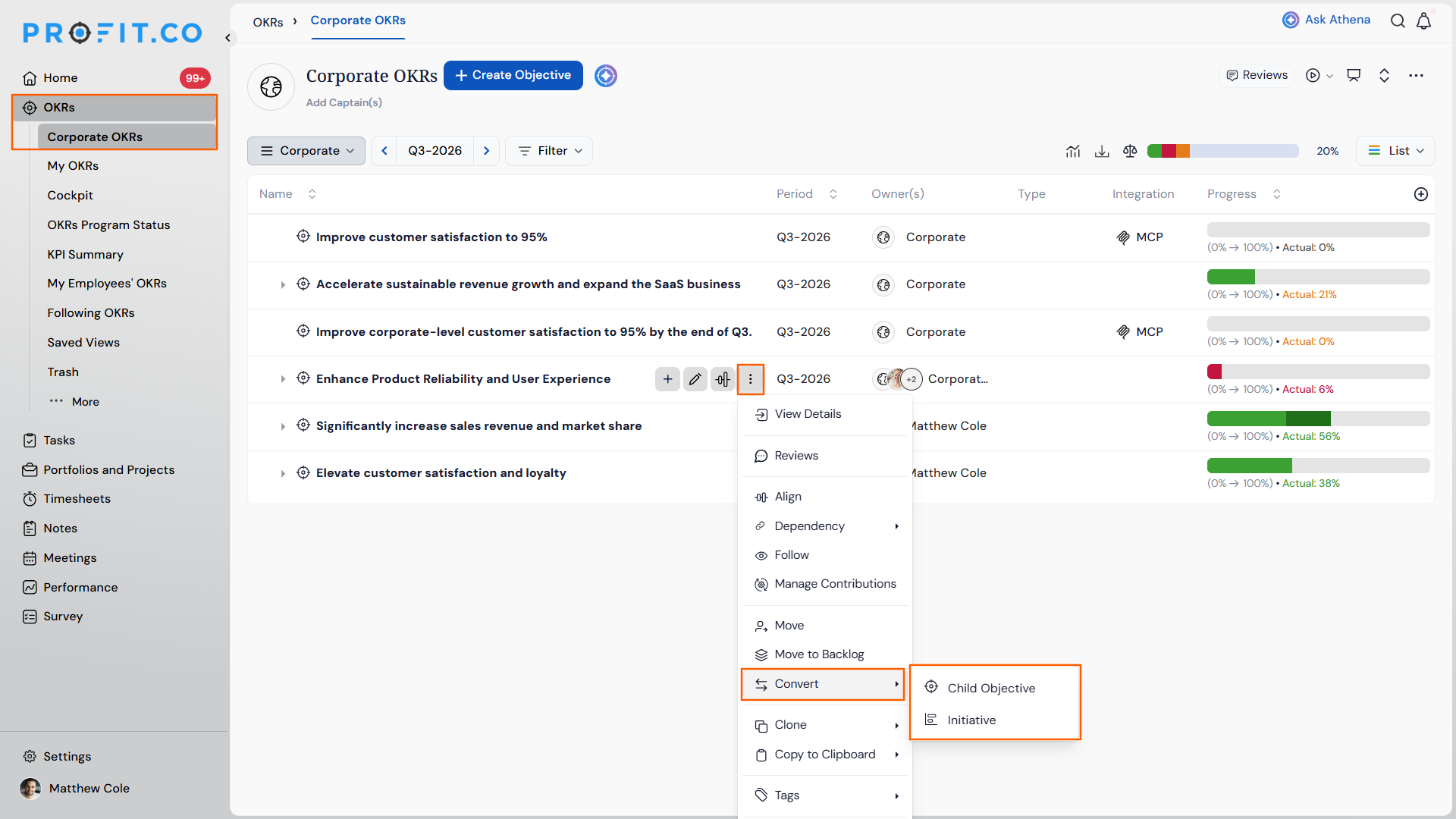
- Open the item you want to convert.
- Click Convert from the action menu.
- Select the destination type from the supported conversion paths.
Step 2
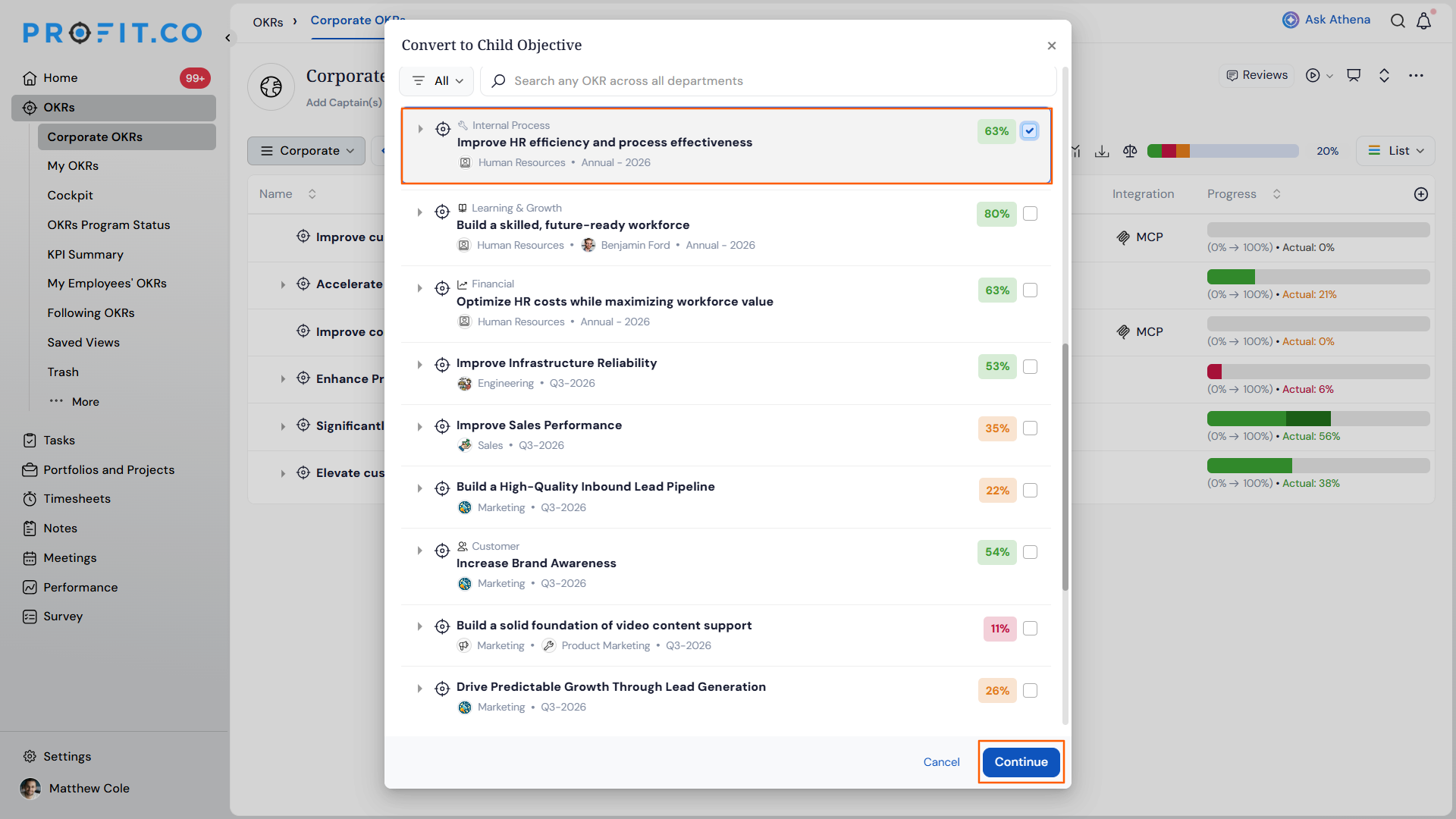
- Use the hierarchy picker to select the new parent, anywhere in the hierarchy including a different department or cycle, and click Continue.
Step 3
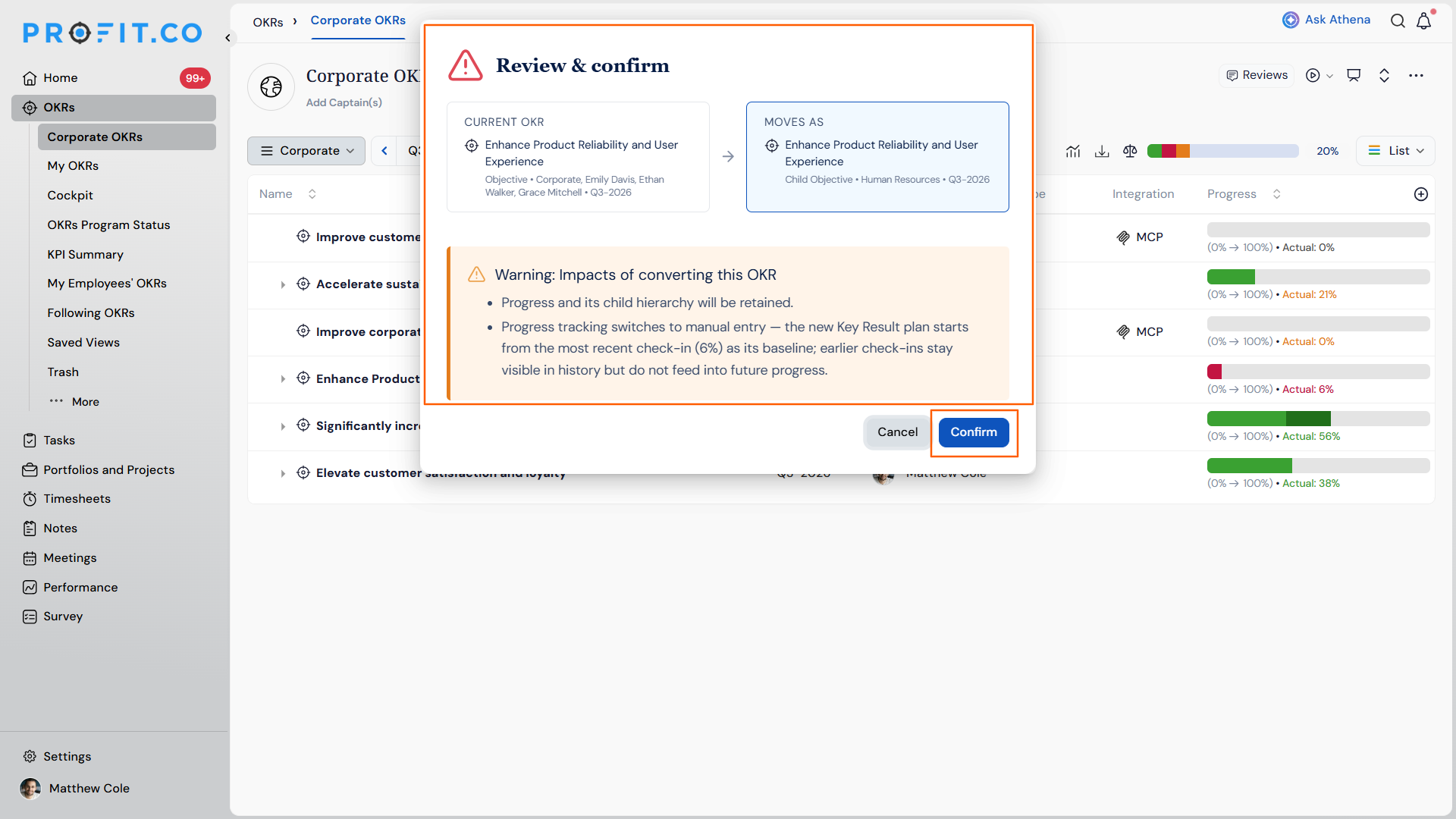
- Review the summary of changes.
- Confirm the conversion to move the item and its history immediately.
What Happens When You Convert an OKR Item?
| Scenario | What Happens |
|---|---|
| You convert an OKR item to a new type and parent. | Profit.co preserves the item's check-in history, comments, and progress records. |
| You convert an item whose child items are incompatible with the new parent's settings. | Profit.co automatically converts each incompatible child item to remain compatible with the new parent. |
| You confirm a conversion after reviewing the summary of changes. | Profit.co moves the item and everything beneath it immediately, with full history intact. |
| You want to reverse a conversion after confirming it. | Profit.co lets you convert the item back to its original type and parent using the same conversion flow. |
| You convert an item that other users are viewing or following. | Profit.co does not send a notification to those users about the change. |
| You exit the confirmation screen without confirming the conversion. | Profit.co discards the change and keeps the item in its original type and parent. |
What Are the Best Practices for OKR Item Conversion?
- Confirm the destination type and new parent carefully before confirming, since converting an item back afterward is a separate manual action, not an automatic undo.
- Check the conversion summary for auto-converted child items before confirming, since incompatible children change type without a separate prompt for each one.
- Tell affected teams about a conversion yourself if visibility matters, since Profit.co does not send a notification when an item's type or parent changes.
- Use conversion to fix hierarchy mistakes instead of deleting and recreating items, since check-in history and comments only carry over through conversion.
- Verify an Objective's key results are project-tracked before converting it to an Initiative, since that path only supports project-tracked key results.
Related Articles
What Are Some Frequently Asked Questions About OKR Item Conversion?
No. An Initiative cannot be converted to a top-level Objective under the supported conversion paths.
No. This path only supports Objectives whose key results are project-tracked.
Yes. The hierarchy picker lets you select a new parent anywhere in the hierarchy, including a different department or cycle.
Yes. Conversion preserves check-in history, comments, and progress on every conversion, including converting an item back to its original type and parent.
Execute your strategy with confidence
Connect OKRs, tasks, and teams in one place with Profit.co
