

Creating and editing KPIs in Profit.co isn't governed by one on/off switch. Three separate privileges, plus any App-Specific roles a user holds, determine who can do what.
Table of Contents
What are the KPI Creation and Edit Permissions?
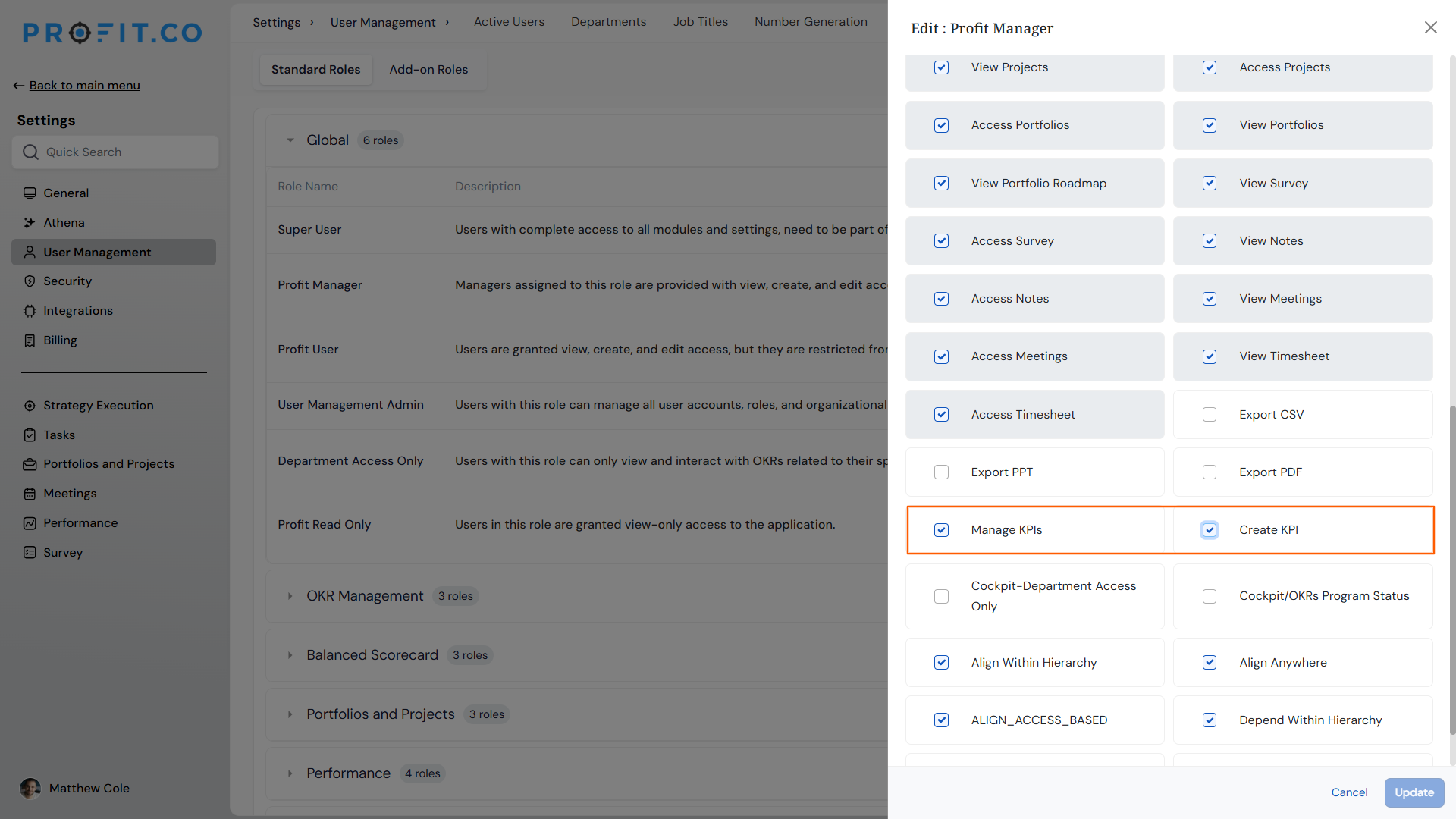
KPI creation and editing is controlled by three distinct privileges on a Global role, not one shared checkbox. Create KPI Profit App is a fixed base privilege that comes checked and cannot be turned off on Standard Roles. Create KPI lets a user add a new KPI while creating a key result, and it exists on both Profit Manager and Profit User. Manage KPIs governs editing any KPI in the library, including pre-defined ones, and it exists only on Profit Manager; it isn't present on Profit User at all.
| Privilege | Profit Manager | Profit User | Admin Can Change It? |
|---|---|---|---|
| Manage KPIs | Checked | Not present | Yes |
| Create KPI | Checked | Checked | Yes |
These privileges carry no department dimension; department scoping runs through separate privileges such as Department Access Only, and KPIs are organized into categories rather than departments. Because Profit.co roles are additive across apps, a user's actual KPI access can also come from an App-Specific role like OKR Admin or Captain, not just their Global role.
How KPI Selection and Creation Fits Into OKR Authoring
These permissions apply inside OKR authoring, not a separate KPI form. Hovering an objective reveals a + button with Add KPI, Add Initiative, and Add Child Objective, and Add KPI opens a panel with a KPI* field and a Suggested KPIs dropdown.
Selecting an existing KPI there needs only standard OKR creation access, not Create KPI or Manage KPIs. An unmatched search shows a measurement-type creation prompt for users with Create KPI, or No KPI Found for users without it; the dropdown has no edit option either way, so all editing happens separately in Settings → General → KPIs under Manage KPIs.
Why KPI Creation and Edit Permissions Matter
Disabling Create KPI on a Global role can look like it blocks KPI creation, when a user's OKR Admin or Captain role still grants it through Manage KPIs. Understanding all three privileges, and how roles stack, lets you configure exactly who can create or edit KPIs without leaving a backdoor open through another role.
This distinction protects everyday work too: restricting who can create or edit KPIs on a role doesn't cut that role off from the library its people already rely on.
How It Works
Method 1: Edit KPI Privileges on a Role
Step 1
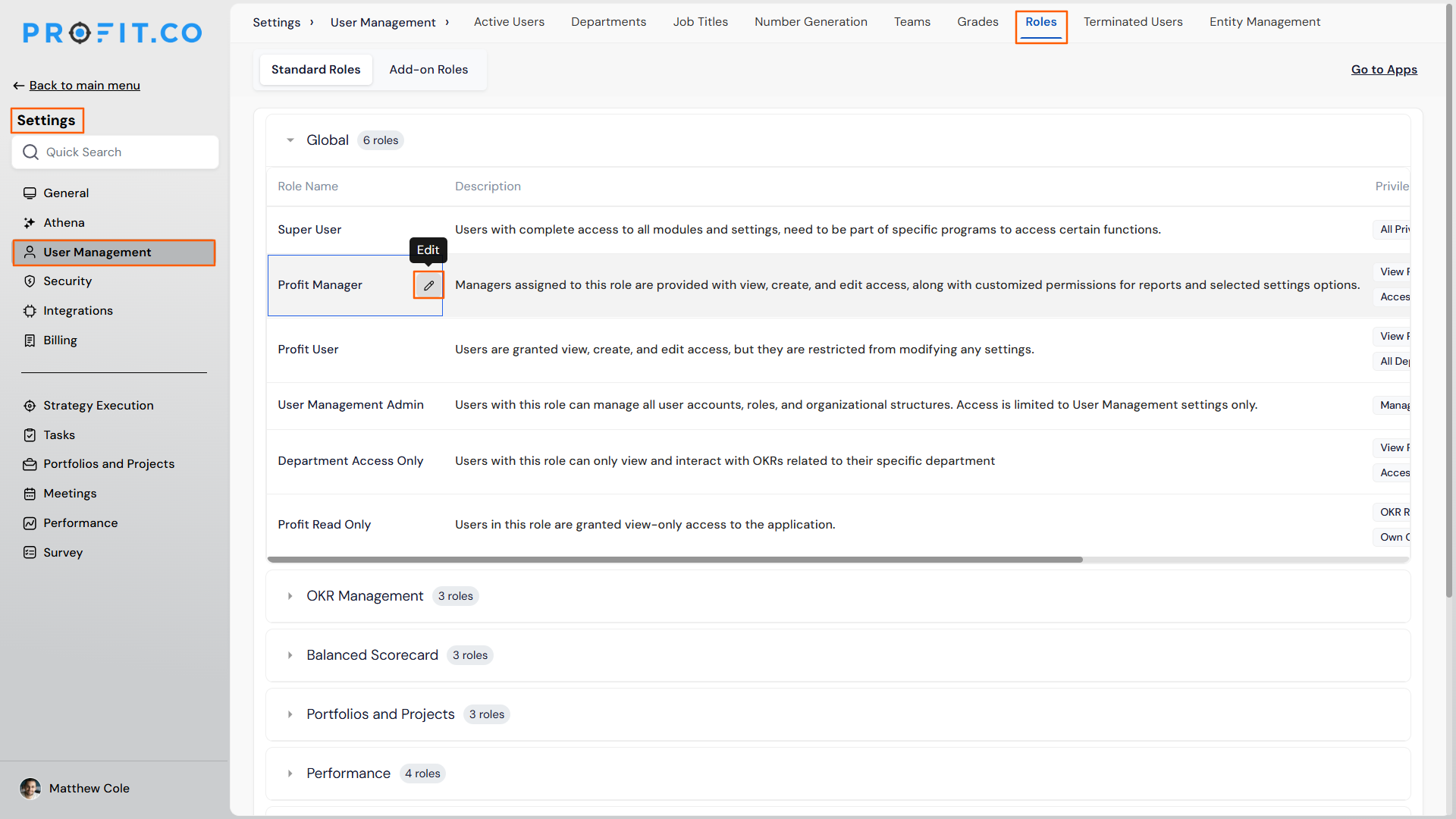
- Navigate to Settings → User Management → Roles → Standard Roles → Global
- Hover the target role row and click the pencil icon
- Confirm the panel title reads Edit : [Role Name] with the Privileges grid visible
Step 2
- Manage KPIs: check or uncheck to control who can edit any KPI in the library
- Create KPI: check or uncheck to control inline KPI creation during key result authoring
Method 2: Check a User's Full Role Stack
Step 1
- Open the user's role assignment screen from Settings → User Management
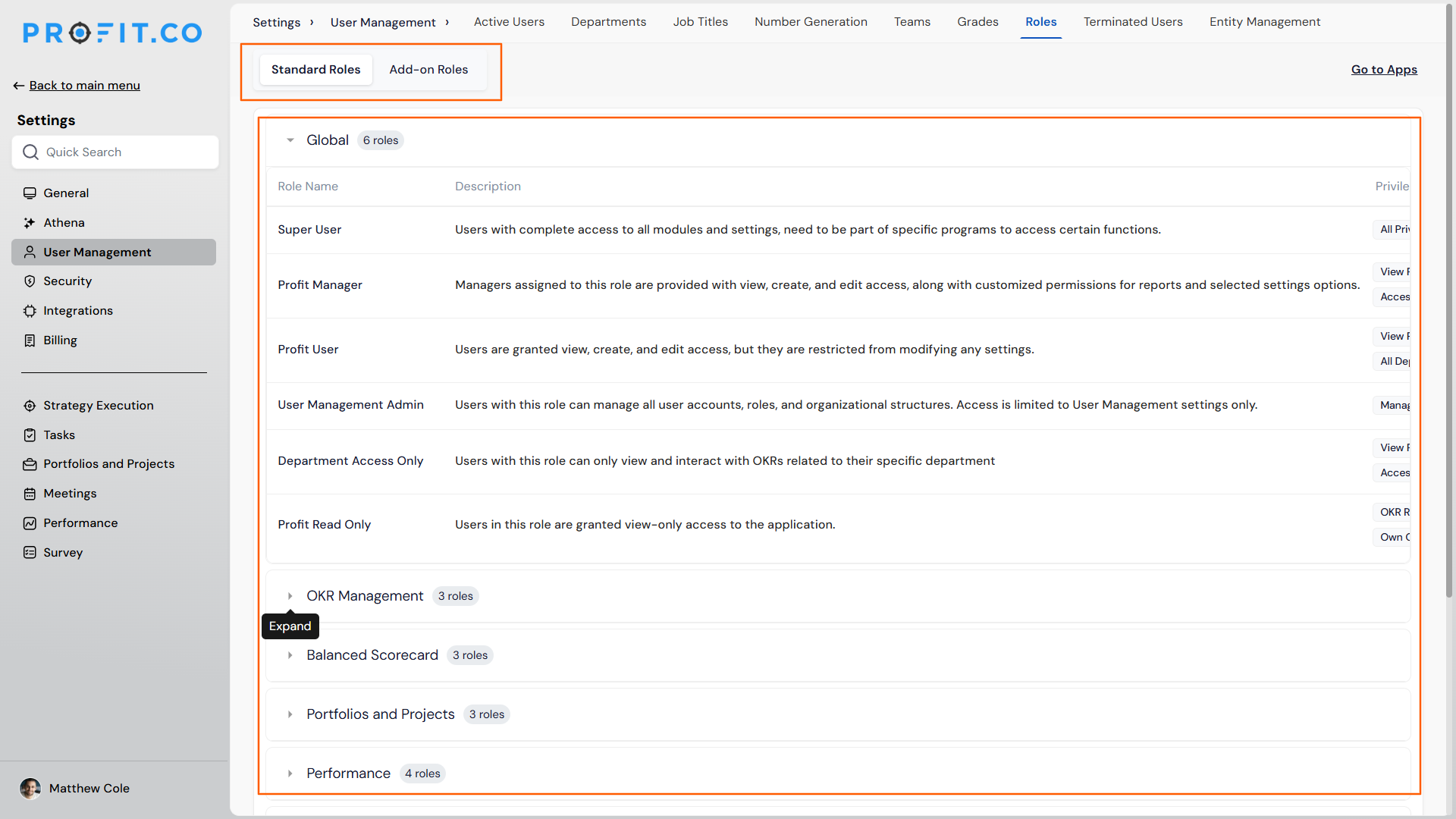
- Review the Apps | Roles grid across Global, OKR Management, Portfolios and Projects, Performance, and Survey
- Switch between the Global, App Specific, and Add-on tabs to see every role the user holds
Step 2
- Check whether the user holds OKR Admin or Captain under any App-Specific assignment
- Treat either of those roles as granting KPI creation and editing, regardless of what the Global role's Create KPI or Manage KPIs checkboxes show
KPI Permission Scenarios and Their Outcomes
These outcomes describe what actually happens once these privileges and roles are in play, separate from the click-by-click steps above.
| Scenario | What Happens |
|---|---|
| You try to uncheck Create KPI Profit App on a Standard Role to block KPI creation. | Profit.co keeps the privilege checked and unavailable to edit, since Create KPI Profit App is a locked base privilege on Standard Roles. |
| You uncheck Create KPI and Manage KPIs on a user's Global role, expecting to block KPI creation. | The user can still create KPIs, since an App-Specific role such as OKR Admin or Captain carries Manage KPIs independently of the Global role's settings. |
| You search for a KPI that doesn't exist yet, without Create KPI access. | The dropdown shows No KPI Found instead of a creation prompt, since inline creation is available only to users who hold Create KPI. |
| You revoke Create KPI or Manage KPIs from a role after KPIs were already created under it. | Nothing happens to those existing KPIs, since revoking the privilege does not retroactively affect KPIs that already exist. |
| You apply the recommended fix and uncheck both Create KPI and Manage KPIs for a role. | Users on that role can still search for and select existing KPIs when creating a Key Result, since that action doesn't depend on Create KPI or Manage KPIs. |
| You try to grant Manage KPIs to a Profit User by editing their Global role. | The checkbox isn't available there, since Manage KPIs does not exist on the Profit User role at all. |
Best Practices for KPI Creation and Edit Permissions
- Check every role a user holds, not just their Global role, before assuming Create KPI or Manage KPIs settings control their KPI access, since App-Specific roles like OKR Admin or Captain grant Manage KPIs independently.
- Don't treat Create KPI Profit App as a lever for blocking KPI creation, since it's a locked base privilege on Standard Roles that can't be unchecked.
- Use Manage KPIs, not Create KPI, to control who can edit KPIs in the library, since Create KPI only governs inline creation during key result authoring, while editing happens separately in Settings → General → KPIs.
- Keep department-level access restrictions in separate privileges such as Department Access Only, since Create KPI and Manage KPIs carry no department scope of their own.
Related Articles
- What are the various roles available for users in Profit.co?
- How to create a KPI from the key result creation page?
Frequently Asked Questions
No. Create KPI Profit App is a separate, locked base privilege that's always checked on Standard Roles, while Create KPI is a distinct, admin-editable privilege that actually controls inline KPI creation.
Not through their Global role, since Manage KPIs doesn't exist there. It's only available on Profit Manager, or through an App-Specific role such as OKR Admin or Captain.
In Settings → General → KPIs, under Categories, KPIs by Category, or KPI Boards. Editing access there is governed by Manage KPIs.
Execute your strategy with confidence
Connect OKRs, tasks, and teams in one place with Profit.co
