
In Profit.co, you can filter tasks by assignee to instantly view tasks assigned to you or any team member, helping you stay focused, track team progress, and manage work more efficiently.
Table of Contents
What is the Assignee filter in Profit.co Task Management?
The Assignee filter in Profit.co allows users to narrow down the task list within any Workspace or Board to show only tasks belonging to a specific person. By combining this filter with condition operators, you can precisely control which tasks are visible, whether they are assigned to you, a colleague, or a specific group of team members.
What filter options are available in Profit.Co-task management?
Profit.co supports multiple filter criteria within the Task Management module to give you precise control over your task view.
| Filter | Description |
|---|---|
| Assignees | Filter tasks by the person(s) they are assigned to |
| Created By | Filter tasks based on who created them |
| Follower | Filter tasks by users who are following them |
| Status | Filter tasks by their current status (e.g., To Do, In Progress, Done) |
| Priority | Filter tasks by priority level (e.g., High, Medium, Low) |
| Tags | Filter tasks using associated tags for categorization |
| Sprint | Filter tasks linked to a specific sprint |
| Workspaces | Filter tasks belonging to a specific workspace |
| Boards | Filter tasks within a particular board |
| Projects | Filter tasks associated with a specific project |
| Milestones | Filter tasks linked to a defined milestone |
| Recurring | Filter tasks that are set as recurring |
| Created On | Filter tasks based on their creation date |
| Due | Filter tasks by their due date |
| Completed On | Filter tasks based on their completion date |
| Multiselect | Apply multiple filter values simultaneously for broader or more refined results |
How to filter tasks assigned to others in Profit.co?
The same Assignee filter can be used to view tasks assigned to any other team member.
Step 1
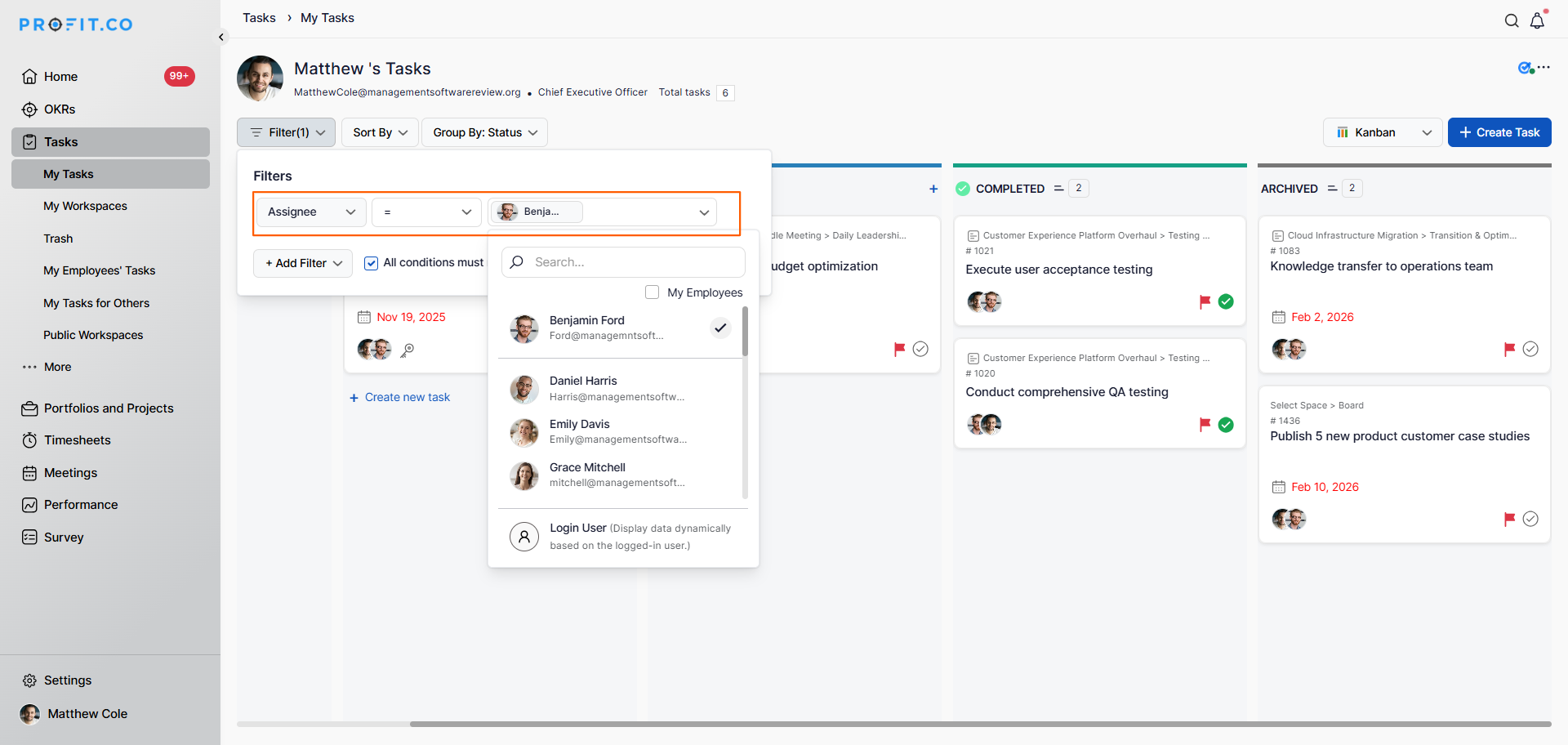
- Open the relevant Workspace or Board from the Task Management section.
- Click on the Filter button at the top of the task view.
- Set the filter field to Assignee.
- Set the condition to "=".
- Select the name of the team member you want to view tasks for from the dropdown.
- The board will display all tasks assigned to the selected person, giving you full visibility into their workload.
Note: You can also combine the Assignee filter with Creation Date or Completion Date filters, using a Range operator to set a From and To date for more precise task tracking.
Best practices for filtering tasks in Profit.co
- Use the Assignee filter regularly during standups or check-ins to get a clear picture of each team member's workload.
- Combine the Assignee filter with date range filters to review tasks due within a specific period.
- Managers can use the filter to spot overloaded team members and redistribute work proactively.
- Clear all active filters after your review to restore the full board view and avoid confusion.
Related Questions
Click here to learn how to use OKRs and Task Management together for effective project management.
Frequently Asked Questions
Navigate to any Workspace or Board, click Filter, set the field to Assignee, the condition to "=", and select your name from the dropdown.
Yes. Use the same Assignee filter and select the team member's name from the dropdown to view all tasks assigned to them.
Yes. You can combine the Assignee filter with the Creation Date or Completion Date filters and use the Range operator to set a From and To date for more targeted task tracking.
