Case Flow
 Case Types
Request for Service
Case Types
Request for Service
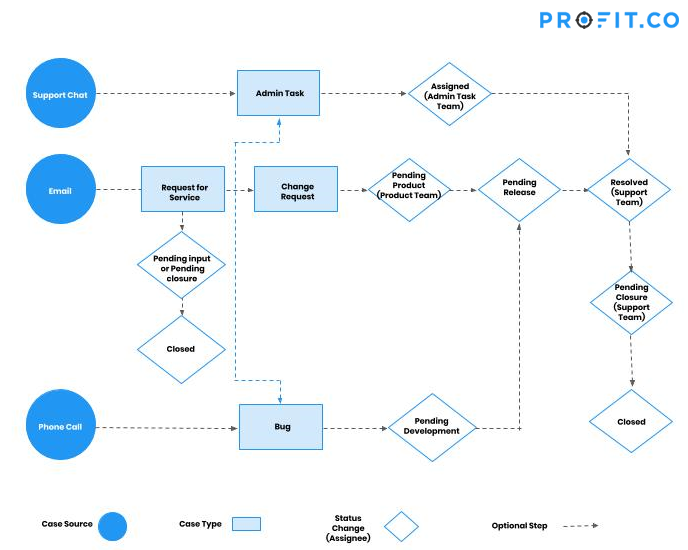
- When using our OKR tracking software cases originate from our 3 support channels (Chat, Email, Phone/Zoom Call)
- Case type is based on below rules. Resolution path changes based on type of case.
- If additional requests are discovered, 1 new case is created for each request.
- Once a case is resolved. An email will be sent to that customer and case status marked as Pending closure.
- Case marked as closed after customer confirmation or 7 days from the email communication with the customer.
- Resolved date set to current date
- Based on customer response will request for testimonial or online review
Case Types
Request for Service
- Example: A customer email with a question
- Example: Support Engineer can’t answer the question at that moment, and escalates to next level
- Example: customer requests to upgrade their account to trial
- Example: customer requests to delete a few data
- Example: customer requests a manual data import
- Example: customer requests a new feature
- Example: customer has feedback on design or text in the product
- Example: customer has a problem that requires a new feature to resolve
- Example: customer receives an unexpected error
- Example: customer cannot log in, or cannot view certain pages
- Example: customer identified a bug in the system
- New – A case opened and waiting for a review with respective team lead
- Assigned – The work is assigned to respective team member by their team lead
- Pending Input – Support team has contacted customers to acquire more information.
- Pending Product – Change request waiting for product to schedule in a release.
- Pending Development – Bug waiting for development to schedule in a release.
- Pending Release – Bug or change request which is scheduled for next release.
- Moved to Staging – Fixes moved to Testing environment to review
- Staging Pass – Case reporter verify the case and mark it to Staging pass
- Staging Fail – Case reporter will verify it and mark it fail if it is not meet the requirement
- Resolved – Fixes moved to Live environment. Support team must follow up and inform the customer regarding the fix.
- Pending Closure – It indicates that customer will review and provide their outcome on the fix
- Closed – All case activities completed after customer confirmation or will start from the status Assigned.
- Check the following emails for any requests, every 2 hours: support@profit.co
- Indicate the plan of the customer account
- Log in to the Apptivo firm and access Accounts App to get the customer plan
- Paid, or potentially paid customer cases should receive immediate priority (except for enhancement requests)
- Indicate any known values for the following fields:
- Case From a Partner?
- Internal or External?
- Possible Testimonial?
- Case Source
- Admin Task Type (if applicable)
- P1 – Urgent – High value customer or Partner cases. It should escalated to engineering team and acknowledge to customer with case#
- P2 – High – It blocks daily activities. But it has a workaround. It should escalated to engineering team and acknowledge to customer with case#
- P3 – Medium – Frequently reported issue or usability issue. Case was escalated to next support level
- P4 – Low – Firm specific or -ve scenario issues, Minor issues, All other requests
- Status: New
- Type: Request for Service
- Priority:
- P2 – High – Case was escalated to the next support level. Shift lead or manage takes the ownership and response to customer
- P3 – Medium – Customer is a paid user having 10+ licenses
- P4 – Low – Customer is a paid user, or reporting a problem, All other requests
- Assigned To:
- If Sending Response Immediately– Assign to yourself
- If General Inquiry – Assign to Support Team
- If Escalating to Next Level – Assign to Shift Lead or Manager
- Summary: Short summary that describe clear issue
- Description:
- Detailed information of the case along with the action item
- Item: Associate the most relevant product. Not every request has a product.
- Need by Date: 1 Day in Future
- Customer: Search and select the proper customer
- Contact: Search and select the proper contact
- Status: Assigned
- Type: Admin Task
- Priority:
- P1 – Task due to product problem. Or task for a high value/paid customer.
- P2 – General tasks that should be resolved within 48 hours.
- P4 – Low – Any low priority task without a timeline.
- Assigned To: Admin Task Team
- Summary: Short summary that describe clear issue
- Description:
- Detailed information of the case along with the action item
- Item: Associate the most relevant product. Not every request has a product.
- Need by Date: 2 Days in Future
- Customer: Search and select the proper customer
- Contact: Search and select the proper contact
- Status: Pending Product
- Type: Enhancement Request
- Priority:
- P1 – Must be completed by next release. Promised to HV customers.
- P2 – Frequently asked request, Global fix.
- P3 – Feature request for a particular client (Not a high value customer)
- P4 – Low – High effort request, or request for a rare use case
- Assigned To: Product Team
- Summary: Short summary that describe clear issue
- Description:
- Item: Associate the most relevant product. Not every request has a product.
- Need by Date: If priority is immediate, set need by date to next release. Otherwise leave blank.
- Customer: Search and select the proper customer
- Contact: Search and select the proper contact
- Once the case is created, go to requirements app
- Search for this feature in the requirements
- If the requirement exists, view the requirement, and add the new case onto the “Cases” tab.
- If the requirement doesn’t exist, use the “Create Requirement From Case” to generate a new requirement
- Summary: Provide a clear short description of the feature
- Description: Provide a detailed description of the feature
- Assigned To: Product Team or Dev Team
- Status: Not Started
- Item: Select an Item, if available
- Category:
- New Feature: Any new functionality/feature that requires design & engineering effort, such as building a new app.
- Design Standard: A general UI change to be applied across multiple apps, like adding loading indicators globally.
- Engineering Requirement: Functionality-only change requiring no design work, like changing default sort order for a list.
- Business Requirement: Feature required only for internal purposes, such as automated registration emails.
- Status: Pending Development
- Type: Report a Problem
- Priority:
- P1 – Must be completed before the next deployment window.
- P2 – Major blocking issue, must be completed by next release.
- P3 – Moderate issue affecting multiple users, or high value customers. Should be fixed within 2 releases.
- P4 – Low – Minor glitch or bug for rare use case. Fix when convenient.
- Assigned To: Profit Dev Team
- Summary: Short summary of the issue
- Description: Detailed description of symptoms and impact.
- Item: Associate the most relevant product. Not every request has a product.
- Need by Date: If priority is high or immediate, set it to next release date.
- Customer: Search and select the proper customer
- Contact: Search and select the proper contact
- Answered Question – Happy
- Answered Question – Unhappy (if unhappy, take a note on their question)
- Added feature request
- Reported a problem – Workaround
- Reported a problem – No Workaround
- Monitor cases every day that are status “Pending Closure” and closed > 1 week ago
- For each case, check if the customer uses Google Apps. Then deliver one of these message templates:
- Testimonial Request – Standard
- Testimonial Request – Google Apps
- Change case status to “Closed”
- Only affects a specific browser Ask the user to try a different web browser, does the issue exist there?
- Only affects a specific computer Ask the user to try a different computer, does the issue exist there? (some users will not have access to this, so move to next step)
- Only affects a specific user Does this issue occur for anyone else in their business?
- Only affects a specific firm Give the user login credentials for a test firm, does the issue exist there?
- Only affects a specific ISP Ask the user to provide their ISP, try to identify if we have other customers on the ISP, do they have the problem?
- Only affects a specific region Try to identify if we have other customers in the region, do they have the problem?