

Multiple Owner Control lets Super Users decide whether Objectives, Key Results, or both can accept more than one owner. Objective-level and Key Result-level ownership can now be restricted independently instead of following one uniform rule.
Table of Contents
What is Multiple Owner Control?
Multiple Owner Control is a setting inside OKR Authoring that governs whether the owner field on Objectives and Key Results accepts a single assignee or several. It lives in the OKRs Assignment section, alongside the Allow multiple owner toggle and two independent checkboxes labeled Objective and Key Result.
Note
The toggle and both checkboxes ship enabled, so no configuration change is required to keep current multiple-owner behavior.
Why Multiple Owner Control Matters
Cross-functional programs often need joint accountability at the Objective level while still requiring one clear owner per Key Result for check-in reporting. Multiple Owner Control lets a Super User match that structure directly instead of applying the same rule everywhere.
Changing the setting does not touch existing ownership assignments. A Super User can tighten or loosen the rule as reporting needs evolve without reassigning current Objectives or Key Results.
How It Works
- Navigate to Settings → OKRs → Planning → General.
- Scroll to the OKRs Assignment section.
- Review the current state of the Allow multiple owner toggle.
- Check Objective to allow multiple owners on Objectives; uncheck to restrict Objectives to one owner.
- Check Key Result to allow multiple owners on Key Results; uncheck to restrict Key Results to one owner.
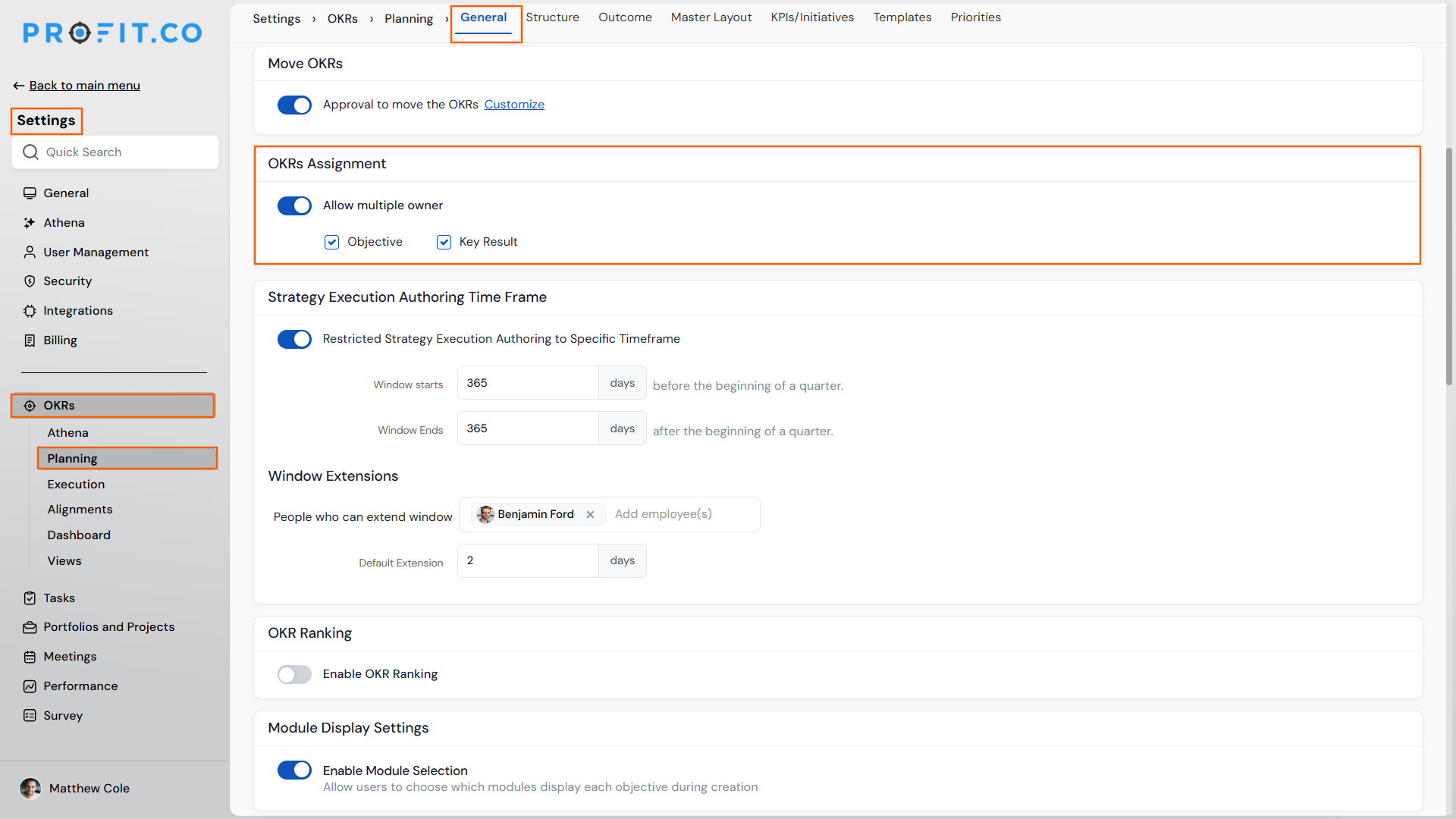
Multiple Owner Control Scenarios and Their Outcomes
| Scenario | Options You Have | What Happens |
|---|---|---|
| You enable Allow multiple owners and check both Objective and Key Result. | Toggle on, both checkboxes selected. | Profit.co opens the owner field on every Objective and Key Result created or edited going forward to accept more than one assignee. |
| You try to add a second owner to a Key Result while the Key Result checkbox is unchecked. | None — the field only accepts one selection. | Profit.co keeps the single owner already in the field; the additional owner you selected does not get stored. |
| You check Objective but leave Key Result unchecked. | Independent per-level configuration. | Profit.co allows multiple owners on Objectives while every Key Result owner field across the module stays single-select. |
Best Practices for Multiple Owner Control
- Match the checkbox combination to how your organization tracks accountability — multiple owners on Objectives for cross-functional programs, a single owner on Key Results for unambiguous check-ins.
- Review OKRs with more than one owner before unchecking a box, since Profit.co keeps existing owners even after the option is restricted.
- Assign one Super User to own changes to OKRs Assignment so authoring cycles don't run under conflicting ownership rules.
- Notify OKR Captains before adjusting the toggle — the assignee field changes immediately for anyone creating a new Objective or Key Result.
- Align Multiple Owner Control with your Alignment structure so jointly owned Objectives still roll up cleanly to individually owned Key Results.
Related Articles
- How do I enable Multi Assignee in KR Assignment
- How do I change an objective owner?
- What are the various roles available for users in Profit.co?
Frequently Asked Questions
Yes. The Objective and Key Result checkboxes work independently of each other, so either level can permit multiple owners while the other stays single-owner.
No. Profit.co leaves existing ownership assignments untouched and only changes how the owner field behaves for new selections going forward.
Profit.co hides both checkboxes while Allow multiple owner is off, since there is nothing to configure at that point; they reappear once the toggle is switched back on.
No. It governs the owner field going forward. OKRs authored before a configuration change keep the owners they already had, regardless of the current checkbox state.
Execute your strategy with confidence
Connect OKRs, tasks, and teams in one place with Profit.co
