

Profit.co automatically rolls up projection statuses from Sub Key Results to their parent Key Results and Objectives, giving leaders a real-time read on Objective health without waiting for manual status updates at each level.
Table of Contents
- What is Projection Status?
- How to Enable Projection Status
- What is Projection Status Roll-up?
- Why Projection Status Roll-up Matters
- How Projection Status Roll-up Works
- Status Calculation with Multiple Key Results
- How Roll-up Behaves Across the OKR Hierarchy
- Best Practices for Projection Status Roll-up
- Related Questions
- Frequently Asked Questions
What is Projection Status?
Projection Status is a forward-looking forecast field in Profit.co that lets users indicate whether a Key Result is expected to be achieved by the end of the OKR cycle, based on current progress, known risks, and team insights.
Unlike the actual progress value, which reflects what has been accomplished to date, Projection Status answers the question: "Based on where we are now, will this Key Result be completed on time?" It appears as a dedicated field during check-ins and operates alongside the standard OKR status, exclusively for the OKR scoring method.
How to Enable Projection Status
Projection Status is disabled by default and must be turned on by a Super User before it becomes available in check-ins.
Steps to Enable
- Navigate to Settings from the left navigation panel.
- Go to OKRs → Authoring and switch to the Outcomes tab.
- Locate the Status Tracking option.
- Enable the Projection Status toggle.
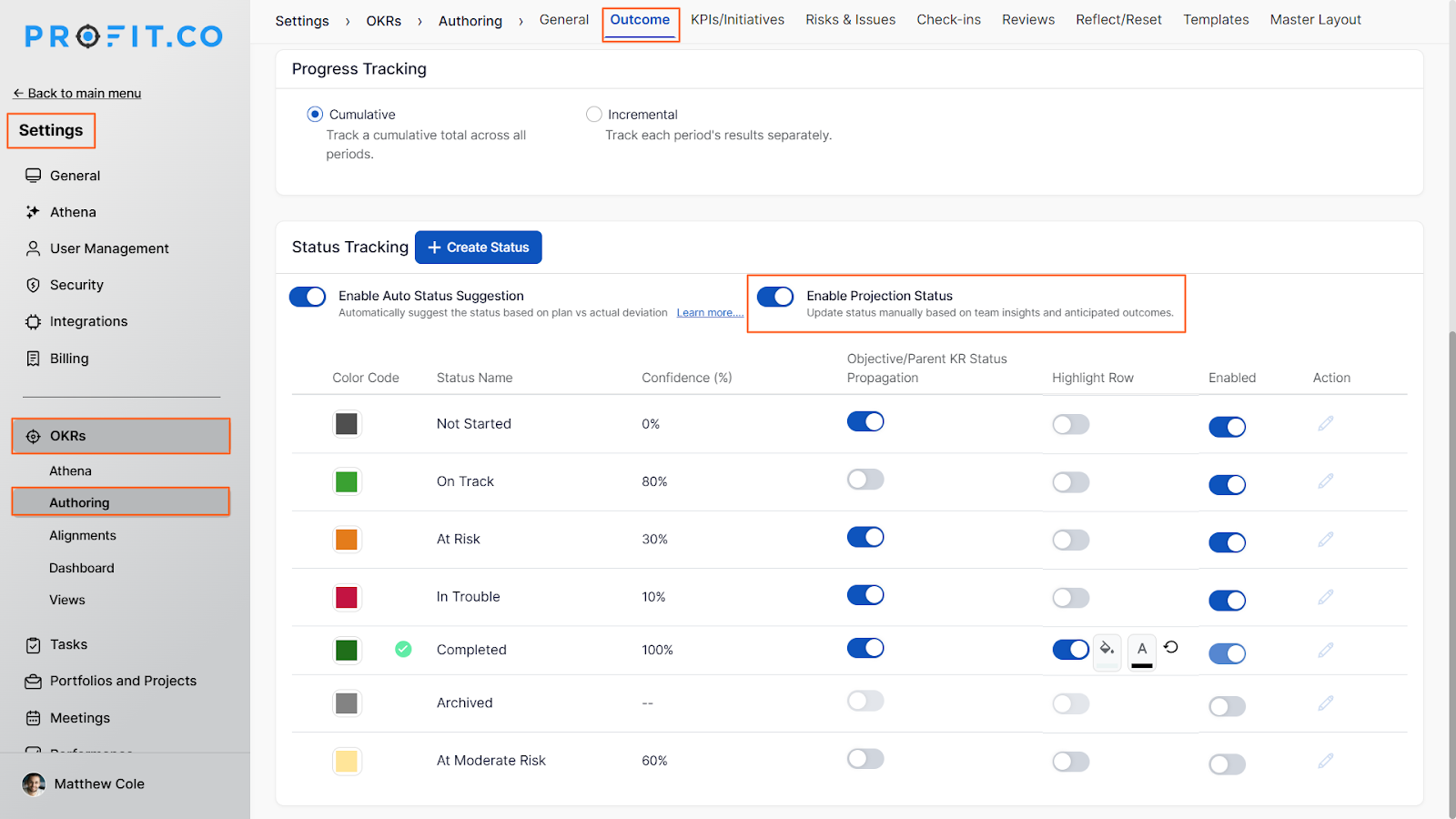
Note: Once enabled, a Projection Status field will appear in the check-in panel for all Key Results. Users can then set their forecast status - such as On Track, At Risk, or In Trouble - at each check-in to reflect their end-of-cycle outlook.
What is Projection Status Roll-up?
Projection Status Roll-up is a behavior in Profit.co where the projection status set during a Sub Key Result check-in automatically propagates upward through the OKR hierarchy - updating the parent Key Result and the associated Objective without any additional input from the user.
Once Projection Status is enabled, the roll-up activates automatically. Any status set at the Sub Key Result level during a check-in is immediately surfaced at the parent Key Result and Objective levels, keeping strategic visibility current across all tiers of the hierarchy.
Why Projection Status Roll-up Matters
Before this feature, projection statuses set at the Sub Key Result level remained isolated; leaders reviewing an Objective had no automated signal about downstream forecast health. The roll-up closes that gap by surfacing Sub Key Result-level projections directly at the Objective level.
This removes a layer of manual interpretation for OKR champions and department heads, and ensures that a single check-in at the execution level immediately informs strategic visibility across the entire hierarchy.
How Projection Status Roll-up Works
Status Roll-up from Sub Key Results
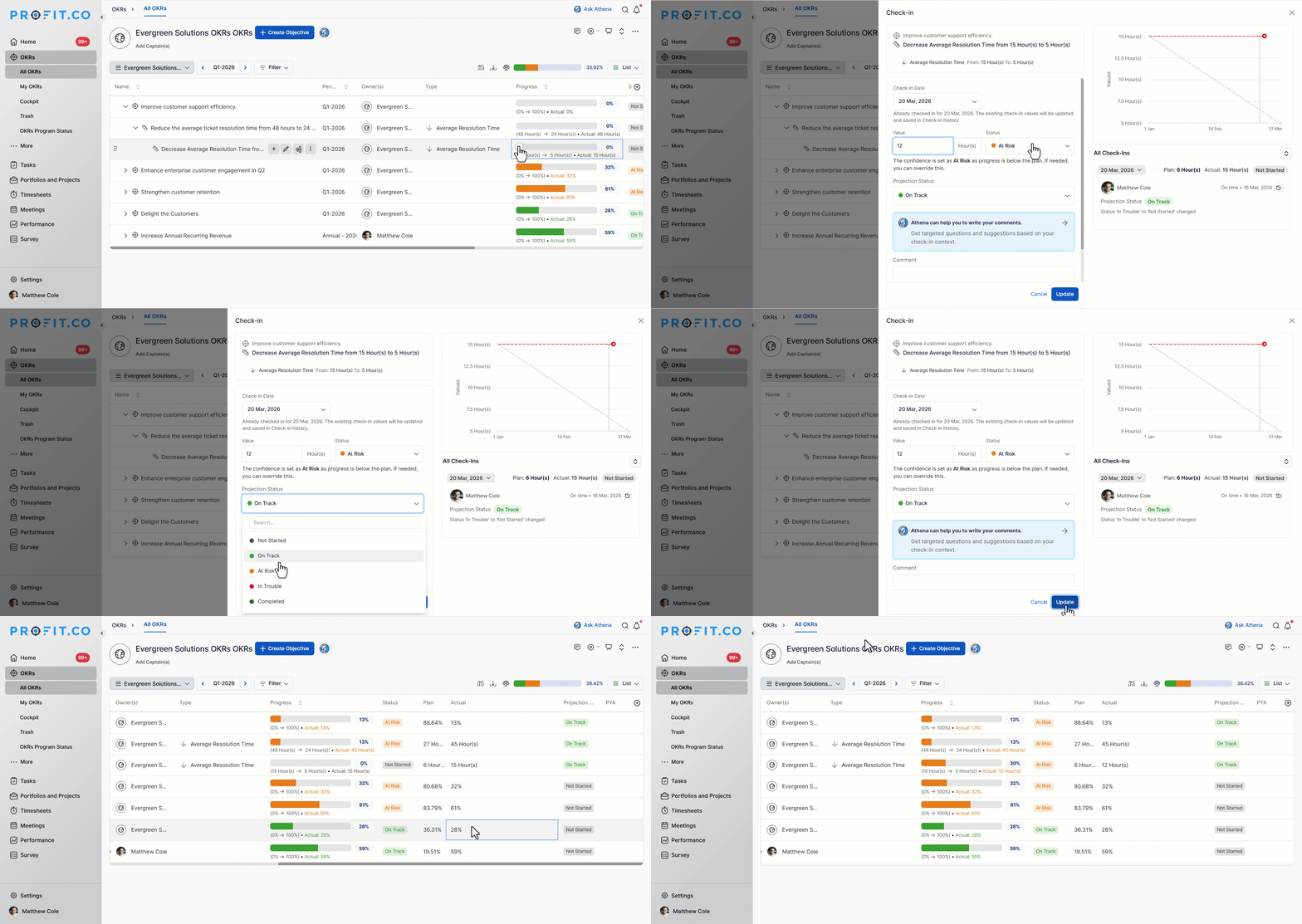
When a user performs a check-in on a Sub Key Result and sets or updates the projection status, the system automatically propagates that status to:
- The parent Key Result
- The Objective linked to that Key Result
Example: If a Sub Key Result is marked as "On Track", that projection status is reflected at both the Key Result and Objective levels immediately after the check-in is saved.
Status Calculation with Multiple Key Results
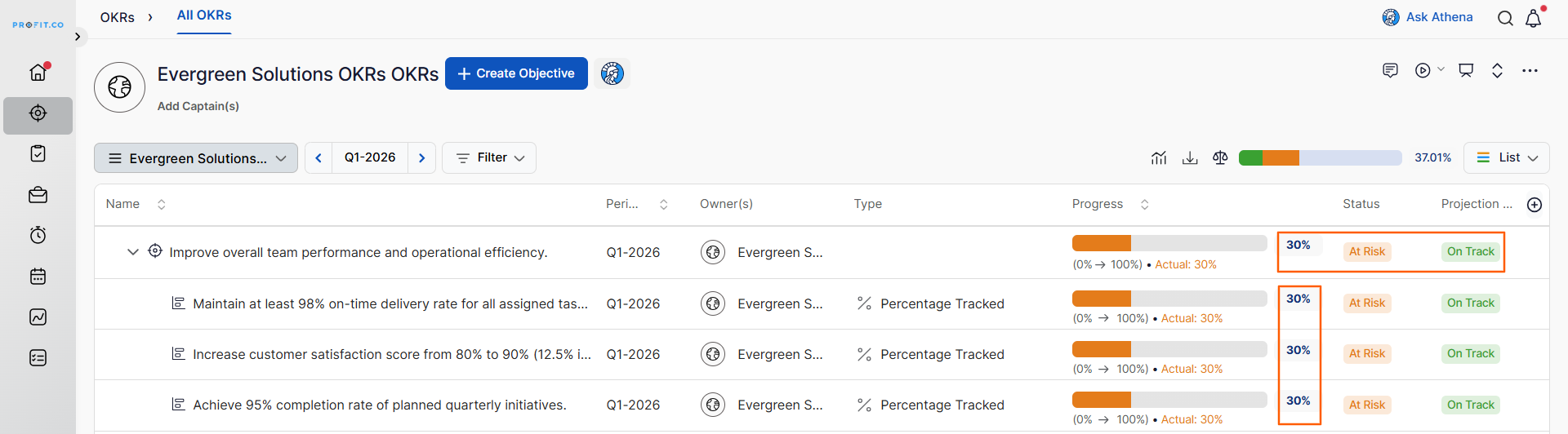
When an Objective has multiple contributing Key Results, the projection status is not drawn from a single Key Result. Instead, the system calculates the average progress across all contributing Key Results and derives the corresponding status from that combined value.
Calculation Logic
| Component | Value |
|---|---|
| KR1 Progress | 30% |
| KR2 Progress | 30% |
| KR3 Progress | 30% |
| Combined Total | 90% |
| Average (90 ÷ 3) | 30% |
| Resulting Projection Status | Status mapped to 30% confidence threshold |
The 30% average maps to a specific projection status based on the confidence thresholds configured in Settings → OKRs → Authoring → Statuses. The status corresponding to that threshold is then displayed on the Objective.
How Roll-up Behaves Across the OKR Hierarchy
| Check-in Level | Status Updates At | Calculation Method |
|---|---|---|
| Sub Key Result | Parent Key Result + Objective | Projection status propagates directly upward |
| Key Result (single) | Objective | Key Result projection status reflected on Objective |
| Multiple Key Results | Objective | Average of all contributing Key Result progress values |
Note: Super Users can control which statuses participate in roll-up propagation by enabling or disabling individual statuses under Settings → OKRs → Authoring → Statuses. Disabled statuses are excluded from the Objective's status calculation.
Best Practices for Projection Status Roll-up
- Enable Projection Status before the OKR cycle begins, navigate to Settings → OKRs → Authoring → Outcomes tab, and turn on the Projection Status toggle so the field appears in all check-ins from day one.
- Keep confidence thresholds in Settings → OKRs → Authoring → Statuses calibrated to your organization's risk tolerance; the roll-up status is only as meaningful as the thresholds driving it.
- When multiple Key Results contribute to an Objective, ensure each Key Result has an active check-in schedule; gaps in Sub Key Result check-ins will cause the average calculation to underrepresent actual progress.
- Avoid disabling high-frequency statuses like "On Track" from propagation unless intentional; doing so skews the Objective-level status toward lower-confidence values.
- Review Objective-level projection statuses during weekly leadership syncs rather than only at formal check-in milestones. The automatic roll-up makes this data available in real time.
Related Questions
- Click here to learn more about the use of Key Result Status Propagation
- Click here to learn more about the use of Objective Status Propagation
- Click here to learn more about how to check in for Key Results
Frequently Asked Questions
No. Projection Status must be explicitly enabled by a Super User before the roll-up behavior activates. Refer to the How to Enable Projection Status section above for the exact navigation path and steps.
Yes. When roll-up is active, the parent Key Result and Objective projection statuses are calculated and overwritten based on Sub Key Result inputs. If you need to set a manual status at the Objective level, you should disable the Sync Status toggle for that Objective.
The system calculates the average using the progress values available at the time of calculation. Sub Key Results with no check-in history will typically contribute a zero or baseline value, which can lower the resulting average and affect the Objective's displayed status.
