Ever feel like you’re constantly chasing down tasks and deadlines? You meticulously plan every project detail, create beautiful Gantt charts, and even color-code your tasks. One minute, your project will sail smoothly, then – bam! – an unexpected curveball hits. Deadlines are missed, team members are confused, and you are drowning in chaos and unfinished work. This frustration is common, but it doesn’t have to be your reality.
What went wrong? Your work planning wasn’t as effective as you thought.
Let’s explore the world of effective work planning and learn how to keep your projects on track, your team happy, and your sanity intact.
Effective work planning isn’t a one-person show. Involve your team in planning, encourage open communication, and foster a collaborative environment.
The Importance of Effective Work Planning
Before we go into the details, let’s understand why effective work planning is crucial. Think of it as the blueprint for your project.- When you have a clear plan, your team knows exactly what needs to be done, by whom, and when.
- With a well-defined plan, you can easily monitor progress, identify potential roadblocks, and adjust as needed.
- Properly allocating tasks and resources ensures that your team works efficiently without wasting time or effort.
- When everyone knows their responsibilities, there’s less chaos and more focus.
By failing to prepare you are preparing to fail.

To learn more about achieving continuous learning for your organization.
How Project Management Tools Enhance Work Planning?
Effective work planning is crucial for the success of any project, and the right project management tools are key to achieving this. Project management has evolved significantly from Henry Gantt’s development of the Gantt chart, a crucial visual tool for task management and progress tracking. This led to more sophisticated methods like the Critical Path Method (CPM), which identifies the most crucial tasks for project success. Modern online project management software now allows for real-time tracking, seamless communication, and collaboration among team members, ensuring key project elements are always prioritized and on schedule. Let’s explore how these tools are intricately linked and why they are indispensable for efficient project executionStructure and Organization
Project management tools provide the necessary structure to implement effective work planning. They help organize tasks, milestones, and deadlines in a clear and manageable way.Resource Allocation
Effective work planning requires optimal resource allocation, including time, manpower, and budget. Project management tools facilitate this by offering features like resource scheduling, load balancing, and budget tracking.Communication and Collaboration
Make sure all team members are on the same page is a key aspect of effective work planning. Project management tools enhance this through features like shared calendars, real-time updates, and integrated communication channels.Monitoring and Reporting
Continuous monitoring and adjustment based on project performance are vital. Project management tools provide dashboards, reporting features, and analytics that help track progress, identify issues early, and make informed decisions quickly.Scalability and Flexibility
As projects grow and change, work plans need to adapt. Project management tools allow for flexibility and scalability in planning, making it easier to adjust tasks, timelines, and resources as project scopes evolve.Choosing the Right Tools
The market is flooded with project management and automation tools, all promising to be the next “WorkOS” or the ultimate solution for professional services firms. But with so many options, how do you know which one is right for you? More importantly, are these tools truly the magic bullet for effective work planning? Project Management Software, Professional Services Automation… it sounds simple, right? Unfortunately, the reality is far more complex. There’s a mind-boggling array of tools available, each with its own strengths and weaknesses.Here are just a few of the major categories
- Project and Portfolio Management Software: This type of software helps manage a series of projects, ensuring they align with company strategies and goals.
- Work Management Software: These systems provide a framework for managing workflows and projects across an organization, offering tools for task management, scheduling, and more.
- Connected Workspace Platforms: Similar to knowledge bases, these platforms support information sharing and collaboration across an organization.
- Knowledge Base Software: Essential for managing information, these tools help store and retrieve knowledge efficiently.
- Collaboration Platforms: They allow for real-time document creation and editing, crucial for teams that collaborate on documents frequently.
- Workflow Management Software: Focused on optimizing workflows, essential for streamlining operations and improving process efficiency.
- Professional Services Automation Platform: Specifically designed for service-oriented businesses, PSA platforms help manage client engagements from proposal to payment.
- Strategic Planning and Execution Platforms: These tools facilitate the management of an organization’s strategic goals, often integrating OKRs (Objectives and Key Results) and performance metrics.
- Resource and Capacity Management Software: These systems are key in managing resources and planning capacity to ensure that projects are not over or under-resourced.
- Standard Operating Procedures Software: SOP tools help standardize procedures across an organization, ensuring consistency and compliance.
Here are a few additional categories of tools that could complement or expand upon the above list
- Customer Relationship Management (CRM) Software: Essential for managing interactions with clients and customers, helping businesses enhance relationships, streamline processes, and boost profitability.
- Human Resources Management Systems (HRMS): These tools help in managing employee data, recruitment, benefits administration, and performance management.
- Enterprise Resource Planning (ERP) Systems: Integrates various functions across the business, including finance, HR, manufacturing, supply chain, services, procurement, and others into a single system.
- Business Intelligence (BI) and Analytics Platforms: These systems provide comprehensive tools and applications for analyzing business data which helps in making informed business decisions.
- Financial Management Software: Tools that assist with finance operations, including accounts payable, accounts receivable, ledger management, and financial planning, often supported by financial AI agents that automate many of these processes.
- Marketing Automation Software: Helps streamline, automate, and measure marketing tasks and workflows to increase operational efficiency and grow revenue faster.
- IT Service Management (ITSM) Tools: Designed to manage the delivery of IT services to customers, ITSM tools cover issue tracking, asset management, and IT support.
- Cybersecurity Platforms: Tools that help protect IT infrastructure, monitor security breaches, and manage other security operations.
- Supply Chain Management (SCM) Software: Manages the flow of goods and services, involving the movement and storage of raw materials, of work-in-process inventory, and of finished goods.
- Project Issue Tracking Software: Specialized tools used to manage a list of issues, recording and following up on issues and bugs that need resolution.
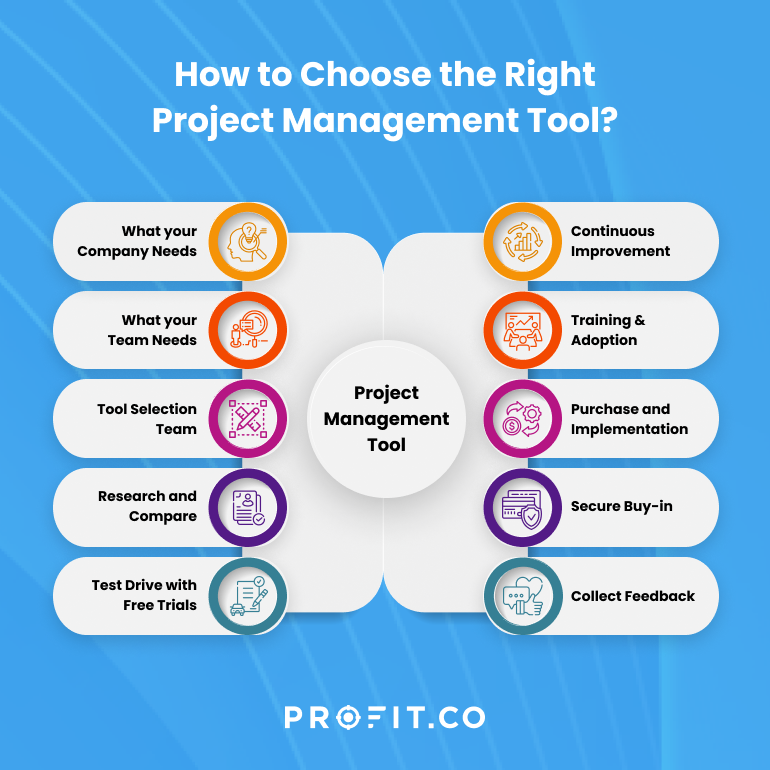
- What is your primary collaboration model? Do you work in a remote team or a centralized office?
- What are your core objectives and KPIs? What are you trying to achieve, and how will you measure success?
- What specific workflows need automation? Are there repetitive tasks that are bogging down your team?
- What tools are you already using? Consider integrations and avoid creating unnecessary silos.
- What are your industry-specific needs? Some tools cater to specific industries like marketing or software development.
- What are your security and data management requirements? Ensure your chosen tools meet your security and compliance standards.
- How will data move within the tool, and how does this impact your operations?