

Breaking down complex objectives into trackable phases is essential for managing qualitative outcomes that don't fit traditional numerical metrics. Profit.co addresses this need by offering customizable Milestone Sequences—reusable templates that transform non-measurable goals into structured, progressive checkpoints, making even the most subjective key results tangible and trackable.
Table of Contents
What makes milestone sequences valuable?
Milestone sequences provide clarity and structure for qualitative goals through systematic progression tracking:
- Structured roadmap: Milestone sequences provide a structured roadmap by breaking down the project into manageable phases or stages
- Non-measurable tracking: In Profit.co a milestone tracked Key Result is non-measurable
- Template reusability: While creating a new key result, we can create a new milestone sequence. The created milestone sequence will be saved under the category My Templates
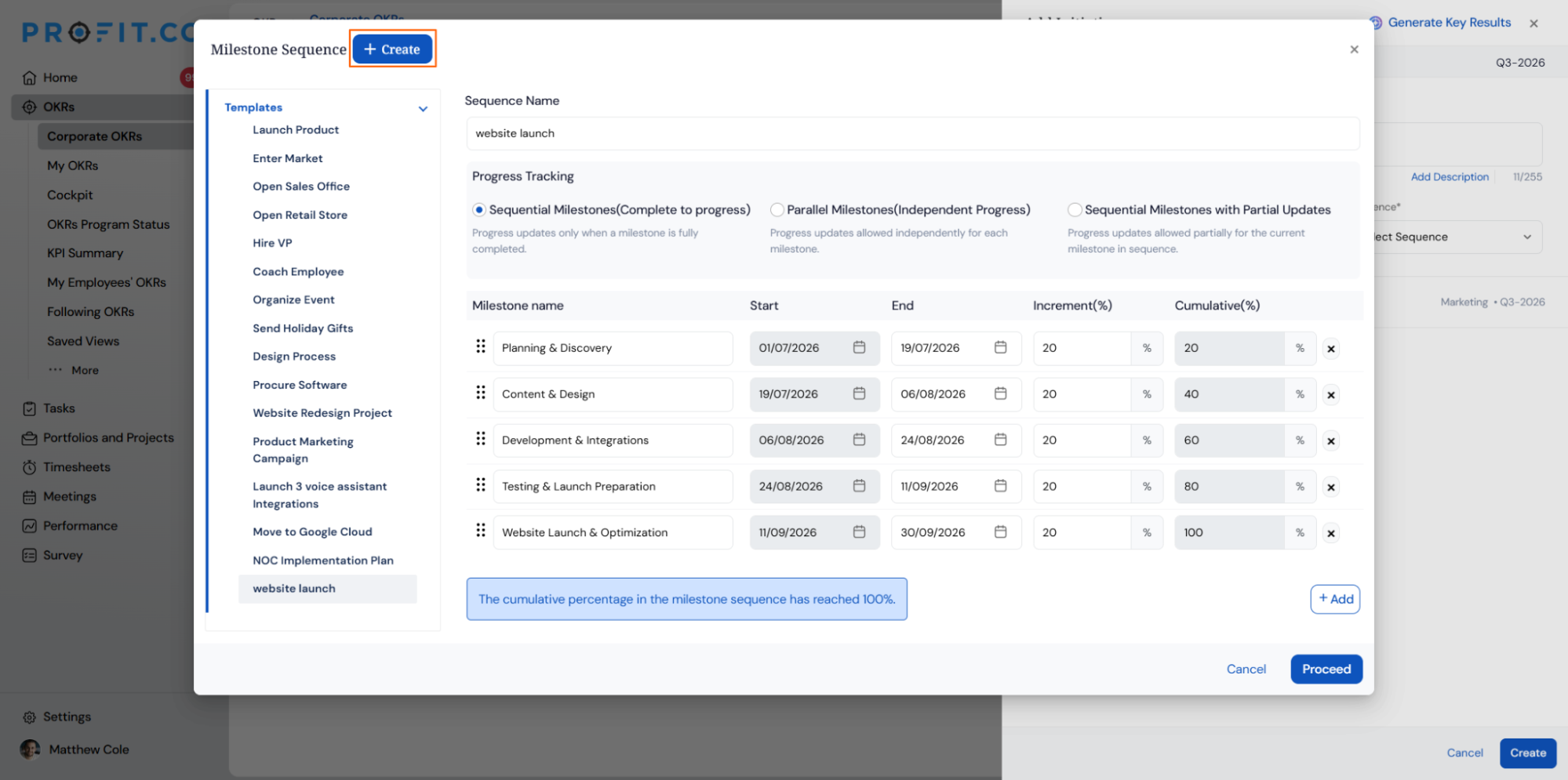
Each sequence also runs on one of three Progress Tracking modes, which controls when a milestone can be checked in relative to the others.
| Progress Tracking Mode | Behavior |
|---|---|
| Sequential Milestones (Complete to Progress) | Progress updates are allowed only after the current milestone is fully completed |
| Parallel Milestones (Independent Progress) | Progress updates are allowed independently for each milestone |
| Sequential Milestones with Partial Updates | Progress updates are allowed partially for the current milestone in the sequence |
How do I set up a new milestone sequence in Profit.co?
Creating a milestone sequence from Settings
Step 1
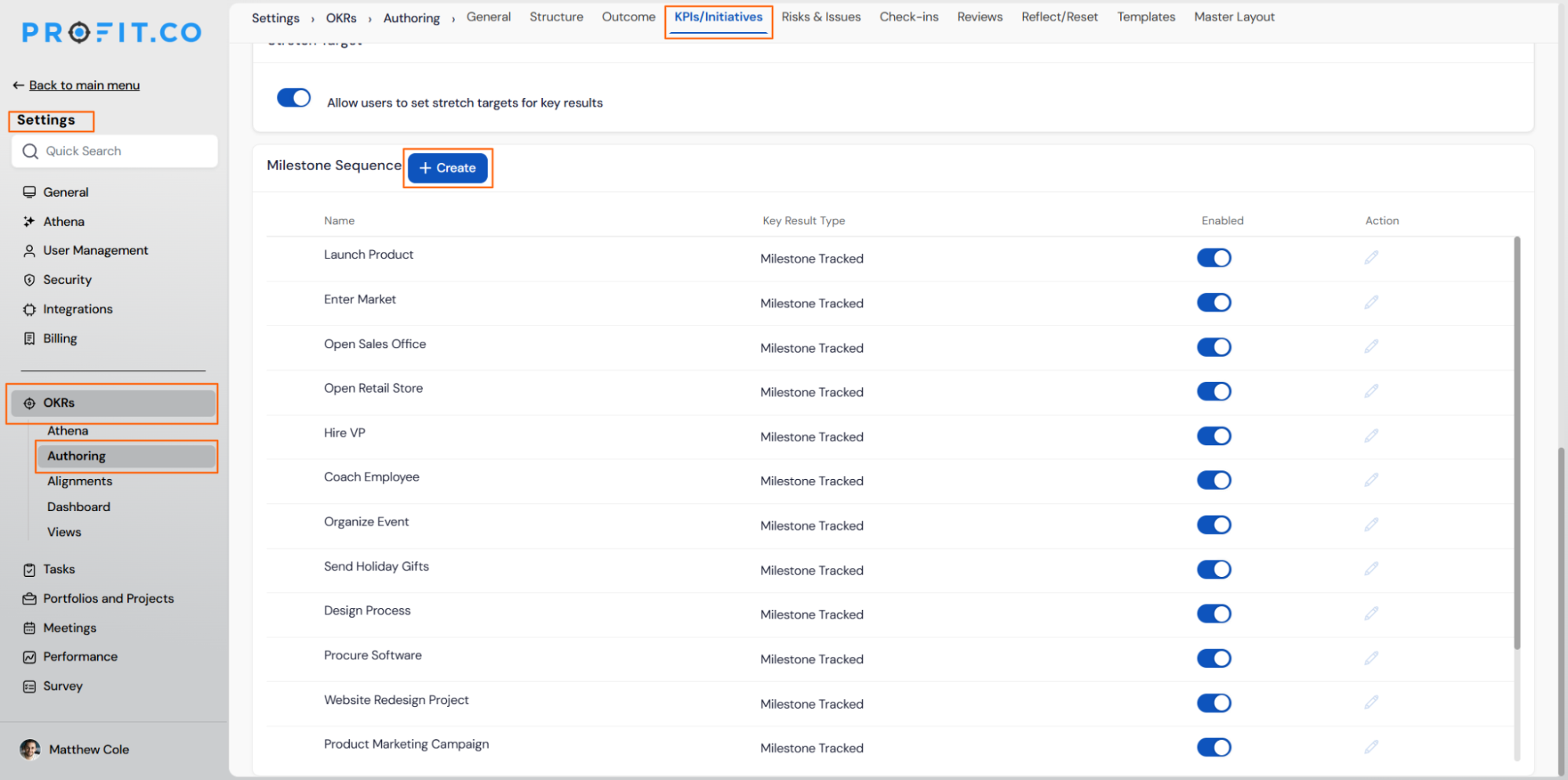
- To set up a new milestone sequence in Profit.co, navigate to Settings → OKRs → Authoring from the left navigation panel.
- Switch to the KPI/Initiatives tab and click Create on the Milestone Sequence option.
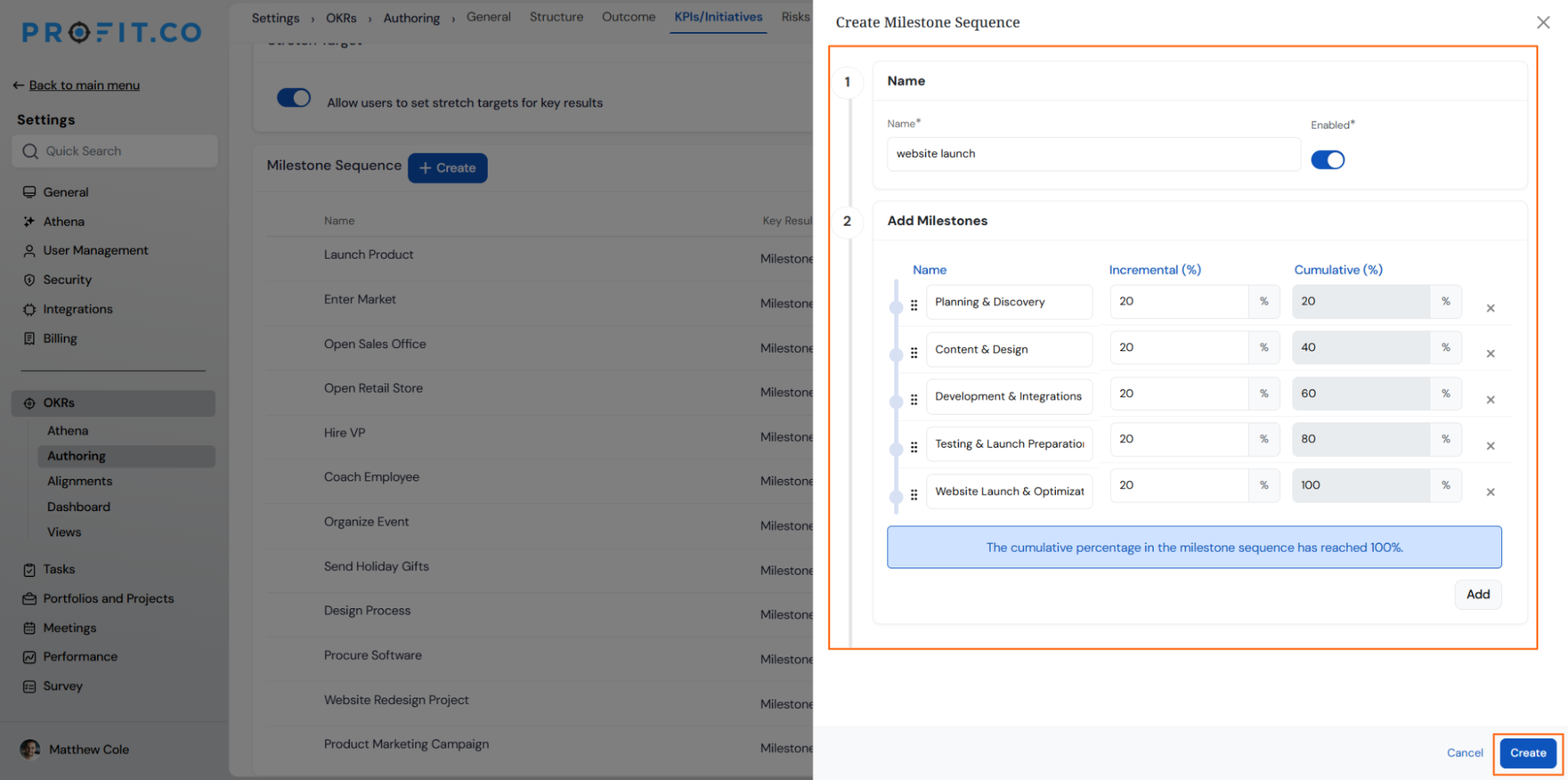
- Enter the Sequence name and add the required milestones.
- Once done, click Create.
Note
Add milestones and set the Increment (%) and Cumulative (%) values for each step. Once the total reaches exactly 100%, Profit.co confirms with "The cumulative percentage in the milestone sequence has reached 100%."; a total under or over 100% blocks Proceed with "The cumulative percentage in the milestone sequence is less than 100%." instead.
Creating a milestone sequence while creating a key result
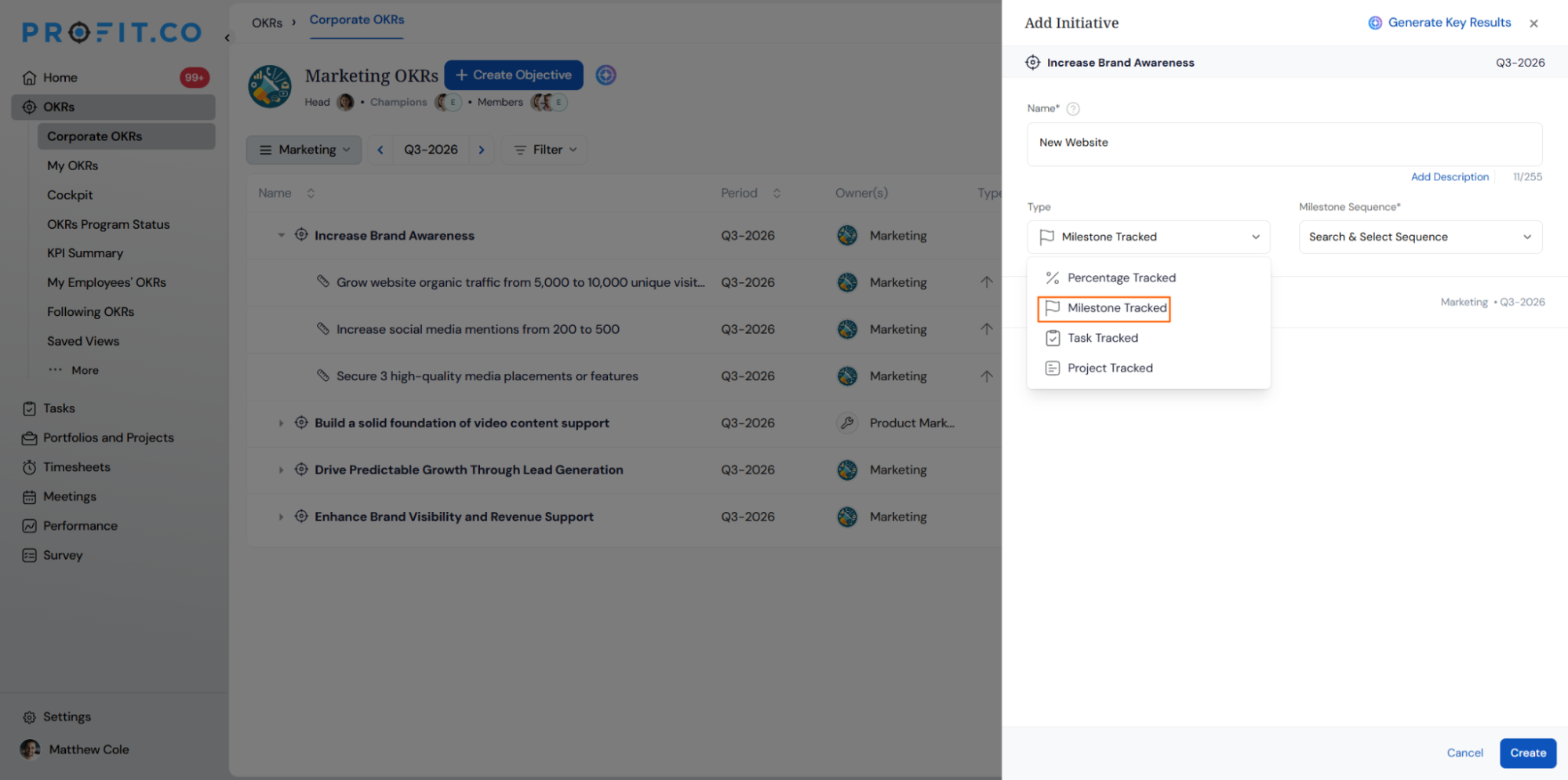
You can also create a new milestone sequence while creating a new Key Result using the Milestone Tracked type.
Milestone Sequence Scenarios and Their Outcomes
| Scenario | Options You Have | What Happens |
|---|---|---|
| You set Increment (%) and Cumulative (%) values that total exactly 100% across all milestones. | Distribute any weight per milestone step, as long as the total reaches 100%. | Profit.co saves the sequence and makes it available to attach to a Milestone Tracked key result right away. |
| You close the sequence panel before clicking Proceed. | None; the in-progress sequence is not retained. | Profit.co discards the unsaved sequence, and it does not appear in the Templates panel. |
Note
When setting up a milestone-based Key Result, the 0% starting point will no longer appear in the sequence setup view.
Once the sequence is created, the Key Result progress will begin from "0% — No progress yet" as usual in the progress view.
What are the benefits of using milestone sequences?
Qualitative Goal Tracking:
- Makes non-measurable objectives trackable
- Provides clear progression framework for subjective outcomes
- Enables consistent evaluation of qualitative work
Reusable Templates:
- Save time by reusing common milestone patterns
- Standardize processes across similar projects
- Build organizational best practices library
Flexible Progression:
- Customize target percentages for each milestone
- Set sequences beyond 100% for stretch goals
- Adapt milestones to project complexity
Enhanced Clarity:
- Break complex projects into digestible phases
- Team members understand the current stage and next steps
- Clear visibility into progress for stakeholders
Best practices for creating milestone sequences
- Define meaningful stages: Create milestones that represent genuine progress checkpoints, not arbitrary divisions—each milestone should signify a completed phase of work
- Use descriptive names: Label each milestone clearly so team members immediately understand what completion means without additional explanation
- Set realistic percentages: Assign percentage weights that reflect actual effort or importance—critical milestones should carry more weight than minor checkpoints
- Leverage standard templates: Before creating new sequences, check if Standard Templates contain suitable frameworks you can adapt to save time
- Organize your templates: Use the drag-and-drop feature to prioritize frequently used milestone sequences at the top of your list for quick access
- Create category-specific sequences: Build milestone templates for common project types (product launches, hiring processes, content creation) to ensure consistency
- Allow for flexibility: Consider adding buffer milestones or setting targets above 100% for projects where scope might expand or unexpected phases emerge
Related Questions
Frequently Asked Questions
Milestone sequences are designed for qualitative, non-measurable key results where progress is tracked through completion of defined phases rather than numerical metrics. Measurable key results use concrete numbers (revenue, conversions, etc.) while milestone-tracked key results use progressive stages.
Yes, you can manage your milestone sequences by navigating to Settings → OKRs → Authoring → Key Results tab. From there, you can edit existing sequences, create new ones, or reorganize them using drag-and-drop.
Yes, you can set the Sequence Target to more than 100% by clicking the +Add button. This is useful for stretch goals or projects where additional phases might be added beyond the original scope.
Execute your strategy with confidence
Connect OKRs, tasks, and teams in one place with Profit.co
