

The Task Dependency feature in Profit.co helps teams coordinate work by showing how tasks are connected, which ones must be completed first, which can start together, and which depend on others to finish.
By clearly defining dependencies, project managers can plan the right sequence of work, reduce blockers, and ensure that projects flow smoothly from start to finish.
Table of Contents
- What are Task Dependencies?
- Types of Task Dependencies in Profit.co?
- How to Create Task Dependencies in Profit.co?
- How does Profit.co determine Task Health based on Dependencies?
- Why Task Dependencies Matter?
- Best Practices for Using Task Dependencies in Profit.co?
- What is the outcome of using Task Dependencies in Profit.co?
- Related Questions
- Frequently Asked Questions
What are Task Dependencies?
A Task Dependency defines the relationship between two or more tasks where one relies on another to begin or complete.
In simple terms, it answers the question: “What needs to happen before this task can move forward?”
Think of it like making a cup of tea:
- You must boil the water before brewing the tea.
- You can add sugar and milk only after the tea is brewed.
Each step depends on the completion of the one before it. Similarly, in Profit.co, tasks follow a logical order, ensuring progress happens in the right sequence without overlap or confusion.
Types of Task Dependencies in Profit.co?
Profit.co supports four standard dependency types used in project management:
Finish-to-Start (FS):
Task B starts only after Task A finishes. Example: Write content (Task A) → then Review content (Task B).
Start-to-Start (SS):
Task B can start once Task A starts. Example: Begin designing (Task A) and writing (Task B) at the same time.
Finish-to-Finish (FF):
Task B can only finish after Task A finishes. Example: Quality testing (Task A) and documentation (Task B) both must wrap up together.
Start-to-Finish (SF):
Task B cannot finish until Task A starts. Example: A security guard (Task B) cannot finish their shift until the next guard (Task A) arrives to take over.
How to Create Task Dependencies in Profit.co?
You can create and manage task dependencies easily using the Tasks module in Profit.co.
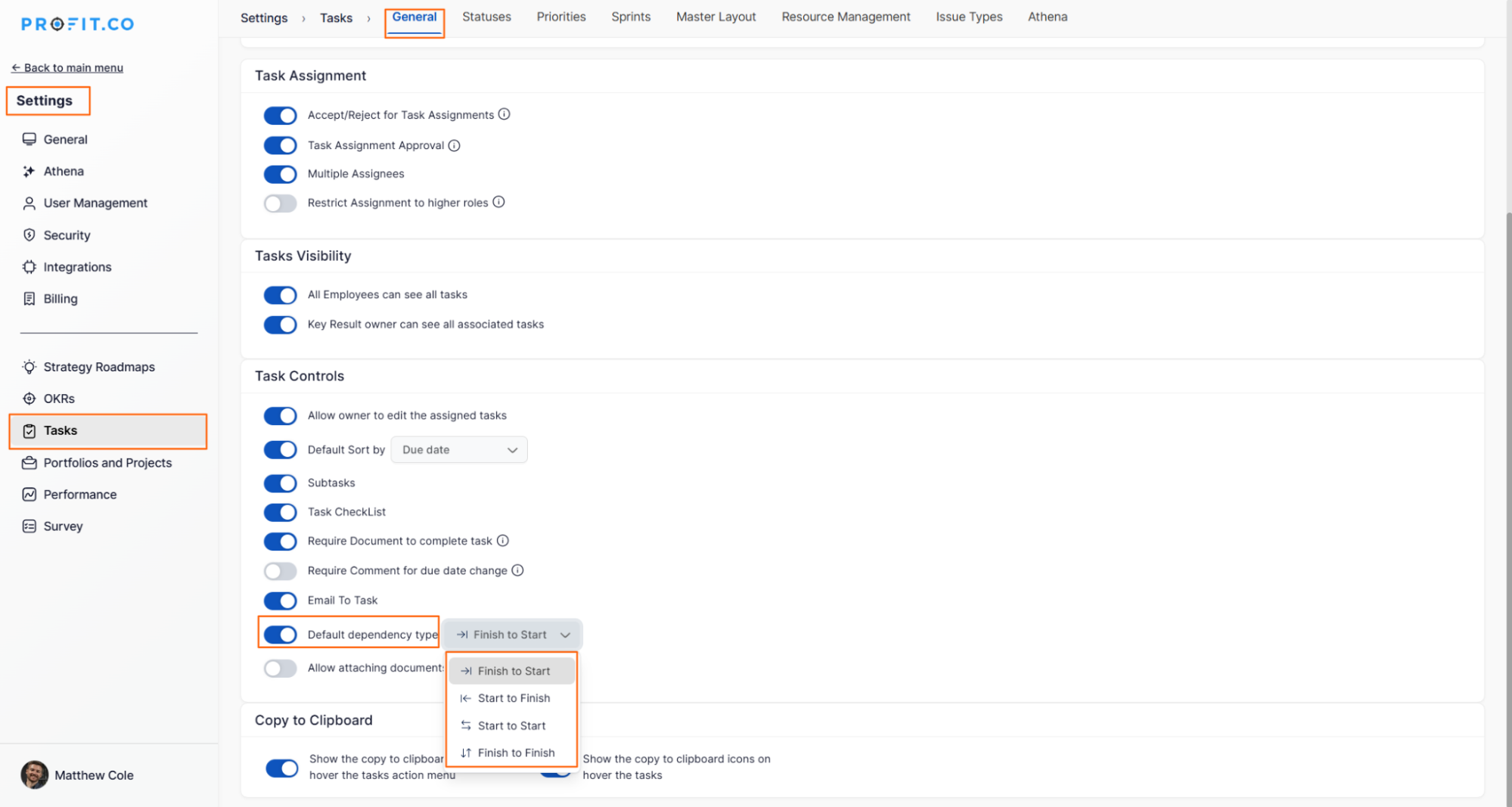
- Navigate to Settings→ Tasks → General → Default dependency type enable the toggle.
- Select a task that needs to be linked to another.
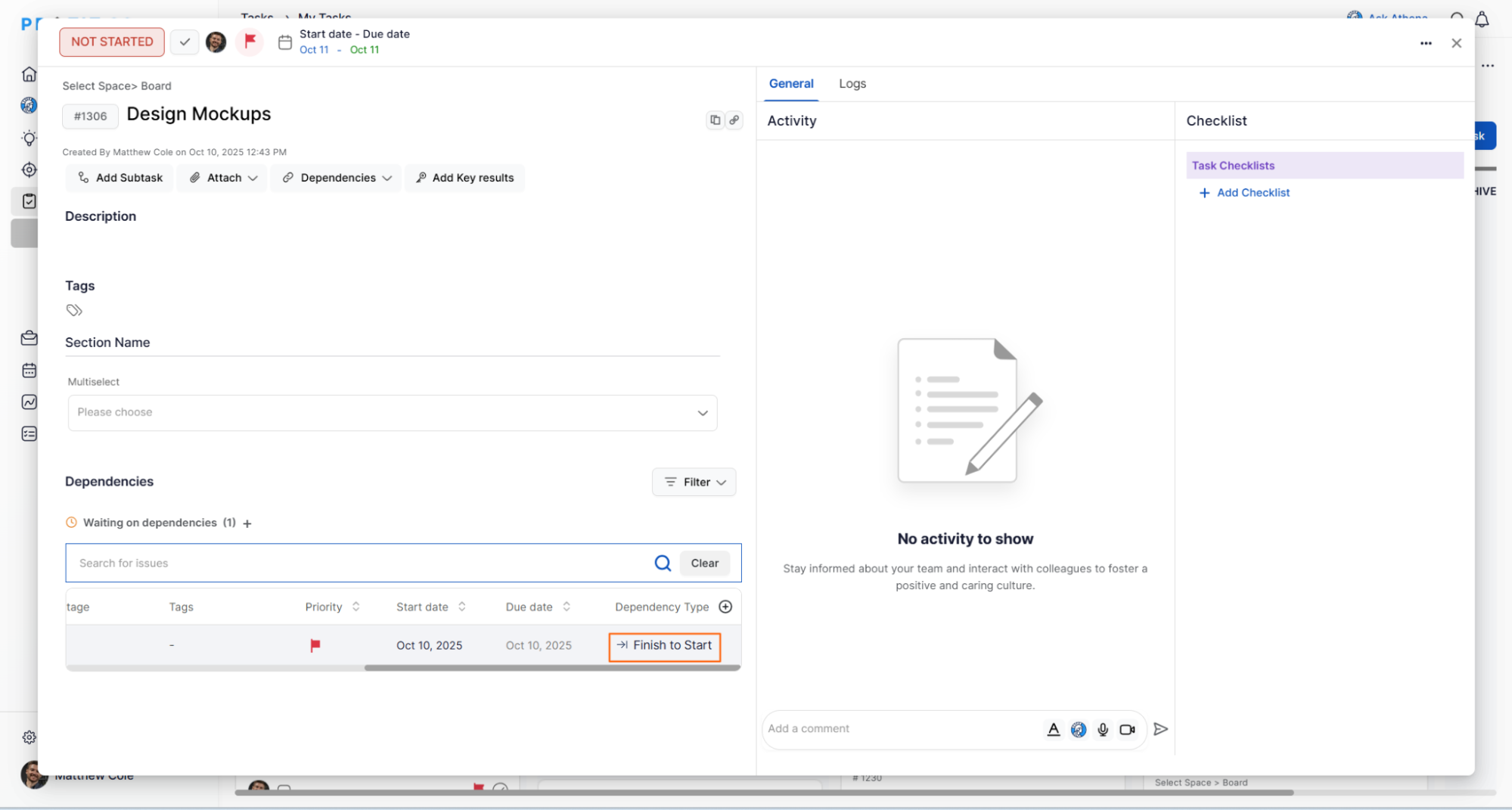
- Click on the Dependencies option in the task detail view.
- Choose Add Dependency and select the related task.
- Define the dependency type: Finish-to-Start, Start-to-Start, etc.
For example, in this case im using the Finish-to-Start (FS)
Task B starts only after Task A finishes. Example: Complete Design Mockups (Task A) → then start Front-End Development (Task B).
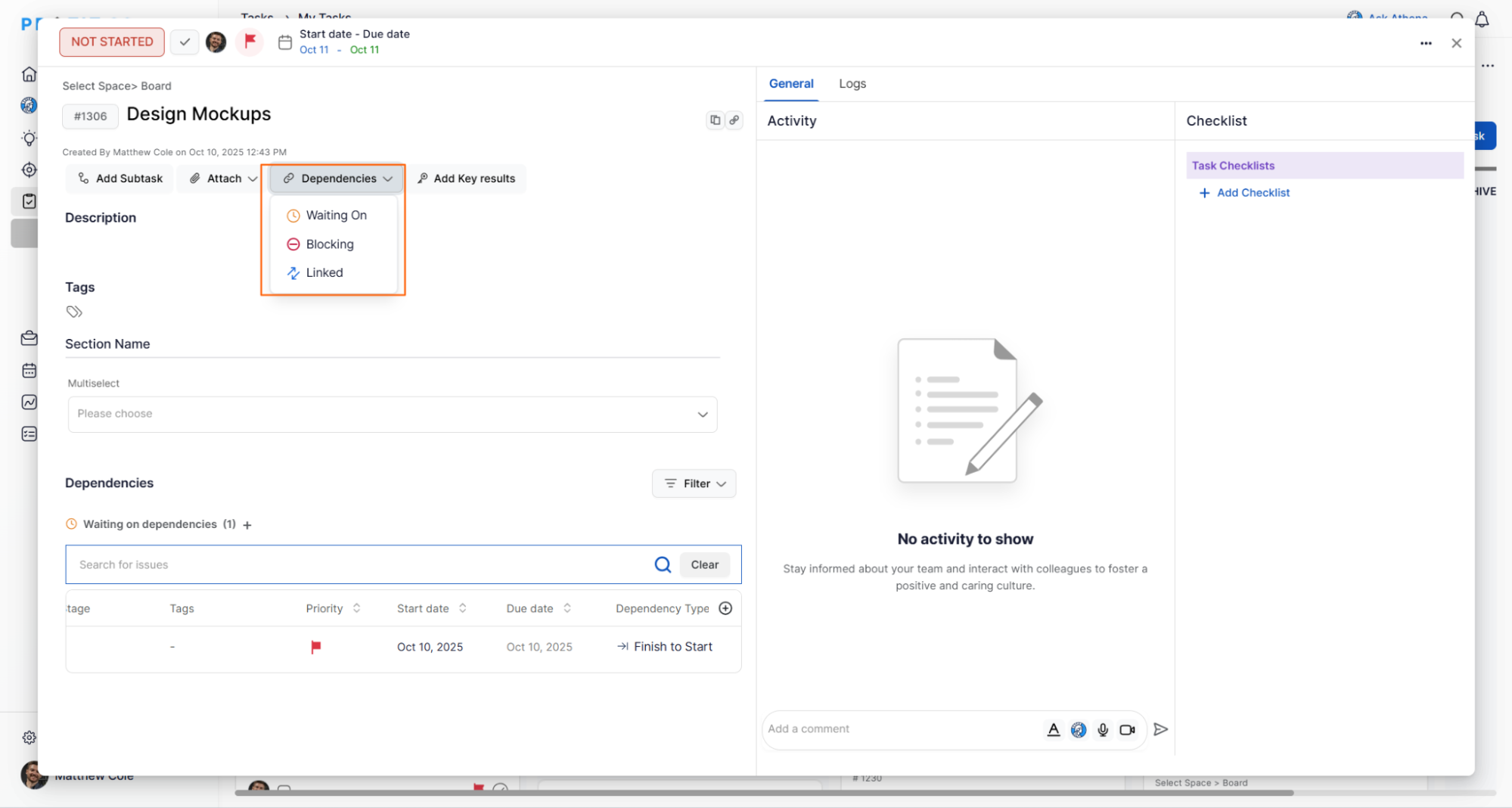
Note:
In Profit.co, dependencies can be categorized into three types: Waiting On, Blocking, and Linked:
Waiting On: Indicates that the selected task cannot proceed until another task is completed. For example, Task B is waiting on Task A to finish before it can start.
Blocking: Highlights that the current task is preventing another task from starting. For example, Task A is blocking Task B until its completion.
Linked: Used when two tasks are related or connected but not strictly dependent on each other. This is useful for tracking associated work without enforcing a dependency sequence.
Once defined, the relationship appears within both task details and the Kanban board view, visually connecting tasks to show dependencies or blockers.
Project and Task Health Based on Dependencies
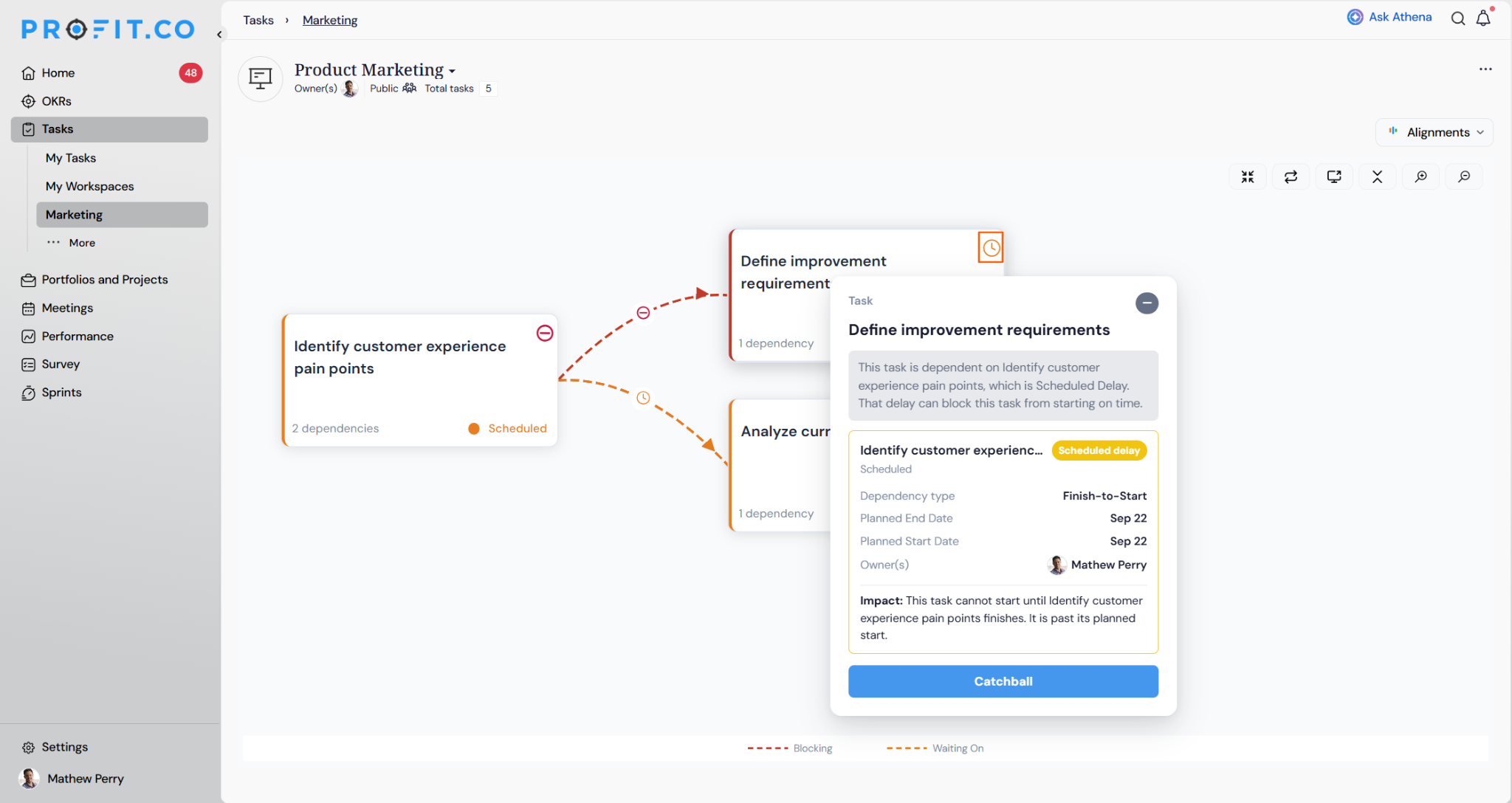
Profit.co considers task dependencies when determining the health of a task. This helps you identify when a task is delayed because it is waiting for another task to be completed or started.
- A task's health depends on the health of the task it is waiting on. If the dependent task is delayed, the waiting task is also shown as delayed.
- If a task depends on multiple tasks, its health is based on the task with the highest delay. The specific task causing the delay is also shown.
- Depending on the dependency type, Profit.co checks whether the preceding task has started or completed as expected.
- When a task is flagged, you can click on it to view details about the issue, including the task causing the delay, the task owner, and the relevant dates.
- You can also contact the person responsible for the blocking task directly from the task details. The message includes the relevant task information.
- Dependency-based health affects only the task's health status. It does not change the task's status, such as Not Started, In Progress, or Completed.
- Once the blocking task is completed, the delay flag is removed and the dependent task returns to a healthy status, even if the blocking task was completed later than planned.
Why Task Dependencies Matter?
1. Clear Sequencing
Dependencies help teams understand what must happen first and what follows next, reducing confusion and overlap.
2. Proactive Risk Management
By visualizing relationships, teams can identify and remove bottlenecks before they delay delivery.
3. Improved Collaboration
Dependencies encourage communication. When one task is blocked, everyone involved knows who or what is holding it up.
4. Better Resource Planning
Managers can assign work efficiently by seeing which tasks are waiting and which can progress independently.
Best Practices for Using Task Dependencies in Profit.co?
- Keep it simple: Define only necessary dependencies to avoid complexity.
- Regularly review links: Update relationships if scope or timelines change.
- Combine with milestones: Link key dependencies to milestone tasks for better visibility.
- Communicate blockers early: Use the dependency view to flag issues before they impact delivery.
What is the outcome of using Task Dependencies in Profit.co?
By using Task Dependencies in Profit.co, teams can visualize workflow, align execution order, and eliminate uncertainty.
Whether you’re managing a small project or a large cross-functional initiative, dependencies create structure and transparency, leading to smoother execution and timely delivery.
Related Questions
Learn how to manage work efficiently with Creating and Managing Tasks in Profit.co.
Click here to learn more about how to use Workspaces and Task Boards in Profit.co.
Frequently Asked Questions
Yes. You can edit or remove task dependencies anytime through the task’s detail view. Simply open the task, navigate to the Dependencies section, and modify or delete the linked task as needed. Updates are reflected automatically in both the task view and Kanban board.
Profit.co displays task dependencies visually on the Kanban board and Task Detail View, where arrows or connection lines indicate relationships like “Waiting On” or “Blocking.” This helps teams identify dependencies and bottlenecks at a glance.
Changing the dependency type updates the relationship logic between tasks. For example, switching from Finish-to-Start to Start-to-Start allows both tasks to begin simultaneously, adjusting timelines and execution flow accordingly.
