













Profit.co lets a super user control, with a single toggle, whether all employees can see each other's tasks or only their own.
Table of Contents
What Is Task Visibility?
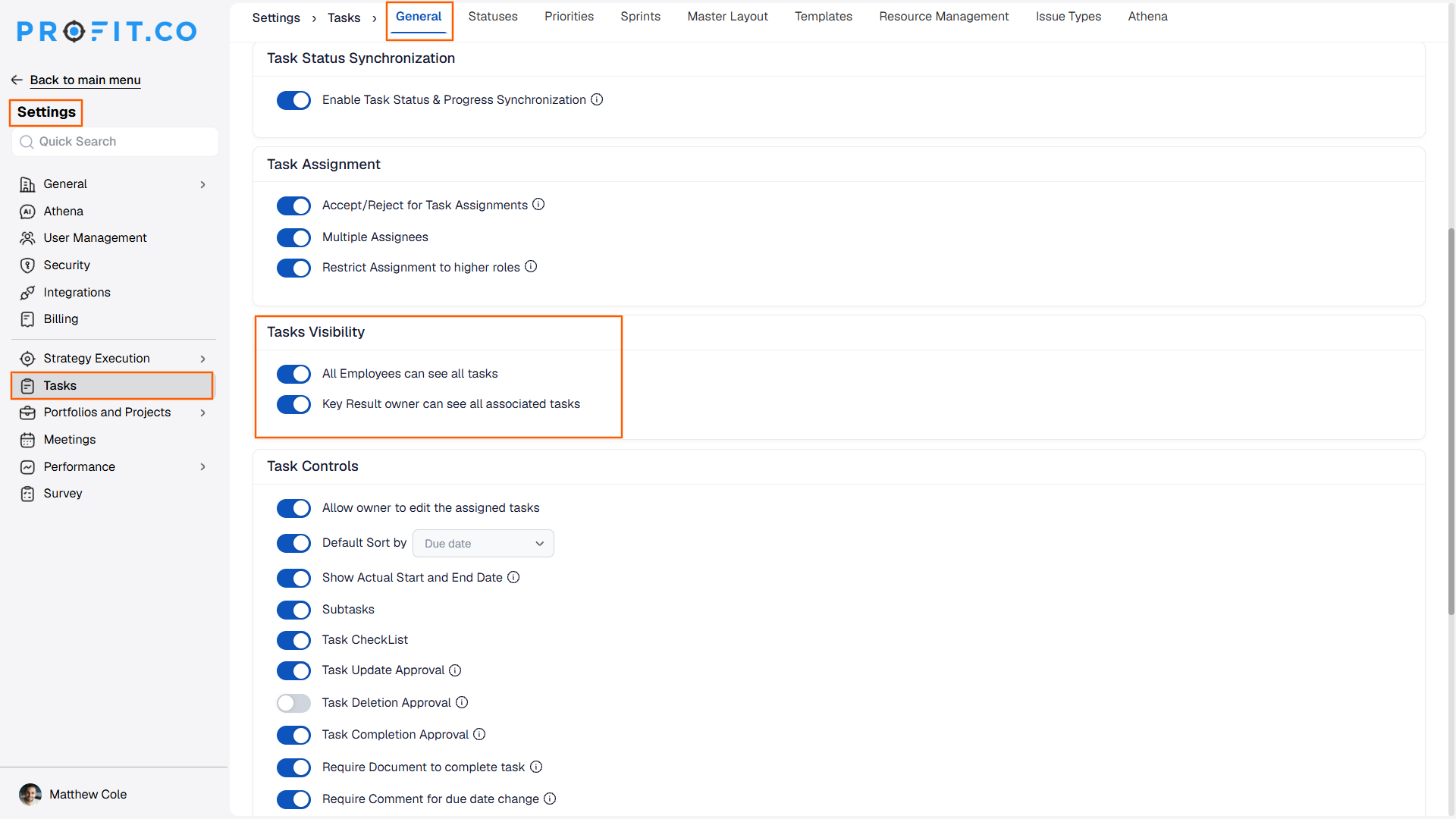
Task Visibility is an organization-wide toggle, "All Employees can see all tasks," under Settings > Tasks > General. It controls whether employees can view tasks owned by people other than themselves.
This setting is controlled by super users, not by individual employees adjusting their own view.
Why Does Task Visibility Matter?
Without this control, an organization has no single switch to decide whether task-level work is open across teams or kept private to each owner. Task Visibility gives super users one place to set that policy for everyone at once, based on the organization's own privacy and transparency priorities.
How Does Task Visibility Work?
Step 1: Open Task Settings
- Go to Settings > Tasks > General.
Step 2: Set the Visibility Toggle
- In the Tasks Visibility section, enable or disable All Employees can see all tasks.
What Happens When You Set Task Visibility?
| Scenario | What Happens |
|---|---|
| You enable "All Employees can see all tasks." | Profit.co lets every employee view tasks owned by anyone else in the organization. |
| You disable the toggle. | Profit.co restricts visibility, and employees see only the tasks their existing access already covers. |
| You look for this toggle as a standard user without super user access. | Profit.co keeps the Tasks Visibility setting under Settings > Tasks > General, which only super users can open and change. |
Caution
Enabling this toggle exposes every employee's tasks organization-wide. Confirm with your team whether any task content should stay private before switching it on.
What Are the Best Practices for Task Visibility?
- Decide the default scope before rolling tasks out organization-wide, since this toggle applies to every employee at once rather than per user or per team.
- Keep the toggle disabled if task content includes sensitive or role-specific work, since enabling it exposes that detail across the whole organization.
- Review who holds super user access alongside this setting, since only super users can change it.
- Communicate a planned visibility change before flipping the toggle, since employees who could not see peer tasks yesterday may see them immediately afterward.
Related Articles
What Are Some Frequently Asked Questions About Task Visibility?
The toggle covers the whole organization. It does not offer a per-department option on its own.
The source content for this feature does not confirm whether the change applies retroactively to existing tasks, so verify this with your administrator before relying on it.
No. Task Visibility is an organization-wide toggle. Visibility for individual boards is set separately, as covered in how to set visibility for each board apart from the Workspace.
Execute your strategy with confidence
Connect OKRs, tasks, and teams in one place with Profit.co
