

Profit.co measures OKR progress using the Say-Do Ratio, a business value methodology that compares what a team committed to against what it actually delivered. This keeps reporting focused on real outcomes instead of partial or inflated progress.
Table of Contents
What is the Say-Do Ratio?
The Say-Do Ratio is a business value measurement (BVM) methodology that compares what was promised or committed (“say”) versus what was actually delivered (“do”).
- Say: The plan, commitment, or the expected progress you declare at a certain point.
- Do: The actual achievement or progress delivered at that point.
Note
The Say-Do Ratio supports four status types: Not Started, On Track, In Trouble, and Exceeded. Exceeded applies automatically when actual progress moves beyond the planned value, and appears alongside the other statuses in reports and lists.
Why the Say-Do Ratio Matters
Before this methodology, progress reporting could reward partial completions or blur the line between a team that just met its plan and one that exceeded it. The Say-Do Ratio replaces that ambiguity with a standardized, threshold-based evaluation.
| Benefit | What Changes |
|---|---|
| Accountability | Holds teams responsible for fulfilling their commitments, not just showing progress. |
| Accurate reporting | Eliminates inflated reporting by discarding partial completions. |
| Outcome focus | Keeps focus on actual business value delivered, not interim milestones. |
| Configurable thresholds | Adjustable thresholds let you define what counts as “done” (e.g., 90% or 100%). |
| Standardized measurement | Ensures reporting aligns across departments by standardizing measurement. |
| Clear distinction | Teams can tell the difference between hitting a plan and exceeding it, instead of both being grouped as On Track. |
How It Works
Step 1
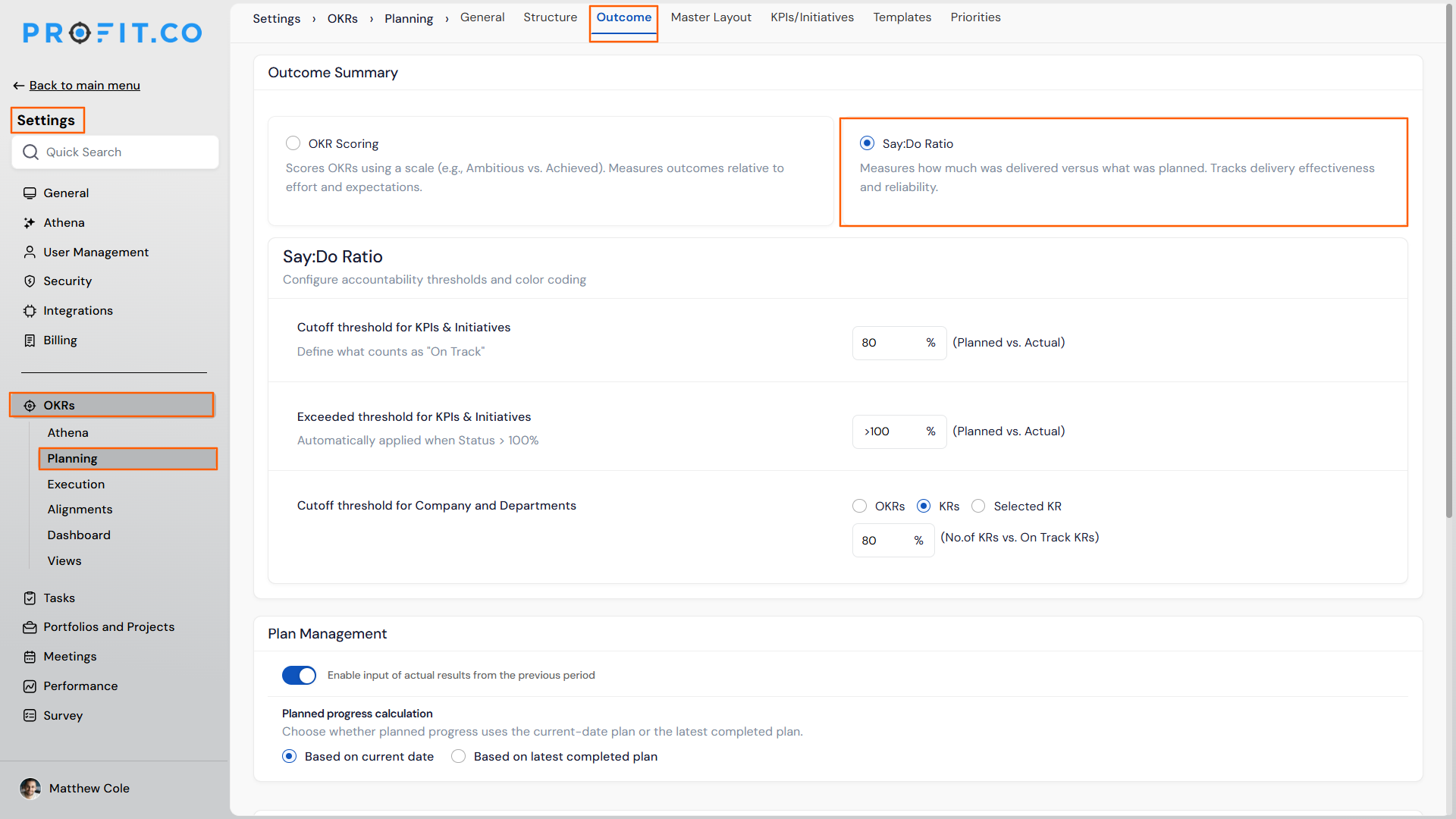
- Navigate to Settings → OKRs → Planning from the left navigation panel.
- Select the Outcomes tab.
- Choose the Say-Do Ratio option.
Step 2
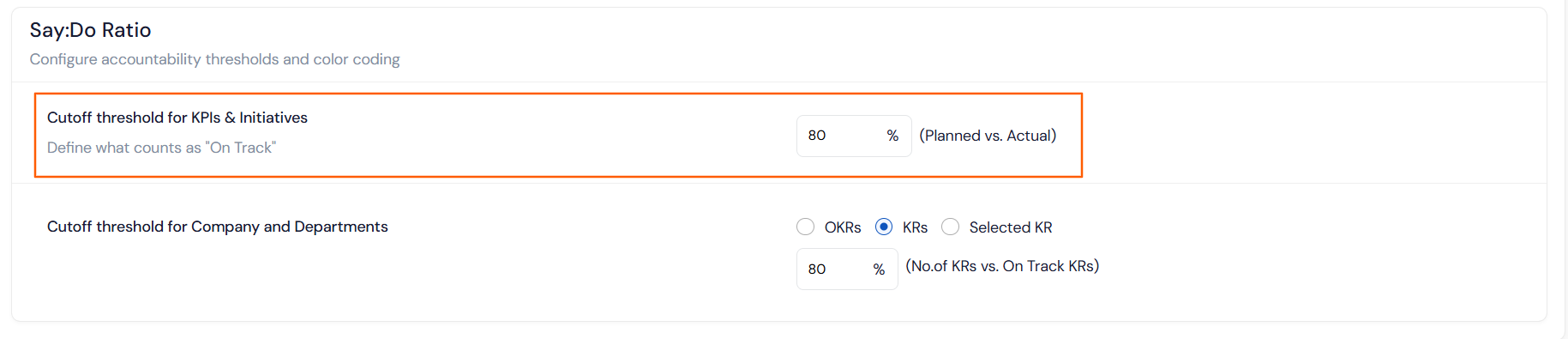
- Set the Cutoff for KPIs & Initiatives (e.g., 80%) to determine when a KPI or initiative is considered successfully delivered.
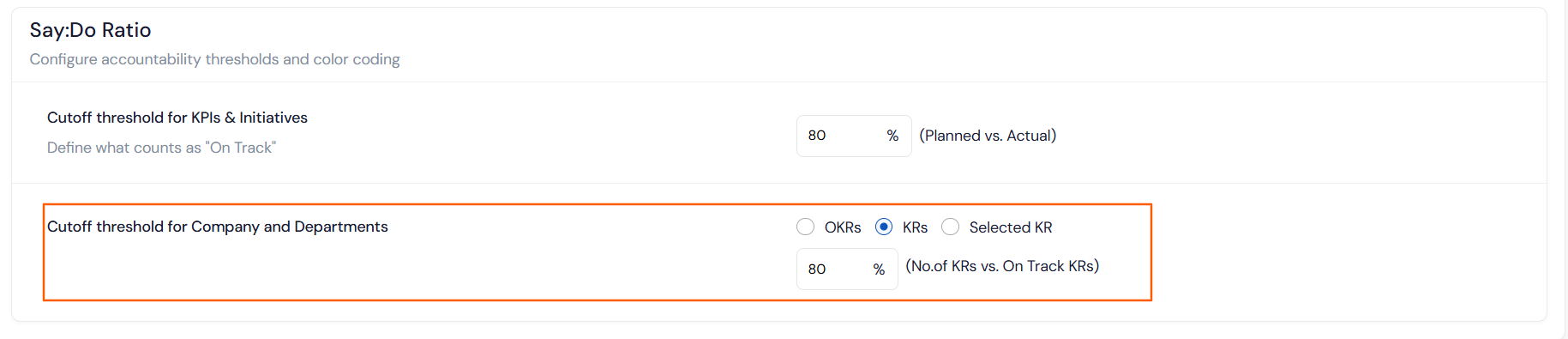
- Set the Cutoff for Company and Department OKRs/KRs (e.g., 80%) to define what portion of total OKRs or KRs must be on track.
Step 3
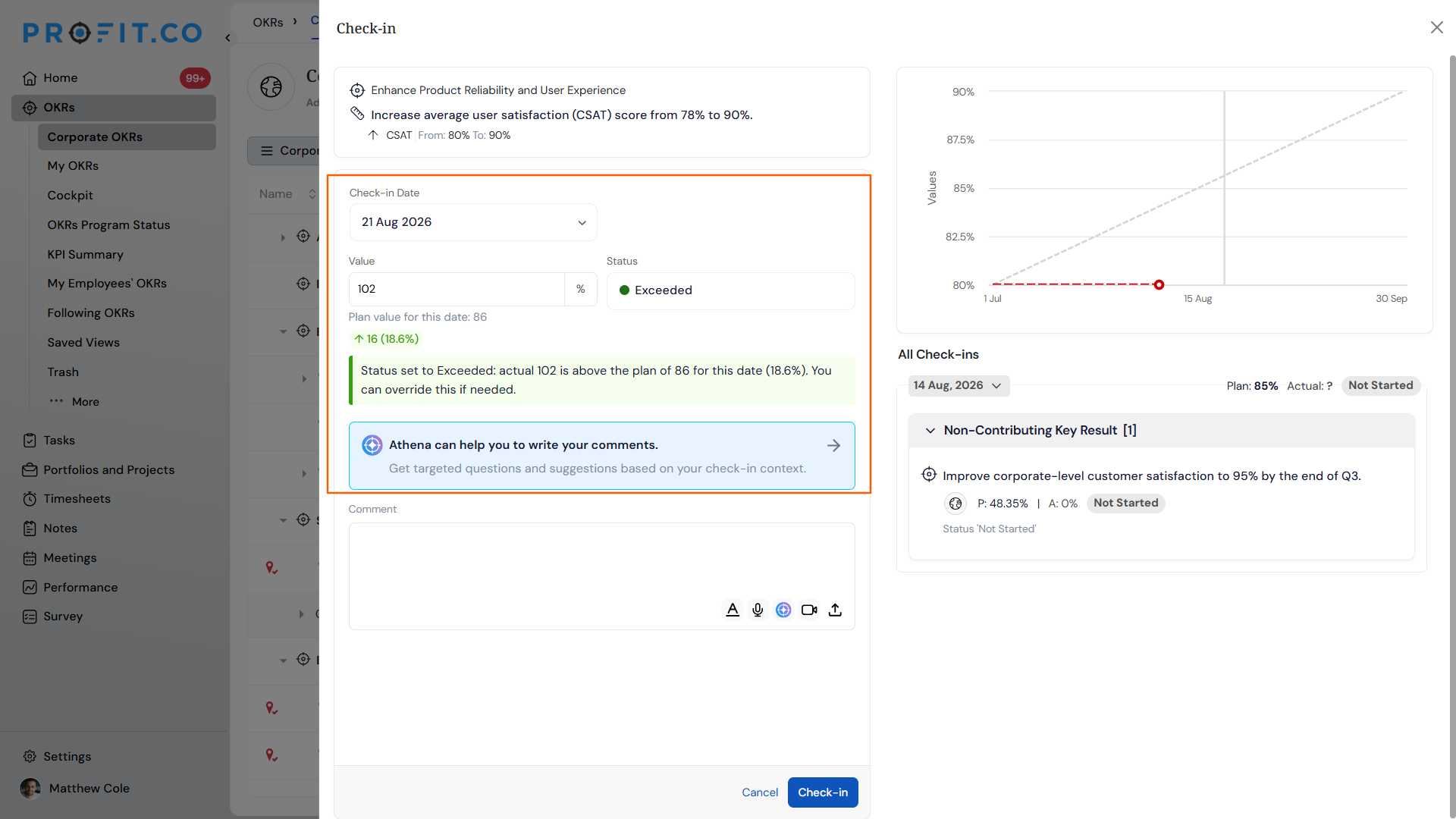
- Track a Key Result using Say-Do tracking the same way you normally check in.
- Compare the check-in's Status percentage against your configured cutoff to see whether it lands as Not Started, On Track, In Trouble, or Exceeded.
Step 4
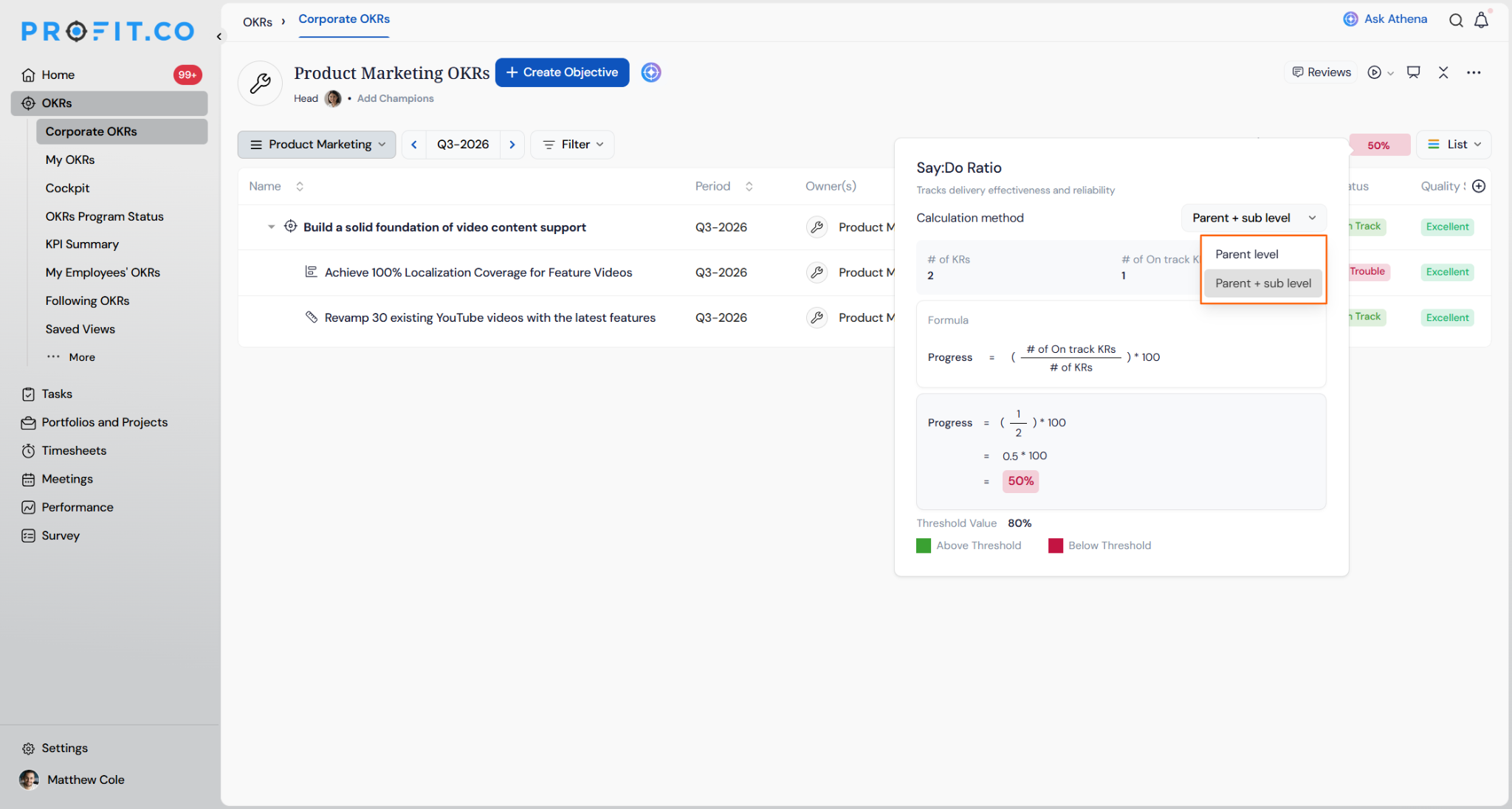
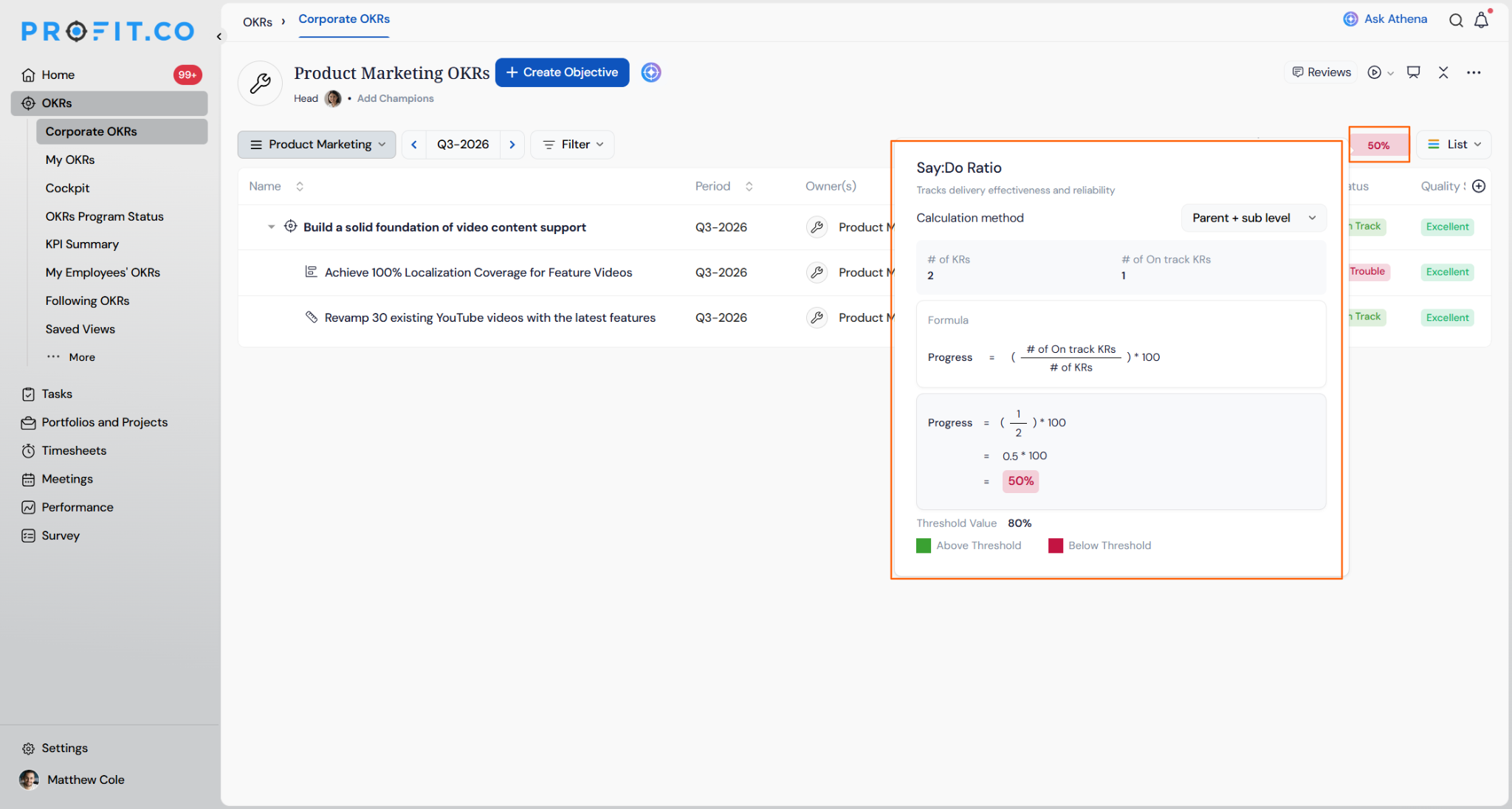
In the Calculation method dropdown, choose one of two options:
- Parent level: Calculates the ratio using only the direct key results under the objective.
- Parent + sub level: Includes both parent key results and all nested sub key results in the calculation.
Say-Do Ratio Scenarios and Their Outcomes
| Scenario | What Happens |
|---|---|
| You check in on a Key Result and progress meets or exceeds the configured cutoff threshold. | Profit.co marks that check-in as On Track. |
| You check in on a Key Result and progress falls below the configured cutoff threshold. | Profit.co marks that check-in as Not Started, even if some progress was made. |
| You record actual progress that exceeds the planned value during a check-in. | Profit.co automatically updates the status to Exceeded and displays it alongside the other Say-Do statuses in reports and lists. |
| You enable the Say-Do Ratio for your organization. | Profit.co replaces standard progress-based scoring with the Say-Do methodology across evaluated OKRs. |
| You view the overall Objective progress under Say-Do Ratio. | Profit.co counts only the Key Results that meet or exceed their threshold as On Track, then divides that count by the total number of Key Results to calculate the Objective's overall ratio. |
Calculation Method Scenarios
| Scenario | What Happens |
|---|---|
| You switch from Parent level to Parent + sub level after check-ins are already underway. | Profit.co keeps every Key Result's own recorded check-in values and dates. Sub-KRs previously excluded now count toward the Objective's Progress, which can move the percentage and threshold indicator in either direction. |
| You switch back to Parent level after tracking under Parent + sub level. | Profit.co excludes those sub-KRs from the Objective's calculation again, without deleting or resetting their check-in history, so you can switch back and forth without losing data. |
| A Key Result in scope for the selected method has no check-in recorded for the current period. | Profit.co still counts it toward the total KR count, but it cannot count as On Track, which pulls the Objective's Progress down until someone checks in. |
| A team member without edit access on the Objective views its Say:Do Ratio panel. | Profit.co lets them view the current Calculation method and Progress, but keeps the dropdown locked so they can't change the calculation even by accident. |
Tip
If any Key Result under the Objective carries sub-KRs, select Parent + sub level before finalizing progress. Parent level excludes their contribution entirely.
Calculation Logic Explained
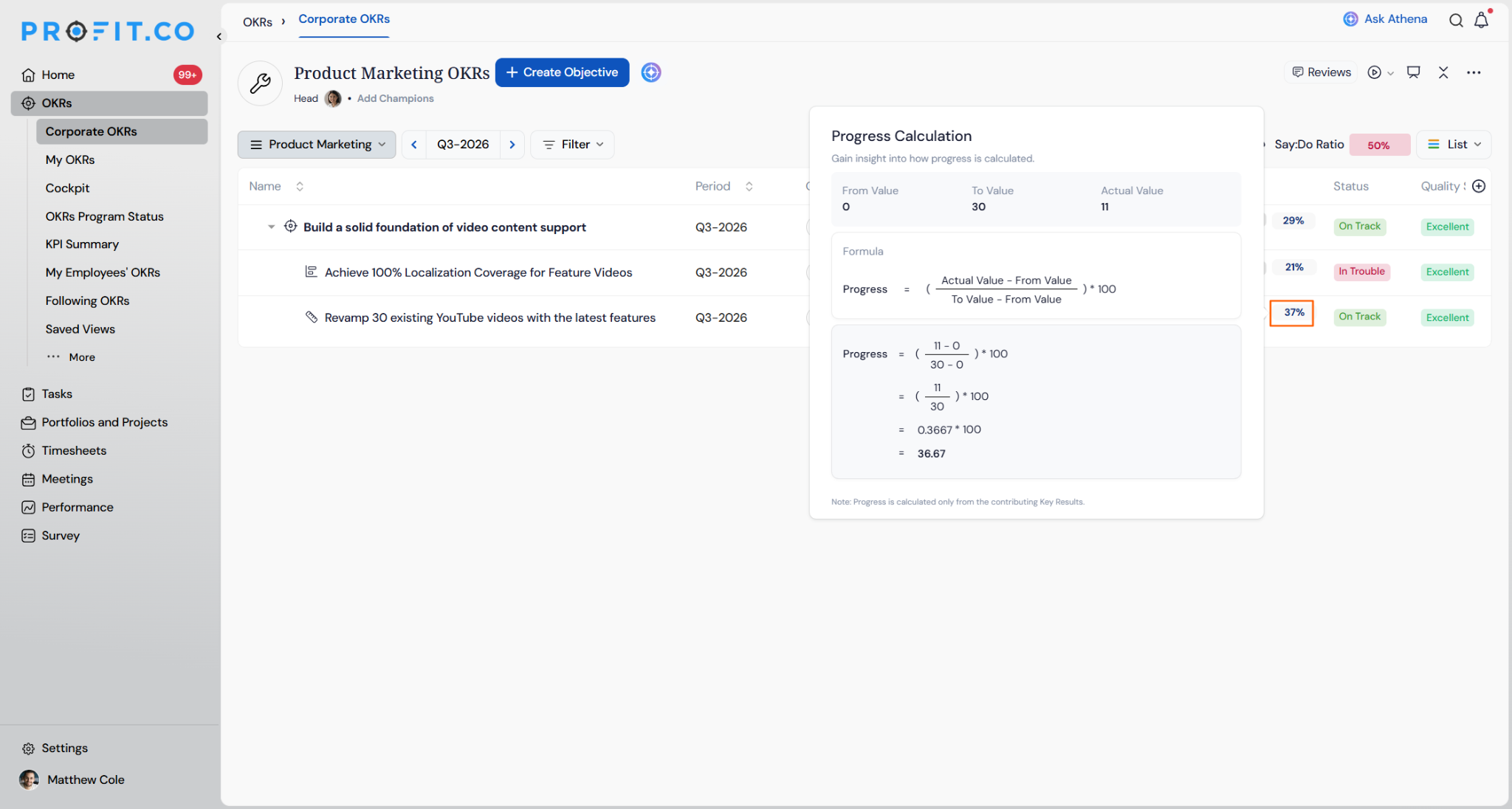
Example: Key Result “Revamp 30 existing YouTube videos with the latest features,” Target Period Q3 (July–September), Check-in Frequency Every Friday. On August 7, the planned progress is 12, and the actual progress is 11.

Progress calculation: Progress = ((11 − 0) / (30 − 0)) × 100. Progress = 36.67 ≈ 37
Status calculation:
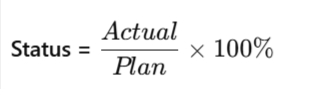
Status = 11 / 12 × 100. Status = 91.66%. Since the Status is 92%, it meets the cutoff for KPIs & Initiatives and is marked as On Track.
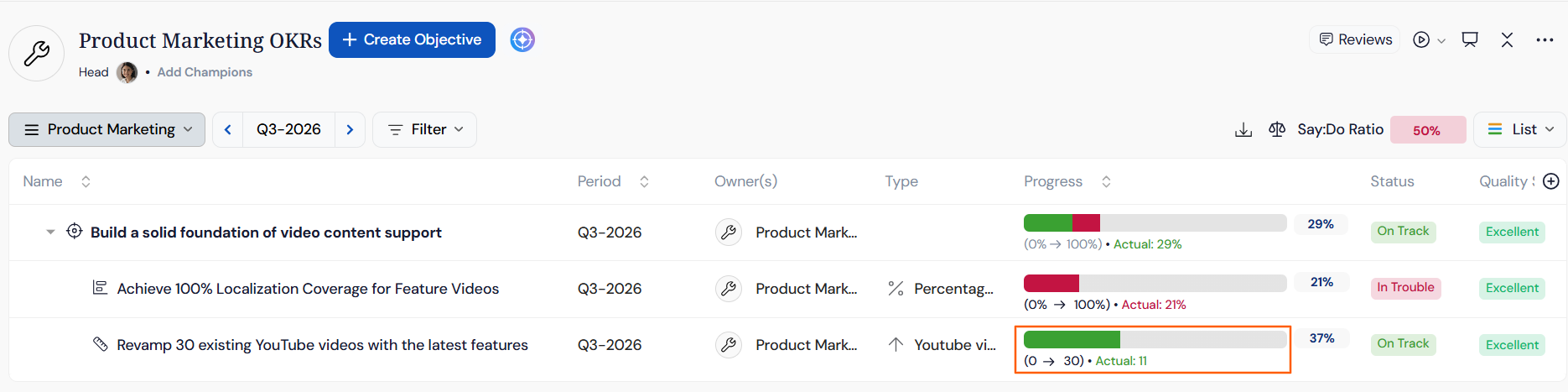
Overall Objective progress: Profit.co evaluates all Key Results under the Objective against the defined cutoff thresholds. Only those KRs meeting or exceeding the threshold count as On Track. The Objective's overall ratio is then (Number of KRs On Track ÷ Total Number of KRs) × 100.
Calculation Method example: with the Calculation method set to Parent + sub level, an Objective with 2 KRs in scope and 1 On Track calculates as Progress = (1 ÷ 2) × 100 = 50%.
Best Practices for Using the Say-Do Ratio
- Set cutoff thresholds before rolling out the Say-Do Ratio broadly, since check-ins are evaluated against whatever percentage you configure for KPIs, Initiatives, or OKRs.
- Treat Not Started as a signal, not a failure, since Say-Do intentionally does not award partial credit below your cutoff, even when real progress was made.
- Review Exceeded results separately from On Track results in reporting, since grouping them together hides genuine overperformance.
- Keep cutoff thresholds consistent across departments where possible, since the Say-Do Ratio is meant to standardize how “done” is measured organization-wide.
- Recalculate Objective-level ratios after changing a Key Result's cutoff, since the overall Say-Do Ratio depends on how many Key Results currently qualify as On Track.
- Default to Parent + sub level for Objectives built with sub-KRs, and reserve Parent level for flat KR structures.
- Confirm the Calculation method on each Objective during OKR setup, not after check-ins begin, to avoid recalculating reporting expectations mid-cycle.
Related Articles
- How does the automatic propagation of Key Result Status work in Profit.co?
- How do I enable and use the status map view in Profit.co?
- How to create sub KR in Profit.co?
Frequently Asked Questions
Exceeded is a separate status. The Say-Do Ratio now supports four statuses total: Not Started, On Track, In Trouble, and Exceeded.
The KPI/Initiative cutoff determines when an individual KPI or initiative counts as successfully delivered. The Company/Department cutoff defines what portion of total OKRs or KRs must be On Track to meet performance standards.
Progress measures how far the actual value moved toward the target. Status measures how close actual progress is to what was planned for that check-in point, and Status is what your cutoff threshold evaluates.
Yes. The Calculation method is set per Objective on its Say:Do Ratio panel, so one Objective can use Parent level while another uses Parent + sub level.
Execute your strategy with confidence
Connect OKRs, tasks, and teams in one place with Profit.co
