

Profit.co helps you to manage the scores for goals, competencies, and OKRs via the Scoring Bucket option.
Why this feature?
- This feature helps you to manage the scores between Competencies, Goals, and OKRs when you include it in your performance review process.
- Based on your requirement you can split the weight among these three in the scoring bucket via Settings.
Note: Only Super Users can have access to Scoring Bucket.
Step 1
Navigate to Settings → Performance → Reviews from the left navigation panel and switch to the Review Templates tab.
Click on the Edit icon of the Review templates you wish to make the changes.

Step 2
Under the Scorig Buckets menu enable the toggles for three of them.
The below-mentioned example shows 0.33 weight for Goals and OKRs and 0.34 weight for Competencies.

Step 3
Once you click on the Edit icon of Goals, OKRs, or Competencies to add weights and percentages in the Update Scoring page. Once done, click Update.
The weight will be updated accordingly.
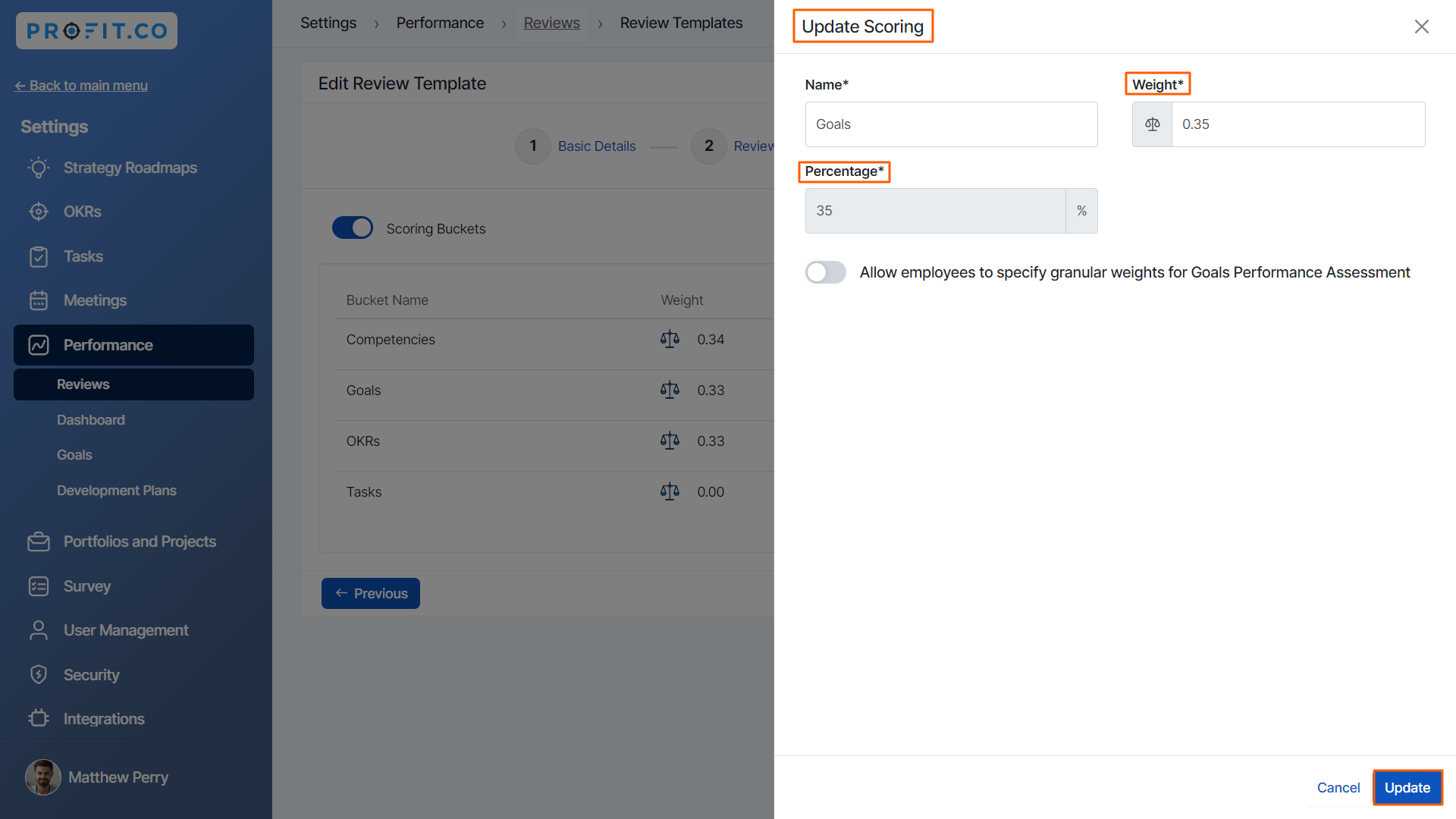
After making all the changes click on the Update button on the Edit Review Template page.

Note: Ensure that the sum of the weights is equal to 1 or 100%.
Related Answer Post
To know more about How to set weights for Goals, click here
