

Portfolio-Level Resource Management lets portfolio owners add people to a portfolio, allocate them across the projects inside it, and monitor total workload from a single screen. It replaces per-project spreadsheet tracking with a live view of who is over- or under-committed across the whole portfolio.
Table of Contents
- What is Portfolio-Level Resource Management?
- Why Does Portfolio-Level Resource Management Matter?
- How Does Portfolio-Level Resource Management Work?
- What Happens When You Use Portfolio-Level Resource Management?
- Who Can Access Portfolio-Level Resource Management Features?
- What Are the Best Practices for Portfolio-Level Resource Management?
- Related Articles
- What Are Some Frequently Asked Questions About Portfolio-Level Resource Management?
What is Portfolio-Level Resource Management?
Portfolio-Level Resource Management is a People tab on the portfolio page that brings project-level staffing up to the portfolio tier. It groups three views, Members & Access, Project Allocation, and Capacity Workbench, so an owner can manage everyone working across a portfolio's projects without opening each project individually.
| Sub-Tab | What It Covers |
|---|---|
| Members & Access | Portfolio membership and portfolio roles, which control visibility only |
| Project Allocation | Assigning portfolio members, and project-sourced users, to specific projects inside the portfolio |
| Capacity Workbench | Aggregate allocation and utilization across every project in the selected scope |
Every allocation is authored on the individual project. The portfolio holds no allocation record of its own; it derives each person's rolled-up load from the underlying project records at read time. Portfolio roles govern visibility only and inherit down through every sub-portfolio and project beneath the portfolio.
Note
Project Allocation only lets you assign people to projects inside the portfolio you have open. Allocating a person to a project in a different portfolio is not supported from this screen.
Why Does Portfolio-Level Resource Management Matter?
Portfolio owners previously had no way to see total workload across a portfolio without exporting every project's allocation and summing it manually. The Capacity Workbench now shows each person's combined load across all portfolio projects in one heatmap, replacing that manual stitching with a live view.
Because the Capacity Workbench flags anyone above 95% utilization before the review period starts, owners can rebalance hours ahead of a delivery slip instead of discovering the overload after it has already affected a project. Allocation still lives on the project record, so portfolio and project numbers never fall out of sync.
How Does Portfolio-Level Resource Management Work?
Step 1
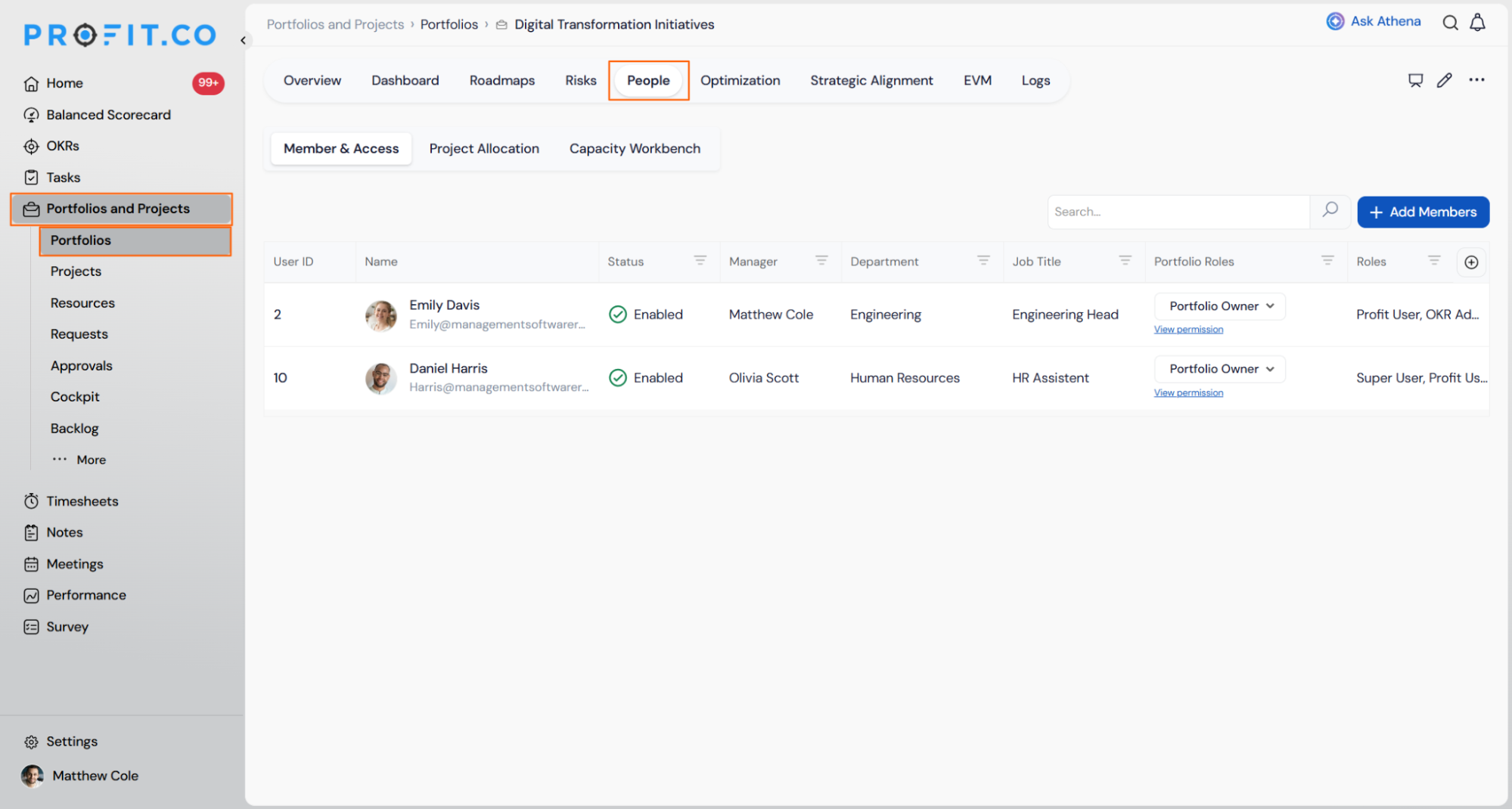
- Navigate to Portfolios and Projects → Portfolios and open the relevant portfolio.
- Click the People tab to access the three resource management sub-tabs.
Prerequisite: You need Owner-level access on the portfolio to add members, allocate people to projects, or resolve overallocations.
Step 2
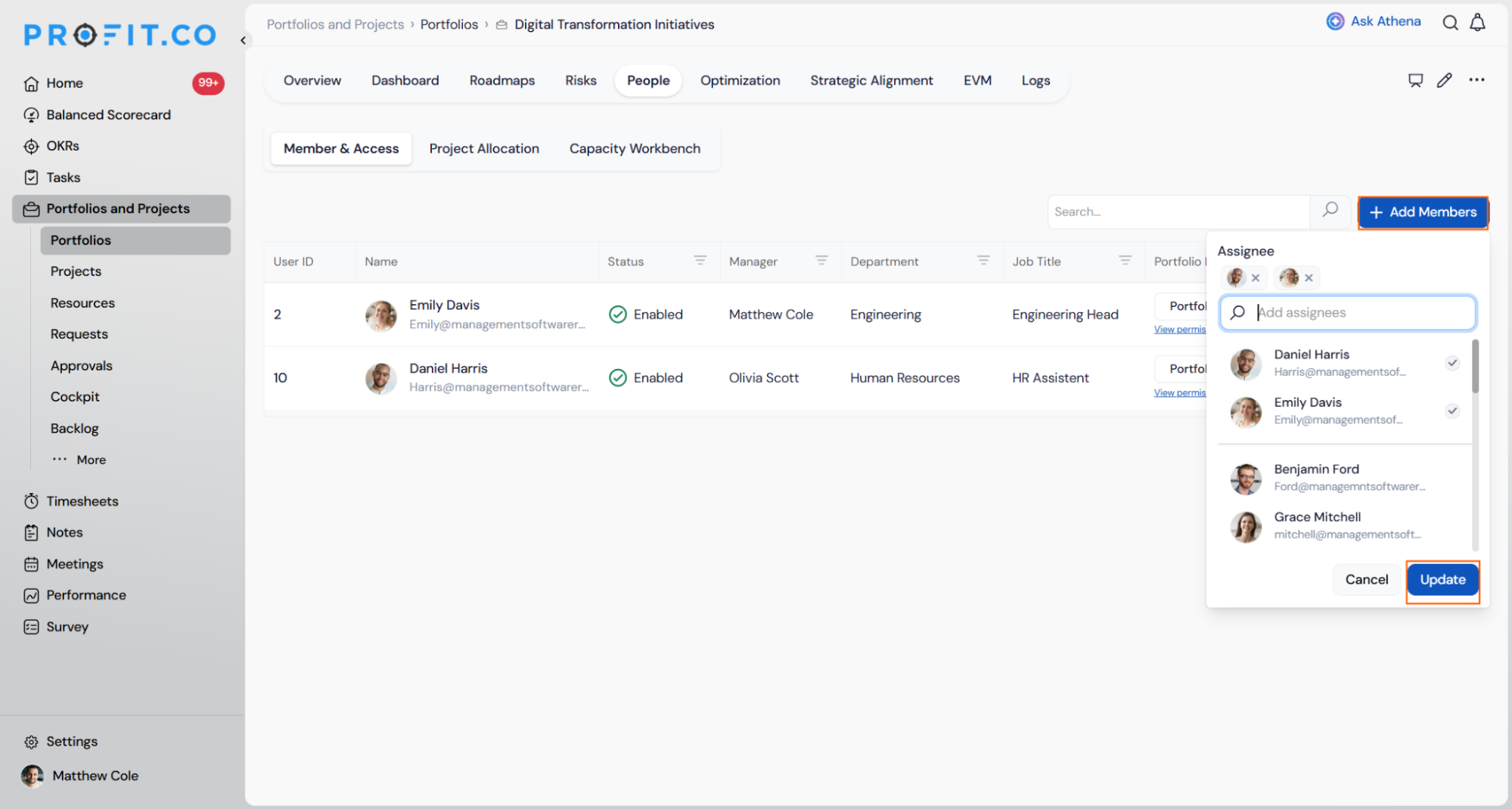
- Click + Add Members and select the people to add along with a portfolio role.
- Review each member's status, department, job title, and portfolio role in the member list.
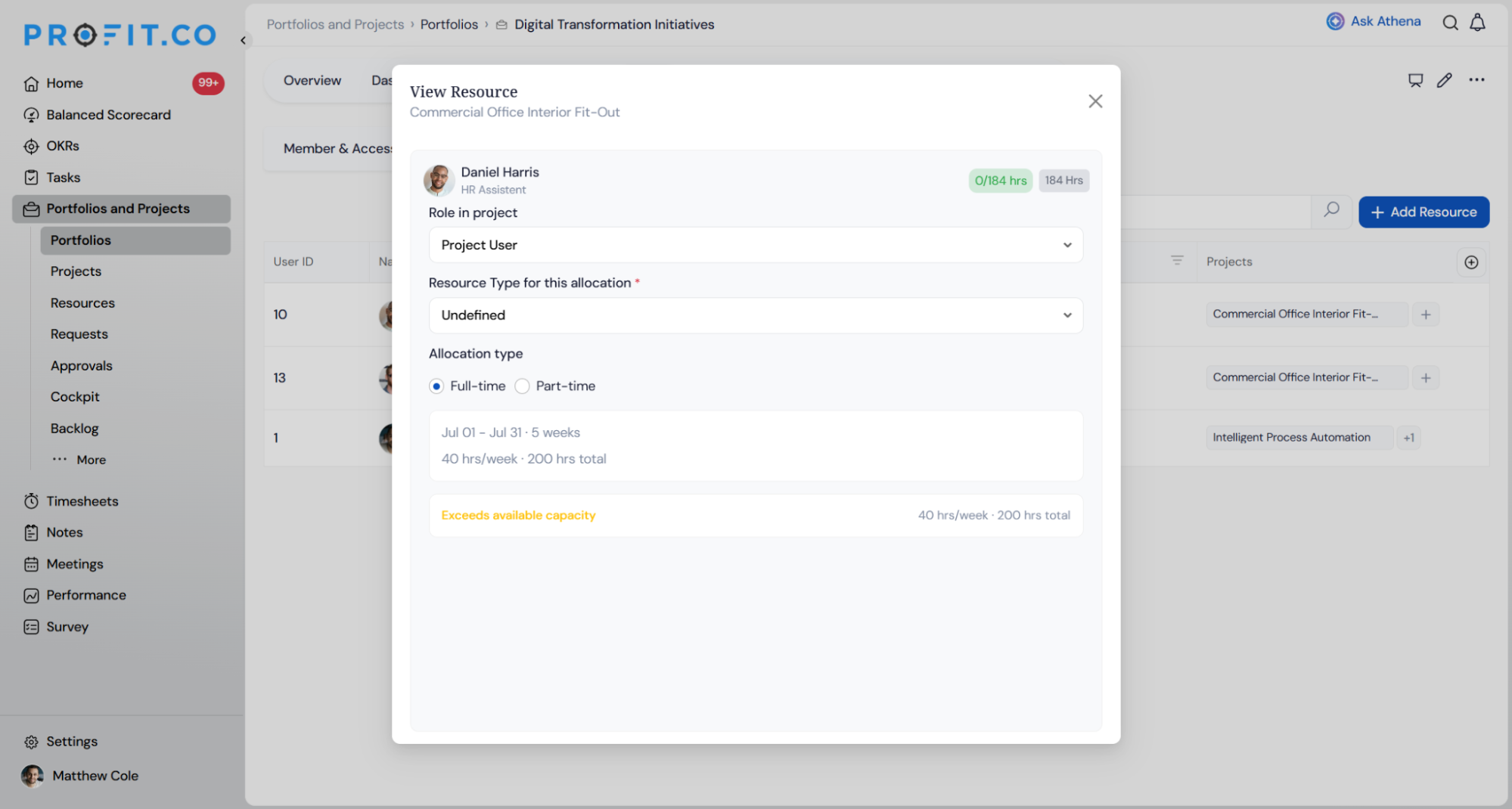
- Select a project from the Allocate to project dropdown to open the allocation panel.
- Choose Full-time or Part-time and set a weekly, monthly, or specific timeframe window.
- Click + Add to portfolio on the row of a user who already has project access but isn't yet a portfolio member.
Step 3
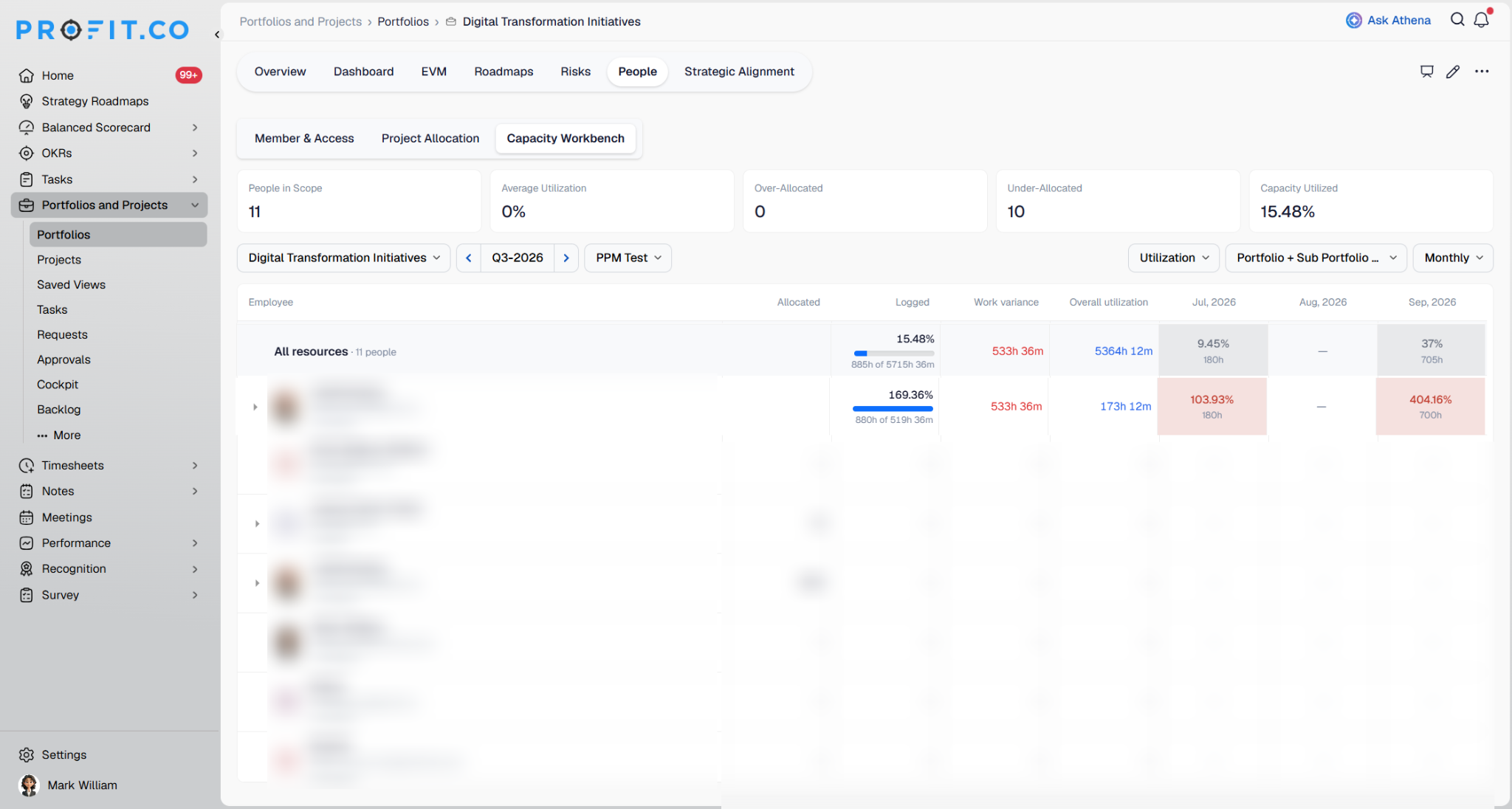
- Open the Capacity Workbench and switch between Monthly, Weekly, and Yearly views.
- Select the portfolio, the period, the scope (such as Portfolio + Sub Portfolio), and whether to view the data Monthly or Weekly.
- The summary cards show People in Scope, Average Utilization, Over-Allocated, Under-Allocated, and Capacity Utilized.
Use the view selector to switch between the workbench's two views:
- Allocation shows each person's Overall allocation, Over-allocated hours, Spare capacity, and the allocation percentage and hours for each month or week. Periods where a person is allocated beyond their capacity are highlighted in red.
- Utilization shows Allocated hours, Logged hours, Work variance, and Overall utilization for each person.
What Happens When You Use Portfolio-Level Resource Management?
This section covers what happens to your allocation data, your capacity numbers, and your access once you act, not the click-path itself.
| Scenario | What Happens |
|---|---|
| You add a person to the portfolio using + Add Members | Profit.co adds them to Members & Access under the selected portfolio role and creates no allocation record. |
| You allocate a portfolio member to a project | Profit.co saves the allocation on that project's own window and rolls the number up to the portfolio at read time without storing a separate portfolio-side record. |
| You remove an allocation using a project chip's Remove action | Profit.co unallocates them from that project and recalculates their load in the Capacity Workbench. |
| You submit an allocation that exceeds the project's available hours or the portfolio's remaining capacity | Profit.co rejects the save through two-level validation and keeps the allocation popup open with your entered values. |
| You attempt to add members, allocate, or rebalance without owner-level permissions | Profit.co's server returns a 403 response and disables the action in the interface without making any change. |
| You move a project to a different portfolio | Profit.co keeps the project's sub-projects in the original portfolio under their original identity and drops the moved project out of that portfolio's capacity roll-up. |
Who Can Access Portfolio-Level Resource Management Features?
Portfolio Role and project-level access work independently in this feature: seeing a portfolio never grants the ability to staff it. The table below maps each persona to what it can actually do inside the People tab.
| Role | What They Can Do in the People Tab |
|---|---|
| Owner | Add members, allocate to projects, remove allocations, promote project-sourced users, resolve overallocations, and set scope |
| Champion (Portfolio Manager) | Allocate portfolio members to projects, edit allocations, and monitor capacity |
| Department Head | View the Capacity Workbench for their people and request a rebalance |
| Standard User | Appear in Project Allocation as a project-sourced user when allocated directly to a portfolio project |
| Viewer | View Members & Access, allocations, and capacity without adding, allocating, or rebalancing |
What Are the Best Practices for Portfolio-Level Resource Management?
- Set the portfolio role at add time instead of leaving it as default, since a portfolio role only controls visibility and won't grant anyone the ability to allocate or rebalance on its own.
- Check the Project Allocation tab for users flagged with + Add to portfolio on a regular cadence, since these people are already working inside the portfolio's projects but stay off portfolio-level reporting until you promote them.
- Set the Capacity Workbench scope to include sub-portfolios before judging whether a portfolio is over-committed, since the Main portfolio only view excludes work happening beneath it.
- Resolve flagged overallocations from the Capacity Workbench rather than editing hours directly on each project, since allocation is still authored per project and scattered edits make it easy to lose track of a person's total load.
- Confirm reassigned hours fit both the project's own availability and the portfolio's remaining capacity before saving, since an allocation that clears one check can still be rejected by the other.
Related Articles
- What is Resource Management in the PPM module?
- How to create a new portfolio in profit.co?
- How do I View Portfolio Health Metrics and Heatmaps in Profit.co?
What Are Some Frequently Asked Questions About Portfolio-Level Resource Management?
Yes. They appear in Project Allocation as a project-sourced user, and an owner can promote them to a portfolio member later using + Add to portfolio.
No. A portfolio role only controls visibility into the portfolio and everything beneath it. Adding members, allocating, and rebalancing all require owner-level access regardless of role.
Health bands configured for the organization: under 80% shows gray, 80 to 95% shows green as optimal, and above 95% shows red as over-allocated.
No. The scope selector only changes which projects' hours are included in the roll-up you see. It does not add, remove, or move any allocation.
Execute your strategy with confidence
Connect OKRs, tasks, and teams in one place with Profit.co
