

Collaborator Assessment lets review templates collect feedback from the people an employee works with day to day, as a step separate from peer and manager assessment. A Super User turns it on per template and decides which roles can populate the Collaborator List.
Table of Contents
- What Is Collaborator Assessment?
- Why Does Collaborator Assessment Matter?
- How Does Collaborator Assessment Work?
- What Happens When You Use Collaborator Assessment?
- How Is Collaborator Assessment Different From Peer Assessment?
- What Are the Best Practices for Collaborator Assessment?
- Related Articles
- What Are Some Frequently Asked Questions About Collaborator Assessment?
What Is Collaborator Assessment?
The Collaborator Assessment step is a part of Profit.co review templates that lets colleagues who work with an employee contribute to that employee's performance review. It is its own step, separate from peer and manager assessments, so this input can be configured and reviewed on its own. Super users turn the step on for each review template where collaborator input is relevant.
Why Does Collaborator Assessment Matter?
Performance feedback used to come only from formally nominated peers or the reporting manager, leaving out day-to-day collaborators, such as cross-functional partners, who never get added as peers. Collaborator Assessment gives that input its own step, so it's captured as structured review feedback instead of being left out entirely.
How Does Collaborator Assessment Work?
Step 1
- Navigate to Settings → Performance → Reviews → Review Templates.
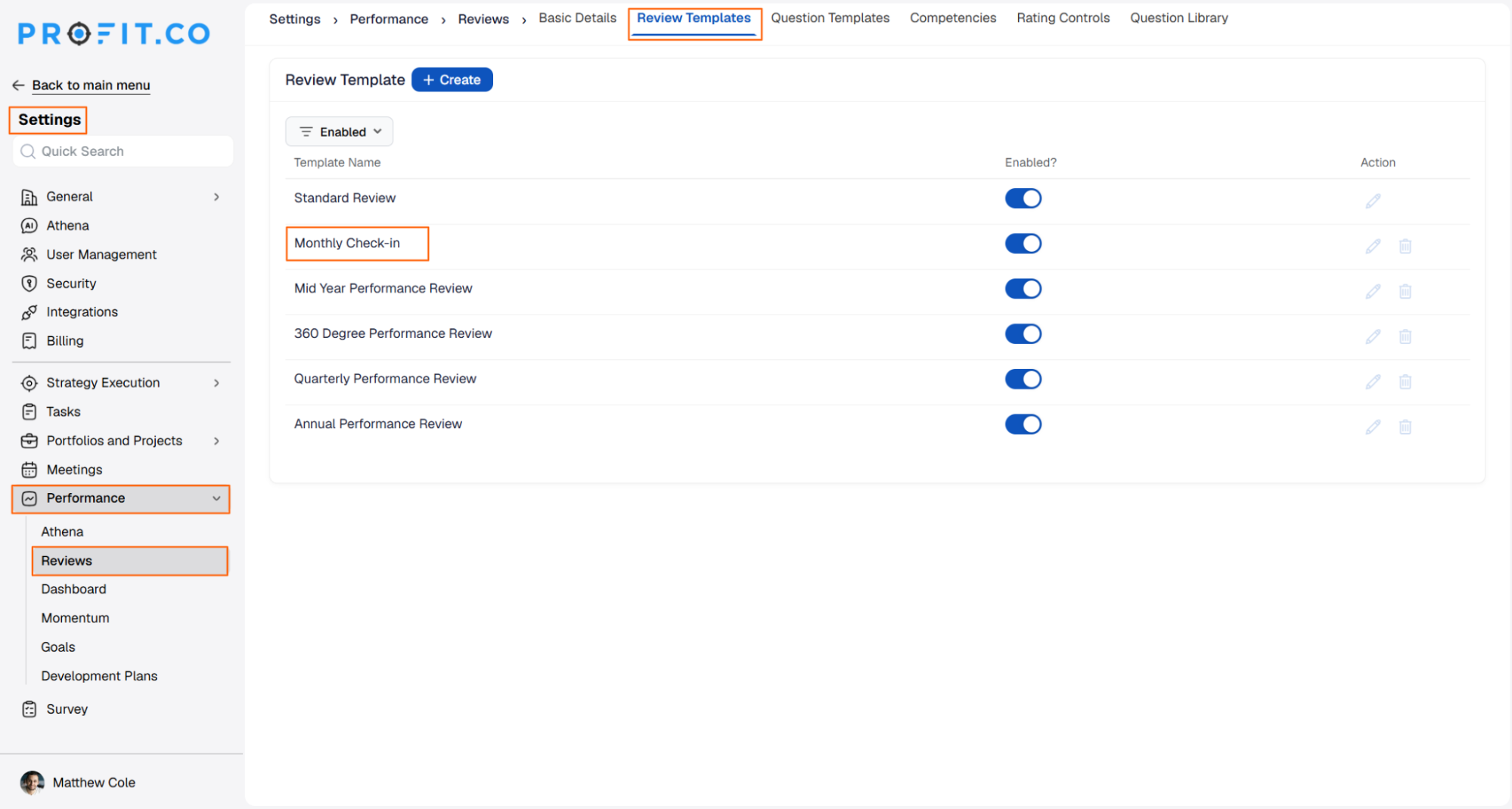
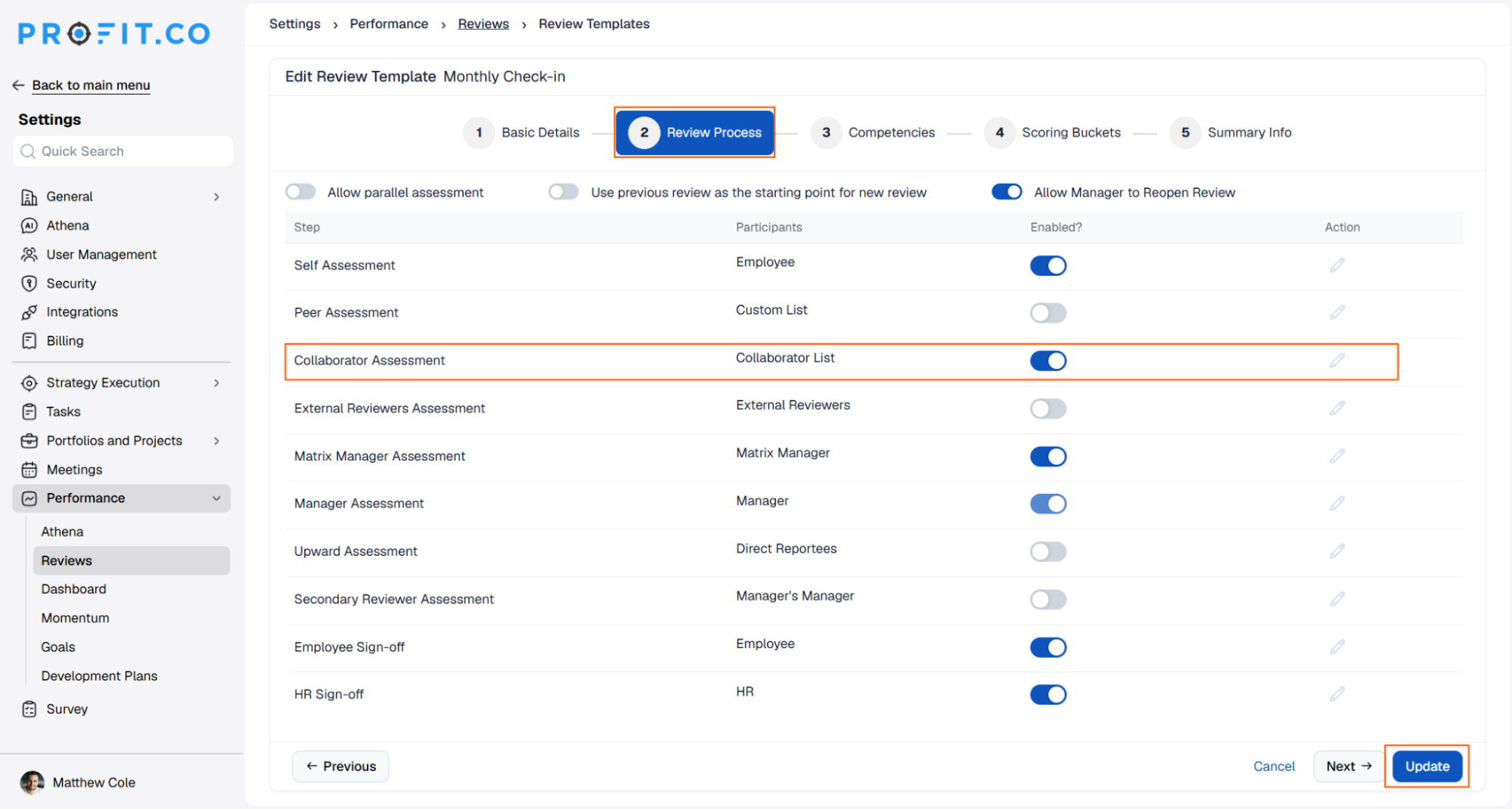
- Open the review template you want to configure and go to its Review Process step.
- Turn on Enabled for the Collaborator Assessment row.
- Participants for this step come from the Collaborator List.
Step 2
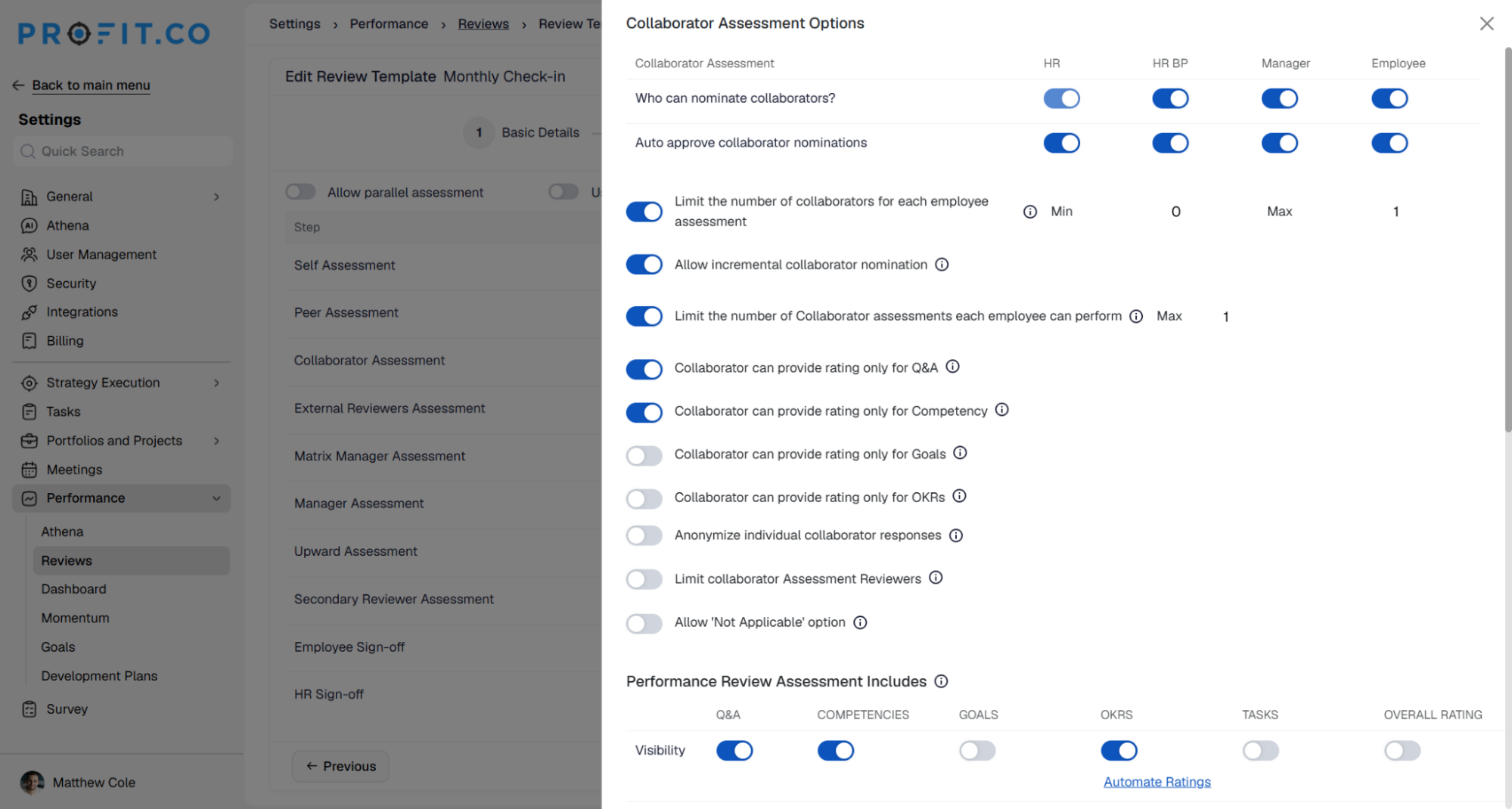
- Click the edit icon on the Collaborator Assessment row.
- Set which roles can add people to the Collaborator List: HR, HRBP, Self, or Manager.
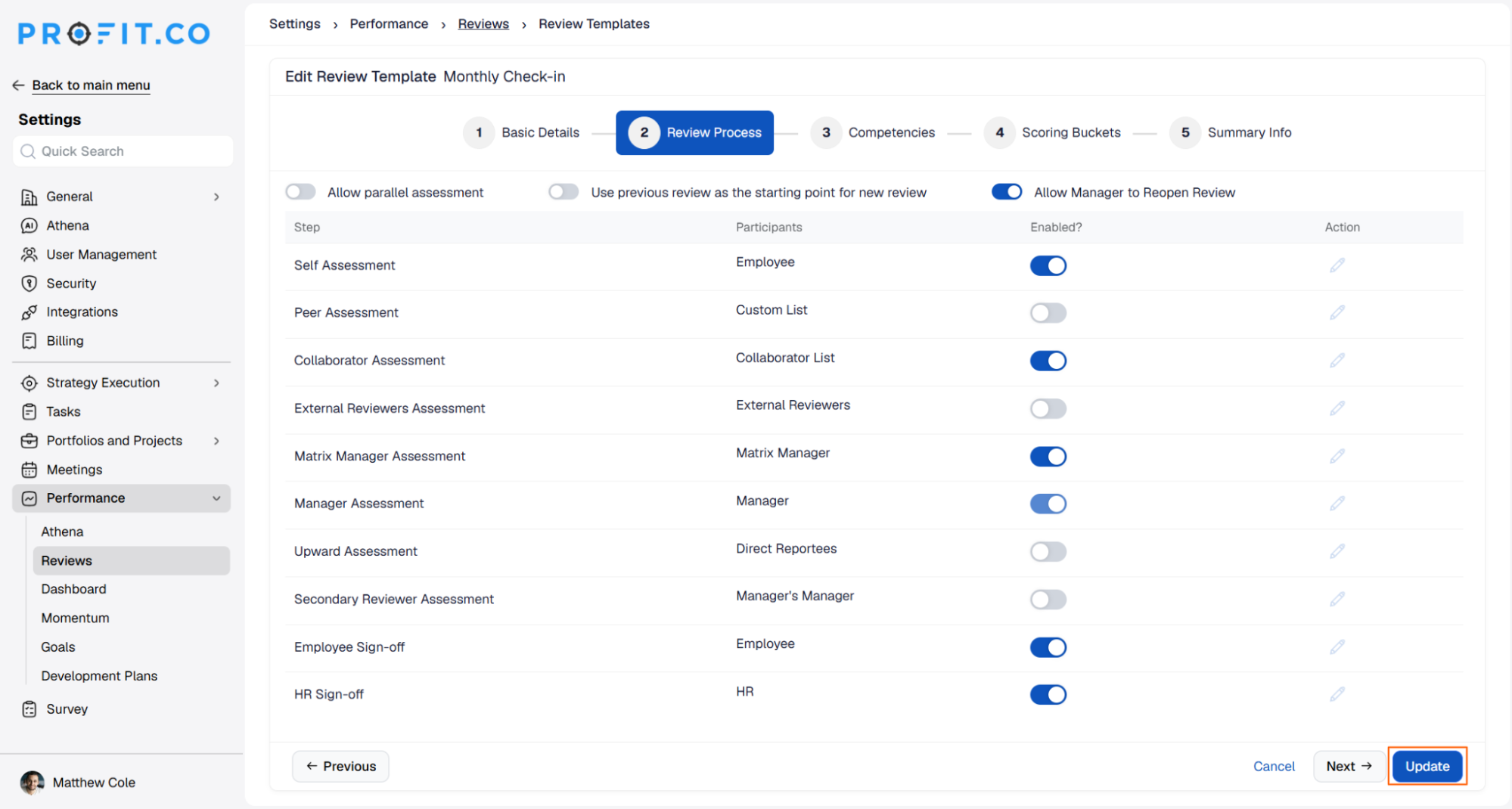
- Click Update to save your changes.
- Reviews created from this template include the Collaborator Assessment step.
What Happens When You Use Collaborator Assessment?
| Scenario | What Happens |
|---|---|
| You enable Collaborator Assessment on a review template. | Profit.co adds a Collaborator Assessment row to that template's Review Process, with participants drawn from the Collaborator List. |
| You set which roles can add collaborators. | Profit.co lets only the roles you enabled, HR, HRBP, Self, or Manager, add people to the Collaborator List. |
| You enable Collaborator Assessment on a template with reviews already in progress. | Profit.co applies the step to reviews created after the change, and does not add a Collaborator Assessment row to reviews already initiated from that template. |
How Is Collaborator Assessment Different From Peer Assessment?
Peer Assessment and Collaborator Assessment both bring outside-the-manager feedback into a review, but they draw from different pools and offer different configuration depth.
| Aspect | Peer Assessment | Collaborator Assessment |
|---|---|---|
| Participant Source | Peers nominated into the review from the organization | The Collaborator List, a separate set of people tied to the employee's review |
| Step in Review Process | Its own Peer Assessment row, with rating-scope, limit, and anonymization options | Its own Collaborator Assessment row, independent of Peer and Manager assessment |
| Who Can Add Participants | HR, HR BP, Manager, or Employee, depending on which nomination-role toggles are enabled | HR, HRBP, Self, or Manager, depending on which roles are enabled on the Collaborator Assessment edit panel |
| Enabled By | Per review template, with settings spanning Min/Max counts, rating scope, and anonymization | Per review template, turned on by a Super User for the step to appear |
Peer Assessment is built for a single, clearly defined review step with granular rating-scope and anonymization controls. Collaborator Assessment is a lighter step for capturing input from anyone the employee collaborates with, controlled mainly through who is allowed to add names to the list.
What Are the Best Practices for Collaborator Assessment?
- Decide which roles, HR, HRBP, Self, or Manager, can add collaborators before rollout, since whichever roles you enable directly control who ends up on each employee's Collaborator List.
- Turn on Collaborator Assessment before a review cycle starts rather than mid-cycle, since the step is expected to apply to reviews created going forward rather than ones already initiated.
- Treat Collaborator Assessment as a separate lever from Peer Assessment rather than expecting Peer's rating-scope and anonymization controls to carry over, since the two steps draw from different participant pools and offer different configuration depth.
- Revisit who holds Collaborator List edit rights whenever team structures change, since those roles are what keeps the list reflecting who an employee actually collaborates with.
Related Articles
- How to configure peer assessment in performance reviews?
- How to Configure Review Templates in Profit.co?
What Are Some Frequently Asked Questions About Collaborator Assessment?
Yes. They are independent steps in the Review Process, so enabling or configuring one does not change the other's settings.
Only a Super User can enable the Collaborator Assessment row on a review template. Once it's on, the separate role setting controls who can add people to the Collaborator List.
You can enable more than one of these roles together on the Collaborator Assessment edit panel, so, for example, both the employee and their manager can add names to the same Collaborator List.
No. It's a separate step for a different participant pool, people the employee collaborates with rather than formally nominated peers, and both can run in the same review template.
Execute your strategy with confidence
Connect OKRs, tasks, and teams in one place with Profit.co
