

The Governance module gives you a structured place inside each project to log and manage risks, issues, decisions, and other RAID-style items. Every enabled type carries its own status lifecycle and a fully automatic activity log.
Table of Contents
- What is the Governance Module?
- Why Does the Governance Module Matter?
- How Does the Governance Module Work?
- What Happens When You Use the Governance Module?
- How Is Risk Level Calculated in the Governance Module?
- What Are the Best Practices for the Governance Module?
- Related Articles
- What Are Some Frequently Asked Questions About the Governance Module?
What is the Governance Module?
The Governance module is a dedicated home inside each Profit.co project for logging and tracking RAID-compatible governance items, replacing the external spreadsheets, email threads, and wikis teams previously relied on. It covers eight independently configurable categories, each with its own lifecycle, ownership, and automatic activity log.
| Governance Type | What It Covers |
|---|---|
| Actions | Follow-up tasks from meetings, reviews, or governance decisions, each with a due date. |
| Assumptions | Factors believed true for planning that must be validated, since they carry risk if they turn out to be wrong. |
| Decisions | Recorded choices, the options considered, and the rationale for the path taken. |
| Issues | Current problems that have already occurred and require active resolution to keep the project on track. |
| Risks | Uncertain future events that could affect project objectives, scored on a configurable Probability x Impact matrix. |
| Strategic Alignment | Maps the project to organizational objectives and key results. |
| Project Changes | Formal requests to modify the approved scope, schedule, budget, or quality baseline. |
| Tollgates | Stage-gate checkpoints requiring approval before the project advances to the next phase. |
Each of the eight types can be turned on or off independently for a project from the Governance Items list. A type that isn't enabled simply doesn't appear on that project's Governance tab.
Why Does the Governance Module Matter?
Governance items used to live outside Profit.co entirely, in spreadsheets and email threads that created data gaps and no audit trail. Now every Risk, Issue, Decision, and other item is logged, tracked, and closed directly inside the project.
Every action on every item is captured automatically with the acting user's name and a timestamp, so compliance-sensitive teams get a complete record without adding a single manual logging step. Super Users also choose which of the eight types to enable and how each one's lifecycle and numbering work, so the module fits the PMO's existing practice instead of forcing a new one.
How Does the Governance Module Work?
Configure Governance Types
Step 1
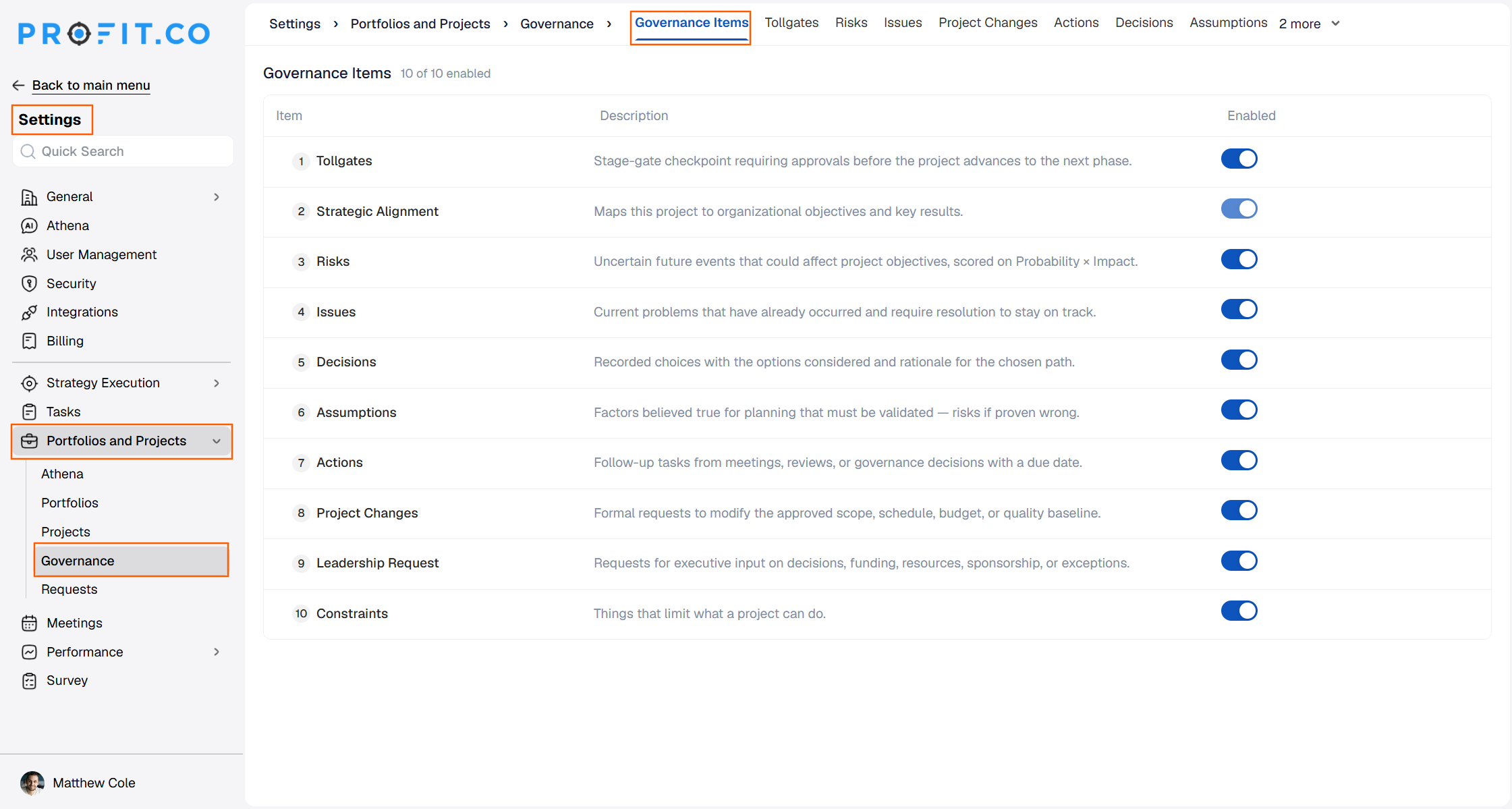
- Navigate to Settings → Portfolios and Projects → Governance.
- Review the Governance Items tab, which opens by default and lists all eight types with their descriptions and enable toggles.
Step 2
- Toggle each governance type (Actions, Assumptions, Decisions, Issues, Risks, Strategic Alignment, Project Changes, Tollgates) on or off independently from the Governance Items list.
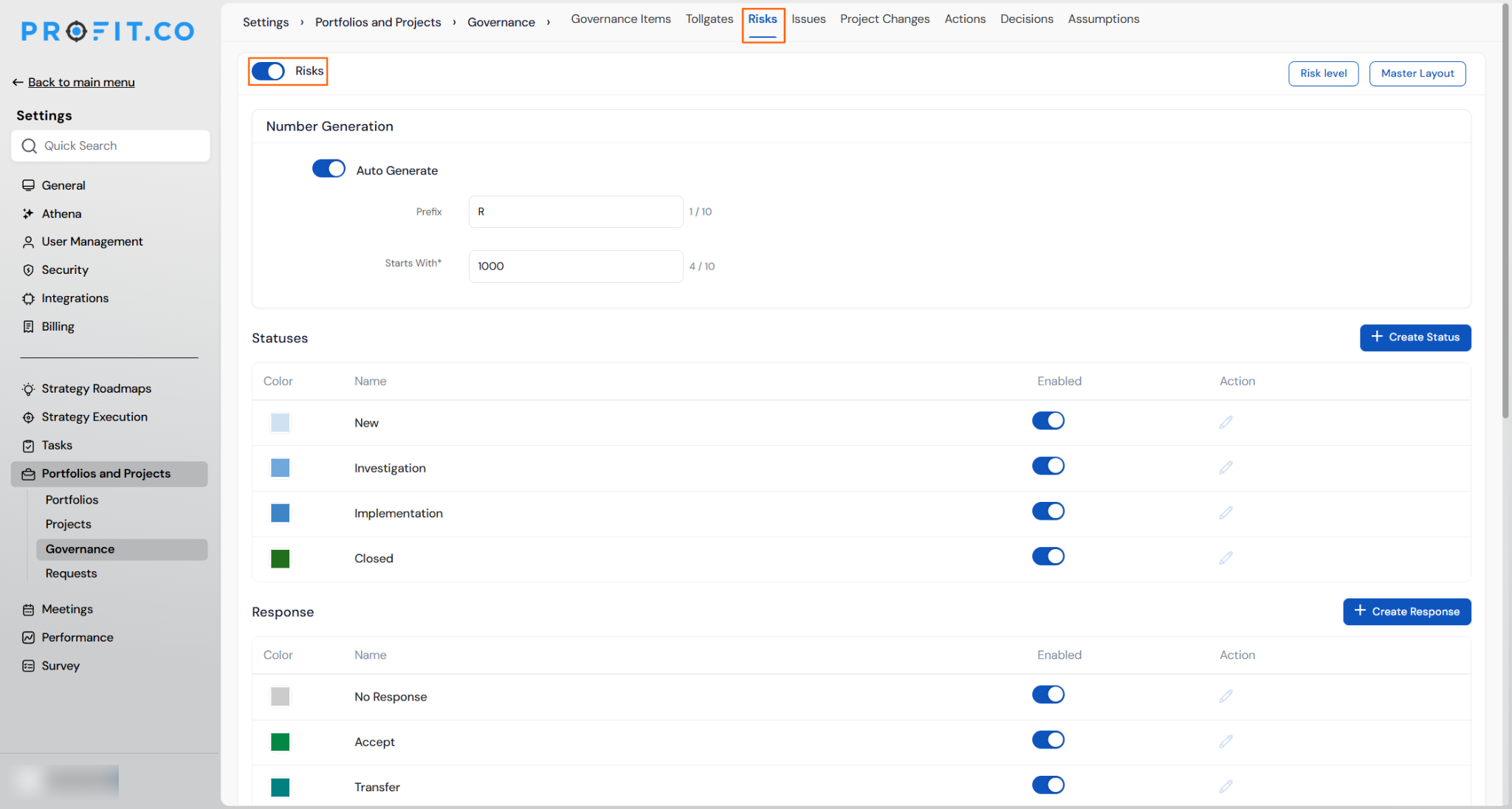
- Switch to that type's own tab, for example Risks, to configure it further, such as setting up the Probability x Impact matrix and its colour-coded threshold bands.
Create and Manage Governance Items
Step 1
- Open the relevant project and click the Governance tab.
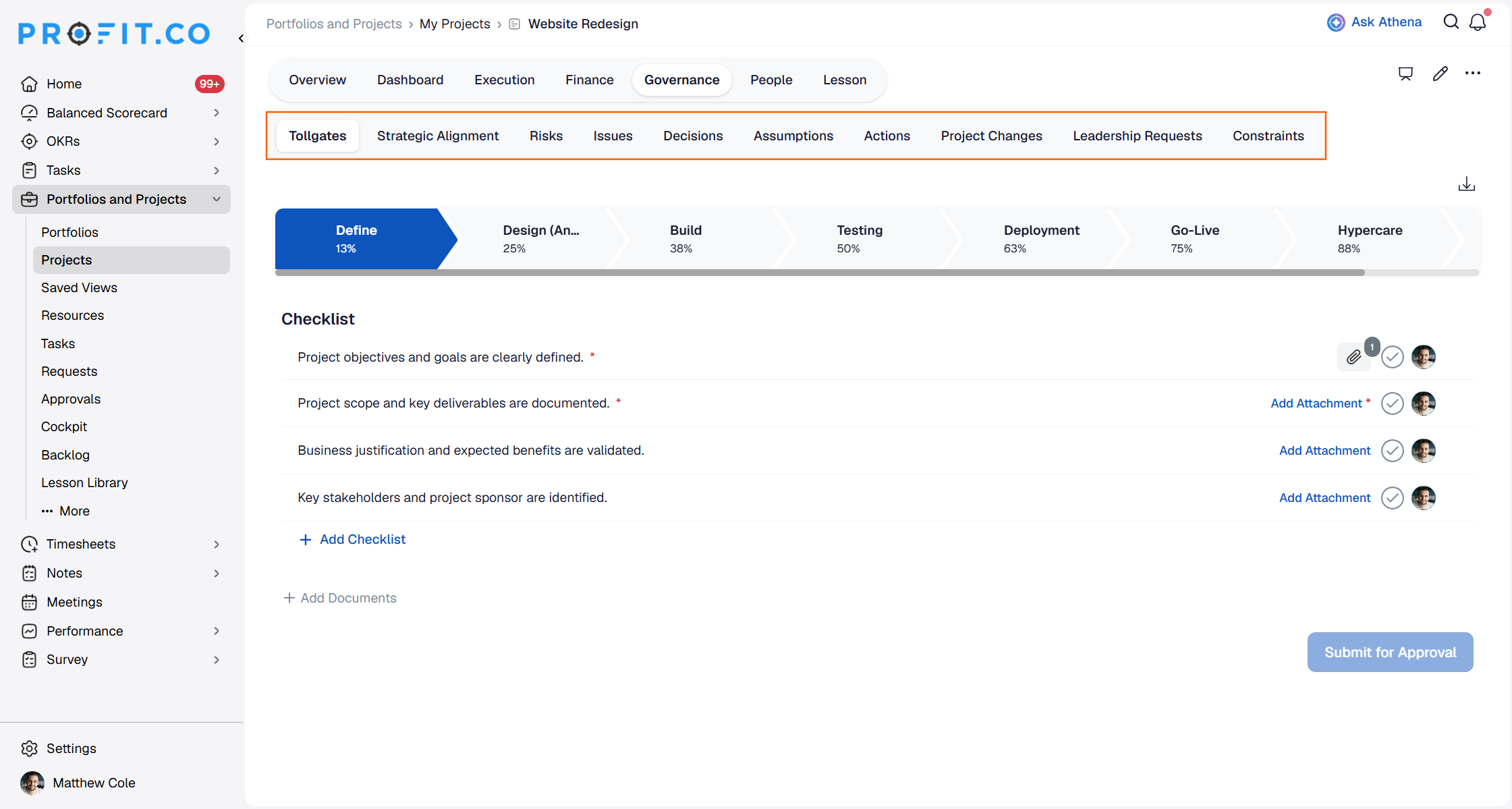
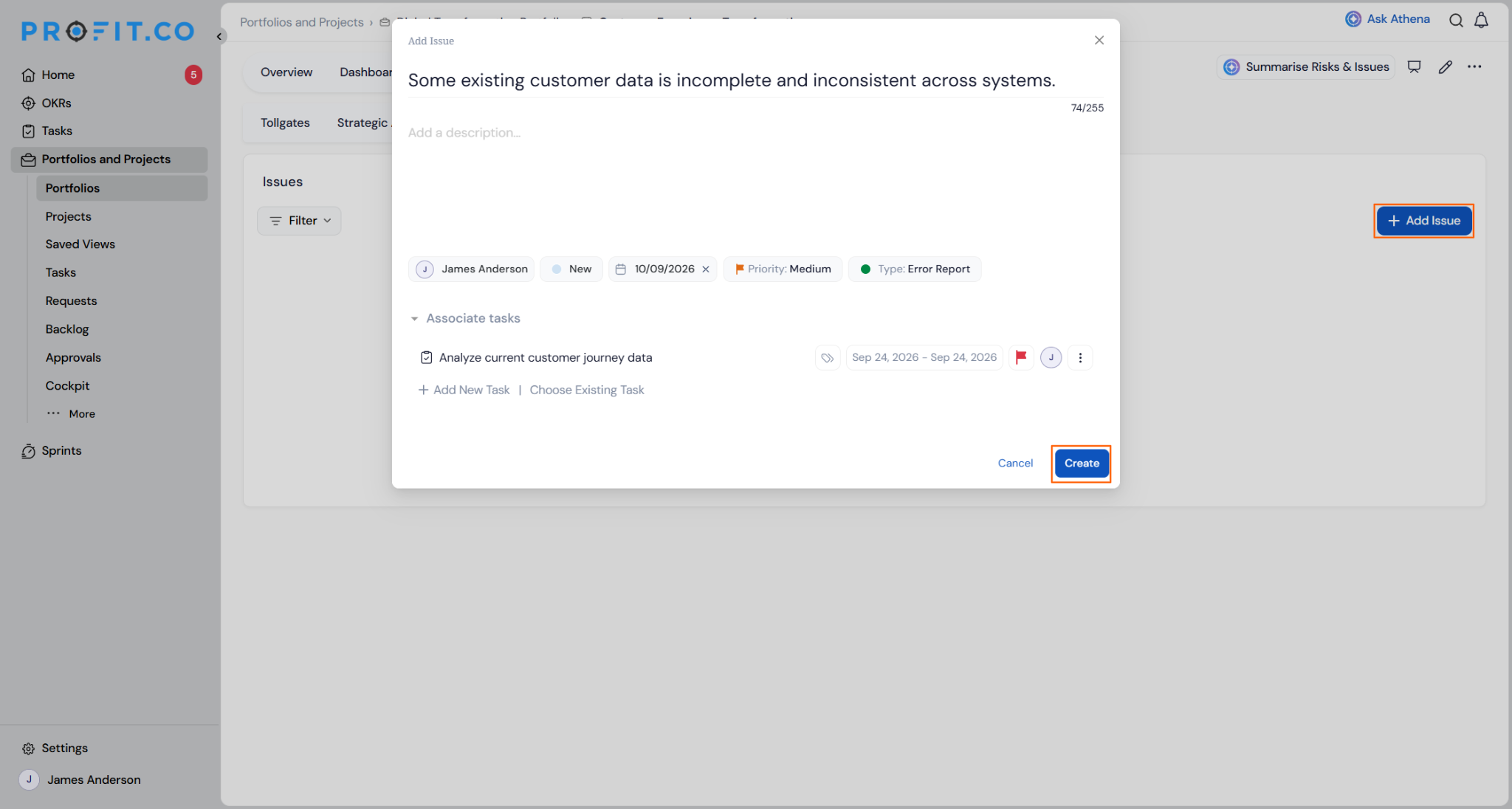
- Click + to create a new item of the selected type.
- Complete the required fields for that type.
What Happens When You Use the Governance Module?
| Scenario | What Happens |
|---|---|
| You escalate a Risk to an Issue. | Profit.co creates a new Issue record, cross-links it to the original Risk, and adds an escalation entry to both items' Activity Logs. |
| You mark an Assumption as Validated or Invalid. | Profit.co updates the Assumption's status field and records the acting user and timestamp on the Activity Log. |
| You assign an Action with a due date. | Profit.co notifies the assignee that a new Action has been assigned to them. |
| You allow an Action to pass its due date. | Profit.co sends the assignee an in-app notification flagging the Action as overdue. |
| You reassign a governance item to a new owner. | Profit.co sends the new owner an email notification, provided the reassignment notification toggle is enabled in the Action Center. |
| You submit a governance item without completing its required fields. | Profit.co blocks the submission and prompts you to complete the missing fields before the item is created. |
How Is Risk Level Calculated in the Governance Module?
Every Risk sits on a 5x5 Probability x Impact matrix. The grid size is fixed, but the colour-coded threshold bands for Low, Medium, High, and Critical are configurable to match your PMO's risk appetite.
Risk Level itself is not something you set directly. Profit.co calculates it automatically from the Probability and Impact values entered at check-in, against whichever threshold bands are currently configured.
What Are the Best Practices for the Governance Module?
- Enable only the governance types your PMO actually uses, since every enabled type adds its own status lifecycle, priority set, and ID prefix that someone has to configure and maintain.
- Set the Probability x Impact threshold bands deliberately before teams start logging Risks, since Risk Level is calculated automatically from those bands and loose thresholds will misclassify severity from day one.
- Enable the reassignment notification toggle in the Action Center wherever ownership changes need visibility, since email notifications for reassignment only fire when that toggle is turned on.
- Escalate materialised Risks through the built-in escalation action rather than creating a separate Issue manually, since escalation is what generates the cross-link and preserves history across both items' Activity Logs.
- Treat the Activity Log as your audit trail for governance reviews, since it captures the acting user and timestamp for every change without any extra logging step from the team.
Related Articles
- How do I get Email Notifications for Task Assignments?
- How do I view portfolio health metrics and heatmaps in Profit.co?
What Are Some Frequently Asked Questions About the Governance Module?
Each of the eight types, Actions, Assumptions, Decisions, Issues, Risks, Strategic Alignment, Project Changes, and Tollgates, can be enabled or disabled on its own from the Governance Items list under Settings → Portfolios and Projects → Governance.
Open the item's detail pane and switch to the Activity Log tab, which holds an immutable record of every change along with the acting user and timestamp.
The matrix is a fixed 5x5 grid. What you configure are the colour-coded threshold bands for Low, Medium, High, and Critical risk levels within that grid.
Yes. The Associated Tasks tab in an item's detail pane lets you link to or create WBS tasks directly from that governance item.
Execute your strategy with confidence
Connect OKRs, tasks, and teams in one place with Profit.co
