

Restrict Dates Within Parent Duration keeps every Milestone, Task, and Subtask's planned dates inside its parent's planned range. It closes the validation gap that previously let a Milestone, Task, or Subtask sit outside its parent's dates with nothing stopping it.
Table of Contents
- What is Restrict Dates Within Parent Duration?
- Why Does Restrict Dates Within Parent Duration Matter?
- How Do I Enable Restrict Dates Within Parent Duration?
- What Happens When You Use Restrict Dates Within Parent Duration?
- How Does Restrict Dates Within Parent Duration Relate to Cascade Date Changes to Children?
- What Are the Best Practices for Restrict Dates Within Parent Duration?
- Related Articles
- What Are Some Frequently Asked Questions About Restrict Dates Within Parent Duration?
What is Restrict Dates Within Parent Duration?
Restrict Dates Within Parent Duration is a configurable, org-level setting under Timeline Cascading. When it's on, editing a Milestone's, Task's, or Subtask's planned Start or End date checks that date against its immediate parent's current planned dates, at every level of the hierarchy, not just at the Project level.
The setting combines two mechanisms: an inline error that blocks Save when a date falls outside the parent's range, and a date picker that disables the out-of-range days directly in the calendar. It applies only to Planned Start Date and Planned End Date, not Actual dates used for execution tracking.
| Level Being Edited | Boundary Checked Against |
|---|---|
| Milestone | Project's current planned dates |
| Task | Milestone's current planned dates |
| Subtask | Task's current planned dates |
Note
This restriction currently applies to the date editors on the Project Overview page. The Execution → Plan (Gantt) and Execution → Tasks (Kanban) views are not covered by this setting yet.
Why Does Restrict Dates Within Parent Duration Matter?
Before this setting, only the Project level had any protection: editing a Project showed a cascade preview, but a Milestone's dates could be edited with no check against its Project, and a Task's dates with no check against its Milestone. The middle of the hierarchy had zero validation.
The setting also removes a structural inversion. A Task that exceeded its Milestone's dates used to push the Milestone, and the Project, outward automatically, letting a child resize its parent. Restrict Dates Within Parent Duration blocks that edit instead, so the Project's and Milestone's own boundaries stay authoritative.
How Do I Enable Restrict Dates Within Parent Duration?
Step 1
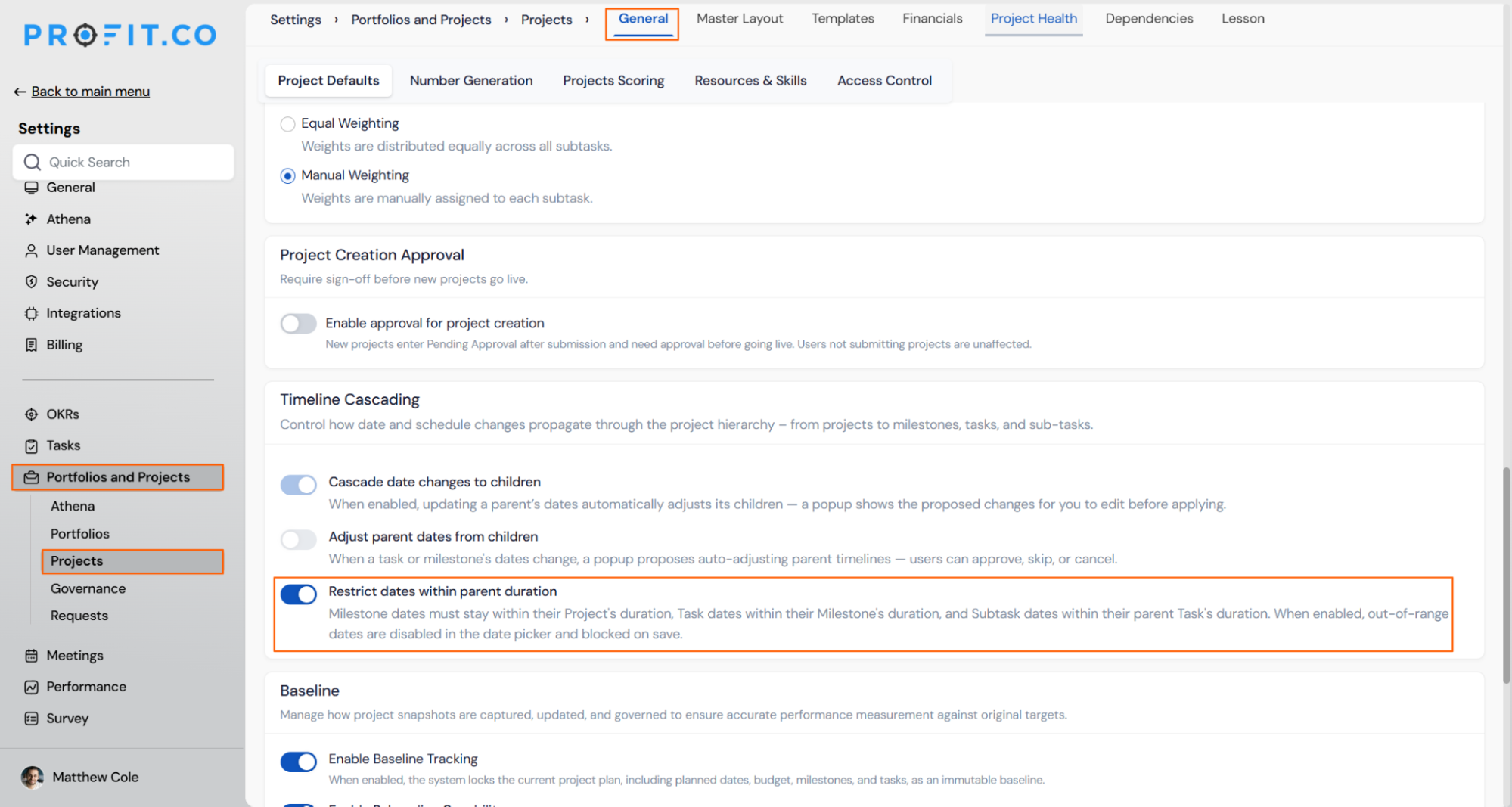
- Go to Settings → Portfolios and Projects → Projects → General
- Select the Project Defaults tab
- Scroll to the Timeline Cascading section
- Enable the toggle Restrict dates within parent duration
Prerequisite
You need Settings access to Portfolios and Projects → Projects to change this setting.
What Happens When You Use Restrict Dates Within Parent Duration?
| Scenario | What Happens |
|---|---|
| You enter dates for a Milestone, Task, or Subtask that exceed its parent's current planned dates while the setting is on. | Profit.co blocks the save and shows an inline error naming the parent's current date range. |
| You open the date editor for a Milestone, Task, or Subtask while the setting is on. | Profit.co dims and disables the days outside the parent's planned range in the calendar, matching the existing out-of-month day treatment. |
| You type an out-of-range date directly instead of selecting one from the picker. | Profit.co still blocks the save with the same inline error, since the inline check remains the authoritative validation. |
| You turn the setting on in an org that already has out-of-range Milestones, Tasks, or Subtasks. | Profit.co leaves those existing records exactly as they are and does not retroactively block or correct them. |
| You turn the setting off after it was on. | Profit.co allows the edit to save even though it now falls outside the parent's range. |
| You view a Milestone, Task, or Subtask whose dates fall outside its parent's range, for any reason. | Profit.co displays a permanent flag on that record naming which parent boundary is violated. |
How Does Restrict Dates Within Parent Duration Relate to Cascade Date Changes to Children?
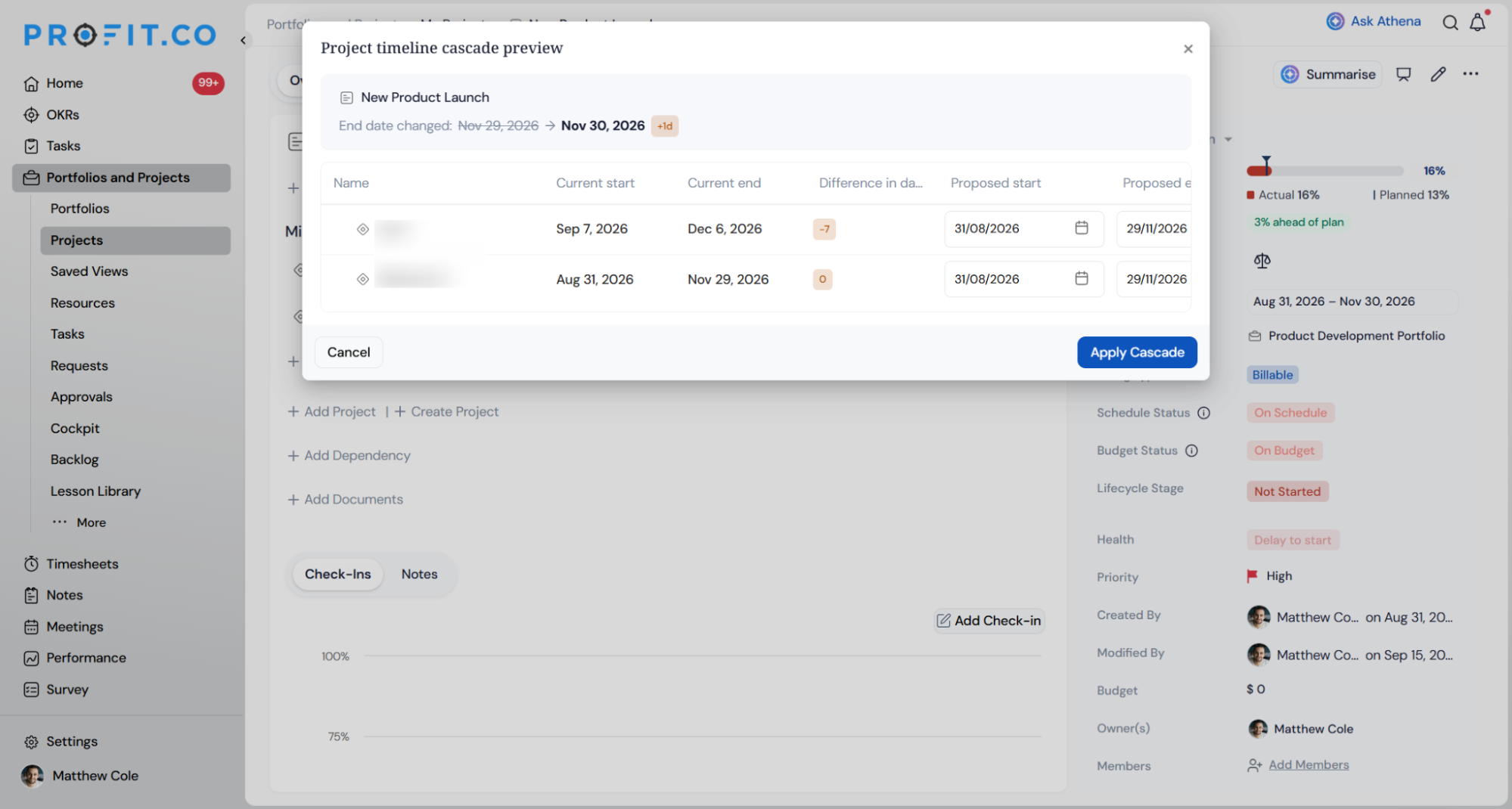
Restrict Dates Within Parent Duration and Cascade Date Changes to Children are separate settings that solve different problems. Restrict blocks a child's date from ever exceeding its parent, going forward. Cascade proposes shifting a parent's children when the parent's own dates change, so the children stay inside the new range.
The two settings can be turned on independently. A related setting, Adjust Parent Dates from Children, has been retired: a Task or Subtask's dates can no longer resize its parent automatically, regardless of how Restrict Dates Within Parent Duration is configured.
What Are the Best Practices for Restrict Dates Within Parent Duration?
- Turn the setting on before a large-scale Milestone or Task restructuring, since records already out of range aren't retroactively corrected or blocked once you enable it.
- If a Task genuinely needs to run later than its Milestone allows, edit the Milestone's dates first. A Task's dates can no longer resize its Milestone automatically.
- Check the Milestone level specifically after enabling this setting, since it previously had no boundary check at all, unlike the Project and Task levels.
- Review already-flagged out-of-range records on a regular cadence, since the flag itself doesn't force or schedule any correction.
- Confirm with your team whether Gantt or Kanban date edits also need this rule, since the restriction currently applies only to the Project Overview page's date editors.
Related Articles
What Are Some Frequently Asked Questions About Restrict Dates Within Parent Duration?
No. It only checks Planned Start and Planned End dates. Actual dates used for execution tracking aren't validated by this setting.
Not yet. The restriction currently applies to the date editors on the Project Overview page only.
Yes. The Subtask boundary check only comes into play once Subtask-level dates are in use for that Task.
No. That capability is retired independently. A child's dates can't resize its parent regardless of how this setting is configured.
Execute your strategy with confidence
Connect OKRs, tasks, and teams in one place with Profit.co
