












Most strategy deployment tools demo the same way: a goal tree, a dashboard, a progress roll-up. That shows the downward direction and nothing else. A useful evaluation tests all three directions on your own strategy.
In this guide
- Why demos all look alike
- The tests
- A demo script
- Scoring
- A two-week evaluation plan
- Reference questions and red flags
- Who should evaluate
- Preparing your evaluation dataset
- Questions for the vendor’s product team
- Evaluation mistakes
- What a passing demo of scenario A looks like
- A full scoring sheet
- A worked example: three vendors, one gate
- What the shortlist costs
- Questions this article answers
Key Takeaways
- →Every demo looks good in the downward direction. Goal trees and roll-ups are where tools compete.
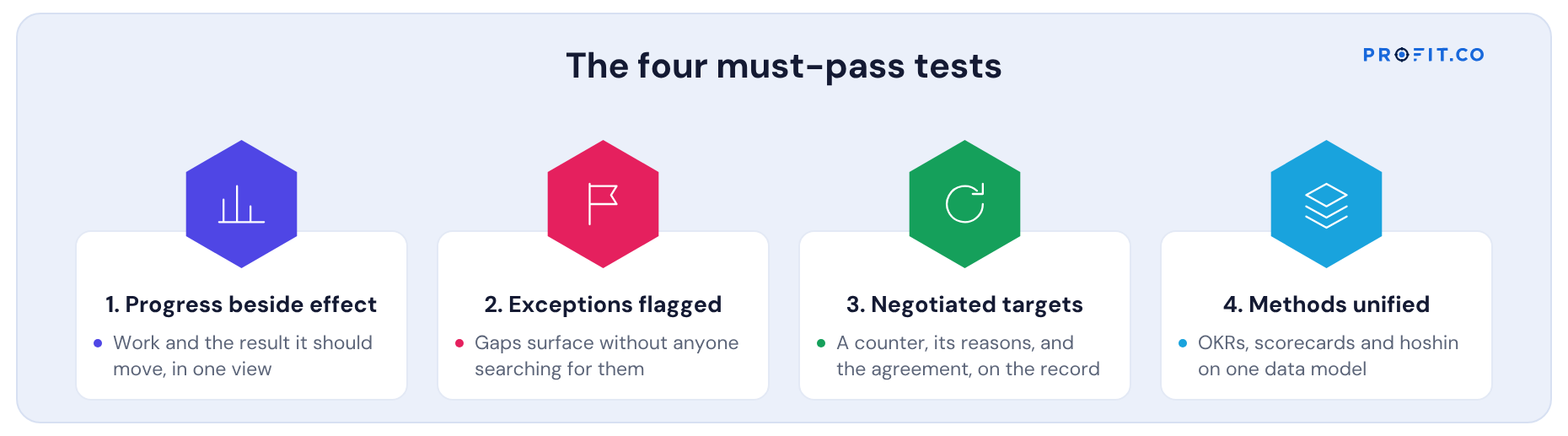
- →Four must-pass tests: progress beside effect, exceptions flagged, negotiated targets, methods unified.
- →Scenario A, the finished program whose result didn’t move, separates deployment tools from progress trackers.
- →Load your own data. A vendor who won’t is telling you something.
- →Keep the same evaluators for every vendor, or you compare evaluators rather than tools.
- →Watch for a custom report built during the demo. If the view has to be built, it won’t exist in your monthly review.
Why demos all look alike
Strategy deployment demos usually start with a goal tree: company objectives at the top, team goals below, everything linked. Then a dashboard with progress percentages rolling up. It looks complete, and it covers one direction out of three.
To see the rest, give the vendor your strategy, a few objectives with real or realistic data, and two scenarios to walk through. A vendor who can’t load your data for a serious evaluation is telling you something.
The three directions the tests below are grouped by are defined in What Is Strategy Deployment? A Definition Without the Jargon.
The tests
| Direction | Test | Pass condition |
|---|---|---|
| Down | Negotiated targets | A level can respond to a proposed target with a counter and reasons; agreement is recorded |
| Down | Targets add up | The tool checks commitments below against the target above before approval |
| Down | Reasoning kept | Six months later, the reasons behind a target are on the record |
| Up | Progress beside effect | Work progress and the result it should move appear together |
| Up | Exceptions flagged | Work that isn’t moving results, and delivery problems, surface without someone searching |
| Up | Time lag respected | Results aren’t judged before they could reasonably have moved |
| Across | Dependencies agreed | A target that depends on another function brings that function into the agreement |
| Across | Actions consented | A corrective action that commits other people’s work needs their agreement |
| All | Methods unified | OKRs, scorecards and hoshin plans share one data model |
| All | History kept | What the plan said, and why it changed, can be shown for any date |
A demo script
Scenario A: the finished program
“This program reached 100% in June. The result it was meant to move has been flat since January. Show us, without building a report, where the strategy office would see that, and what happens next.”
Scenario B: the disputed target
“The group proposes 36% for a region. The region says 30% is achievable without a contract model another function owns. Show us how this is negotiated, how the other function is brought in, and what the record looks like in six months.”
Scenario C: the roll-up
“Five regions commit to targets. Show us what happens if their commitments add up to less than the group target.”
Scenario A separates deployment tools from progress trackers faster than any feature list.
Scenario B is the one most tools handle with a comment thread. What a real negotiation record looks like is described in Cascading Goals vs Negotiating Them: Why Top-Down Cascades Fail.
Scoring
Treat four tests as must-pass: progress beside effect, exceptions flagged, negotiated targets and methods unified. A tool that fails any of them can still be useful, as a goal tracker or a reporting layer, but it isn’t deploying strategy in all three directions. Score the rest on a weighted comparison with practical fit: integrations, permissions, languages, administration effort and cost.
Those four are worth keeping in front of you through every demo, because each one is a different direction failing in a different way. Their pass conditions are the ones set out in the table above.
A two-week evaluation plan
| Days | Activity | Output |
|---|---|---|
| 1 to 2 | Prepare a slice of your strategy: three objectives, their targets, a few programs, three months of results | Evaluation dataset |
| 3 to 8 | Demos on your data, same evaluators each time, running the three scenarios | Pass or fail per test |
| 9 | Reference calls for vendors that passed the must-pass tests | Notes on adoption and upkeep |
| 10 | Fit and cost comparison | Shortlist decision |
Reference questions and red flags
Ask references
- Name a decision the tool helped you make earlier than you would have otherwise.
- Who maintains the data each month, and how long does it take?
- Do leadership reviews run from the tool or from slides built from it?
Red flags
- The vendor won’t load your data, or switches to its own demo environment.
- The only upward signal is percent complete.
- Target disagreements are handled “outside the tool”.
- Must-pass capabilities are “on the roadmap”.
Who should evaluate
| Evaluator | Why |
|---|---|
| Strategy office lead | Owns the process the tool must support |
| An executive who chairs reviews | Will decide whether reviews run from the tool |
| Two objective owners from different functions | Will check in and negotiate; can test usability and the across direction |
| Finance or portfolio office | Tests integration with budgets and projects |
| IT or security | Tests integration, permissions and hosting requirements |
Keep the same evaluators for every vendor. Different people seeing different demos produces a comparison of evaluators, not tools.
Preparing your evaluation dataset
- Three strategic objectives, with their targets and owners.
- Two levels below each, with the targets you would want to negotiate.
- Four to six initiatives, each naming the result it should move.
- Three months of results, real or realistic, including one initiative that finished without moving its result.
- One cross-functional dependency, with the function that owns it.
The finished-without-effect initiative is the most important item in the dataset. It is what scenario A tests, and it is the case most tools can’t show.
Questions for the vendor’s product team
- What is the data model underneath: do OKRs, scorecard measures and hoshin objectives share one set of records, or are they separate modules with sync?
- How are target agreements stored: as a final value, or with the proposals, counters and agreement behind them?
- How does the tool decide a result can’t be judged yet?
- Which integrations exist today for finance, portfolio and data systems, and which would be custom?
- How are visibility and editing permissions handled across entities or divisions?
Evaluation mistakes
- Testing only the downward direction. Goal trees and cascades are where every tool looks good.
- Letting the vendor’s demo data stand in for yours. Your own finished-without-effect case is the real test.
- Weighting features over must-pass tests. Breadth can’t compensate for a missing upward direction.
- Ignoring the people who check in. If owners find updates awkward, adoption fails regardless of the executive view.
- Comparing license prices alone. Upkeep and implementation usually cost more; see What Drives the Cost of Hoshin Kanri Software.
The best evaluation is the one where your own failing initiative is on the screen.
What a passing demo of scenario A looks like
| Step | A tool that passes | A tool that fails |
|---|---|---|
| Open the program | Shows 100% complete beside the result it should move, flat since January | Shows 100% complete, green |
| Ask why it’s flagged | The expected lag has passed and the result hasn’t moved; it appears on an exception list | Nothing is flagged; someone would have to notice |
| Ask what happens next | A corrective action or review can be opened on the gap, involving whoever it commits | A comment or a task |
| Ask what the record shows later | The decision and its reason are kept with the objective and the link | The status changes; the reasoning is lost |
Watch for a vendor building a custom report during the demo to show the gap. If the view has to be built, it won’t be there in your monthly review.
A full scoring sheet
Adjust weights to your situation; keep the must-pass tests as a gate.
| Test | Must pass | Weight if passed |
|---|---|---|
| Negotiated targets | Yes | — |
| Progress beside effect | Yes | — |
| Exceptions flagged | Yes | — |
| Methods unified | Yes | — |
| Targets add up | No | 15% |
| Reasoning kept | No | 10% |
| Time lag respected | No | 15% |
| Dependencies agreed | No | 20% |
| Actions consented | No | 15% |
| History kept | No | 10% |
| Practical fit: integrations, permissions, effort | No | 15% |
A worked example: three vendors, one gate
| Test | Vendor A | Vendor B | Vendor C |
|---|---|---|---|
| Progress beside effect (must pass) | Pass | Fail | Pass |
| Exceptions flagged (must pass) | Pass | Fail | Fail |
| Negotiated targets (must pass) | Pass | Pass | Fail |
| Methods unified (must pass) | Pass | Fail | Pass |
| Targets add up | Pass | Pass | Fail |
| Dependencies agreed | Pass | Fail | Fail |
Vendor B had the most polished goal tree and the lowest price. It failed three must-pass tests, all in the upward and across directions that the demo never reached. Only the scenarios exposed that.
What the shortlist costs
Price is the last gate, not the first, because the cheapest tool on the shortlist is usually the one that failed the upward tests. A goal tracker is cheap because it does less.
Among published alternatives, OnStrategy lists $200 per month for unlimited users. i-nexus publishes a free Starter tier for up to five users and $28 per user per month at its Standard tier. Run the three scenarios against both before comparing the numbers.
Profit.co publishes two plans, Essentials and Enterprise, quoting against modules and scale rather than a public seat rate. The four must-pass capabilities sit in Essentials alongside OKRs and Goals, Balanced Scorecard, Hoshin Kanri and Strategy Roadmap, which is what the “methods unified” test is asking about. The 30-day free trial is long enough to load your own evaluation dataset and run scenario A on it.
We built Profit.co around these tests: catchball sessions with a balance constraint for targets, the exception queue and four-quadrant view for evidence, consent from every function a target or action commits, and OKRs, scorecards and hoshin on one model. Check for yourself on your own data. See the strategy deployment software page.
Free Product Demo
Run the scenarios on your own strategy
A 30-minute walkthrough, tailored to your team.
Book a free demo
What happens in the call
How your teams set goals, track progress and review results.
Strategy, performance, projects and engagement on one platform, with AI.
A practical path to align teams, execute faster and drive results.
Questions this article answers
Negotiated targets that are checked to add up, work progress shown beside its effect on results, automatic flagging of exceptions, agreed dependencies and actions across functions, one model for OKRs, scorecards and hoshin, and a kept history.
Give the vendor a slice of your own strategy and ask them to walk through scenarios: a finished program whose result didn’t move, a disputed target, and commitments that don’t add up.
Progress beside effect, exceptions flagged automatically, negotiated targets and a single model across the methods you use.
About two weeks: two days to prepare a slice of your own strategy, six for demos on that data with the same evaluators, one for reference calls and one for the fit and cost comparison.
Published alternatives include OnStrategy at $200 per month for unlimited users, and i-nexus with a free Starter tier for five users and $28 per user per month at Standard. Profit.co publishes two plans, Essentials and Enterprise, quoted against modules and scale rather than a public seat rate, with a 30-day free trial.