

Profit.co allows users to set a default landing page so they are taken directly to their most-used section every time they log in. Users with department or sub-department access can configure their landing page to reflect their specific position within the organizational hierarchy.
Table of Contents
What is the Default Landing Page?
The Default Landing Page setting in Profit.co determines which page a user is directed to immediately after logging in. It can be configured per user from Preferences and supports a wide range of menus and views across the platform.
Each time the user logs in - or clicks the company logo from any page - they are taken directly to their configured landing page. Both the Menu (module) and View (display format) can be customized independently.
Why Default Landing Pages Matter
Users who work primarily within a specific module - such as Tasks, OKRs, or a particular department - no longer have to navigate from the Home screen on every session. The setting removes repetitive navigation steps and ensures users arrive at the most relevant context for their role.
For organizations with complex hierarchies, landing pages tied to sub-departments give users a focused, access-appropriate starting point. This improves usability and reinforces access control by surfacing only what is relevant to each user.
Department and Sub-Department Landing Pages
Profit.co's organizational hierarchy supports main departments and multiple sub-department levels. The default landing page respects this structure based on the user's access level.
| Access Level | Landing Page Behavior |
|---|---|
| Full department access (e.g., Engineering) | User sees the complete department view, including all associated sub-departments. |
| Sub-department access only (e.g., Python under Java → Engineering) | User can set that specific sub-department as their default landing page. |
| No department access | Department-based landing pages are not available; standard module views apply. |
Upon login, each user is directed to their assigned department or sub-department view automatically, without any manual navigation.
How It Works
Follow these steps to configure your default landing page in Profit.co:
Step 1
- Click on your Profile icon at the bottom-left corner of the sidebar.
- Select Preferences from the menu.
- Navigate to the General tab within the Preferences window.

Step 2
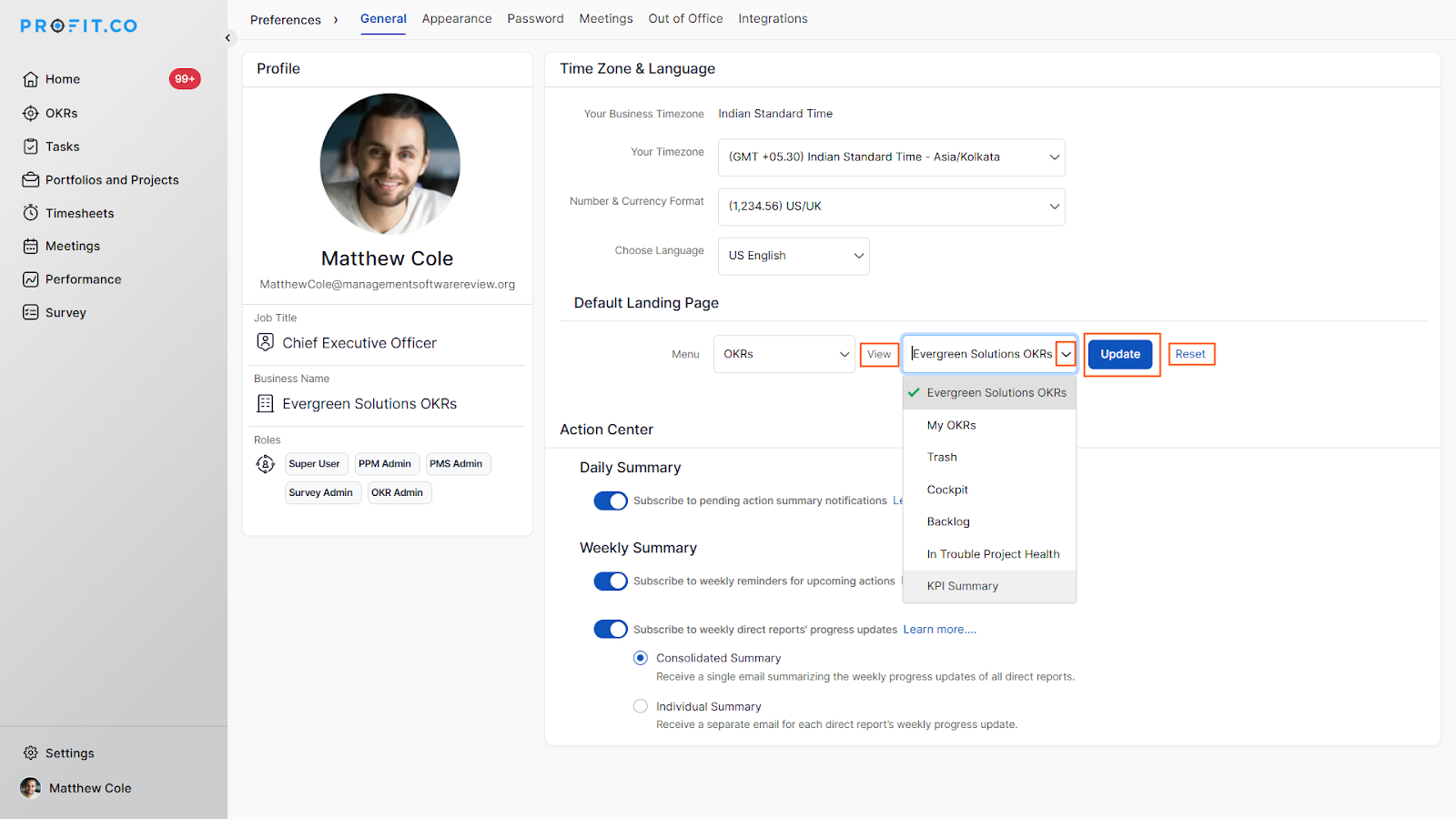
- On the Default Landing Page section on the General page.
- Use the Menu dropdown to select the module you want to land on (e.g., Tasks, OKRs, a specific department, or sub-department).

- Use the View dropdown to select which page should be displayed (e.g., Favorite Workspaces, My Tasks, All Employees' Tasks).
- Click Update to save your selection.
- To reset to the platform default, click Reset.
- Log out and log back in - you will be taken directly to your configured landing page.
Best Practices for Default Landing Pages
- Set the landing page to the module you access first in every session - not necessarily the most-used module overall.
- Users with sub-department access should configure their landing page to that specific sub-department rather than a generic module to avoid landing outside their access scope.
- After any role or department access change, revisit the Default Landing Page setting to ensure it still reflects your current access.
- Use the Reset option when onboarding users who haven't yet determined their most-used module - it avoids mis-configured landing pages during the adjustment period.
- Administrators should inform users of this setting during onboarding so that each team member configures it to match their primary workflow from day one.
Related Questions
Click here to learn more about how to edit the Profile Details through Preferences in Profit.co
Click here to learn more about the Various Roles Available for Users in Profit.co
Frequently Asked Questions
Yes. The Default Landing Page setting is configured per user under their individual Preferences. Each team member can set a different menu and view it independently of others.
Yes. Clicking the company logo from any page in Profit.co directs you to the landing page you have configured under Preferences → General → Default Landing Page.
The Default Landing Page is a user-level preference tied to individual accounts. Super Users can guide team members through the setup, but each user must configure their own settings via their own Preferences panel.
