

The Period Progress filter lets you view progress for Objectives, Key Results, and Initiatives scoped to a single selected period instead of the cumulative total across the full OKR cycle.
Table of Contents
What is the Period Progress Filter?
By default, Profit.co calculates OKR and Initiative progress cumulatively across the entire selected cycle—an annual Objective with check-ins in Q1, Q2, and Q3 shows combined progress from all three quarters. The Period Progress filter recalculates that same figure to reflect only the check-ins logged within one selected period, such as Q3-2026.
The option applies to Objectives, Key Results, and Initiatives in any OKR list view where the period filter is available. It is controlled at the Settings level, so the option does not appear anywhere until a super user turns it on.
Why the Period Progress Filter Matters
Teams running quarterly reviews on annual OKRs need to know what happened in the current quarter, not what accumulated since January. Show Period Progress isolates that figure directly in the list view, without asking managers to mentally subtract prior-quarter progress from a blended total.
Because the option is gated behind a super user setting, your organization controls whether period-scoped progress is available at all, and can introduce it only when your reporting cadence calls for it.
How It Works
Step 1
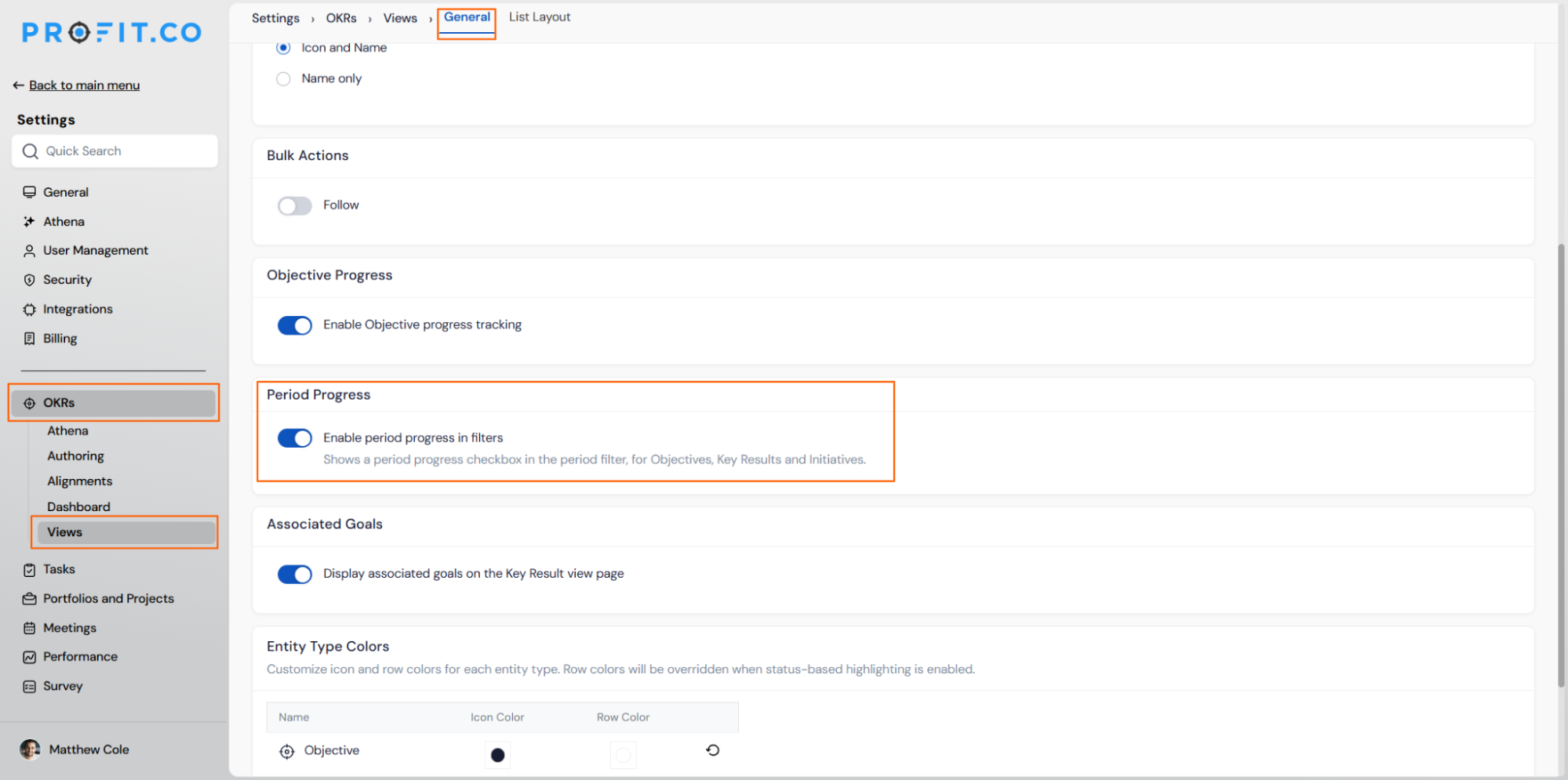
- Navigate to Settings → OKRs → Views → General
- Locate the Period Progress section
- Toggle on Enable period progress in filters
Step 2
- Navigate to your OKR list view (for example, Corporate OKRs)
- Click the period filter dropdown (for example, Q3-2026)
- Scroll to the bottom of the dropdown to find the filter checkboxes
- Check Show Period Progress alongside the existing Show Exact Match option
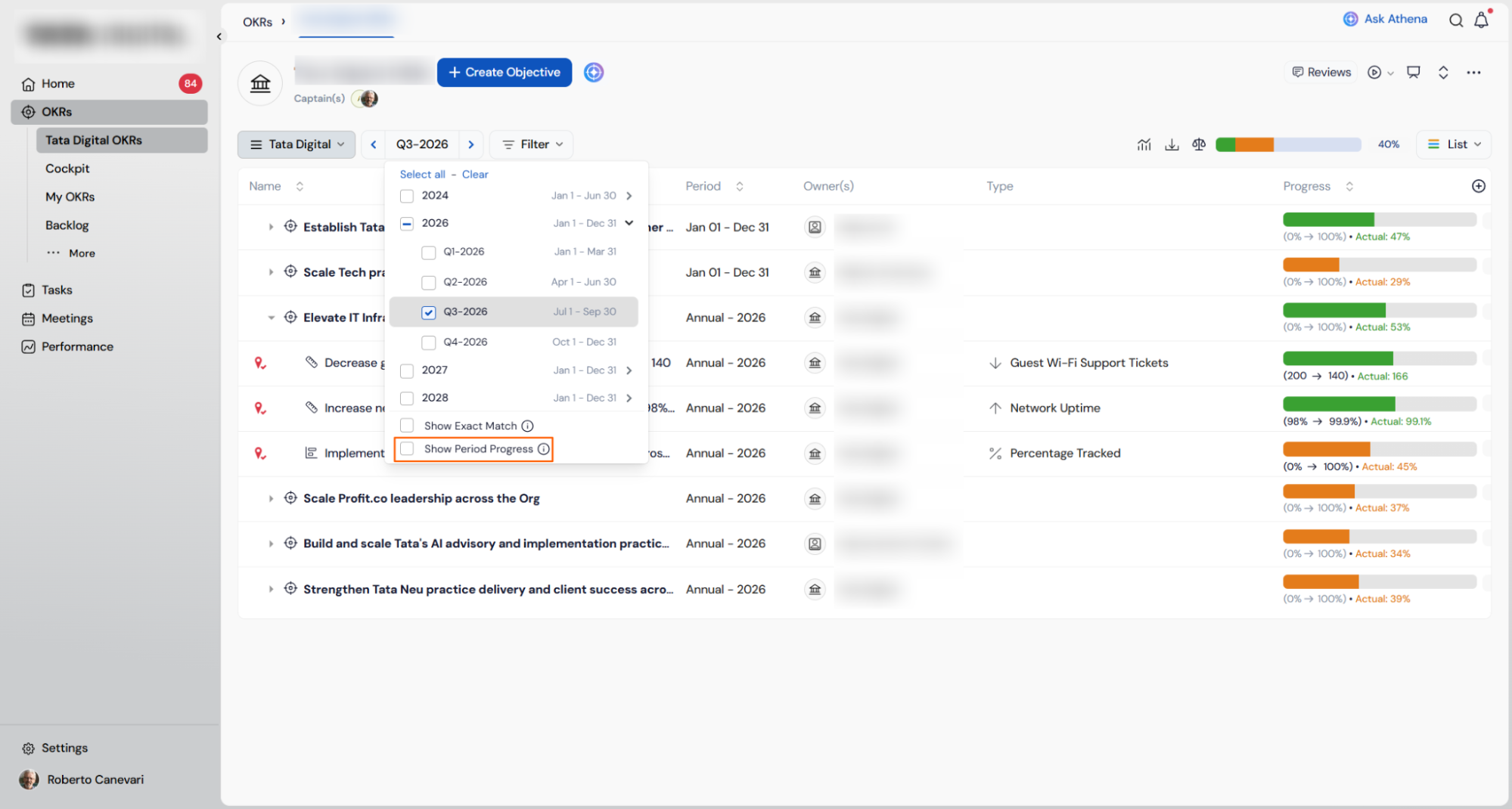
- Profit.co recalculates the Progress column for every Objective, Key Result, and Initiative in the view
- Progress now reflects only the selected period, for example Q3-2026
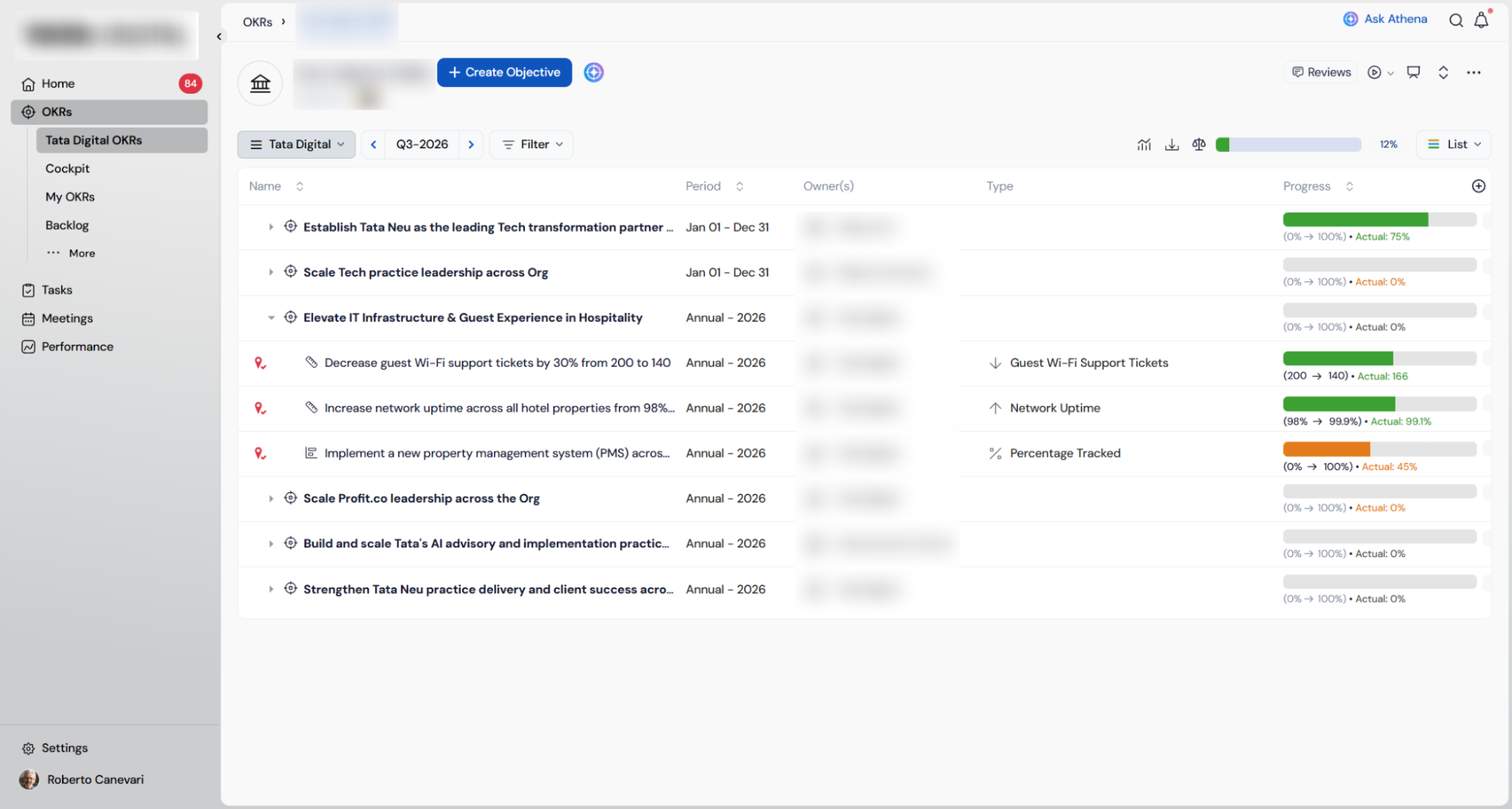
- Uncheck Show Period Progress
- The Progress column reverts to the cumulative total across the full OKR cycle
Period Progress Filter Scenarios and Their Outcomes
| Scenario | Options You Have | What Happens |
|---|---|---|
| You check Show Period Progress for a selected quarter, such as Q3-2026, in the OKR list view. | Select any available period in the filter and check Show Period Progress alongside Show Exact Match. | Profit.co recalculates the Progress column for every Objective, Key Result, and Initiative in the view, replacing the cumulative figure with progress based only on check-ins logged inside Q3-2026. |
| A super user enables Enable period progress in filters in Settings, but no one selects Show Period Progress in the list view. | Leave the new checkbox unchecked, or check it at any point once it's visible in the period filter. | Profit.co continues to display cumulative progress across the full cycle for every OKR and Initiative until a user actively checks the option in that view. |
Caution
Turning off Enable period progress in filters removes the Show Period Progress checkbox from the period filter for every user in the organization, not just for the super user who changed the setting.
Best Practices for the Period Progress Filter
- Pilot the toggle with one department before enabling it organization-wide, since turning it off later removes the checkbox for everyone at once.
- Tell Objective and Key Result owners when you plan to review Show Period Progress numbers, since the same Progress bar reflects two different calculations depending on the checkbox state.
- Reserve Show Period Progress for quarterly business reviews and status checks; leave it unchecked for annual planning conversations where cumulative progress is the relevant figure.
- Confirm the period filter is set to the exact quarter you want to review before checking Show Period Progress, since the checkbox scopes progress to whichever period is currently selected.
- Route enable and disable requests for this setting through a super user, since standard OKR editors cannot access Settings → OKRs → Views → General.
Related Articles
- How to filter OKRs by Periods?
- How to enable OKR Progress and what is its use in Profit.co?
- How to create Customize OKR periods under settings in Profit.co?
Frequently Asked Questions
The Show Period Progress checkbox disappears from the period filter for every user immediately, and all OKR list views revert to displaying cumulative progress across the full cycle.
Objectives, Key Results, and Initiatives all support Show Period Progress in any list view where the period filter is available.
No. The checkbox only changes how progress is calculated for display; check-in history for every period remains intact whether the box is checked or unchecked.
No. The two checkboxes operate independently, so selecting or clearing Show Period Progress does not change the state of Show Exact Match, and vice versa.
Execute your strategy with confidence
Connect OKRs, tasks, and teams in one place with Profit.co
