

Profit.co restricts editing on aligned OKRs so only users with edit rights in the owning department can change the fields that define the objective. Everyone in the receiving department can still track and update progress on the same OKR.
Table of Contents
- What Are Ownership Boundaries for Aligned OKRs?
- Why Do Ownership Boundaries for Aligned OKRs Matter?
- How Do Ownership Boundaries for Aligned OKRs Work?
- What Happens When You Try to Edit an Aligned OKR?
- What Are the Best Practices for Ownership Boundaries on Aligned OKRs?
- Related Articles
- What Are Some Frequently Asked Questions About Ownership Boundaries on Aligned OKRs?
What Are Ownership Boundaries for Aligned OKRs?
Ownership boundaries are the permission rules Profit.co applies to an OKR once it has been aligned into your department from another department. They determine which fields you can change based on your access in the OKR's owning department, not your access in your own department.
The rule targets a specific set of definitional fields. These are the fields locked for you unless you hold edit rights in the owning department:
- Owner
- Assigned Users
- KPI
- Key Result Type
- From Value
- To Value
- Period
- Name
Note
This rule applies only to OKRs aligned in from another department. OKRs you own outright in your own department follow your normal edit permissions.
Why Do Ownership Boundaries for Aligned OKRs Matter?
Before this rule, a user blocked from editing an aligned OKR had no way to know why, who owned the record, or where to go for a change, and typically had to raise a support ticket to find out. Profit.co now surfaces the owning department, the current owner, and a direct link to the source record the moment a field is locked.
Because definitional fields can only be changed from the owning department, a receiving department can no longer overwrite the OKR's target values, period, or name by accident. Edit rights are also evaluated per person, so two users on the same aligned OKR can correctly see different access without either result being a bug.
How Do Ownership Boundaries for Aligned OKRs Work?
Step 1
- Open any OKR that has been aligned into your department from another department.
- Click into any field on the OKR, such as Owner, Period, or Name.
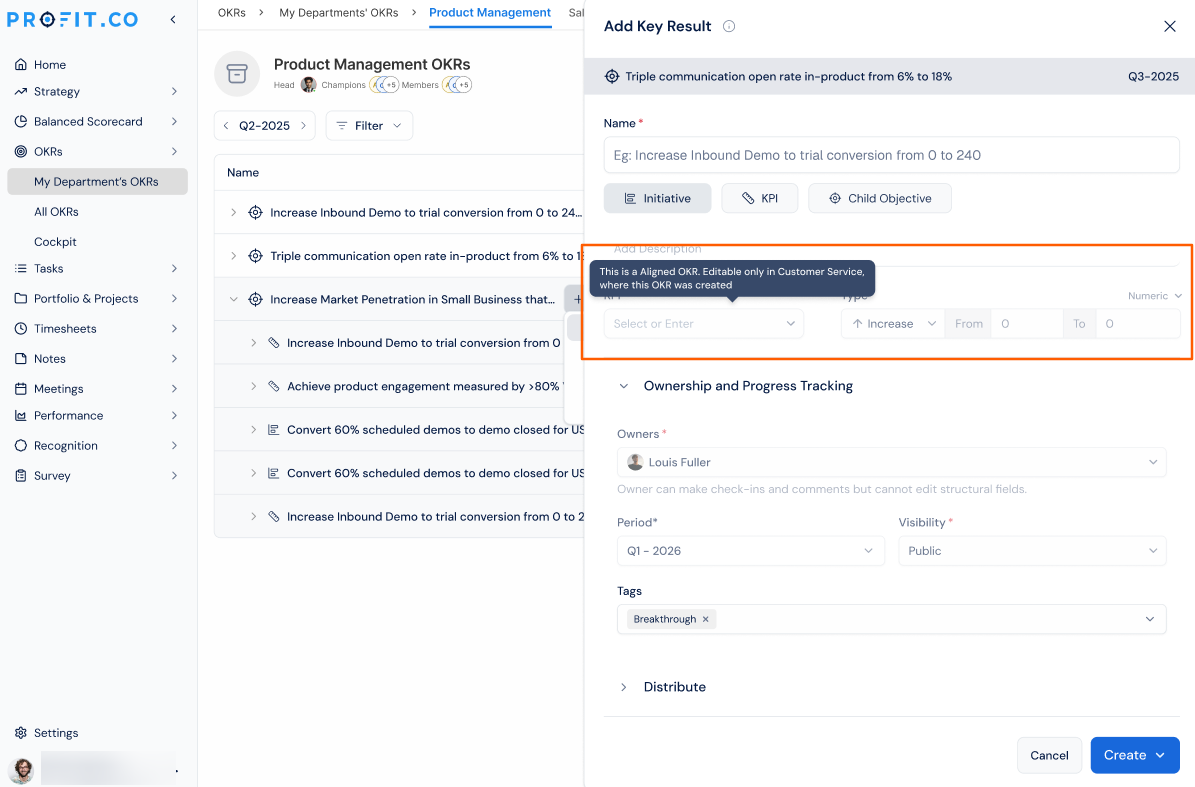
- Hover over a field marked read-only to view the one-line explanation.
- Note the owning department and owner named in the tooltip.
What Happens When You Try to Edit an Aligned OKR?
| Scenario | What Happens |
|---|---|
| You open an aligned OKR and hold edit rights in the owning department. | Profit.co makes every field on the OKR fully editable, with no restrictions applied. |
| You open an aligned OKR without edit rights in the owning department. | Profit.co locks the Owner, Assigned Users, KPI, Key Result Type, From Value, To Value, Period, and Name fields as read-only. |
| You hover over a locked field on an aligned OKR. | Profit.co shows a one-line explanation naming the owning department, the current owner, and a link to the source record. |
| You update a check-in, comment, or progress value on an aligned OKR. | Profit.co processes the update normally, regardless of your edit rights in the owning department. |
| You change a protected field on an aligned OKR from within the owning department. | Profit.co logs the actor, the actor's department, and the owning department in the audit trail. |
| You and another user open the same aligned OKR from different departments. | Profit.co grants each of you edit access based on your own rights in the owning department, not a shared lock on the record. |
What Are the Best Practices for Ownership Boundaries on Aligned OKRs?
- Read the lock tooltip before escalating a request, since it already names the exact owning department and owner you need to contact.
- Use the source record link in the tooltip to jump straight to the owning department's OKR instead of searching for it manually.
- Confirm your own edit rights in the owning department before assuming a field is broken, since access is person-specific rather than a blanket lock on the record.
- Keep logging check-ins and comments on aligned OKRs even without edit rights, since progress tracking is never affected by ownership boundaries.
- Check the audit log after a protected field changes to confirm which department and user made the edit, since Profit.co records this automatically.
Related Articles
- How do I align my OKRs?
- Where do I notify and accept an Alignment request?
- How do I check-in for Key Results?
What Are Some Frequently Asked Questions About Ownership Boundaries on Aligned OKRs?
It applies only to OKRs aligned into your department from another department. Your own department's OKRs follow standard edit permissions.
Yes. Access is evaluated against your current edit rights in the owning department each time you open the record, so a change to those rights changes what you can edit.
No. Only the eight definitional fields, Owner, Assigned Users, KPI, Key Result Type, From Value, To Value, Period, and Name, are restricted. Every other field follows normal access.
The input confirms restriction is based on your edit rights in the owning department specifically, not on a general role or title.
Execute your strategy with confidence
Connect OKRs, tasks, and teams in one place with Profit.co
