

Project Health Status configuration lets administrators define how Profit.co evaluates and displays a health indicator for projects and milestones at every stage of their lifecycle. Each stage runs its own logic, so a project can show a meaningful health signal whether it hasn't started yet or is already underway.
Table of Contents
- What Is Project Health Status?
- Why Does Project Health Status Matter?
- How Do I Configure Project Health Status?
- What Happens When You Configure Project Health Status?
- How Does Health Status Work for Each Stage?
- What Are the Best Practices for Project Health Status?
- Related Articles
- What Are Some Frequently Asked Questions About Project Health Status?
What Is Project Health Status?
Project Health Status is a setting under Active Project Health that governs how Profit.co assigns an On Time / Delayed style indicator to a project or milestone at a given lifecycle stage. Four stages carry a Health option: Not Started, Scheduled, In Progress, and Completed. On Hold, Archived, and Closed do not.
Each stage's own Health Status Configuration panel lets you turn on automatic assignment, rename the two default statuses it comes with, and, for In Progress specifically, choose a calculation method and set Velocity Bands. The configuration applies the same way to both projects and milestones.
Project check-ins now record stage and health in a single Stage & Health field, which lists each health status under its own stage. Because you set both values in one selection, Profit.co cannot save a mismatched stage and health pair.
Key Terms
| Term | Meaning |
|---|---|
| Stage | Where the project or milestone sits in its lifecycle: Not Started, Scheduled, In Progress, or Completed. |
| Health | How the project or milestone is performing against plan: On Time or Delayed. Health is calculated independently of Stage. |
| Planned Progress | Where the project or milestone should be today, based on its planned start and end dates. |
| Actual Progress | How much work is actually done, reported directly rather than estimated from the schedule. |
| Velocity | Actual Progress divided by Planned Progress. A value of 1.0 or more maps to On Time; below 1.0 maps to Delayed. |
Why Does Project Health Status Matter?
Without stage-specific logic, health only ever means one thing: whether progress matches plan, once progress exists. That leaves a blind spot before a project ever starts. Because Not Started and Scheduled run on date comparisons instead, a project can be flagged Delayed the moment its planned start passes, long before any check-in happens.
Automatic assignment also removes the guesswork managers previously had to apply when updating health by hand at every check-in. Once a stage's logic and bands are set once, the status reflects actual delivery data on its own, and the same rules apply consistently to every project and milestone in that stage.
| Stage | Calculation Logic | Default Statuses |
|---|---|---|
| Not Started | Compares today's date, or the actual start date once logged, against the planned start date. | On time to start, Delay to start |
| Scheduled | Compares actual progress against expected progress, distributed evenly across the stage duration. | Scheduled On time, Scheduled delay |
| In Progress | Calculates Actual Progress ÷ Planned Progress × 100 and matches the result to your Velocity Bands (Progress-Based), or to SPI and CPI (EVM-Based) for billable projects with a cost and schedule baseline. | In Trouble, At Risk, On Track |
| Completed | Compares the scheduled completion date against the actual completion date. | Completed On time, Completed delay |
How Do I Configure Project Health Status?
Step 1
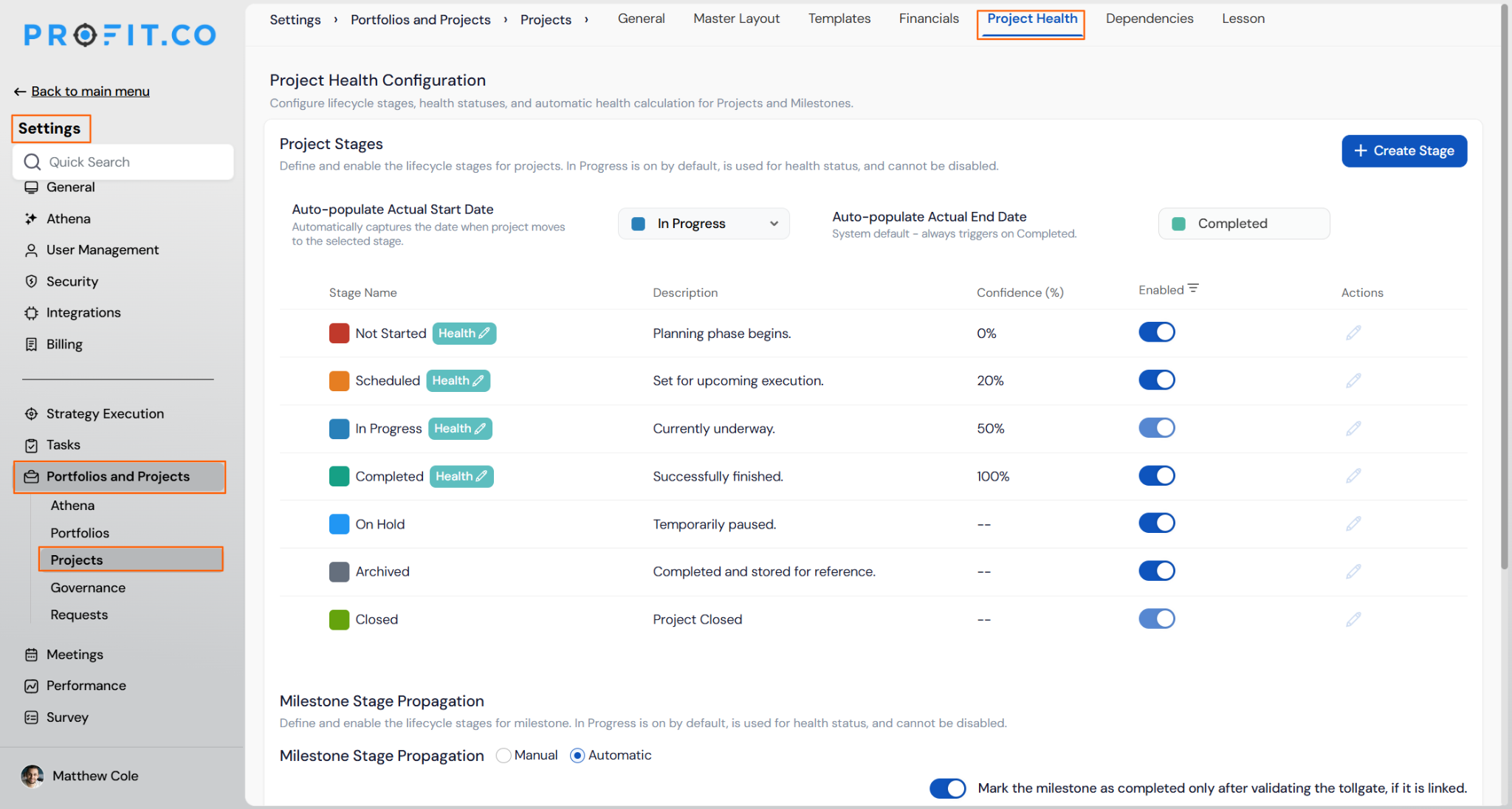
- Go to Settings → Portfolios and Projects → Projects from the left navigation panel.
- Review the Project Stages list, where Not Started, Scheduled, In Progress, and Completed each show a Health tag.
Step 2
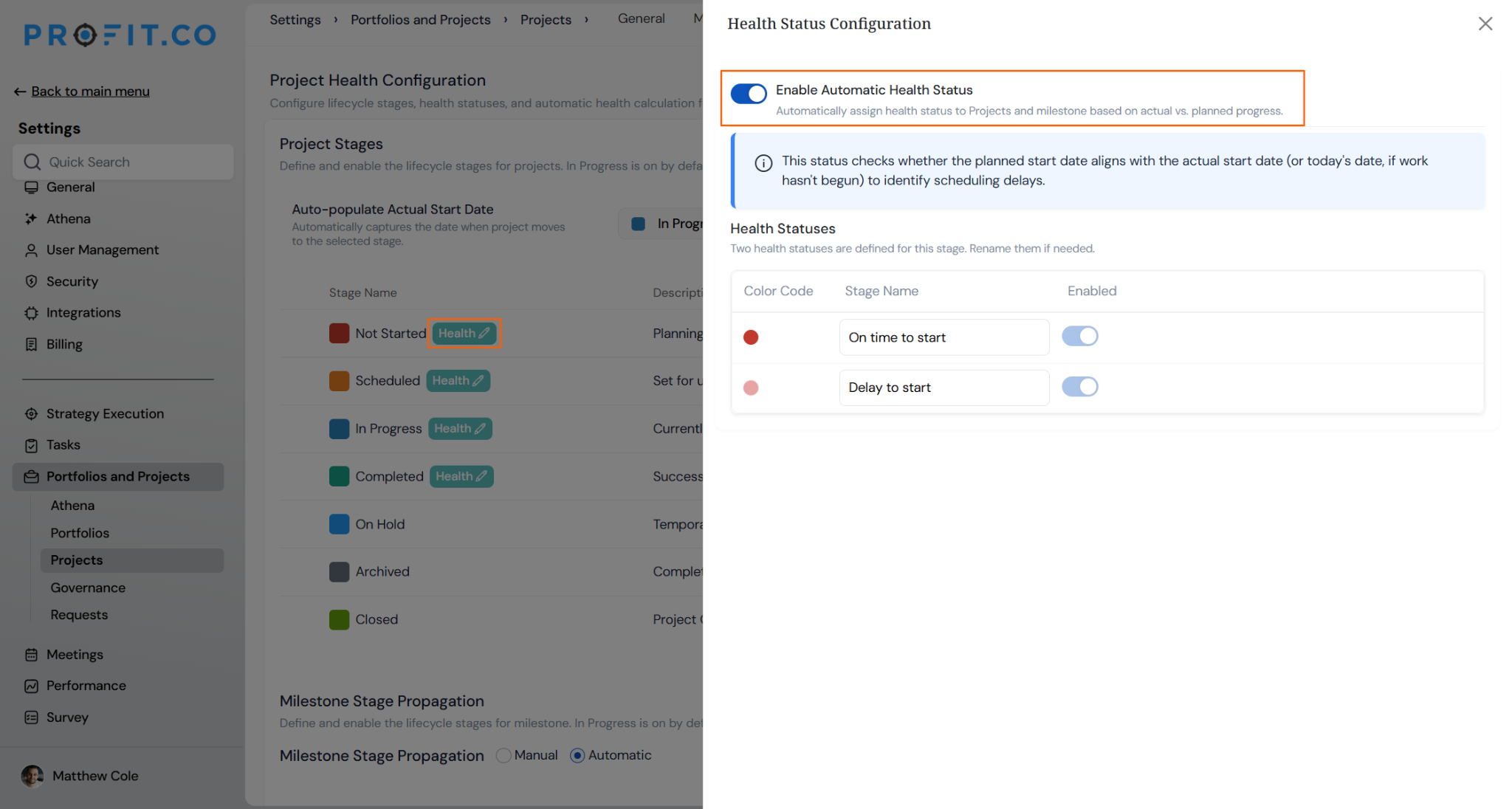
- Click the Health edit icon next to the stage you want to configure.
- The Health Status Configuration panel opens on the right.
- Toggle on Enable Automatic Health Status.
Step 3
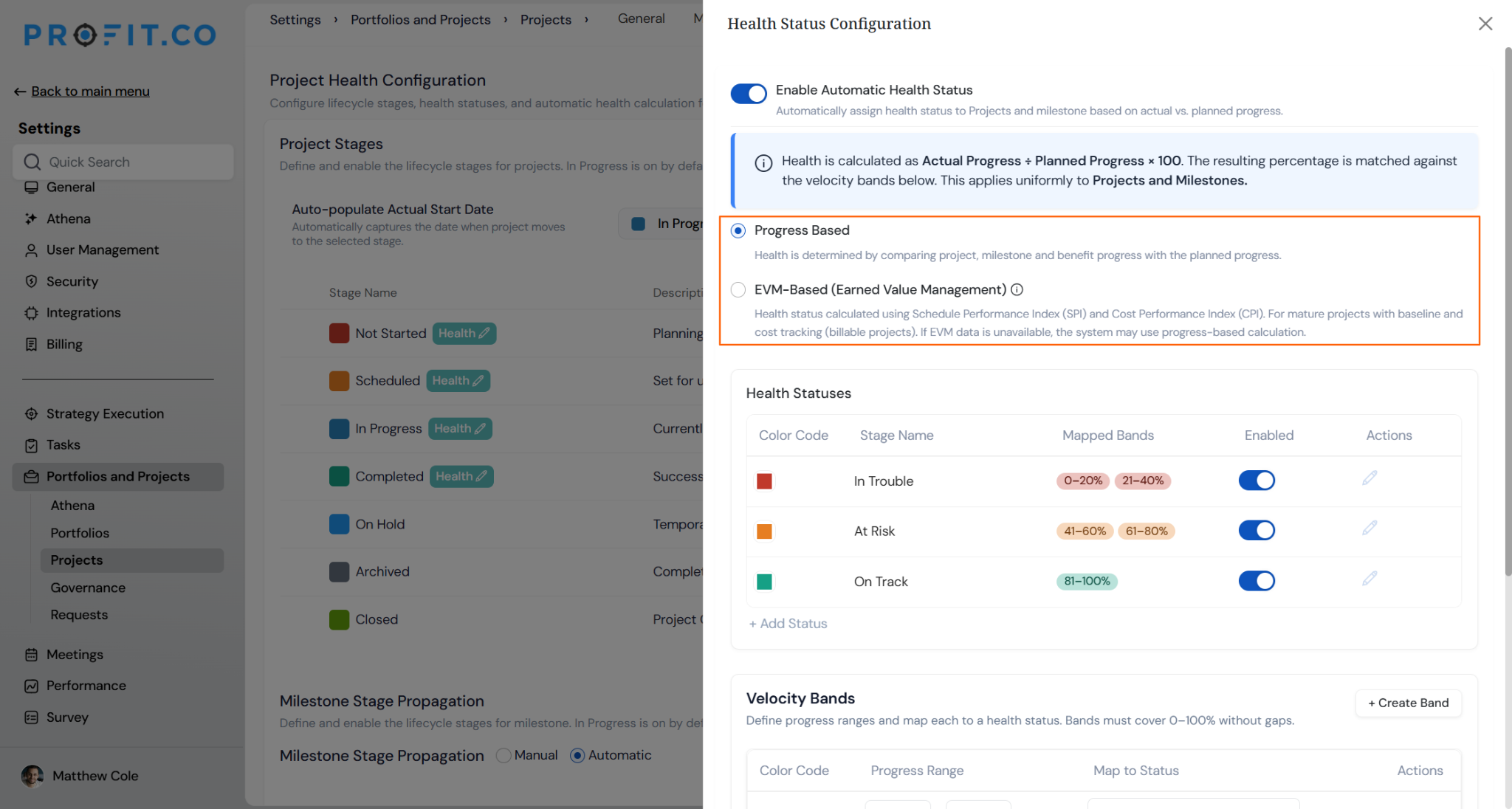
- For the In Progress stage, choose Progress Based or EVM-Based (Earned Value Management).
- Configure the Health Statuses and Velocity Bands so the ranges cover 0 to 100% without gaps.
What Happens When You Configure Project Health Status?
| Scenario | What Happens |
|---|---|
| You enable Automatic Health Status for a stage. | Profit.co calculates the stage's health status from actual versus planned progress and leaves the underlying progress values unchanged. |
| You wait for a project's health status to change automatically (for example, from On Track to At Risk). | Profit.co notifies the relevant stakeholders and updates the status shown on the project. |
| You turn off Automatic Health Status after it has been running. | Profit.co keeps every previously assigned health status unchanged and lets you select the status manually going forward. |
| You rename a health status label for a stage. | Profit.co displays the new label everywhere the status appears and keeps every previously recorded status value intact. |
| You look for a Health option on the On Hold, Archived, or Closed stage. | Profit.co hides the Health edit icon for these stages and applies automatic health status only to Not Started, Scheduled, In Progress, and Completed. |
Note
Velocity Bands and the Progress-Based versus EVM-Based method choice are configured here for In Progress, but full field-level setup is documented in the Project Check-in article linked below. Velocity rolls up from task to milestone to project. A milestone's health reflects the combined actual and planned progress of everything beneath it, not just one task.
How Does Health Status Work for Each Stage?
Each of the four stages runs its own calculation logic and comes with its own default status pair, as summarized in the Calculation Logic table above. Not Started and Scheduled rely on date and expected-progress comparisons, In Progress can run either Progress-Based or EVM-Based calculations, and Completed compares the scheduled and actual completion dates.
What Are the Best Practices for Project Health Status?
- Configure the Not Started and Scheduled stages before projects reach them, since their health checks run purely on dates and expected-progress distribution, with no way to backfill status once time has already passed.
- Reserve EVM-Based calculation for billable projects that already have a cost and schedule baseline, since it depends on SPI and CPI data that other projects will not have to calculate against.
- Keep Velocity Bands contiguous across the full 0-100% range, since any gap between bands leaves that slice of progress without a mapped health status.
- Rename default labels like "In Trouble" or "At Risk" to match your organization's terminology before rolling this out, since every stakeholder will see whichever label is active when a status changes.
- Turn off Automatic Health Status only when your team is ready to select status manually at every future check-in, since existing statuses stay as they are but nothing updates on its own afterward.
Related Articles
- How do I perform a Project Check-in in Profit.co?
- How do I view portfolio health metrics and heatmaps in Profit.co?
What Are Some Frequently Asked Questions About Project Health Status?
Yes. For the In Progress stage, click + Add Status to create additional health states beyond the default two. See the Project Check-in article for the full configuration steps.
No. The calculation method choice, Progress-Based or EVM-Based, is scoped to In Progress only. The other three stages always run their own fixed date or progress-distribution logic.
No. Health Status Configuration for a stage applies uniformly to both projects and milestones, using the same enabled statuses and calculation logic for each.
Execute your strategy with confidence
Connect OKRs, tasks, and teams in one place with Profit.co
