

Profit.co's Tollgate-based progress reporting calculates a project's overall progress from the Tollgates it has passed and the milestones completed within its current Tollgate — instead of rolling up purely from milestone and task completion. It's built for teams running a stage-gate (Tollgate) delivery model, where later gates should count for more than earlier ones.
Table of Contents
- What is Tollgate-based progress reporting?
- Why use gate-weighted progress instead of the standard roll-up?
- How does the calculation work?
- How do I turn on and configure Tollgate-based progress reporting?
- How do I set each Tollgate's completion %?
- What happens in different scenarios?
- Related Questions
- Frequently Asked Questions
What is Tollgate-based progress reporting?
Tollgate-based (gate-weighted) progress is a third method for calculating Project Progress, alongside Equal Weighting and Manual Weighting. When it's active, progress is derived from two things:
- Tollgate completion % — the cumulative percentage the project reaches once a given Tollgate is approved.
- Milestone completion — how many milestones inside the current (not-yet-approved) Tollgate are Done.
The result is a single, fully calculated progress number. It's never typed in manually — it always reflects the stage the project has actually reached.
Why use gate-weighted progress instead of the standard roll-up?
The standard roll-up method calculates progress only from what's been defined and completed so far. If a project has only planned out its first phase in detail, finishing that phase can show 100% progress — even though the project has barely started.
For a stage-gated delivery model, that's misleading. Later Tollgates usually represent more scope, more risk, and more value delivered than earlier ones, so they should be weighted to count for more.
In short: gate-weighted progress makes the percentage match the phase the project has actually reached, with later, heavier gates worth more than early ones.
How does the calculation work?
Progress is calculated in two steps:
- Milestone completion — the share of the current Tollgate's milestones that are Done (weighted, if Manual milestone weighting is used). A milestone that's in progress contributes nothing until it's marked Done.
- Project progress — the last approved Tollgate's %, plus that milestone-completion share applied across the gap between the last approved gate and the current one.
Progress = Last Approved Tollgate % + (Milestones Done ÷ Total) × (Current Tollgate % − Last Approved Tollgate %)
Example: Gate 3 is approved at 40%. Gate 4 is worth 85% and has 3 milestones, 2 of which are Done.
- Milestone fraction: 2 ÷ 3 = 0.667
- Gate increment: 85% − 40% = 45 points
- Progress: 40% + (0.667 × 45%) = 70%
The project reads 70% — clearly inside Gate 4, and not yet close to Gate 5.
How do I turn on and configure Tollgate-based progress reporting?
Step 1
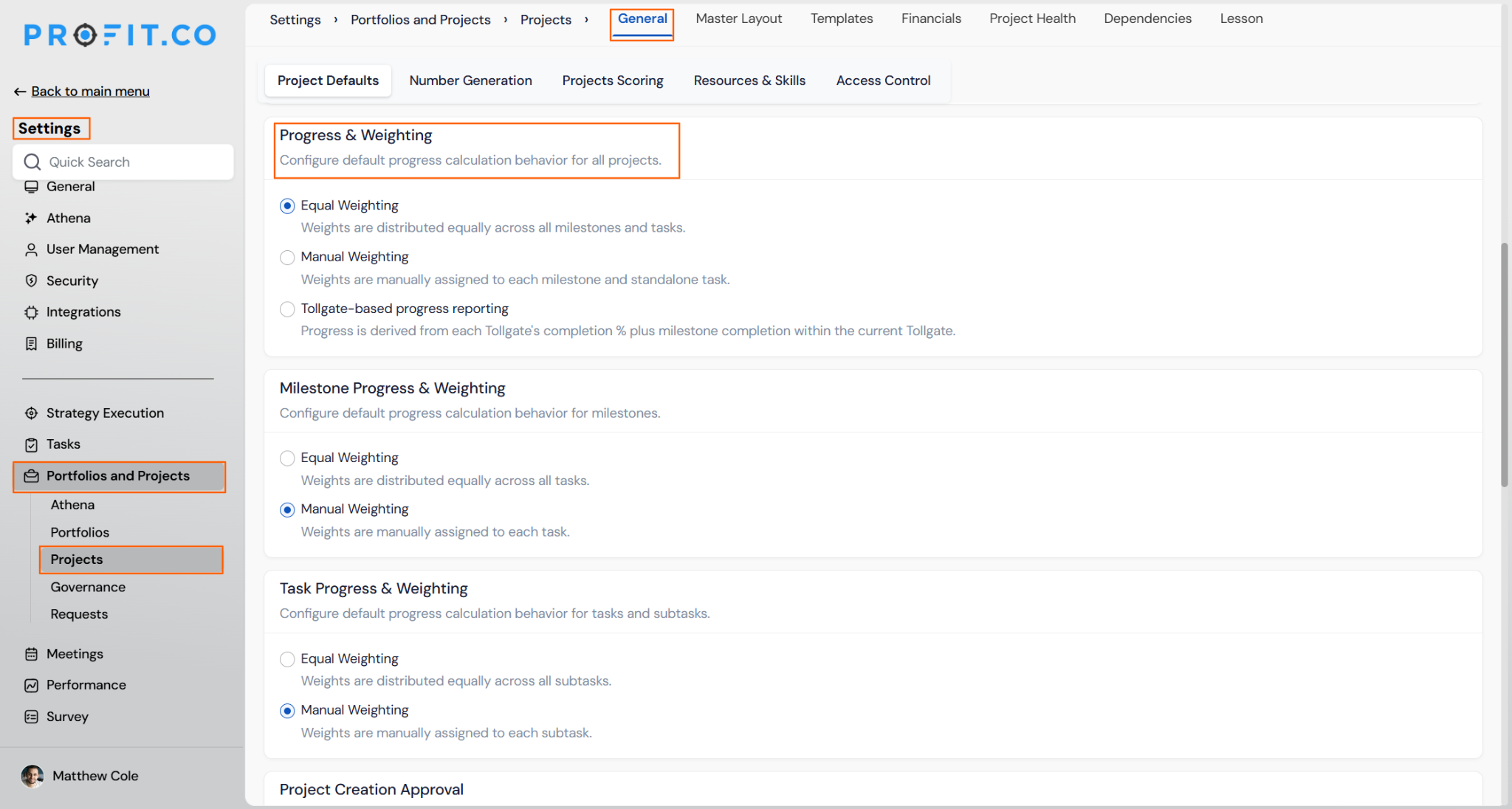
- Go to Settings → Portfolios and Projects → Projects → General and open the Project Defaults tab.
- Scroll to Project Progress & Weighting.
Step 2
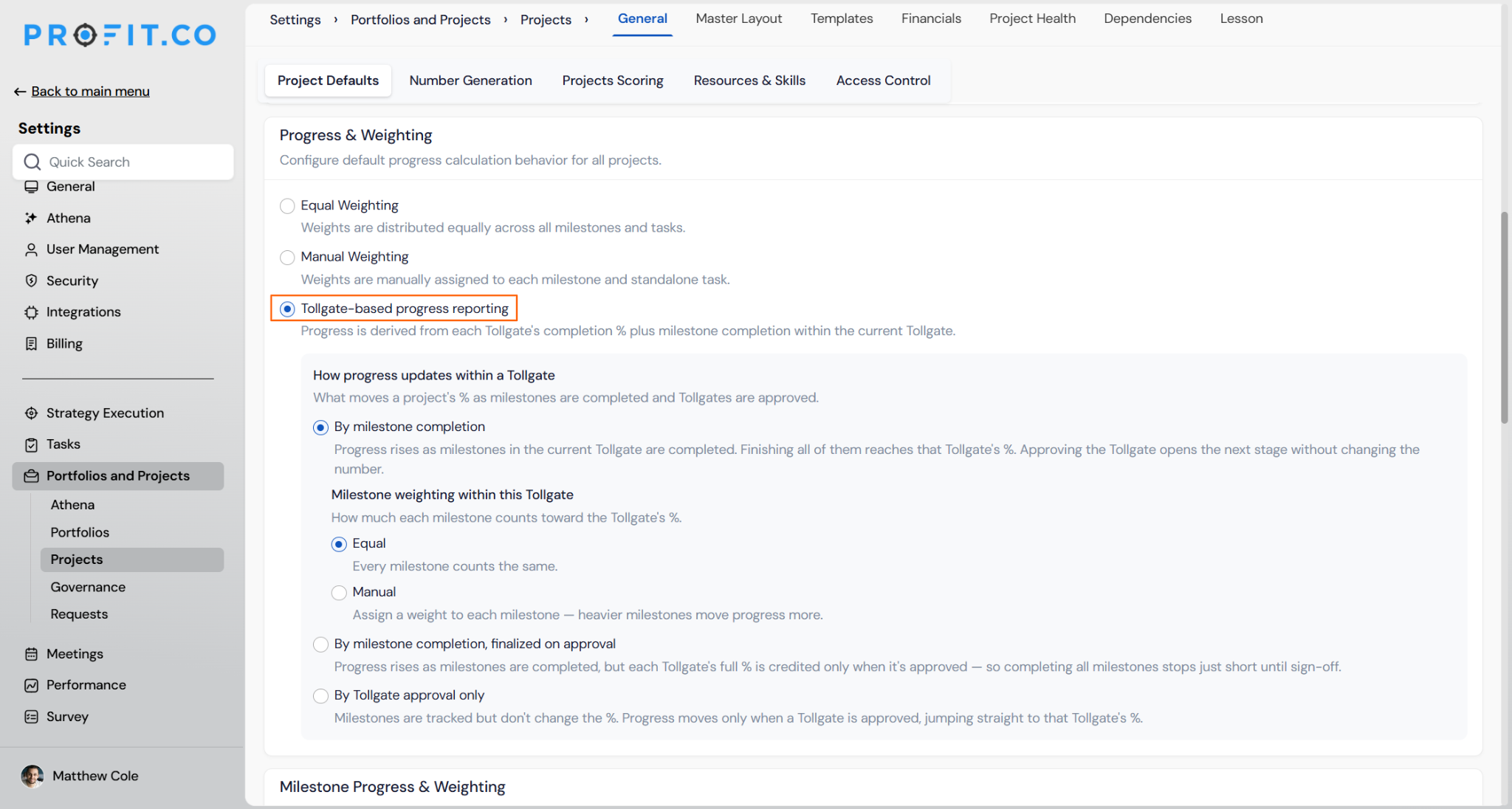
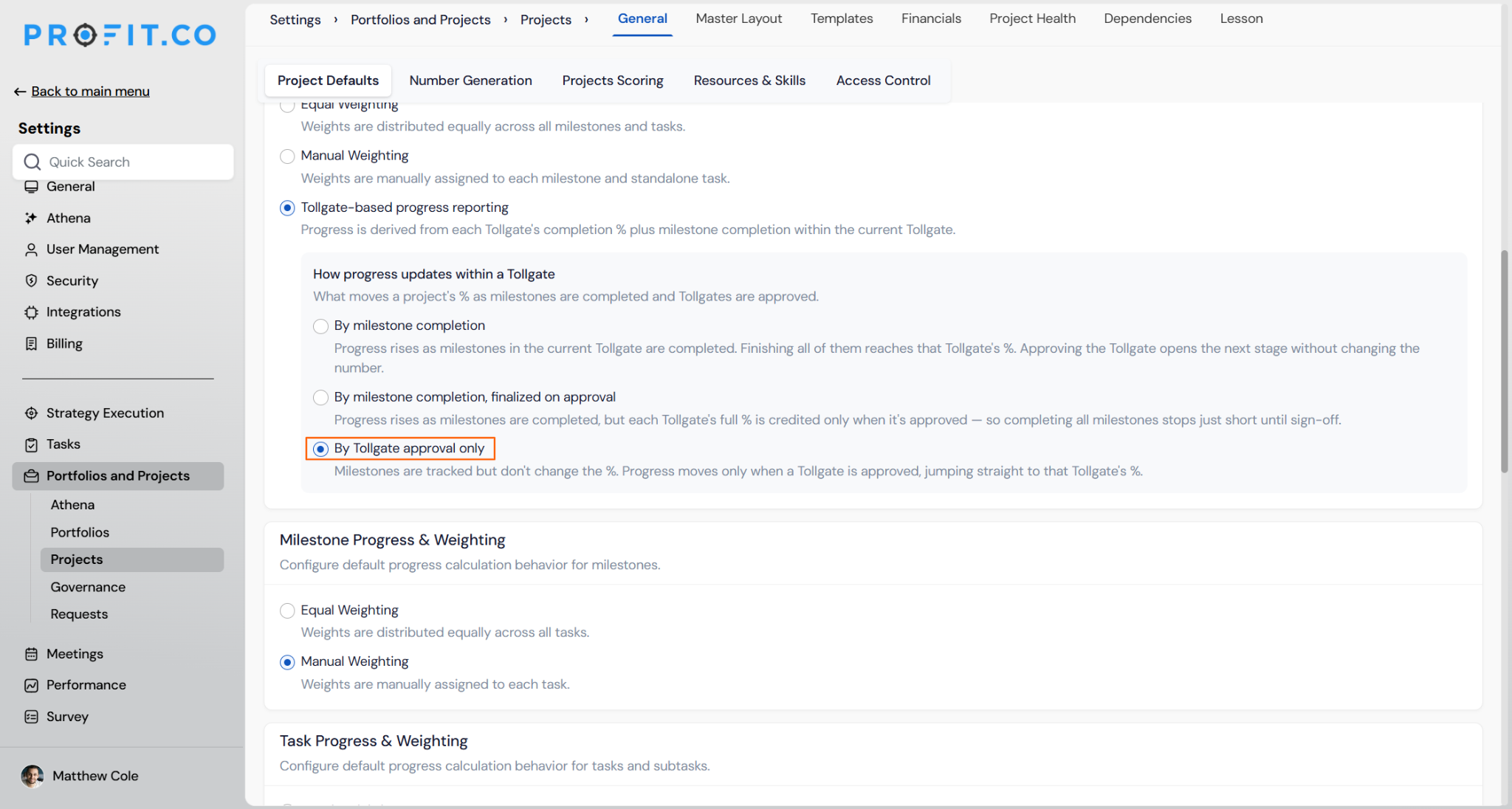
- Alongside Equal Weighting and Manual Weighting, select Tollgate-based progress reporting. This reveals the How progress updates within a Tollgate section.
Step 3
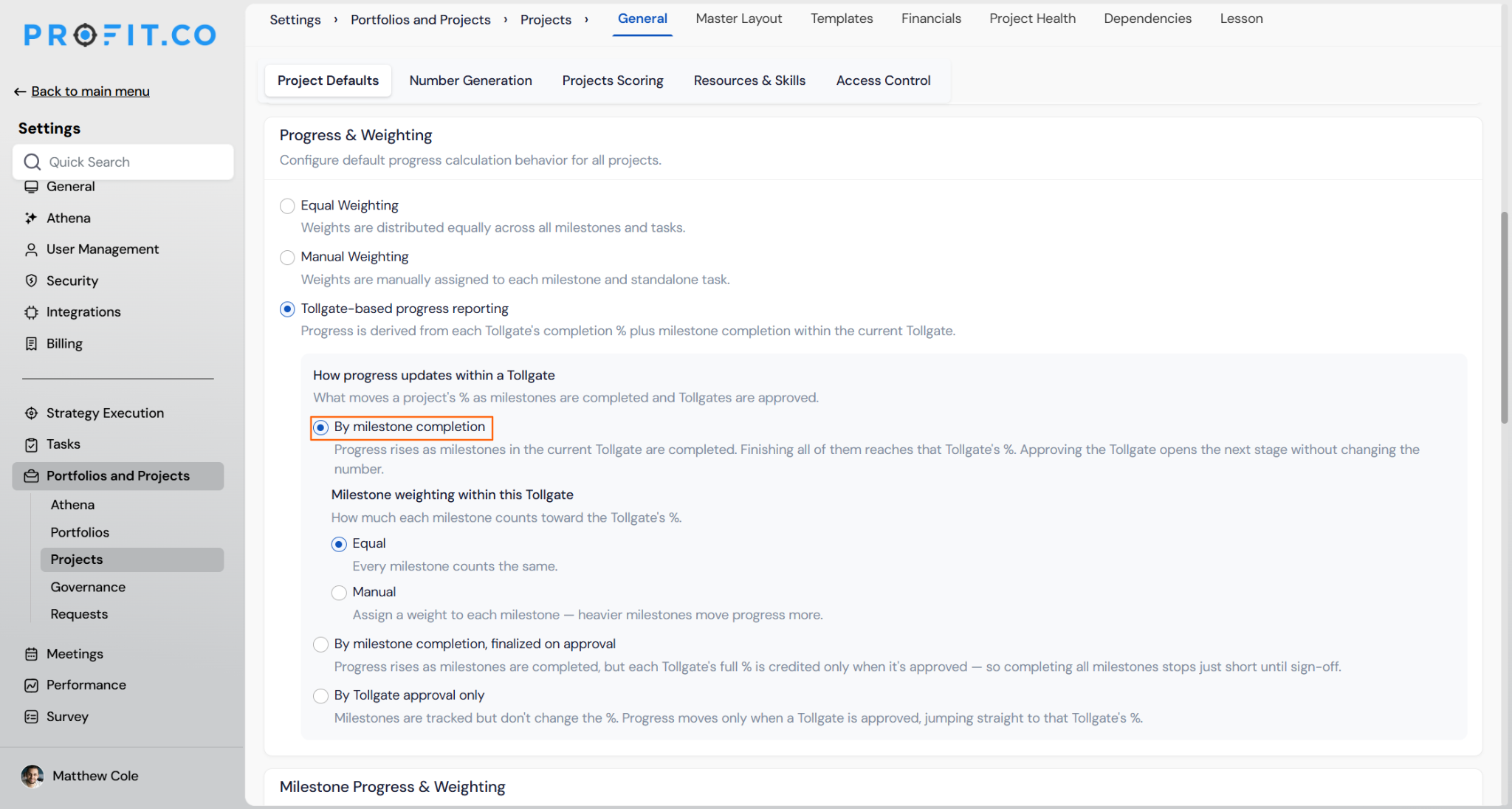
Pick one of three behaviors for what moves the % as milestones complete and Tollgates are approved:
- By milestone completion (recommended) — progress rises as milestones in the current Tollgate are completed. Finishing all of them reaches that Tollgate's %. Approving the Tollgate opens the next stage without changing the number.
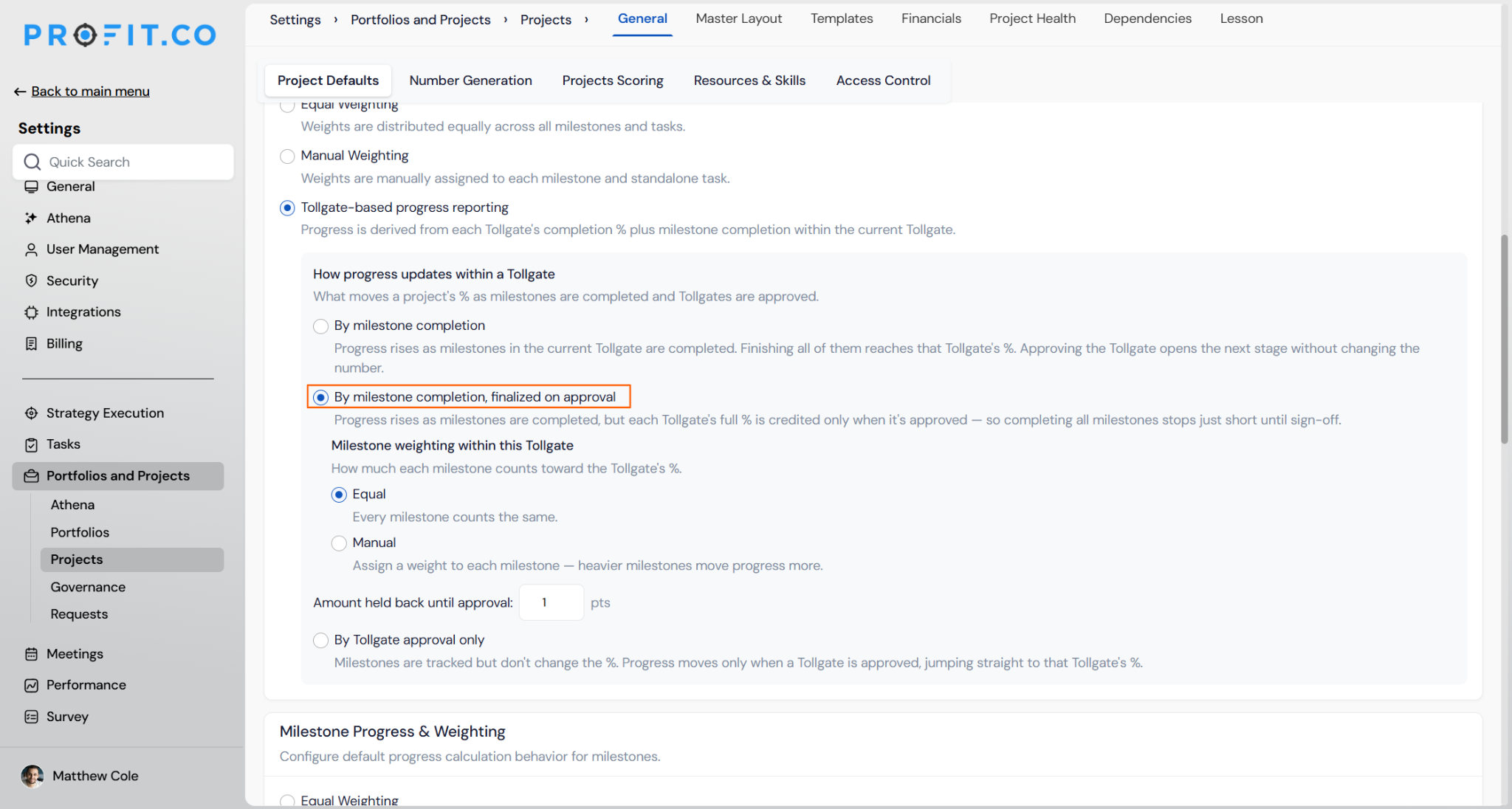
- By milestone completion, finalized on approval — progress rises the same way, but a set number of points are held back and only credited once the Tollgate is approved. The Amount held back until approval field lets you set exactly how many points to hold back (default: 1 pt), so completing every milestone stops just short of the Tollgate's full % until sign-off.
- By Tollgate approval only — milestones are tracked for visibility but don't move the %. Progress only jumps when a Tollgate is approved, straight to that Tollgate's %.
Step 4
- Equal — every milestone in the current Tollgate counts the same toward its %.
- Manual — each milestone is given its own weight, so heavier milestones move progress more than lighter ones.
How do I set each Tollgate's completion %?
Step 1
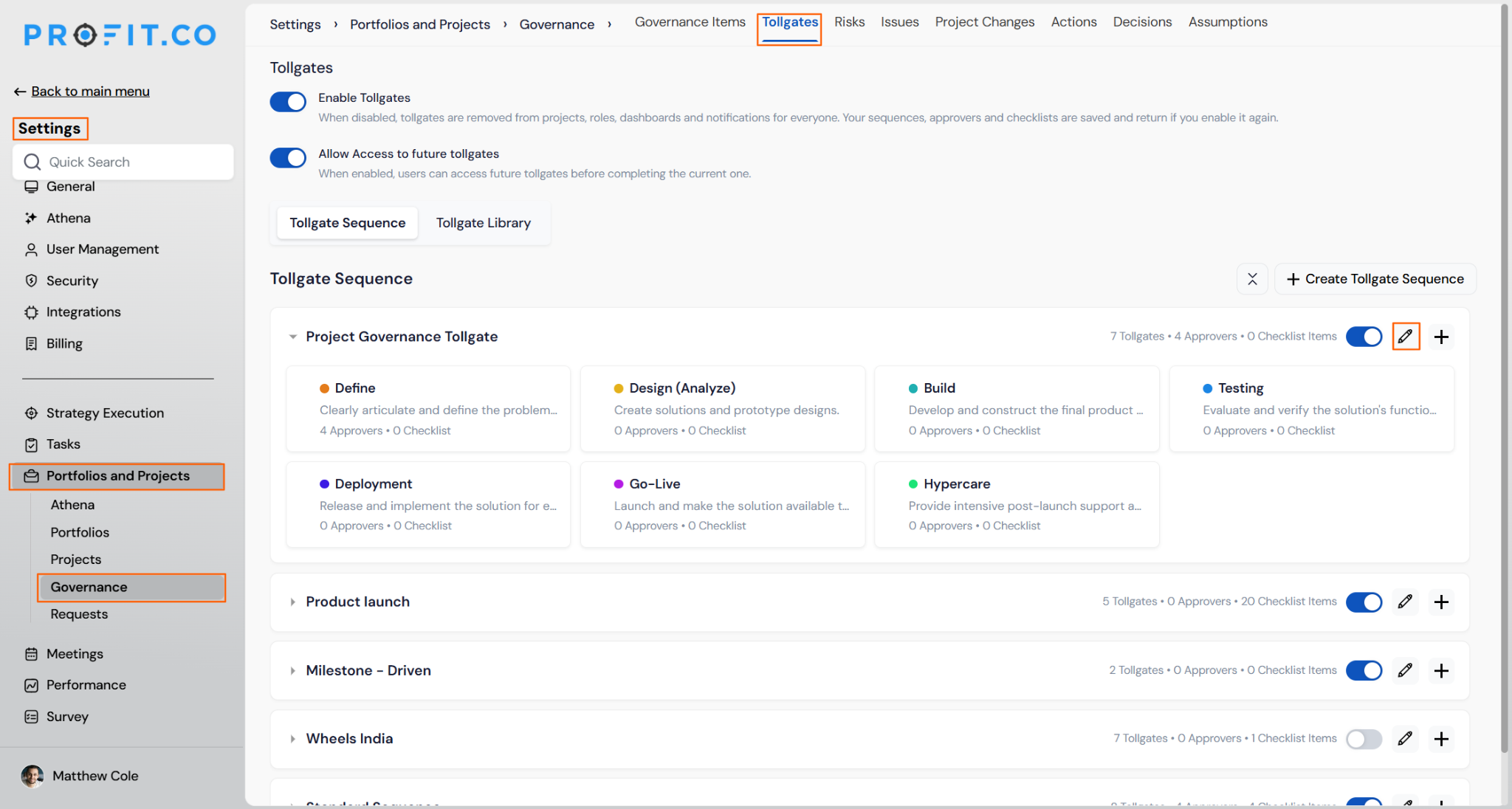
- Go to Settings → Portfolios and Projects → Governance and switch to the Tollgates tab.
- Make sure the Tollgates you plan to use are enabled.
- Choose the relevant Tollgate Sequence and click its edit icon to open the Update Tollgate Sequence screen.
Step 2
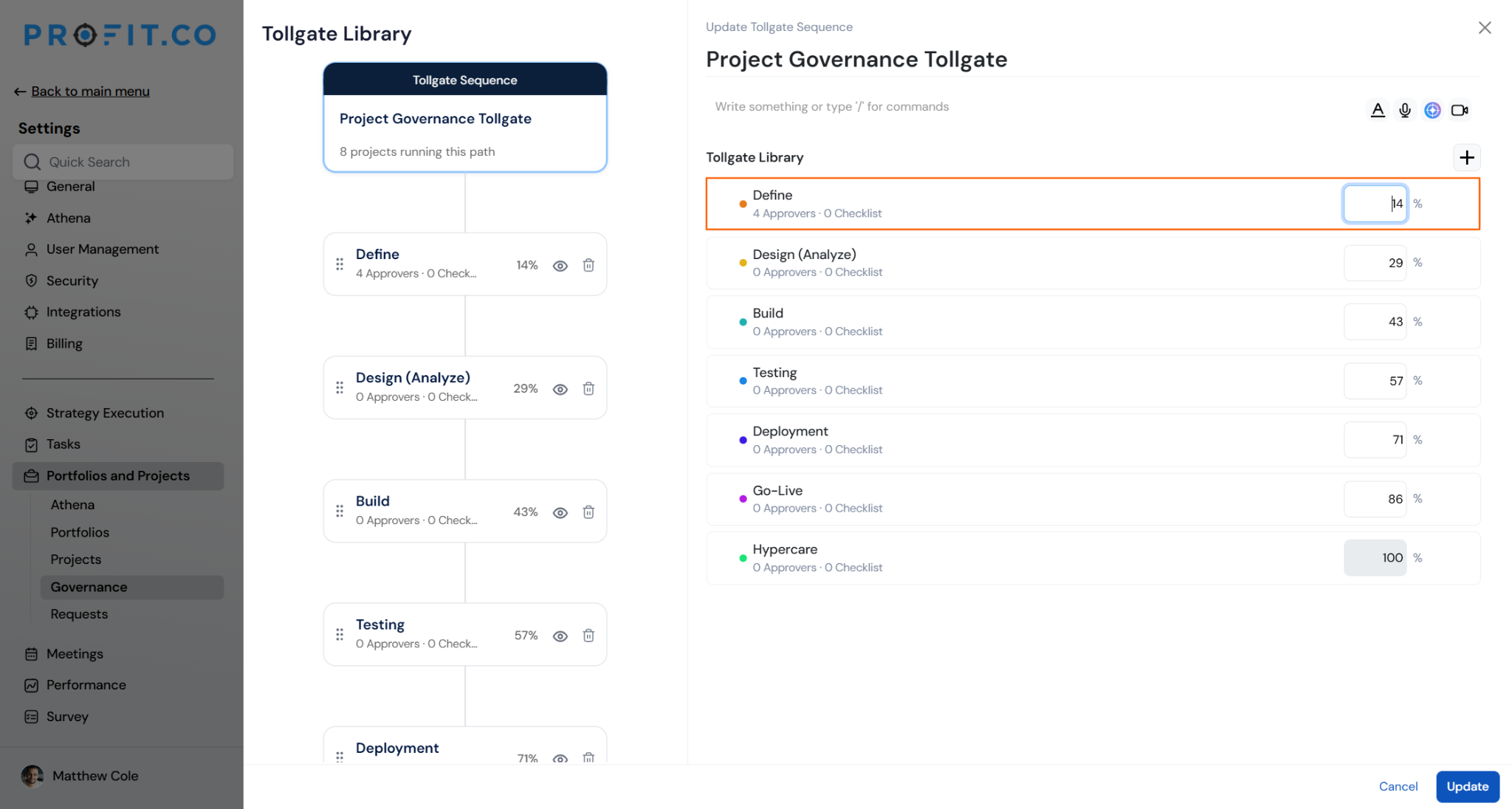
- Enter a completion % for each enabled Tollgate, then click Update.
- Percentages must strictly increase from one gate to the next, and the final enabled gate must equal 100%. Disabled Tollgates (for example, certificate steps) take no % and are excluded from the sequence.
What happens in different scenarios?
| Scenario | What Happens |
|---|---|
| A brand-new project. | No Tollgate has been approved yet, and no milestones exist. Progress shows 0% — there's nothing yet to measure it against. |
| All milestones done, gate not yet approved. | Every milestone inside Gate 1 (worth 20%) is Done, but the gate hasn't been submitted for approval. Under the recommended behavior, progress already shows 20% — approving the gate afterward simply opens Gate 2 without changing the number. |
| Mid-way through the current gate. | Gate 3 is approved at 40%. Gate 4 is worth 85% with 3 milestones, 2 of which are Done. Progress = 40% + (2 ÷ 3 × 45%) = 70%. |
| A gate with no milestones defined. | Progress holds at the previous gate's % and doesn't move until that gate is approved — this avoids a divide-by-zero and prevents a false jump. |
| Weighted milestones (Manual weighting). | Inside a gate worth 15%, "Foundation" (weight 1) is 100% complete and "Core" (weight 3) is 60% complete. Weighted completion = (1×100 + 3×60) ÷ (4×100) = 70%, so the gate contributes 70% × 15% = 10.5 points — "Core" has more influence than "Foundation" because it carries more weight. |
| Every gate approved. | Once the final Tollgate is approved, progress locks at 100% and stays there. |
Related Questions
Frequently Asked Questions
No. For projects on Tollgate-based progress reporting, progress is always calculated. The manual override option is hidden in Check-in for this method. Manual entry remains available only for projects on Equal Weighting or Manual Weighting.
Existing projects keep their current behavior unless you explicitly move them to Tollgate-based reporting. Turning the method on in Project Defaults doesn't retroactively change projects still on Equal or Manual weighting.
Yes, for every enabled Tollgate in the sequence you plan to use. Percentages must strictly increase, and the final enabled gate must equal 100%. Profit.co blocks project creation on an incomplete sequence and prompts you to finish setting it up first.
No. Only a milestone in a Done (terminal) status counts toward the current Tollgate's completion. An in-progress milestone contributes nothing until it's marked Done.
It only appears under "By milestone completion, finalized on approval." It sets how many points of the current Tollgate's % are withheld until the gate is formally approved — so completing every milestone gets the project close to, but not all the way to, that Tollgate's full %.
No. Tollgates are approved sequentially in the order defined by the Tollgate Sequence; out-of-sequence approval isn't supported.
The same calculated value appears consistently across the project list (shown as Auto · Gate-weighted), the project header, Check-in, and dashboards.
Execute your strategy with confidence
Connect OKRs, tasks, and teams in one place with Profit.co
