

Standard Attributes is the section in Master Layout where an entity's built-in fields, such as Owner, Priority, and Planned Start Date, become directly configurable for the first time. It now spans Portfolio, Project, and Milestone, and, as of this release, Task.
Table of Contents
- What is the Standard Attributes Section in Master Layout?
- Why Does the Standard Attributes Section in Master Layout Matter?
- How Do I Use the Standard Attributes Section in Master Layout?
- What Happens When You Use the Standard Attributes Section in Master Layout?
- What Fields Are Included in Standard Attributes for Each Entity?
- What Do the Duration and Schedule Sections Show?
- What Are the Best Practices for the Standard Attributes Section in Master Layout?
- Related Articles
- What Are Some Frequently Asked Questions About the Standard Attributes Section in Master Layout?
What is the Standard Attributes Section in Master Layout?
Standard Attributes is a section Profit.co adds to the Master Layout canvas for Portfolio, Project, and Milestone, and to a new Tasks tab for the first time. It carries the platform's built-in fields, such as Owner, Status, Priority, Tags, Planned Start Date, Planned End Date, Actual Start Date, and Actual End Date, as ordinary configurable attributes rather than fixed system fields.
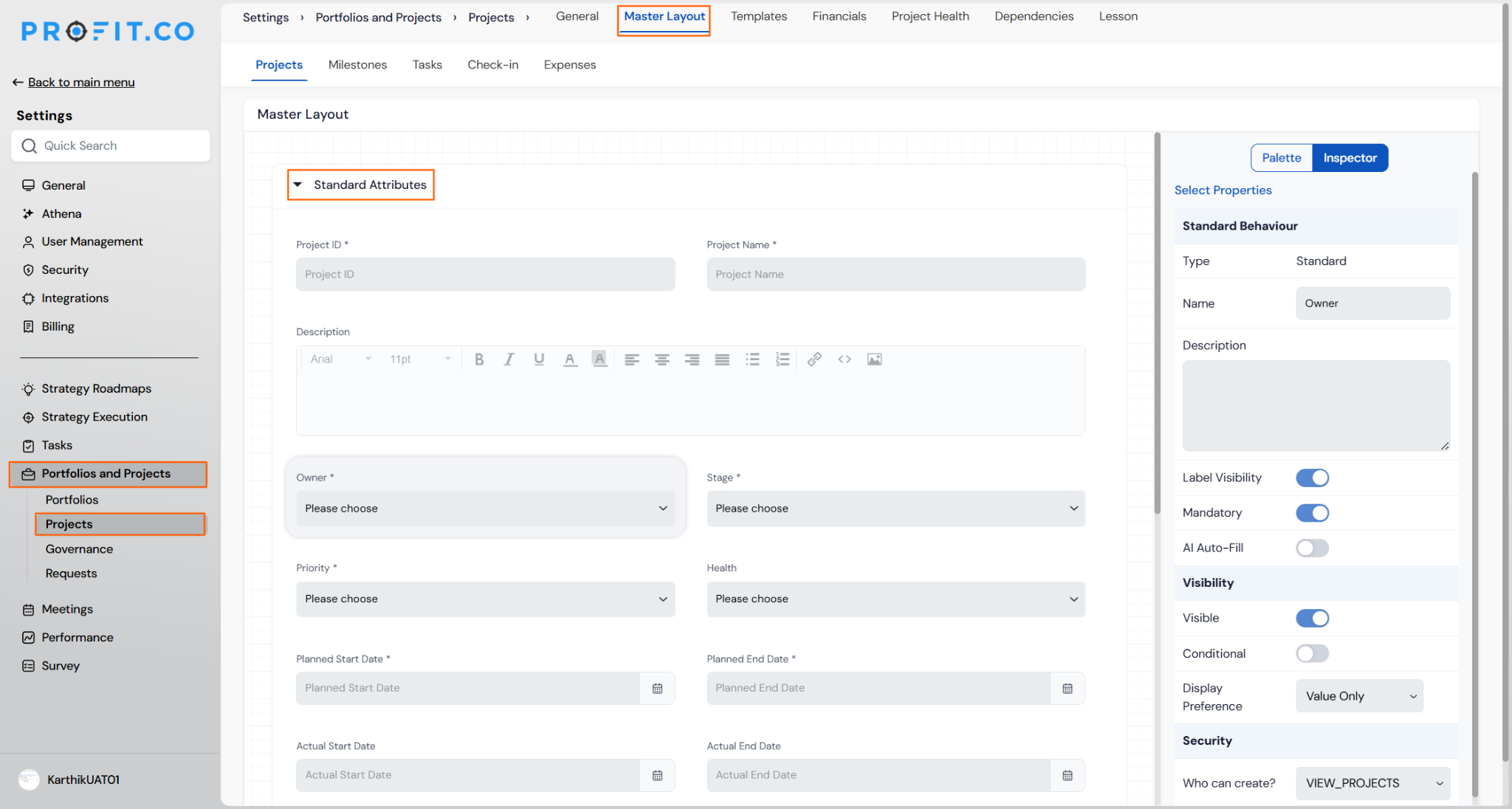
Selecting any field inside Standard Attributes opens the same Inspector panel used elsewhere in Master Layout, covering Standard Behaviour, Label Visibility, Mandatory, Visibility, and Security. On Project, Standard Attributes sits alongside existing custom sections, such as Value Dimensions or Complexity Dimensions, without replacing them.
Why Does the Standard Attributes Section in Master Layout Matter?
Earlier, Owner, Status, Priority, Tags, and the four date fields were fixed system fields, not something a Super User could configure. Standard Attributes brings these fields into the same Sections and Attributes canvas already used for custom fields, so governance settings like Mandatory and Security apply consistently across both.
Task benefits most directly, since it previously had no Master Layout tab at all. A PPM Admin can now review and adjust Task's built-in fields the same way they already do for Portfolio, Project, and Milestone.
How Do I Use the Standard Attributes Section in Master Layout?
Step 1
- For Portfolio, go to Settings → Portfolios and Projects → Portfolios → Master Layout.
- For Project, Milestone, or Task, go to Settings → Portfolios and Projects → Projects → Master Layout, then switch to the Projects, Milestones, or Tasks sub-tab.
- Scroll to the Standard Attributes section on the canvas.
- On Project, note it sits alongside other sections such as Value Dimensions.
- Click any field inside Standard Attributes, for example Owner or Planned End Date.
- Use the Inspector panel on the right rail to review or adjust Standard Behaviour, Label Visibility, Mandatory, Visibility, and Security.
What Happens When You Use the Standard Attributes Section in Master Layout?
| Scenario | What Happens |
|---|---|
| You open Master Layout for an entity that already has custom sections, such as Project's Value Dimensions. | Profit.co adds Standard Attributes alongside the existing sections, and does not remove or reorder the custom ones. |
| You open Master Layout for Task for the first time. | Profit.co shows a new Tasks tab with its own Standard Attributes section, matching Portfolio, Project, and Milestone. |
| You inspect Planned Start Date, Planned End Date, Actual Start Date, or Actual End Date for the first time after this release. | Profit.co shows Planned Start Date and Planned End Date already set to Mandatory ON, and Actual Start Date and Actual End Date set to Mandatory OFF, with no manual setup required. |
| You configure Standard Attributes differently across Portfolio, Project, and Milestone. | Profit.co keeps each entity's configuration independent, so a change made on one entity's Standard Attributes does not affect another entity. |
What Fields Are Included in Standard Attributes for Each Entity?
Portfolio, Project, and Milestone don't share an identical field set. The table below lists each entity's confirmed Standard Attributes fields.
| Entity | Standard Attributes Fields |
|---|---|
| Portfolio | Portfolio ID, Portfolio Name, Portfolio Description, Owner(s), Stage, Priority, Health, Planned Start Date, Planned End Date, Actual Start Date, Actual End Date, Tag, Visibility |
| Project | Project ID, Project Name, Project Description, Owner, Stage, Priority, Health, Planned Start Date, Planned End Date, Actual Start Date, Actual End Date, Tags, Tollgate Sequence, Project Category, Billing Type, Budget, Budget Type |
| Milestone | Milestone ID, Milestone Name, Milestone Description, Planned Start Date, Planned End Date, Actual Start Date, Actual End Date, Tag, Stage, Priority, Tollgate Stage |
Note
Budget and Budget Type apply only when the project is marked billable.
What Do the Duration and Schedule Sections Show?
Duration and Schedule are calculated, reporting-style sections on the Master Layout canvas, separate from Standard Attributes. They display derived scheduling information rather than raw field values you configure directly.
Governance settings such as Mandatory and Security don't apply here — those controls live in Standard Attributes. Duration and Schedule are meant to be reviewed as reporting output, not treated as configuration targets.
What Are the Best Practices for the Standard Attributes Section in Master Layout?
- Review each entity's Standard Attributes list before rollout, since Portfolio, Project, and Milestone don't share identical field sets. Only Project, for example, carries Tollgate Sequence and the Budget-related fields.
- Set up Task's new Standard Attributes tab now even though enforcement isn't live yet, so the Mandatory settings are already correct once the Task quick-add popup is rebuilt.
- Treat Duration and Schedule as reporting fields rather than configuration targets, since Mandatory and Security settings live in Standard Attributes, not in these calculated sections.
- Check your existing custom sections, such as Value Dimensions, after this release, since Standard Attributes is added alongside them rather than replacing them, and your section order may need a review.
- Confirm which projects are marked billable before reviewing Budget and Budget Type in Standard Attributes, since those two fields only apply to billable projects.
Related Articles
- How to create a Project in the PPM module?
- What is a Tollgate in the PPM in Profit.co?
- How to set Custom Attributes for Tasks?
What Are Some Frequently Asked Questions About the Standard Attributes Section in Master Layout?
It's new for Task, which had no Master Layout tab before this release, and newly added to Portfolio, Project, and Milestone's existing Master Layout tabs alongside whatever custom sections already exist.
Health appears in Portfolio and Project's Standard Attributes. It is not part of the Milestone fields confirmed for this release.
Yes. Standard Attributes is added alongside those existing custom sections on Project's Master Layout canvas, and it doesn't replace or restrict them.
No. Opening or viewing the section doesn't change any settings. Existing configurations stay as they were, and only Planned Start Date and Planned End Date show Mandatory ON by default the first time an organization opens Master Layout after this release.
Execute your strategy with confidence
Connect OKRs, tasks, and teams in one place with Profit.co
